

Master flash steps and tight aerial chains with the best Bleach Soul Resonance controls 2026 setup, fixing camera drift and missed inputs on touch and PC.
Why Default Touch Layouts Sabotage Your Combat Flow
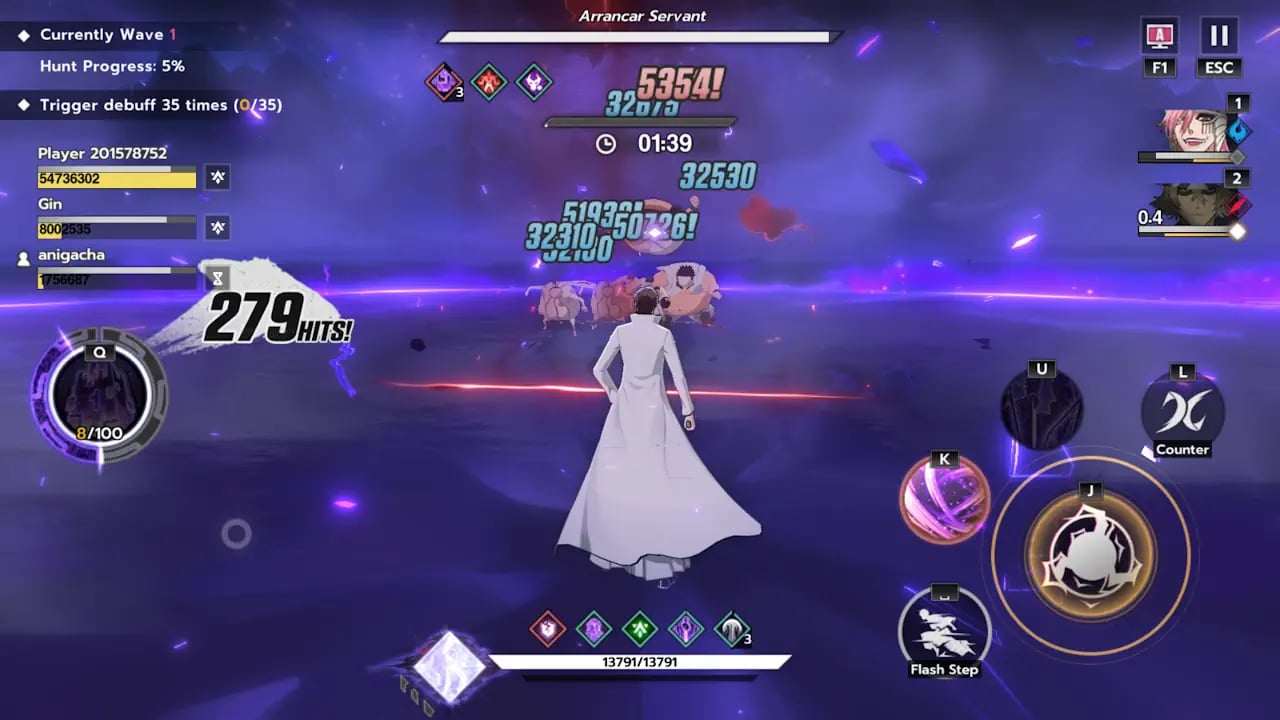
Default control schemes in 3D action titles are built for accessibility rather than technical precision. In Bleach: Soul Resonance, that design philosophy collapses against aggressive boss patterns. The default configuration bunches your core actions into a tight arc in the bottom-right corner. When you must transition instantly from basic strikes to a defensive flash step, thumb travel distance is too wide, and the touch zones overlap enough to register accidental basic attacks instead of dodges.
Crowded touch controls create visibility bottlenecks. Your right thumb blocks incoming visual tells whenever an enemy winds up a heavy strike. Five core battle actions—normal attacks, dodge, technique, ultimate, and counter—compete for roughly two square inches of glass. Rapid input sequences blur together: you tap for an evasive dash, land slightly off-center, and trigger a normal swing directly into an unblockable hit.
Default camera behavior worsens the problem. Automatic tracking tries to swing behind your character during dashes, which violently shifts your vantage point during multi-directional flash steps. In a three-character party format that relies on quick switches to maintain aerial juggles, erratic camera spins break your lock on enemy poise gauges and ruin hitboxes.
The Optimal HUD Layout for Flash Steps and Aerial Chains
Fixing input drops requires isolating defensive commands from offensive clusters. Thumb travel lag will get you caught by instant attack tells. Splitting high-frequency buttons across distinct thumb paths creates clean muscle memory for chaotic fights.
A customized HUD layout anchors your dodge command near the outer bezel. This separation guarantees that defensive inputs never cross paths with normal attack strings. Place the counter button directly above the dodge icon, allowing a quick upward roll of your thumb rather than an awkward stretch across the screen.
Apply these structural adjustments inside the layout editor:
- Enlarge the dodge button layout to 125% scale and position it on the far-right border, level with the lower third of your screen.
- Scale the normal attack button to 115% and anchor it slightly to the left of your dodge key, leaving a visible gutter between both inputs.
- Position your counter command directly above the dodge zone at 110% scale to create an intuitive reaction line.
- Group your character technique and ultimate skill keys higher along the right edge at 100% scale, clearing the center screen for visibility.
- Move party member switch portraits to the top-right quadrant beneath the mini-map so your left thumb handles movement uninterrupted while your right hand triggers swaps.
This setup eliminates dead zones. If you run a four-finger claw grip, relocate party switch portraits to the upper-left edge so your index finger triggers swaps without interrupting movement inputs.
Bleach Soul Resonance Camera Sensitivity Settings for Boss Tracking
Action brawlers die to sluggish camera rotation. If you cannot whip your viewpoint 180 degrees in a single swipe, mobile boss encounters will punish your blind spots. Dialing in your camera profile lets you track erratic teleports without inducing perspective jitter.
Disable automatic target-locking persistence for consistent combo chains. While soft-lock helps beginners acquire targets, hard-lock algorithms often jerk your perspective toward low-threat minions instead of the primary boss. Manual tracking gives you complete autonomy over spacing, letting you position strikes toward poise-depleted targets.
Recommended baseline sensitivity sliders for high-execution play:
- Set horizontal camera sensitivity to 65% to enable quick lateral turns without overshooting your mark.
- Drop vertical camera sensitivity down to 40% to prevent erratic skyward tilt during aerial combo chains.
- Lower your combat zoom intensity to 0% to keep the view frustum wide throughout intense Bankai sequences.
- Turn off dynamic camera shake entirely; excessive shaking masks enemy telegraphs during multi-hit counter phases.
- Calibrate the swipe deadzone to 10% on glass to ensure slight finger placement micro-shifts do not jerk your perspective.
Adjust these numbers to match your screen size. Tablet players should drop horizontal sensitivity to 50% because longer physical hand travel covers the same angular distance. Compact phone users should raise horizontal sensitivity to 70% to compensate for smaller swipe channels.
Perfecting Reaction Windows: Dodges, Counters, and Charged Attacks
Combat hinges on precise frame data across five main battle actions: normal attacks, dodge, technique, ultimate, and counter moves. Mistiming these inputs guarantees punishment from elite foes with super armor.
Dodging at the exact moment an attack lands triggers a slow-motion window. This pause provides an uncontested damage phase to fire off high-tier skills or set up aerial launchers. Mashing the dodge button prematurely produces an ordinary dash that burns stamina without granting defensive invulnerability frames. Treat the flash step as a reactive counter-measure rather than an evasive panic button.
Timed counters carry even higher value. Activating a counter right as an enemy strikes shatters their poise gauge, paralyzing them for burst combos. Against aggressive bosses, counters act as a hard stop. Normal attacks charge your special energy meter alongside the health bar; once that gauge fills, holding down the basic attack command unleashes an empowered charged attack that chips through depleted poise.
Matchup advantages dictate how fast you crush enemy defenses.
The combat damage system features an attribute triangle alongside neutral and specialized archetypes:
| Damage Attribute | Strong Against | Vulnerable To | Strategic Combat Role |
|---|---|---|---|
| Slash | Thrust | Spirit | Core frontline breaker; rapid multi-hit string chains |
| Thrust | Spirit | Slash | High-mobility burst; closes gaps on evasive enemies |
| Spirit | Slash | Thrust | Ranged skill zoning; massive elemental ultimate bursts |
| Strike | Neutral | Neutral | Reliable baseline; unaffected by standard triangle penalties |
| Finesse | Specialized | Variable | Complex execution archetype; high damage without standard squad synergies |
Elemental advantage multipliers directly amplify poise gauge depletion, shortening the time needed to stun targets during counter windows.
Finesse units, such as SSR Bambietta from the August 2026 update, operate outside standard squad synergy dynamics. Finesse attacks deal immense individual damage but demand strict timing and independent execution because they lack traditional elemental team buffs. Pick damage profiles according to boss weaknesses to maximize stagger windows.
Team Switching Dynamics and Battle Action Hierarchy
Solo hero play hits a hard wall in late-game challenges. Real-time combat features a three-character party format where rapid character switching extends combo chains mid-fight. You can cycle through your entire roster without dropping juggle counts if you map your controls properly.
When your active character finishes an aerial launcher or hits the end of a normal string, tap the portrait of a benched party member. The incoming unit hits the field mid-strike, canceling the recovery lag of your previous fighter. This handoff allows you to cycle through techniques consecutively, stacking damage modifiers before the boss can recover poise.
Roster roles define switching priority. Units tagged with the Tactic role carry battlefield passives that grant squad-wide stat buffs upon meeting specific attribute criteria. Swapping in your Tactic unit early in a rotation applies attack buffs across your party, maximizing the burst phase of your primary carry.
Input hierarchy for team rotations:
- Open with your Strike or Slash initiator to trigger the first counter and strip initial poise.
- Launch the target into an aerial juggle using your primary technique.
- Tap your Tactic character switch mid-air to deploy party buffs while maintaining the juggle counter.
- Unleash your Tactic unit's technique to extend hit-stun.
- Swap into your primary SSR burst character to execute charged attacks and trigger an ultimate finisher.
To build a three-character squad with proper synergy, you need consistent access to summoning resources. You can buy Spiritual Jades top up to secure Assault and Tactic units capable of clearing high-tier trials.
Platform Breakdown: Mobile Touchscreen vs. PC Emulation
Platform choice comes down to input fidelity versus portable convenience. Mobile screens grant portability, but thermal limits and input crowding compromise high-level execution. PC emulation offers locked frame rates and physical keybinds.
Some community guides label Bleach: Soul Resonance strictly as a mobile-only title. However, testing across BlueStacks and MuMuPlayer confirms that the game runs on desktop hardware with full input remapping. USB screen mirroring also works, though low-grade charging cords introduce noticeable latency. Use USB 3.0 or better cables to eliminate input lag when projecting to a monitor.
Emulators allow tighter combo execution via physical key assignments. You can map dodging, basic attacks, and character switches to separate physical keys, freeing your mouse hand exclusively for free-look camera movement.
Hardware trade-offs across platforms:
| Platform Option | Input Latency | Camera Precision | Hardware / Configuration Requirements |
|---|---|---|---|
| Native Mobile Touch | Zero interface lag; thermal throttling can induce frame drops | Medium; dependent on thumb swipe space and screen real estate | Modern iOS or Android device; requires optimized HUD layout |
| USB Screen Mirroring | Low to high; highly dependent on cable throughput | Medium; mirrors touchscreen gestures via desktop peripherals | USB 3.0 or better cable mandatory; charging-only cables introduce lag |
| Android PC Emulator | Ultra-low input response; stable physical switch triggers | High; full 360-degree free-look controlled via dedicated mouse aim | Vulkan rendering mode; unlocked high-FPS profiles supporting up to 240 FPS |
Selecting the appropriate setup depends on whether you prioritize physical portability or frame-locked competitive precision.
For emulator setups, switch your graphics engine to Vulkan rendering. Particle-heavy Bankai animations strain mobile GPUs, leading to dropped frames during crucial dodge windows. Running high-refresh profiles up to 240 FPS smooths combat animations, making visual telegraphs obvious well before strikes connect.
To configure Bleach Soul Resonance keybinds 2026 on a keyboard, bind basic attacks to Left Click, dodge to Spacebar, counter to Left Shift, and character techniques to E and Q. Assign party swaps to keys 1, 2, and 3. This arrangement mirrors action RPG standards and gives your fingers dedicated control lanes without overlapping commands.
Squad Optimization: Progression Thresholds and Gacha Currency
Optimized controls cannot compensate for severe stat deficiencies. Account progression thresholds gate the passives and equipment slots that turn clean inputs into high damage numbers.
Account milestones at levels 25, 35, and 45 grant passive abilities that alter character performance. These passives accelerate gauge accumulation, reduce technique cooldowns, and lengthen counter stun duration. Level 22 unlocks the Stamp equipment system, allowing each team member to equip up to six stamps for attribute scaling and set synergy bonuses.
Recruiting key characters and weapons requires tracking each banner's rules and pity limits:
| Banner Category | Hard Pity Count | 50/50 Failure Risk | Banner Rules & Guarantees |
|---|---|---|---|
| Beginner Recruitment | 50 Pulls | None | 20% discount on summon costs; guarantees one permanent SSR character; expires once completed |
| Standard Character Banner | 80 Pulls | None | Guarantees an SSR within 80 draws; allows players to select and lock their preferred pity target |
| Limited Character Banner | 80 Pulls | None | Guarantees the featured promotional SSR unit; accumulated pity transfers to future limited banners |
| Weapon Stamp Banner | 40 / 80 Pulls | None | Initial featured SSR weapon stamp guaranteed at 40 pulls; subsequent cycles require 80 pulls |
Pity mechanics in Bleach: Soul Resonance do not feature punishing 50/50 losses, making squad progression predictable across banner cycles.
Because standard and limited character banners guarantee your selected or featured SSR within 80 pulls without a 50/50 mechanic, planning roster additions is direct. If you are starting fresh, clear the 50-pull beginner banner first for the discounted SSR.
To reach the 80-pull ceiling on time-limited releases, prepare your currency reserves ahead of time. You can recharge Spiritual Jades to guarantee top-tier units before promotional banners leave the rotation.
Weapon stamps carry an initial 40-pull pity for exclusive SSR stamps before shifting to the standard 80-draw threshold. Equipping a featured SSR weapon stamp on your main DPS accelerates poise-break efficiency, giving you longer windows to execute high-damage chains.
Perfecting Your Execution Consistency
Combo execution requires disciplined training to overwrite default muscle memory. When moving to your new layout, spend fifteen minutes in practice trials focusing entirely on timing defensive reactions.
Watch enemy shoulder animations rather than weapon tips. The visual spark indicating an impending attack triggers right before the weapon swing starts. Dodging on the spark guarantees your slow-motion window, whereas waiting for the strike itself leads to getting clipped by active hitboxes. Countering shares this timing: press counter right as the visual flash peaks to stun the target.
If you drop inputs during team switch combos, reduce combat visual clutter. Ultimate animations and Bankai particle effects can momentarily obscure your touchscreen buttons. Lowering non-essential combat particle effects keeps your button gutters clear during chaotic fights.
Securing characters, weapon stamps, and progression upgrades is essential to keeping pace with late-game combat stages. Players can pick up an in-game currency top up to stock Spiritual Jades for upcoming banner rotations.
FAQ
How do you trigger slow-motion counters in Bleach: Soul Resonance?
You must execute a dodge right before an enemy attack connects with your character's hitbox. Timing this defensive action accurately activates a slow-motion window that halts incoming aggression and leaves bosses vulnerable to extended combo strings.
How does the counter mechanic break boss poise?
Activating a counter at the exact moment of impact deflects incoming damage entirely. This action rapidly depletes the target's poise gauge and temporarily paralyzes them, creating an ideal opening for your heavy burst rotations.
How do you unleash charged attacks during combat?
Landing normal attacks charges the energy meter located directly beside your health bar. Once that gauge is completely full, hold down the normal attack button to release an empowered charged attack that chips through heavy enemy armor.
Can you play Bleach: Soul Resonance with physical controllers?
You can play with gamepads by launching the game through PC emulators like MuMuPlayer or BlueStacks using custom keymappings. Direct mobile controller functionality requires operating system mapping tools or Bluetooth input configuration.
What causes mistimed dodges and input latency on mobile?
Touch control crowding often causes players to hit dead space between inputs, while device thermal throttling during visual-heavy ultimate animations introduces input lag. Spacing out your HUD elements and dropping graphic overhead helps eliminate response delays.
How does character switching fit into combo strings?
Switching party members does not interrupt your combat rhythm. You can swap in Assault or Tactic units mid-animation to chain skills together, cancel recovery lag, and maintain juggle combos without dropping hit counts.
What is the pity threshold for summoning limited characters?
Limited character banners guarantee the featured SSR unit within 80 summons with no 50/50 failure mechanic. Any accumulated pulls toward pity transfer directly to subsequent promotional banners.
The Final Input Verdict
Sticking with default controls in Bleach: Soul Resonance is an active handicap. Crammed buttons invite misclicks, and sluggish camera tracking blinds you during boss fights. Separating your dodge button, positioning counters for instant thumb access, and dialing horizontal sensitivity to 65% transforms combat responsiveness.
Whether you execute combos on an expanded mobile HUD or map physical switches on an emulator, personal comfort dictates execution speed. Isolate your defensive commands, drill your flash step timing against enemy attack sparks, and rely on clean character switching to control the fight without dropping inputs.






Comments