


To stop opponent chat spam in 8 Ball Pool, players can silence match phrases directly at the table or adjust operating system permissions on iOS and Android to block disruptive banner notifications. Muting in-game chat stops psychological disruption because opponents cannot tell whether their phrases are reaching your screen, while configuring system settings prevents drop-down alerts from ruining cue alignment during timed shots.
Why Opponents Chat Bomb and What Muting Achieves
Opponents frequently use preset phrase spam during critical turns to disrupt cue alignment and break a player's concentration. On Miniclip's community forums, players explicitly document deploying "chat bombing"—repeatedly firing preset lines such as "In your face!" or "You Sure Are Lucky!" after missed shots or slop pots—specifically to rattle their rivals.
The most effective countermeasure is silence. When you learn how to mute opponent in 8 ball pool matches, their taunts vanish from your screen instantly. Crucially, the game does not inform opponents that they have been muted. Opponents will waste their own turn timer firing preset lines into a void, completely unaware that their disruption is invisible to you.
| Disruption Layer | Target Interruption | Setting Action | Visual Context | Source Link |
|---|---|---|---|---|
| In-Game Table | Opponent preset phrase bombing and taunts | Toggle table chat mute | 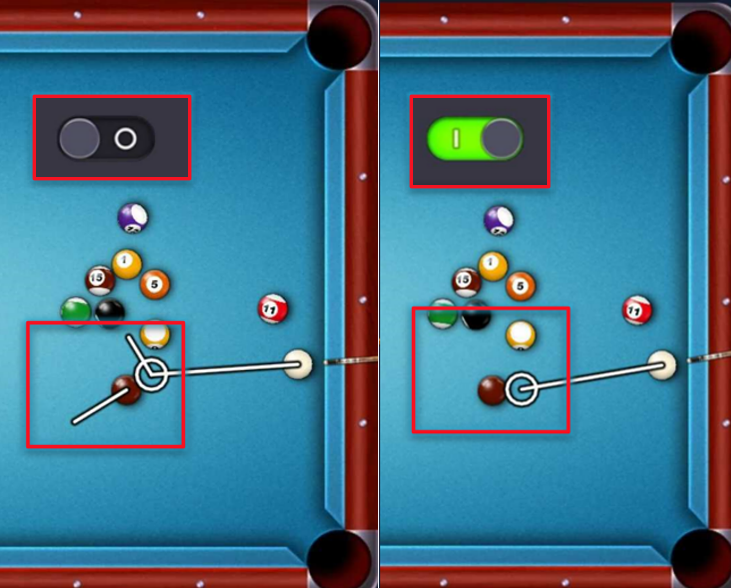 | Miniclip Forum Report |
| OS App Layer | Background challenge and marketing pushes | Toggle OS application notifications | OS Settings Interface | NakedPact Guide |
| System Alerts | Incoming calls and banner pop-ups | Activate Focus or Do Not Disturb | Status Bar Indicator | Apple Support |

Golden Spin
 Golden SpinUSD 0.68Buy Now
5 Scratchers
5 ScratchersUSD 1.02Buy Now20 Cash
20 CashUSD 1.35Buy Now20,000 Coins
20,000 CoinsUSD 1.35Buy Now3 Golden Shots
3 Golden ShotsUSD 1.35Buy Now15 Scratchers
15 ScratchersUSD 3.28Buy NowPool Coda Bundle
Pool Coda BundleUSD 3.27Buy Now50 Cash
50 CashUSD 3.37Buy Now52,000 Coins
52,000 CoinsUSD 3.37Buy Now110 Cash
110 CashUSD 6.78Buy Now112,000 Coins
112,000 CoinsUSD 6.78Buy Now250 Cash
250 CashUSD 13.56Buy Now256,000 Coins
256,000 CoinsUSD 13.56Buy Now
How to Silence Opponent Chat at the Table
Eliminating opponent chatter can be handled during active play or permanently within client configurations.
- Enter an active match on any table.
- Tap the chat bubble or profile icon associated with your opponent.
- Select the mute option to hide incoming preset phrases and emojis for that table session.
- To configure 8 ball pool mute chat permanently across games, access the main settings cog from the home screen and toggle off the chat options.
Turning off chat isolates your focus purely on ball trajectory and spin control. In 8 Ball Pool by Miniclip, high-tier tables require significant Coin investments for entry fees. Missing an alignment due to a text pop-up can cost millions of Coins. Players who manage resources carefully or acquire 8 Ball Pool Cash and Coins through third-party platforms such as Codashop understand that shot precision directly protects account value.
Disabling Push Notifications on iOS and Android
Outside of direct gameplay, 8 Ball Pool issues push notifications designed to pull players back onto the tables. According to NakedPact's application analysis, the game repeatedly pushes messages such as "Pending challenge!" and "Your opponent is waiting!" to force re-engagement.
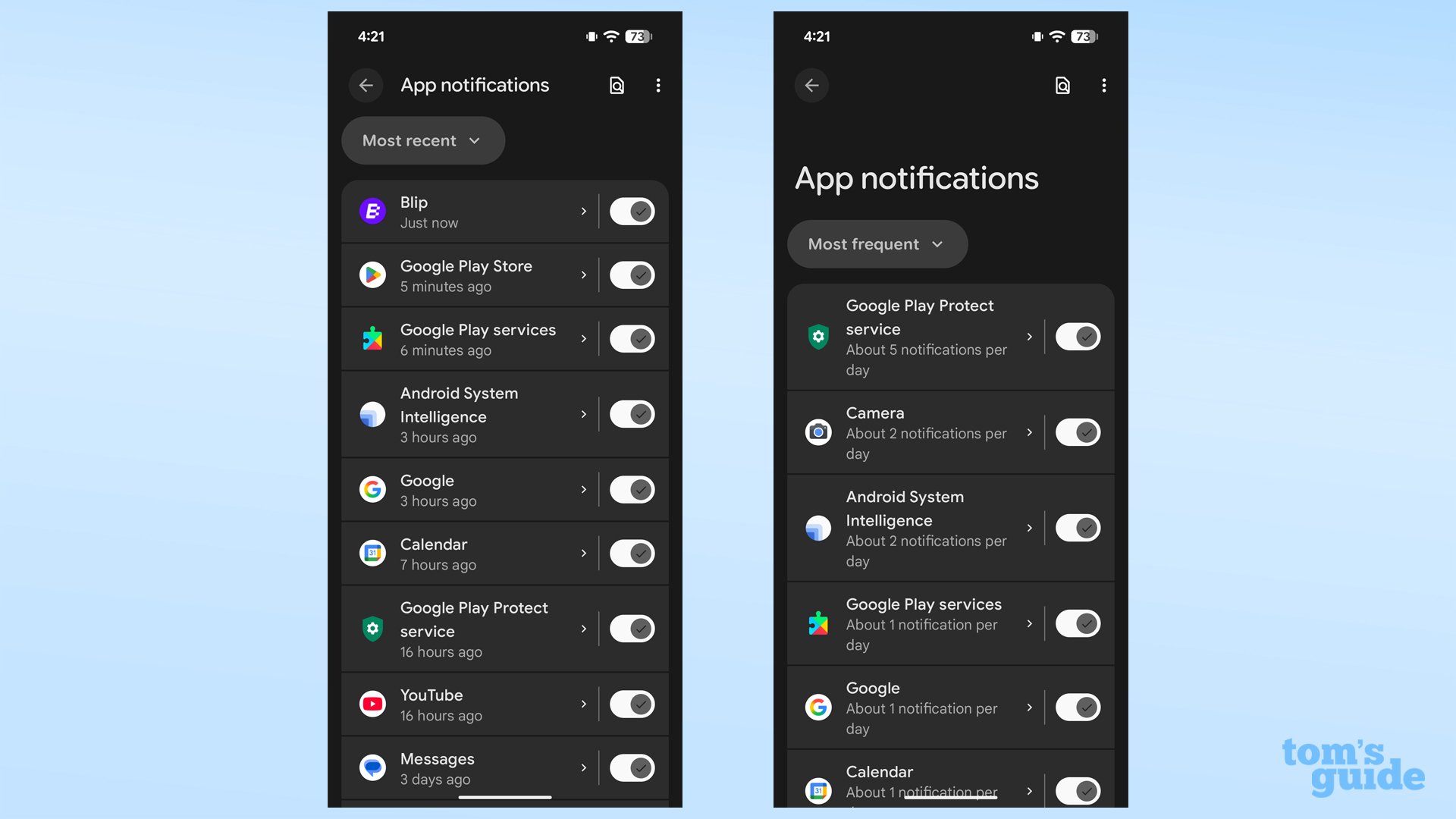
These alerts can be cut off entirely using your device's core operating system controls. Because Android device manufacturers organize configuration submenus differently across versions, specific navigation paths vary.
| Operating System | Navigation Path | Action Required | Result |
|---|---|---|---|
| Apple iOS | Settings > Notifications > 8 Ball Pool | Toggle off Allow Notifications | Blocks all background challenge alerts and badges (NakedPact) |
| Android (Standard) | Settings > Notifications > App notifications > 8 Ball Pool | Disable notification switch | Silences all game alert channels (Google Support) |
| Android (OEM / Alternate) | Settings > Apps & notifications > 8 Ball Pool > Notifications | Toggle off notifications | Disables background alerts across older OS builds (NakedPact) |
Disabling alerts at the OS level ensures you only play matches on your own schedule without unsolicited app pings.
Blocking System Banners During Matches
An unexpected text message or calendar reminder dropping down from the top edge of your screen can displace your cue guide, leading to an accidental scratch. System-level tools prevent other apps from intruding during play.
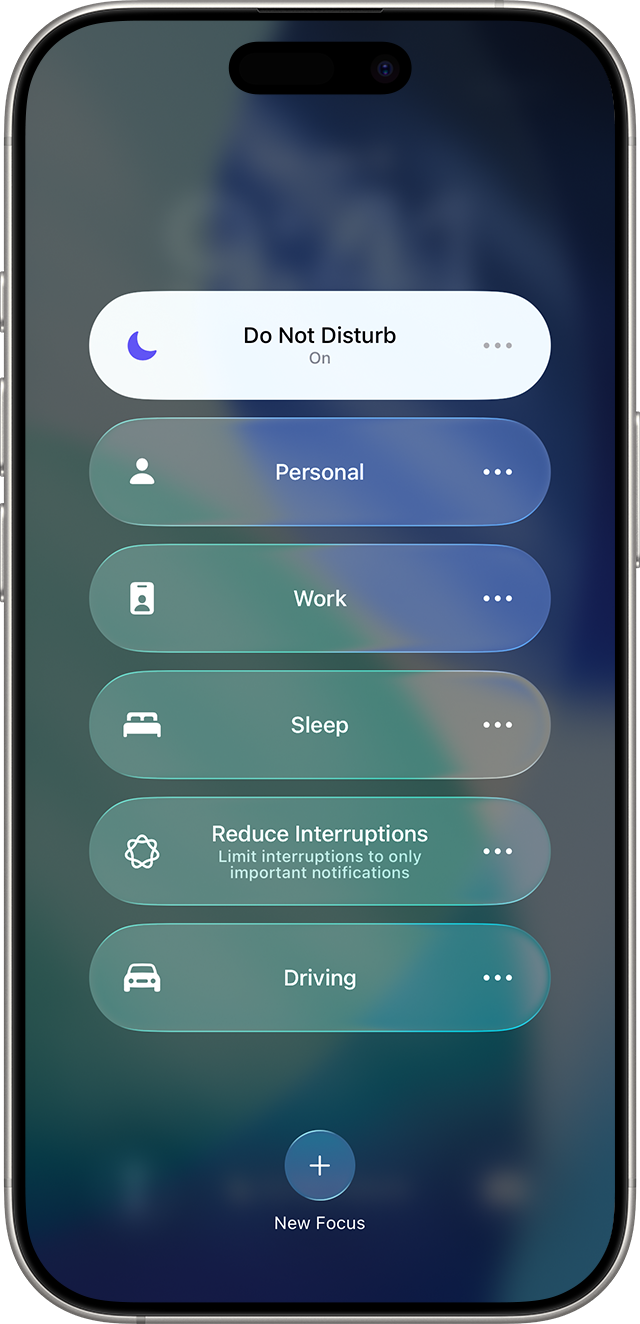
iOS Do Not Disturb Focus Mode
As confirmed by Apple Support, Do Not Disturb is a dedicated Focus feature available in iOS 15, iPadOS 15, and subsequent updates. When enabled, it silences incoming calls, alerts, and banners, displaying a small status bar symbol to show that incoming traffic is muted.
- Swipe into your Control Center before starting a high-stakes match.
- Tap the Focus button and select Do Not Disturb.
- Take your shots without risk of a message banner dropping over the target ball.
Android Priority and Pop-on-Screen Controls
According to Google Android documentation, Android systems allow users to navigate to Settings > Notifications > App notifications to customize alert behaviors. Instead of silencing your whole phone, you can selectively disable "Pop on screen" permissions for high-volume apps like messaging platforms. This keeps messages coming through silently without letting them render over your 8 Ball Pool aiming ruler.
Recommended Settings Profiles
Achieving maximum table concentration requires configuring in-game audio and tactile feedback alongside chat rules. The 8 ball pool sound settings and the 8 ball pool turn vibration setting should match your playing environment.
- Open the 8 Ball Pool home screen and tap the gear icon in the lower-left corner.
- Locate the audio sliders: Sound FX and Music.
- Adjust the Sound FX slider down to low or zero if ball-clack audio breaks your concentration.
- Slide Music completely off to prevent repetitive background loops.
- Scroll to the Vibration toggle: leave this enabled only if you rely on tactile cues for timer countdowns, or turn it off to keep your aiming hand completely stable.
| Setting Profile | Chat State | Sound FX & Music | Vibration Setting | Best Used For |
|---|---|---|---|---|
| Tournament Focus | Disabled / Muted | Sound FX: Off / Music: Off | Off | High-tier tables where misclicks cost significant Coins (NakedPact) |
| Standard Match | Muted on opponent | Sound FX: On / Music: Off | On (Timer aid) | Regular play with ball-strike feedback (Miniclip Forum) |
| Casual Friendly | Enabled | Sound FX: On / Music: On | On | Low-stakes private matches with acquaintances |
Deviate from the Tournament Focus profile only when playing low-stakes friendly matches where table chatter and audio effects provide social enjoyment rather than competitive interference.






Comments