

Payment cleared but no Echo Beads? Find why your Where Winds Meet top up is not received in account, check delay windows, and fix missing currency quickly.
Your card was charged, but your character in Everstone Studio's open-world Wuxia RPG still shows zero premium currency. Before assuming the payment failed or contacting your card issuer, understand that delivery delays happen along the billing pipeline.
Tracking down missing currency requires checking payment gateways, server routing, and character mailboxes. Here is how to locate your order and resolve the delivery delay.
Understanding Delivery Latency and Pending Transactions
A payment confirmation from your bank does not mean NetEase's game server has finished crediting your account. Your transaction data passes from the payment processor to a billing aggregator, syncs with NetEase's global account database, and finally reaches your specific server shard.
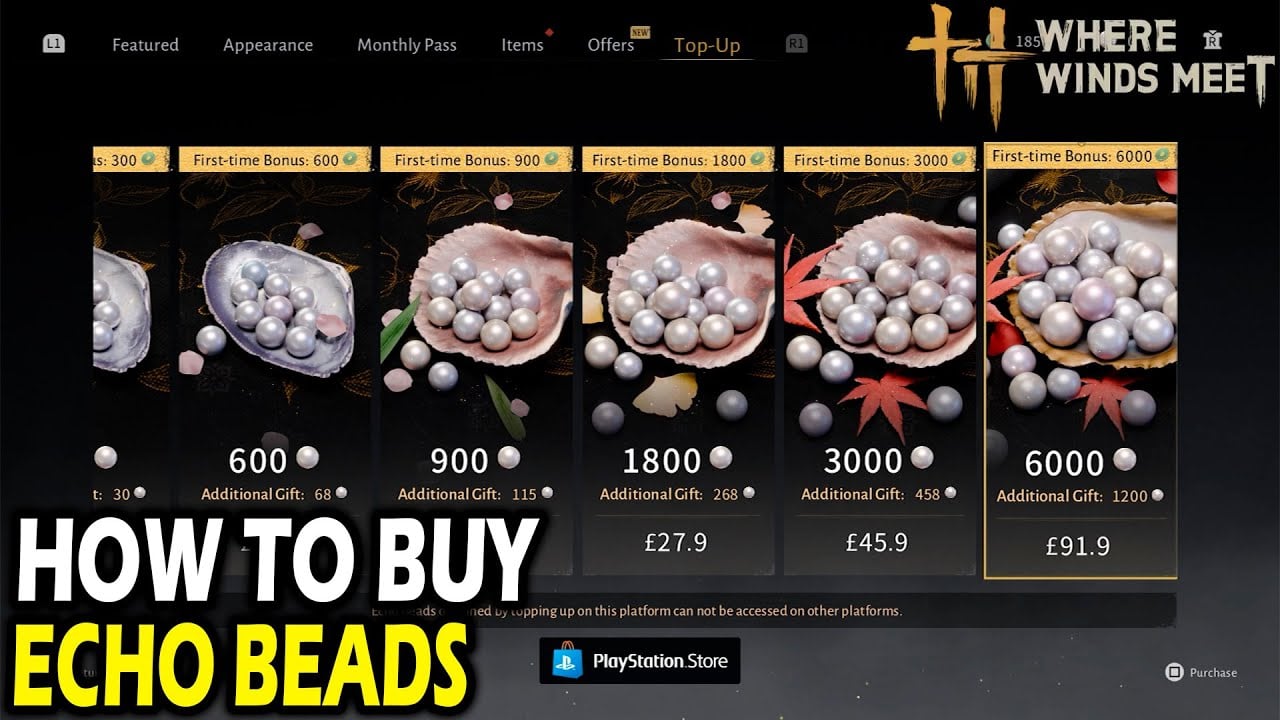
Digital wallets and card payments usually settle in 30 seconds to 5 minutes. Bank transfers rely on multi-hop clearinghouse verification, which takes 2 to 4 hours. During this time, your banking portal may report the transfer as completed while the game's billing server still lists it as pending.
Expected settlement windows by payment channel:
| Top-Up Channel / Method | Expected Processing Window | Delivery Mechanism | Action if Missing Past Window |
|---|---|---|---|
| In-Game Card / Digital Wallet | 30 seconds to 5 minutes | Direct balance update | Restart client; inspect profile balance |
| Bank Transfer | 2 to 4 hours | Direct balance update | Verify clearing status with bank |
| First-Time Bundle Bonus | 5 to 15 minutes | In-game mailbox | Check mail tab before opening ticket |
| Server Transfer / Error Correction | 3 to 5 business days | Support manual delivery | Follow up on support ticket ID |
Delivery delays usually clear automatically once the transaction moves past the gateway queue.

60 Echo Beads
 60 Echo BeadsUSD 0.99Buy Now
180 Echo Beads
180 Echo BeadsUSD 2.41Buy NowMonthly Pass
Monthly PassUSD 4.05Buy Now300 + 30 Echo Beads
300 + 30 Echo BeadsUSD 4.05Buy Now600 + 68 Echo Beads
600 + 68 Echo BeadsUSD 8.10Buy NowElite Battle Pass
Elite Battle PassUSD 8.10Buy Now900 + 115 Echo Beads
900 + 115 Echo BeadsUSD 12.19Buy NowPremium Battle Pass
Premium Battle PassUSD 16.16Buy Now1800 + 268 Echo Beads
1800 + 268 Echo BeadsUSD 24.40Buy Now3000 + 458 Echo Beads
3000 + 458 Echo BeadsUSD 40.52Buy Now6000 + 1200 Echo Beads
6000 + 1200 Echo BeadsUSD 81.76Buy Now12000 Echo Beads
12000 Echo BeadsUSD 163.39Buy Now
Check Your In-Game Mailbox for Bonus Echo Jade and Echo Beads
Promotional packages split currency across two destinations. Where Winds Meet divides currencies into direct Echo Beads and promotional Echo Jade.
Base Echo Beads deposit straight into your currency balance upon purchase. Bonus Echo Jade and promotional Echo Beads route to your in-game mailbox instead. Under heavy server load, mailbox delivery lags by 5 to 15 minutes.
Open your ESC menu and click the mailbox icon. Mail attachments expire after 30 days. If you do not claim the mail within that window, the enclosed Echo Jade is permanently deleted.
First-time purchase rewards split between direct wallet credits and mail attachments:
| Package Tier | Base Price (USD) | Included First-Time Bonus Content |
|---|---|---|
| 60 Echo Beads | $0.99 | 60 bonus Echo Jades |
| 600 Echo Beads | $9.99 | 600 bonus Echo Jades + 68 bonus Echo Beads |
| 3000 Echo Beads | $49.99 | 3000 bonus Echo Jades + 458 bonus Echo Beads |
| 6000 Echo Beads | $99.99 | 6000 bonus Echo Jades + 1200 bonus Echo Beads |
| 12000 Echo Beads | $199.99 | Maximum standard bundle (check live store for current promos) |
Check both your main balance bar and your in-game mailbox before submitting a support ticket for missing currency.

Common User Errors: UID Mismatch and Server Selection
Account identification errors cause most permanent delivery failures after the standard processing window has passed. Where Winds Meet isolates character data by server shard, such as Kaifeng and Qinghe.
Locating Your Exact Player UID
Your Player UID is an 8-10 digit identifier tied directly to your character save file: 1. Launch the game and enter the world. 2. Press ESC to open the system menu. 3. Check directly beneath your character's name in the upper area of the screen. 4. Copy the 8-10 digit number shown.
When you get your Where Winds Meet top up, verify every digit against your ESC menu. Entering an incorrect digit delivers your currency to someone else's account.
Server Routing and Cross-Progression Traps
Selecting the wrong server shard (such as buying for Kaifeng when your character is on Qinghe) blocks delivery entirely. Moving misrouted funds requires a manual customer service ticket, which takes 3 to 5 days.
Console accounts require linked profiles before playing. If you launch on Xbox or PlayStation without linking your NetEase account, the system creates a blank console save that blocks cross-platform sync until customer support manually detaches it.
Regional restrictions also apply: cross-progression and shared Echo Beads function across PC, console, and mobile within the same geographic server region, but balances cannot transfer across different regional servers.
Account Safety: Why You Must Never File a Premature Chargeback
Filing a payment dispute directly through your card issuer or bank freezes your game account.
NetEase's billing systems flag payment reversals automatically. Filing a chargeback triggers an automated account suspension within 24 to 48 hours and adds a $15 to $25 negative balance penalty. You must pay off this deficit before support will unlock your character.
Two chargebacks within a 12-month period result in a permanent account ban.
Use official customer support channels instead. Billing investigations take 3 to 5 days to confirm order paths, and formal refunds take 7 to 10 days to process without endangering your profile standing.
Safe Top-Up Verification Checklist
Keep your account secure by knowing what legitimate top-up services require: * Legitimate checkouts ask for: Your 8-10 digit Player UID and your active server shard (such as Kaifeng or Qinghe). * Scams ask for: Your account password, email verification codes, or two-factor authentication tokens.
When you order your Where Winds Meet recharge, you only need to submit your public UID and server name.
How to Contact Where Winds Meet Customer Support for Missing Top Ups
If your purchase does not appear after 4 hours on card payments, open an official billing ticket. Preparing your transaction details in advance speeds up the investigation.
Step-by-Step Ticket Submission Guide
Gather your details and submit through the client:
- Capture Proof: Screenshot your purchase invoice showing the merchant Transaction ID, timestamp, and amount paid.
- Capture Account Proof: Screenshot your ESC menu showing your character name, server name, and visible 8-10 digit UID.
- Access Support: Open in-game settings, click the Customer Service tab, and select Billing & Payment Issues.
- Submit Details: Enter your 8-10 digit UID, server name, exact purchase timestamp, and attach the invoice screenshot.
Support agents use this data to locate the blocked payment in the gateway logs and credit the missing Echo Beads to your mailbox.
Spender Strategy: Choosing the Right Bundle for Your Goals
Purchased Echo Beads and earned Echo Jade remain on your profile permanently. Seasonal tokens, such as Little Red Flowers, expire when their specific event window closes. Avoid purchasing event-tied currency unless you have enough time to spend it before the timer expires.
The Battle Pass supports retroactive progression. You can level the pass through gameplay first, then purchase the premium track later in the patch cycle to claim all unlocked rewards at once.
Choose your tier based on your playtime and spending target:
Free-to-Play / Budget Explorers
Test account binding with the $0.99 tier (60 Echo Beads + 60 bonus Echo Jades). This verifies that your UID connects properly before you commit larger sums.
Mid-Tier Spenders
The $9.99 tier (600 Echo Beads + 600 bonus Echo Jades + 68 bonus Beads) or the $49.99 tier paired with the seasonal Battle Pass provides solid value. Buy the Battle Pass after ranking up your progression tiers to collect the cosmetic rewards and mounts immediately.
Heavy Spenders & Collectors
The $99.99 tier (6000 Echo Beads + 6000 bonus Echo Jades + 1200 bonus Beads) gives the highest bead-to-dollar return for exclusive mounts and weapon skins. When you secure Where Winds Meet Echo Beads, double-check your UID and server name to avoid manual processing queues.
FAQ
Why hasn't my Where Winds Meet top-up appeared in my account?
Delivery delays usually happen because of standard payment processing wait times, which can take up to 4 hours for bank transfers. High server congestion can also slow delivery, or you may have entered an incorrect UID or server name. Check your in-game mailbox first, as bonus currencies and order receipts are frequently sent there.
Where can I find my Player UID to check a missing order?
Press the ESC key on your keyboard while in-game to open the main character overview. Your 8 to 10 digit UID is displayed directly beneath your character's name. Always confirm both this UID and your assigned server name before completing any purchase.
Should I file a credit card chargeback if my Echo Beads are missing?
No, you should never file a bank chargeback for missing in-game currency. Chargebacks trigger automated account suspensions within 24 to 48 hours, apply a $15 to $25 penalty fee, and risk a permanent ban. Contact official NetEase customer support instead to resolve the issue safely.
Why did my top-up or progress disappear when switching platforms?
This problem occurs if you launched the game on a console and created a character before linking your primary NetEase profile, which generates a conflicting placeholder save. Cross-progression and shared currency balances also only function when you log into the exact same server region.
How long does NetEase take to investigate a missing top-up ticket?
Official customer service investigations take between 3 to 5 days to verify payment logs and route missing currency. If a financial refund is required, processing takes 7 to 10 days through normal billing channels.
Do purchased Echo Beads and bonus Echo Jades expire?
Purchased Echo Beads and bonus Echo Jades remain permanently on your account and never expire. In contrast, time-limited seasonal currencies like Little Red Flowers disappear as soon as their specific event period concludes.
Final Steps to Resolve Top-Up Delays
Missing currency almost always stems from gateway latency, a miskeyed UID, or an uncollected mailbox attachment. Give card transactions 15 minutes and bank transfers up to 4 hours to clear. Check your in-game mailbox for bonus Echo Jade, verify your 8-10 digit Player UID in the ESC menu, and confirm your server shard. If your balance does not update after the standard processing window, submit a ticket with your transaction screenshot directly to NetEase customer support.






Comments