
Ghost Story: Love Destiny Top Up on XPTopup
Ghost Story: Love Destiny brings romantic wuxia adventures, mythical quests, and character progression to mobile gamers. To enhance your experience, obtain rare cosmetics, upgrade divine equipment, and participate in limited-time events, you need in-game currency. Recharging Jade and obtaining VIP privileges allows you to progress smoothly through romantic encounters, faction battles, and dungeon raids.
XPTopup provides a direct Player ID recharge service for Ghost Story: Love Destiny. You can refill your Jade balance or purchase monthly subscription passes without logging in through external credentials or sharing private account details. Enter your Player ID, pick your desired pack, and complete the order. Live prices and current bundle options are displayed directly on the product checkout selection above.
How to Find Your Ghost Story: Love Destiny Player ID
Your Player ID is the unique numeric identifier linked to your Ghost Story: Love Destiny profile. It ensures that any currency or pack purchased on XPTopup transfers directly to your character. Follow these steps to locate your credentials inside the game:
- Open the Ghost Story: Love Destiny app on your mobile device.
- Log in to your game server and load your character.
- Tap on your character avatar located in the top-left corner of the main screen.
- In the profile overview window, locate your numeric Player ID displayed beneath your character nickname.
- Tap the copy icon next to your Player ID or write it down carefully for checkout.
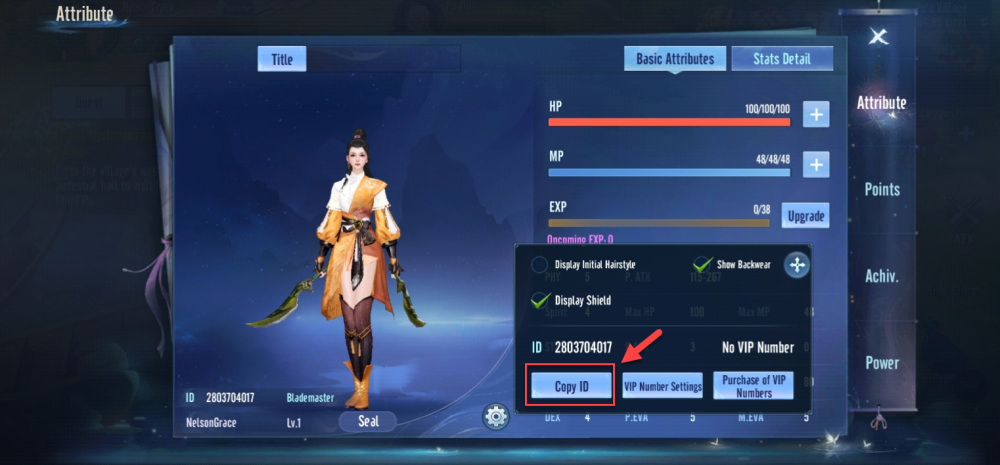
Double-check your copied Player ID before submitting your order to prevent any delivery misplacement.
Step-by-Step Guide: How to Top Up Ghost Story: Love Destiny on XPTopup
Purchasing your Ghost Story: Love Destiny top up takes just a few quick steps on XPTopup:
- Select Your Package: Browse the live catalog on this page to choose your desired Jade bundle or Monthly Privilege Pass.
- Enter Your Player ID: Type or paste your exact in-game Player ID into the designated input field.
- Select Your Payment Method: Choose your preferred payment channel from the available checkout options.
- Complete Checkout: Review your order details and finalize the payment transaction.
- Receive Your Items: Once the transaction processes, your purchased Jade or membership pass is credited straight to your Ghost Story: Love Destiny account. Re-log or refresh your in-game mailbox to view the updated balance.
Available In-Game Packages: Jade Bundles and Monthly Privilege Passes
Ghost Story: Love Destiny features various currency denominations and pass types designed to support different playstyles and upgrade paths.
| Package Type | In-Game Utility & Benefits | Delivery Mode |
|---|---|---|
| Jade Bundles | Primary premium currency used for cosmetic summons, rare gear crafting, auction bidding, and stamina refills | Direct Credit to Account Balance |
| Monthly Privilege Pass | Provides immediate Jade upon purchase plus daily login bonus claims, discount privileges, and extra dungeon attempts | Direct Account Activation |
| Growth Funds / Event Packs | Grants tiered milestone rewards as your character reaches specific level thresholds | In-Game Event Activation / Direct Credit |
Note: Live pricing, special promotional bundles, and active currency values are listed on the interactive checkout widget at the top of this page.
Why Choose Player ID Direct Recharge Over Account Sharing
Account security is vital when purchasing digital items. Direct Player ID top-ups offer essential protections compared to third-party login services:
- Zero Password Sharing: You never disclose your login email, social login tokens, or passwords. Your login data stays completely in your hands.
- No Risk of Account Takeover: Because no third party logs into your game client, your bound equipment, currency balances, and social links remain untouched.
- Instant Processing: Direct ID matching systems send the package straight to the game server without waiting for someone to manually log in and purchase it.
- Send Gifts Easily: Since only a Player ID is required, you can surprise friends, guild members, or in-game partners with Jade gifts directly by entering their ID.
Supported Payment Options and Transaction Processing Details
XPTopup supports a wide selection of regional and global payment methods to make buying Jade straightforward. Whether you prefer credit cards, debit cards, local e-wallets, online bank transfers, or regional payment channels, you can choose the option that suits you best at checkout.
All payment processing is handled through secure encryption channels. Once your payment clears, our automated distribution system links your selected package to your Player ID. Most orders process within moments. You will receive an on-screen confirmation and order summary so you can track your transaction status in real time.
Troubleshooting and Delivery Verification
If your items do not appear immediately in your account after completing your purchase on XPTopup, check the following points:
- Restart the Game App: Completely exit Ghost Story: Love Destiny and relaunch it. This forces the client to sync your updated wallet balance from the server.
- Check the In-Game Mailbox: Certain event items, bonus Jade, or monthly passes arrive via the in-game mail system rather than direct inventory deposits.
- Verify Your Submitted Player ID: Review your order confirmation receipt on XPTopup. Ensure that the numeric ID matches your profile.
- Contact 24/7 Support: If your order status is marked complete on XPTopup but your balance has not updated after restarting, reach out to our customer support team with your Order ID for immediate investigation.






























