

The Brawl Stars graphics settings that actually fix stutter on Android: the FPS cap, quality level, battery saver switch, and one phone toggle for 60 FPS. I've lost enough Showdown matches to frame drops to know which sliders matter and which ones are placebo. Here's the list I run, in the order I'd set them.
Brawl Stars is Supercell's mobile brawler for Android and iOS — Brawlers, Solo Showdown, 3v3 matches, all the usual chaos. It's not a demanding game by 2026 standards, which is exactly why constant stutter on a mid-range phone is so infuriating. It's almost always fixable, though, and almost never where you'd expect.
Update the Game Before You Touch a Single Setting
Everyone skips this step, and it's the one Supercell keeps proving matters. The March 10, 2026 optional update specifically fixed startup freezes on some low-end Android devices. The July 8, 2026 maintenance fixed crashes during Nano modes, and an optional update shortly before that patched reconnect-during-match and team-invite bugs. Supercell has been shipping device-level fixes in optional updates all year.
Translation: an outdated build can cause freezes that no in-game graphics setting will ever fix. Open the Play Store, check for an update, then start tweaking. If you're reinstalling anyway because you want a clean slate on a new phone, the easy part is the account — a Brawl Stars Gems and Brawl Pass top-up through xptopup's product page takes care of the wallet side, and the settings below handle the performance side.

Starter Pack! Brawl like a pro!
 Starter Pack! Brawl like a pro!USD 2.41Buy Now
Ultimate Collector's Pack
Ultimate Collector's PackUSD 21.76Buy NowCollector's Pack
Collector's PackUSD 22.57Buy NowPro Pass Plus
Pro Pass PlusUSD 20.14Buy Now2000Gems
2000GemsUSD 80.63Buy Now950Gems
950GemsUSD 40.31Buy Now360Gems
360GemsUSD 16.12Buy Now170Gems
170GemsUSD 8.06Buy Now80Gems
80GemsUSD 4.02Buy Now30Gems
30GemsUSD 1.60Buy NowBrawl Pass Plus Upgrade
Brawl Pass Plus UpgradeUSD 4.02Buy NowBrawl Pass Plus
Brawl Pass PlusUSD 10.48Buy NowBrawl Pass
Brawl PassUSD 7.25Buy Now
What Your Phone Actually Needs to Run Brawl Stars
The floor is low: at least 2GB of RAM and Android 5.0 or higher. But the floor and the fun floor are different things. Phones with 4GB of RAM or more play noticeably smoother in team fights, when multiple players and a pile of effects hit the screen at once.
Two maintenance habits that sound like grandma advice and genuinely work: keep at least 1GB of storage free, and swipe away background apps before a match. Clearing the app's cache under Settings > Apps > Brawl Stars > Storage is also safe — progress is tied to your login, not the local cache — and I restart my phone every few days during a heavy play stretch. None of this is glamorous. All of it shows up in frame pacing.
The In-Game Settings That Change Something (and the Ones That Don't)
My honest ranking of the in-game options, based on what the sources actually support and what I've watched happen on weaker phones:
| Setting | What it actually does | My verdict |
|---|---|---|
| Graphics quality (high → medium/low) | Often eliminates stutter outright, biggest effect on weaker GPUs | Do it first |
| Detailed shadows | Pure GPU cost, zero gameplay impact | Off, always |
| Particle effects | GPU cost during team fights, zero gameplay impact | Off on mid-range |
| Frame rate / FPS cap | Decides whether you get 60 or drop to 30 — see the divisor rule below | The most important slider |
| Battery saver mode | Throttles the processor; hurts performance on purpose | Off while playing |
| Screen shake | A comfort and feel toggle, not a performance one | Preference, doesn't touch FPS |
The quality question comes up constantly: does lowering graphics make the game play differently? No. Switching from high to medium or low, and disabling detailed shadows and particle effects, reduces stutter without changing how the game plays. The improvement is biggest on phones with weaker GPUs.
And if you feel like one notch down from max "wastes" visuals — the wider evidence says otherwise. Hands-on PC testing found Ultra versus High was nearly impossible to spot in motion while performance jumped enormously; Hogwarts Legacy gained roughly 15% FPS from Balanced upscaling, while maxed Cyberpunk 2077 managed about 20 FPS and maxed Alan Wake 2 limped along at 1–3. Max settings are a marketing tier. Medium is where games actually live.
The FPS Cap Rule Nobody Explains: Divisors of Your Refresh Rate
The single most useful thing to understand about Brawl Stars frame rates, and almost no guide spells it out: a phone that throttles frame rates can only target divisors of the display's refresh rate.
| Display | Stable FPS targets | The catch |
|---|---|---|
| 60 Hz | 60 FPS, 30 FPS | A phone that can't hold 60 falls straight to 30 — there's nothing in between |
| 90 Hz | 90 FPS, 45 FPS, 30 FPS | 45 FPS is the stable middle step most 60 Hz-only guides never mention |
| 120 Hz | 120 FPS, 60 FPS, 40 FPS, 30 FPS | 60 or 40 FPS are the battery-friendly caps that still pace cleanly |
Why does this explain the dreaded 30 FPS cap? Because on a 60 Hz display, the only stable targets are 60 and 30. If your phone can't hold 60 — or battery saver or Android's FPS-throttling intervention caps it on purpose — you land on 30. There is no 45, no 50, no mercy.
Two more facts from Google's own documentation that changed how I think about this: FPS throttling can only lower a game's frame rate, never raise it, and when the game's own frame pacing and the intervention both apply, the lower target wins. The FPS counter in your phone's Game Dashboard tells you what's actually running — trust it over your eyes.
The One Phone-Side Toggle That Raises Your Refresh Rate
Most phones don't run at peak refresh rate by default. Manufacturers trade smoothness for battery, silently. So before you blame Brawl Stars, check whether your panel is even awake.
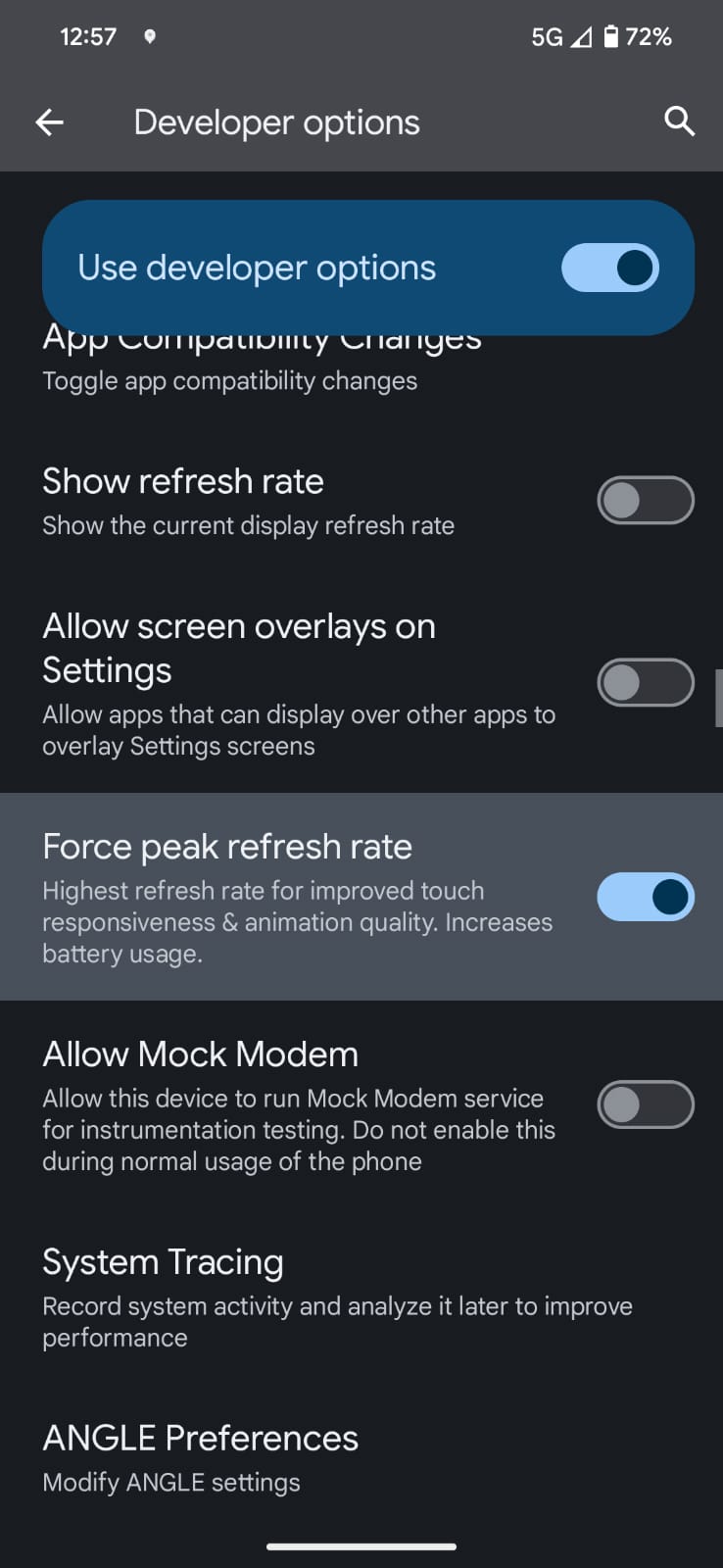
Start with Settings > Display > Smooth Display — that's the obvious switch, and it's off on plenty of phones out of the box. Then go deeper: enable Developer options by tapping Build number repeatedly in About phone, and toggle Force peak refresh rate. On a Pixel 8, that took a media app from 60 Hz to 120 Hz, and the Show refresh rate toggle displays the live number so you can verify.
There's a second route, and it matters because Android skins hide this control in different places. At least one player found Brawl Stars refusing to exceed 60 FPS simply because the app wasn't in the phone's per-app "apps that use high refresh rate" list — on some Android skins, that list, not the game, decides whether the panel speeds up. I'd check both. No single source confirms which route works on a given phone, so trying each takes two minutes and one of them will usually stick.
The limits are real, though. You can never exceed the panel's maximum — a 90 Hz phone cannot reach 120 Hz, no setting will conjure hardware into existence. And the display draws extra power at higher refresh rates. The smoother visuals and faster touch response show up most in quick games like this one, but you pay for it at the wall charger.
Battery Saver vs Smoothness: Pick a Side
Nobody resolves this contradiction for you, because there is no resolution — it's a tradeoff, and you have to pick.
Android's official guidance is built around throttling: the Game Mode FPS-throttling intervention (Android 13 or later) can cut GPU power by up to 50% and total system power by 20%, and it smooths frame pacing on games that don't pace themselves. It's the official lever when battery life matters more than peak smoothness. Meanwhile, every refresh-rate guide pushes the opposite direction — force peak Hz for smoothness, accept the battery cost.
My take: battery saver mode throttles the processor and hurts Brawl Stars performance, so it's off whenever I'm actually playing. Matches are short. I'd rather get 25 minutes of clean 60 FPS than 45 minutes of slideshow. If you're stuck on a long commute with no charger, capping the frame rate to a divisor of your display's refresh rate — 60 or 40 FPS on a 120 Hz panel — is the smarter battery move than letting the system throttle at random.
One trap to flag: playing while charging on a cheap charger can cause thermal throttling that slows the processor anyway. A dedicated game or performance mode prioritizes the game instead, but drains battery faster. There's no free lunch here, only which bill you'd rather pay.
When It's Not Your Settings at All
What follows saves you three hours of futile slider-flipping. Sometimes the game is just broken, and no graphics setting fixes a server.
Consider the Galaxy A16 owner on 100 Mbps fiber who gets freezes and the Wi-Fi icon only in Brawl Stars, while every other game shows excellent ping. That's not "your internet is bad" — that's a Brawl Stars-specific failure on a connection most of us would kill for. So don't default to blaming your connection just because a support script says Wi-Fi and 5 GHz. If every other game runs clean, the problem probably isn't the pipe.
Supercell itself acknowledged a drop in service quality in the MENA region due to server disruptions in its February 2026 release notes. Regional server problems can be the real cause of perceived lag, and they look identical to a settings problem from inside a match.
The player reports tell the same story from other angles: someone crashes at 79% loading on every attempt across reinstalls, a Showdown player gets lagged so badly the brawler is already defeated while the sounds still play, and an iPad owner's game won't open at all despite reinstalls. If your symptom matches one of these, settings aren't the fix — waiting for a patch or contacting in-game support is.
The Fix Order: What to Try, Step by Step
If you're stuck, work down this list in order. Each step rules something out:
- Update the app. The March 10, 2026 optional update alone fixed startup freezes on some low-end Android devices. Freezing at the loading screen is often a build problem, not a settings problem.
- Turn off battery saver (and unplug that cheap charger). A throttled processor caps your FPS before the game even renders a frame.
- Set the frame rate properly. Check your display's refresh rate, then pick a valid divisor — 60 FPS on 60 Hz panels, 60 or 40 on 120 Hz. Confirm the number with your phone's Game Dashboard FPS counter.
- Drop graphics quality to medium, kill shadows and particles. Zero gameplay change, big stutter reduction on weaker GPUs.
- Force peak refresh rate on the phone side. Smooth Display first, then Developer options > Force peak refresh rate, then check Brawl Stars is in the per-app high-refresh-rate list. One of these three is usually the culprit on a phone stuck at 60.
- Do the maintenance pass. Clear the cache (your account is safe — it's tied to your login), keep 1GB of storage free, close background apps, restart the phone every few days. If it still stutters after all this, it's probably the servers, not you.
Android vs iOS: Where the Controls Live
The in-game settings are identical on both platforms, but the phone-side levers are very different, and that's where most of the confusion happens:
| Lever | Android | iOS |
|---|---|---|
| In-game FPS cap, quality, shadows | Identical settings menu | Identical settings menu |
| Battery saver | System Battery Saver throttles the processor — off while playing | Low Power Mode does the same class of throttling |
| Refresh-rate control | Smooth Display, Developer options' Force peak refresh rate, and/or a per-app high-refresh-rate list — location varies by skin | No user-facing equivalent; the system manages it |
| FPS verification | Game Dashboard FPS counter | No built-in equivalent in the research |
| Update fixes | Optional Android updates shipped all through 2026 | Optional iOS updates shipped alongside them |
The honest summary: Android gives you more control and more places to get it wrong. iOS gives you less control and fewer excuses. If your iPad won't open the game at all despite reinstalls — a real report from this year — there's no settings rabbit hole to fall down, which is either a blessing or a curse depending on your temperament.
FAQ
Why is Brawl Stars capped at 30 FPS on my phone?
On a 60 Hz display the only stable targets are 60 and 30 FPS, so a phone that can't hold 60 drops straight to 30 — and battery saver or Android's FPS-throttling can cap it there on purpose. Turn off battery saver, raise the in-game frame-rate setting, and make sure your display is running at its peak refresh rate.
How do I get Brawl Stars above 60 FPS on Android?
Check Smooth Display under Settings > Display first, then enable Developer options by tapping Build number repeatedly in About phone and toggle Force peak refresh rate. Also confirm Brawl Stars appears in your phone's high-refresh-rate app list — that fixed a 60 FPS cap for at least one player.
Does lowering graphics quality change how Brawl Stars plays?
No. Switching from high to medium or low and disabling detailed shadows and particle effects reduces stutter without changing gameplay. The improvement is biggest on phones with weaker GPUs.
Will clearing Brawl Stars' cache delete my account?
No — progress is tied to your login, not the local cache, so clearing it under Settings > Apps > Brawl Stars > Storage is safe. Keep at least 1GB of storage free while you're in there.
What are Brawl Stars' minimum Android requirements?
At least 2GB of RAM and Android 5.0 or higher, though 4GB or more plays noticeably smoother in team fights. Below that, expect lower frame rates during busy matches.
Why does Brawl Stars drain my battery so fast?
High frame rates and peak refresh rates multiply GPU load, which is why Android's FPS throttling can cut GPU power by up to 50% and system power by 20%. If battery matters more than smoothness, cap the frame rate to a divisor of your display's refresh rate — 60 or 40 FPS on a 120 Hz panel.
My Verdict After a Season of Dropped Showdowns
Exactly what I run, and what I'd tell you to run: graphics quality medium, shadows off, particles off, frame rate set to a divisor of my panel's refresh rate, battery saver off, Smooth Display and Force peak refresh rate on, and the game updated before every session. That combination gets a stable 60 FPS on hardware that has no business running this game that smoothly.
The one thing I'd call a trap is chasing 120 FPS on a mid-range phone. The panel and GPU cost stack up, the battery pays for it, and the gameplay difference in a top-down brawler is smaller than your thumb thinks it is. The other trap is blaming your Wi-Fi when a Galaxy A16 owner on 100 Mbps fiber proves the game can freeze on a perfect connection.
Settings are the free part of this game. The Gems and the Brawl Pass are the paid part, and if you're sorting out the paid side after fixing the performance side, topping up Brawl Stars Gems is the straightforward route — the product page shows what's on offer, and the live checkout handles the rest by country. Fix the frames first, though. No skin looks good at 30 FPS.






Comments