30Gems

Total

USD 1.61

Skip to main content
XPTopup
Search...
Quick answer

To top up Brawl Stars Gems & Brawl Pass, pick a package, enter your Email and pay at checkout. It is credited to that account after payment is confirmed — no password needed.

Product specs
GameBrawl Stars Gems & Brawl Pass · Supercell
PlatformsMobile
Product typeDirect top-up to your game account
Account details neededEmail
Packages13
DeliveryAutomatic after payment is confirmed, usually within minutes
PaymentCards, e-wallets, local methods and crypto — options depend on your country

Brawl Stars top up on XPTopup delivers Gems, Brawl Pass products and bundles to the account behind the Email you enter at checkout. You never share a password; delivery runs automatically once payment is confirmed and usually completes within a few minutes.

Brawl Stars top-up specs

  • Currency: Gems
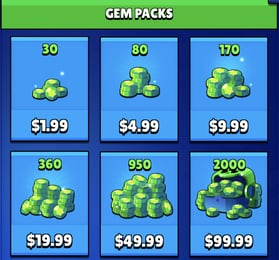
  • Gem packs: 30, 80, 170, 360, 950 and 2000 Gems
  • Passes: Brawl Pass, Brawl Pass Plus, Brawl Pass Plus Upgrade, Pro Pass Plus
  • Bundles: Starter Pack! Brawl like a pro!, Collector's Pack, Ultimate Collector's Pack
  • Required: Email
  • Region: account region as shown at checkout
  • Delivery: automatic, usually within minutes; status on the order page
  • Password needed: no

Which address goes in the Email field

This product identifies your account by an email address, not by a player tag. Brawl Stars progress is saved through Supercell ID, which is registered to an email address, and that is the address to enter.

  • Open Brawl Stars, go to Settings and check that Supercell ID shows as connected.
  • Enter the exact address that Supercell ID was created with, not a backup or work address.
  • Type it without spaces and check the part after the @ letter by letter.
  • Your player tag (the code starting with #) is not used for this product.

Value delivered to a wrong account cannot be pulled back, so a typo in the address is the one mistake worth ruling out before you pay.

Gems or a pass: what to buy

  • 30 and 80 Gems: covers a small gap before one shop item.
  • 170 and 360 Gems: for a skin or an offer you have been saving toward.
  • 950 and 2000 Gems: several purchases across a season in one order.
  • Brawl Pass and Brawl Pass Plus: the season's reward track; take the pass directly instead of collecting Gems for it.
  • Brawl Pass Plus Upgrade: for accounts that already own this season's Brawl Pass and want to move up to Plus.
  • Pro Pass Plus: a separate pass product; read its in-game description for what the current season includes.

In-game costs are set by Supercell and change between seasons, so check what the item you want costs first, then pick the smallest pack that covers it. Current prices for every option are in the live price table below this guide.

Gem packs, passes and bundles compared

The thirteen options on this page fall into three groups, and it helps to know which one you are buying:

  • Six Gem packs: plain currency added to the account balance, spent on whatever you like.
  • Four pass products: the base Brawl Pass, Brawl Pass Plus, the Brawl Pass Plus Upgrade step and Pro Pass Plus.
  • Three bundles: Starter Pack, Collector's Pack and Ultimate Collector's Pack.

Bundle contents and any purchase limits are defined by the game. Read the in-game description before ordering, and if you are unsure whether your account can take a bundle, ask support before paying.

Recharge Process

Top-up Procedures

  1. 1

    Place Your Order & Check Out

    Complete your purchase securely through our checkout process.

  2. 2

    Instant Auto-Delivery to Your UID

    Once your payment is confirmed, your top-up is automatically delivered to the UID you entered — fast, 100% secure, and no account login required.

Brawl Stars Gems & Brawl Pass FAQ

01

How do I top up Brawl Stars with my Email?

Pick a Gem pack, pass or bundle, enter the email address of your Supercell ID in the Email field and pay. Delivery runs automatically, and nobody asks for your password.

02

Which email address should I enter?

The one your Brawl Stars account's Supercell ID is registered to. Any other address, even one you own, does not point to the right account.

03

Can I use my player tag instead of an email?

No. The checkout form for this product asks for an Email only, so the tag starting with # is not needed or used here.

04

How long do Gems take to arrive?

Usually a few minutes after payment is confirmed. The order page shows the status; if your balance has not changed, restart the game and look again.

05

Can I buy a Brawl Pass for a friend?

Yes, if they give you the email address of their account. Delivery goes to whatever address is in the field, so let them send it to you in writing to avoid typos.

06

Brawl Pass Plus or Brawl Pass Plus Upgrade?

The upgrade is for accounts that already hold the base Brawl Pass this season. If you have no pass yet, choose Brawl Pass or Brawl Pass Plus instead.

07

What if I mistype the email address?

Anything delivered to another account cannot be pulled back, so check the address before paying. If an order fails, support helps you, and failed orders are refunded to the original payment method.

08

Does a Gems top-up count toward in-game events or offers?

Event eligibility is decided by the game's publisher, not by the store. Check the rules on the event page inside Brawl Stars.

Brawl Stars Gems & Brawl Pass
Brawl Stars Gems & Brawl Pass Recharge

Brawl Stars Gems & Brawl Pass

SupercellMobile3.9ksold

Prices exclude Tax. Tax is shown at checkout.

Related Articles

Brawl Stars Brawloween Event Guide: Schedule, Rewards, and Bosses

Brawl Stars Brawloween Event Guide: Schedule, Rewards, and Bosses

2026-10-03

Explore the Brawl Stars Brawloween event: Candy totals, Trick and Treat Box mechanics, six scaling bosses, Loony daily wins, and Mortis' Mortuary solutions.

How to Fix Brawl Stars Crashing on Launch on Android

How to Fix Brawl Stars Crashing on Launch on Android

2026-10-02

Fix Brawl Stars crashing on launch on Android with this prioritized guide. Troubleshoot 87% loading freezes, clear app cache safely, and verify system specs.

Brawl Stars Regional Pricing: How Store Regions and Webstore Bonuses Affect Gem Costs

Brawl Stars Regional Pricing: How Store Regions and Webstore Bonuses Affect Gem Costs

2026-09-28

Evaluate how Brawl Stars regional pricing works across app stores and web storefronts. Discover verified Supercell Store bonuses, platform transfer locks, and regional gifting rules.

How to Clear Brawl Stars Event Rewards Before the Season Reset

How to Clear Brawl Stars Event Rewards Before the Season Reset

2026-09-21

Learn how to clear all Brawl Stars event rewards before season reset, including the 2,800 XP tail milestone, 15 Mega Pig tickets, and auto-claim mechanics.

Brawl Pass vs Gem Packs: The Best First Purchase in 2026

Brawl Pass vs Gem Packs: The Best First Purchase in 2026

2026-09-09

Deciding between the Brawl Pass and raw gem packs? We break down the math, 18x reward multipliers, and real account value for your first spend in 2026.

Brawl Stars Graphics Settings for Android: Stable 60 FPS in 2026

Brawl Stars Graphics Settings for Android: Stable 60 FPS in 2026

2026-08-27

The Brawl Stars graphics settings that actually fix stutter on Android: the FPS cap, quality level, battery saver switch, and one phone toggle for 60 FPS. I've lost enough Showdown matches to frame drops to know which sliders matter and which ones are placebo. Here's the list I run, in the order I'd set them.

Payment Support

SBP (Faster Payments System)Credit / debit cardBLIKPmpromptpayBank card (Belarus)PixBank card (Kazakhstan)JKOPAYPrzelewy24PayUBoostDuitnowDragonpayAlipayHKOctopusAirwallex FpxBinance PayGate PayTouch 'n Go eWalletFPSBancontactApple PayGoogle PayCredit / debit cardTrustlypaysafecardMyBankMultibancoEps