

Learn how to find your Haikyu Fly High UID in 30 seconds and buy Diamonds fast via UID recharge — no password needed, just instant top-up today.
What Haikyu Fly High Diamonds Actually Do
HAIKYU!! FLY HIGH is the officially licensed volleyball RPG from Garena (developed by Prophet Games) — collect characters, build dream teams, run the plays you loved in the anime. I came for Hinata and Kageyama, stayed because team-building decides points.
Star Gems and Diamonds are the premium currencies. You spend them on high-value packs, monthly passes, and gacha pulls. Some stores list Rainbow Diamonds as the top-tier label — same family, different checkout name.
More than 5 million players pre-registered globally. The game launched globally July 31, 2025 on App Store and Google Play.
Check your device before you buy. You need Android 9 or higher and about 2.67 GB free. I've watched a download stall at 95% on a full phone — free the space first.
Reaching character level 20 unlocks support gacha and support skills, so Diamonds you save early can be spent there once it opens. The draft notes the 1st Anniversary campaign runs July 22 to August 5 with limited banners and login bonuses.
Here is the baseline so you are not guessing:
| Item | Detail |
|---|---|
| Global Launch Date | July 31, 2025 |
| Pre-Registrations | 5 million |
| Minimum Android Version | Android 9 |
| Install Size | ~2.67 GB |
| Support Gacha Unlock | Character Level 20 |
| Publisher | Garena (Developed by Prophet Games) |
Clear those specs and you avoid the most common headache: paying for Diamonds you can't install the game to use.

Memory Recruit Special I
 Memory Recruit Special IUSD 0.82Buy Now
Recruit Ticket x1
Recruit Ticket x1USD 0.65Buy NowStarter Pack
Starter PackUSD 0.70Buy NowUltra Recruit Special I
Ultra Recruit Special IUSD 0.82Buy NowUltra Recruit Ticket x1
Ultra Recruit Ticket x1USD 0.65Buy Now60 Star Gems
60 Star GemsUSD 0.72Buy NowStamina Boost Pack I
Stamina Boost Pack IUSD 1.62Buy NowMemory Recruit Special II
Memory Recruit Special IIUSD 4.04Buy NowStamina Boost Pack II
Stamina Boost Pack IIUSD 4.04Buy NowUltra Recruit Special II
Ultra Recruit Special IIUSD 4.04Buy NowRecruit Ticket x5
Recruit Ticket x5USD 3.26Buy NowUltra Recruit Ticket x2
Ultra Recruit Ticket x2USD 3.26Buy Now300 Star Gems
300 Star GemsUSD 3.61Buy NowFirst Cheer Bundle
First Cheer BundleUSD 4.93Buy NowMemory Recruit Special III
Memory Recruit Special IIIUSD 8.11Buy NowUltra Recruit Special III
Ultra Recruit Special IIIUSD 8.11Buy NowRecruit Ticket x10
Recruit Ticket x10USD 8.48Buy NowUltra Recruit Ticket x3
Ultra Recruit Ticket x3USD 8.48Buy NowMemory Recruit Special IV
Memory Recruit Special IVUSD 12.17Buy NowUltra Recruit Special IV
Ultra Recruit Special IVUSD 12.17Buy Now980 Star Gems
980 Star GemsUSD 10.87Buy NowFirst Memory Bundle
First Memory BundleUSD 17.71Buy NowFirst Growth Bundle
First Growth BundleUSD 21.29Buy NowRecruit Ticket x20
Recruit Ticket x20USD 19.58Buy NowUltra Recruit Ticket x4
Ultra Recruit Ticket x4USD 19.58Buy Now1980 Star Gems
1980 Star GemsUSD 21.75Buy NowRecruit Ticket x30
Recruit Ticket x30USD 32.64Buy NowUltra Recruit Ticket x5
Ultra Recruit Ticket x5USD 32.64Buy Now3280 Star Gems
3280 Star GemsUSD 36.25Buy NowRecruit Ticket x55
Recruit Ticket x55USD 65.28Buy NowUltra Recruit Ticket x6
Ultra Recruit Ticket x6USD 65.28Buy Now6480 Star Gems
6480 Star GemsUSD 72.51Buy Now
How to Find Your Haikyu Fly High UID in 30 Seconds
No password, no login share — just the numbers. Your UID is the only ID a direct top-up needs.
Here is the exact path:
- Log into HAIKYU!! FLY HIGH on the server where your main team lives.
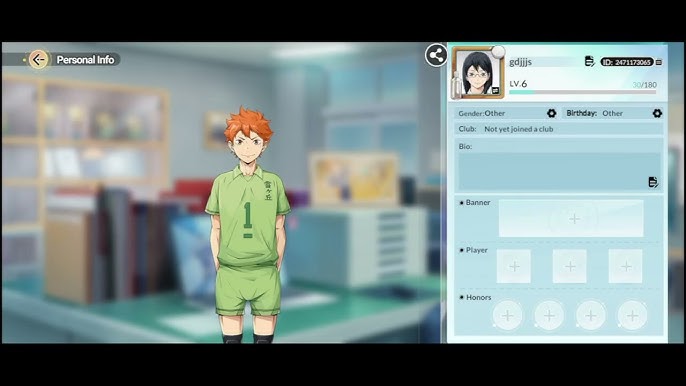
- On the main screen, look top left. Tap your Avatar icon.
- Your Player ID / UID appears on the profile card. Tap copy. Paste it somewhere safe.
Thirty seconds if you don't hunt around menus.
Mistakes I see every week:
- Copying your nickname instead of the numeric UID. Nicknames have letters; UIDs are numbers only.
- Grabbing the UID from the wrong server. SEA, PH, ID and Brazil accounts are server-tied — double-check your active server before you copy.
- Adding a space at the start or end. That blank triggers an “invalid ID” error. Paste, then check.
If you run multiple accounts, label them. I keep “Main - UID 123... - SEA” so Diamonds never land on an alt.
How to Top Up Haikyu Fly High by UID Without a Password
You never hand over your game login. Enter the ID, pick a pack, pay — Diamonds land in your in-game mailbox or wallet.
My flow takes about a minute:
- Open the product page and select HAIKYU!! FLY HIGH.
- Paste your UID exactly as copied. Check the server if the store asks for it.
- Choose your pack — 60, 300, or 980 Diamonds, or a monthly pass if listed.
- Review the total on the checkout before you pay. Reputable stores show the full amount upfront, including fees and taxes.
- Pay with your usual method and confirm the order ID on the success screen.
- Return to the game and check mail or currency balance. Log out and back in if it does not appear instantly.
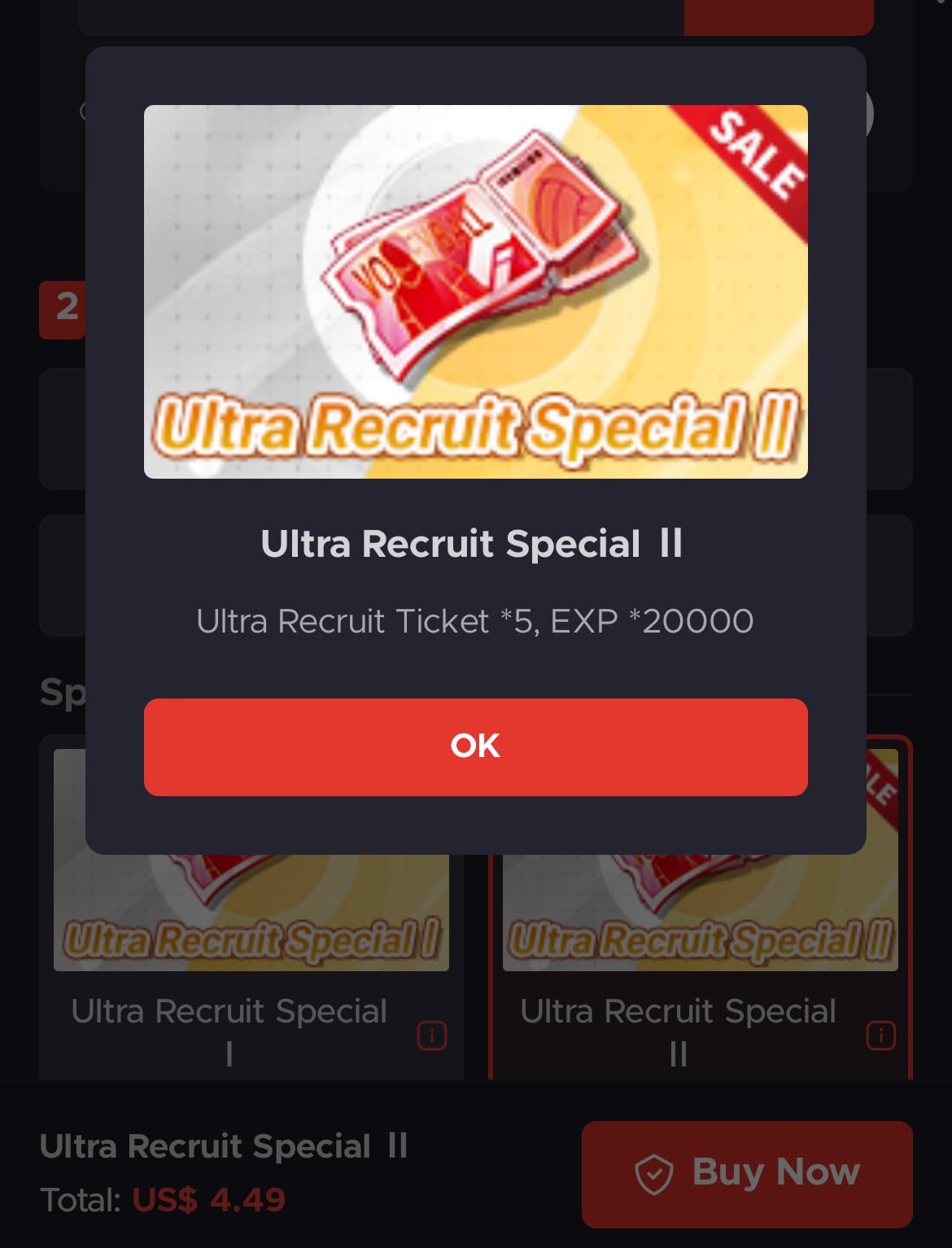
I use top up Haikyu Fly High diamonds on xptopup because it only asks for UID and shows the total before payment, so I know what I am paying without sharing a password.
Seen guides that tell you to message someone after you pay? Some say you must contact support or a seller in chat to get credited. A clean UID recharge credits by ID without extra steps — if a store makes you chase a person to deliver, skip it.
Payment note: your wallet or card network handles the charge, not the game store. If your bank flags an overseas transaction, approve it in your banking app and try again.
Which Diamond Pack Should You Buy First?
Match the pack to how you play — don't buy the biggest by default. The store lists three core Diamond tiers that cover most players.
Pick your entry point first:
| Pack Label | Diamonds | Note |
|---|---|---|
| Starter Package | 60 Diamonds | Standard entry pack for new buyers |
| Standard Package | 300 Diamonds | Mid-tier option for regular players |
| Large Package | 980 Diamonds | High-value pack for resource building |
That table covers the base Diamond packs. Monthly passes and Star Gem bundles sometimes appear on the live product page — check there for exact contents before you pay.
My take after watching pulls and early pity:
If you are F2P testing the waters
Buy the 60 Diamond Starter Package. One small recharge confirms the UID flow works on your server and shows how the currency lands. You get a feel for rates without overcommitting.
If you play daily and pull on banners
Go for the 300 Diamond Standard Package. You can split it across a banner and support gacha after level 20, and use it during the Anniversary window July 22 to August 5.
If you are building for meta or 1st Anniversary
The 980 Diamond Large Package is the resource builder. It lets you cover featured characters and support skills without repeat checkouts. Unsure? Start with 300 and add 60 later.
If you want to compare live options side by side, check the current prices for Haikyu Fly High recharge by UID before you decide, since pack listings and passes can shift during events.
Don't buy Diamonds to “catch up” to level 20. Level 20 is playtime, not pay. Spend after you unlock support gacha, so every Diamond can go toward the wider system.
Is UID Recharge Safe? What Real Stores Ask For
Yes — if the store only asks for UID. That's the point of direct top-up.
Here is how I separate clean stores from risky ones:
A legitimate UID top-up will ask for: - Your numeric Player ID / UID, and sometimes server/region - The pack you want (60 / 300 / 980 Diamonds, or a pass) - Standard payment info handled by the payment provider
A scam or risky seller will ask for: - Your game password, email OTP, or “verification code” - Access to your Google Play / App Store login - That you send money off-platform via direct transfer or gift cards - That you install a remote app or share your screen
Never give a password. No real UID recharge needs it. If a checkout asks for it, close the tab.
I skip any offer with a secret discount not shown on the checkout total. If the price isn't on the page before you pay, it isn't real. Reputable stores show the total before you pay.
Tip for PH and ID players on shared devices: copy your UID, then clear the clipboard. Stops you pasting the wrong ID next time.
FAQ
How do I find my Haikyu Fly High Player ID for top-up?
Log into the game and tap your Avatar icon in the top left corner of the main screen. Your numeric Player ID appears on the profile card — copy it without extra spaces.
What is the difference between Diamonds and Rainbow Diamonds?
Star Gems and Diamonds are the primary premium currencies used to buy high-value packs and pulls. Rainbow Diamonds is a premium label some stores use for the same Diamond wallet, so check the pack detail on the product page.
How do I receive my Diamonds after a UID recharge?
After payment, Diamonds are credited directly to the UID you entered and show in your in-game mailbox or balance. If you do not see them, restart the game and verify you used the correct server and UID.
What are the device requirements to play Haikyu Fly High?
You need Android 9 or higher and about 2.67 GB of free storage. The game launched globally on July 31, 2025 via App Store and Google Play, so update your OS if your device is on the edge.
Which pack should a new player buy first?
Start with the 60 Diamond Starter Package if it is your first purchase. It is the lowest-risk way to test the UID flow, and you can move to 300 or 980 Diamonds once you hit level 20 and unlock support gacha.
Do I need to share my password to top up?
No. A proper Haikyu Fly High recharge by UID only needs your numeric Player ID. If any site asks for your password or OTP, leave — that is not a legitimate top-up.
My Final Call: The Fastest Way to Recharge Right Now
I’ve tried the slow path — logging in, hunting for the in-app pack, dealing with store tax and failed receipts. UID direct is faster.
Tap the top left avatar, copy the numbers, paste on checkout. Pick 60 if you’re testing, 300 if you pull regularly, 980 if you’re going hard for Anniversary banners July 22 to August 5.

If you are ready, get your Rainbow Diamonds on xptopup with just your UID — no password, no extra steps, just the Diamonds in your account so you can get back to building your dream team.


Comments