Haikyu!! Fly High Top Up: Fast and Secure Star Gem Reloads
Power your squad with direct top-up options for Haikyu!! Fly High on XPTopup. Whether you need Star Gems to summon UR and SSR players, refresh training energy, or acquire skill training materials, topping up your account takes only your in-game User ID. You never have to share account credentials, login tokens, or passwords.
XPTopup delivers in-game resources directly to your linked game account. Current pricing and supported payment options are displayed on the live checkout interface, allowing you to select your preferred package and complete your transaction without friction.
How to Find Your Haikyu!! Fly High User ID
To ensure your Star Gems credit to the right account, locate your numeric User ID inside the game client before placing your order.
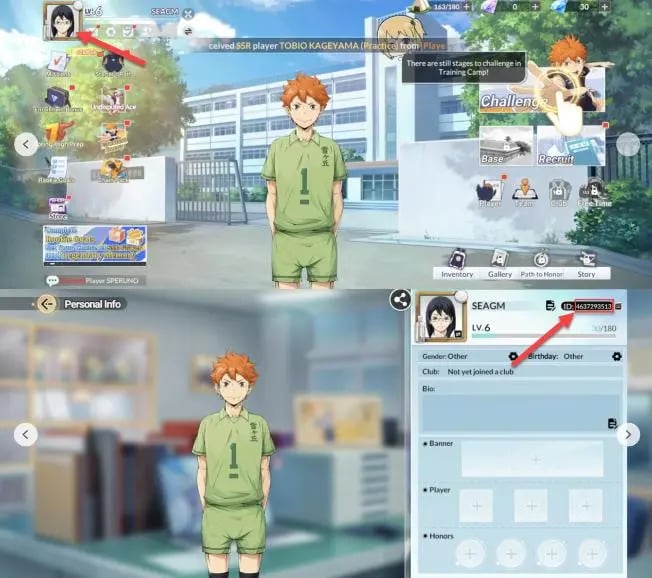
- Launch Haikyu!! Fly High on your mobile device or emulator.
- Tap your Player Avatar / Profile Icon located in the top-left corner of the main home screen.
- Open your profile overview to view your account details.
- Locate your User ID displayed below your team name.
- Tap the Copy icon next to the number to copy your User ID directly to your clipboard.
Double-check that you paste the exact ID into the User ID field on XPTopup before proceeding to checkout.
Step-by-Step Guide to Haikyu!! Fly High Top Up on XPTopup
Follow these quick steps to recharge your account balance:
- Select Your Item: Choose the Star Gem pack or item denomination you wish to purchase from the product catalog above.
- Enter Your User ID: Paste your numeric User ID into the required input field.
- Proceed to Checkout: Click the purchase button to view available local and international payment methods on the live checkout screen.
- Complete Payment: Follow the on-screen payment instructions to authorize your transaction.
- Check In-Game: Once the order status updates to completed, open Haikyu!! Fly High to confirm your updated Star Gem balance or retrieve items from your in-game mailbox.
In-Game Currencies: Star Gems, Diamonds, and Recruit Tickets
Haikyu!! Fly High uses multiple currencies to manage team building, gacha recruitment, and daily stamina. Understanding how each currency functions helps you spend your resources efficiently.
| Currency / Item | Classification | Acquisition Method | Primary In-Game Use |
|---|---|---|---|
| Star Gems (Paid) | Premium Currency | Direct Top-Up via XPTopup | Purchasing exclusive packages, Recruit Tickets, and daily stamina refreshes |
| Star Gems (Free) | Earnable Currency | Story mode, daily missions, achievements, and events | Standard pulls, stamina refills, and general store purchases |
| Recruit Tickets | Pull Voucher | Exchanged for Star Gems, event rewards | Summoning characters on Standard and Rate-Up banners |
| Gold Coins | Basic Resource | Daily matches, idle club training, stage clears | Upgrading player levels, badges, and equipping gear |
| Training Drinks | Stamina Resource | Mission rewards, Star Gem purchases | Restoring stamina required to sweep story and resource stages |
Paid Star Gems give you full flexibility across limited-time event stores, daily discount packages, and special seasonal step-up banners.
Understanding the Haikyu!! Fly High Gacha and Pity System
Recruiting top-tier players from Karasuno, Nekoma, Aoba Johsai, Date Tech, and Shiratorizawa is essential for clearing competitive PvP leagues and high-difficulty club trials. The recruitment system relies on structured pity thresholds:
- Standard Recruitment: Uses standard recruit tickets or Star Gems to pull from the general player pool. Every pull contributes to a fixed counter that guarantees high-rarity players at designated milestones.
- Event Pick-Up Banners: Feature specific UR/SSR rate-up volleyball players (such as Shoyo Hinata, Tobio Kageyama, Toru Oikawa, or Kenma Kozume). These banners feature a dedicated pity counter. If you do not pull the featured player within a set number of pulls, the hard pity mechanic ensures the featured character on the guaranteed milestone pull.
- Duplicate Conversion: Pulling duplicate copies of players awards character shards and memory fragments. These fragments let you unlock passive skill nodes, stat increases, and special spike/block animations through player breakthrough mechanics.
To prepare for limited banner schedules, stocking up on Star Gems beforehand ensures you have enough summons ready to hit the guaranteed pity threshold.
Password-Free Account Safety and Secure Checkout
XPTopup prioritizes user security by operating exclusively through official direct-to-UID delivery methods:
- Zero Password Requirements: We never ask for your game password, Google account, Apple ID, or third-party social logins. Your login credentials stay private.
- No Account Access Needed: Our automated delivery system sends the purchased items straight to your User ID on the game server.
- Encrypted Transactions: All payment sessions use modern encryption standards to protect your billing information.
- Transparent Pricing: Current rates and applicable regional currencies are calculated directly at checkout, ensuring complete clarity before you pay.
Order Verification, Delivery Processing, and Support
Orders submitted on XPTopup are processed swiftly. Once your payment clears, our fulfillment system pushes the Star Gems directly to your account.
If you are logged into the game during payment, you may need to restart the game client or switch game menus to refresh your current balance. If items do not appear immediately, check your in-game mailbox to collect any attached packages.
For any questions regarding order status, User ID verification, or payment inquiries, our dedicated customer support team is accessible to assist you directly through the platform.