

Stuck waiting for your Honkai Impact 3rd Crystals or B-Chips? Here is how to fix missing balances, verify your UID, and track down stalled game orders.
Seeing money leave your bank account while your in-game balance sits untouched is infuriating. You swiped for a limited expansion banner or outfit bundle, yet your wallet is lighter and your Valkyries have nothing new to show for it.
Your funds have not vanished into the Sea of Quanta, but you must diagnose the stall before taking actions that could lock your profile.
The Immediate 15-Minute Sanity Check
When your balance fails to update immediately, step away from the checkout screen. Repeatedly hitting the purchase button during an order lag only queues duplicate charges.
Work through three basic checks first:
- Payment authorization holds: Look at your bank or provider statement. If the charge shows as pending, risk algorithms are still reviewing the transaction. The storefront will not ping the game server until the transfer clears.
- Expired verification timers: One-time SMS authentication codes typically expire in 60 seconds. A network delay or late entry cancels the session on the provider's side while the app hangs on confirmation.
- Stale client cache: The Hyperion bridge does not continuously poll the balance server. Force-closing the client and restarting your device triggers a fresh handshake that loads credited items immediately.

30 B-Chips
 30 B-ChipsUSD 0.38Buy Now
65 Crystals
65 CrystalsUSD 0.74Buy Now65 B-Chips
65 B-ChipsUSD 0.74Buy Now330 B-Chips
330 B-ChipsUSD 3.77Buy Now330 Crystals
330 CrystalsUSD 3.76Buy NowMonthly Card
Monthly CardUSD 3.77Buy Now660 Crystals
660 CrystalsUSD 7.55Buy Now990 B-Chips
990 B-ChipsUSD 11.13Buy Now1320 B-Chips
1320 B-ChipsUSD 14.89Buy Now1320 Crystals
1320 CrystalsUSD 14.89Buy Now1980 B-Chips
1980 B-ChipsUSD 22.51Buy Now3300 B-Chips
3300 B-ChipsUSD 37.56Buy Now3300 Crystals
3300 CrystalsUSD 37.75Buy Now6600 B-Chips
6600 B-ChipsUSD 73.78Buy Now6600 Crystals
6600 CrystalsUSD 73.78Buy Now
Why Your Crystals or B-Chips Are Stalled
Honkai Impact 3rd runs on two distinct paid currencies. Standard Crystals fund supply drops, stamina refreshes, and basic shop items. B-Chips, by contrast, are strictly paid tokens for outfit bundles, leveling packs, and battle pass access. Because B-Chips interface directly with cash-only packs, their server crediting follows a stricter verification pipeline.
Identifying where the delivery pipeline stalled determines whether you should wait or contact support.
The Incorrect UID or Server Mismatch Trap
Simple input typos cause a heavy portion of missing recharge inquiries. Check your User ID by tapping your character name or Player ID in the top-left corner of the main screen, then copy the numerical sequence directly from the profile card.
Swapping two digits causes the portal to reject the order or credit an inactive account holding that ID. Selecting the wrong regional server—like Americas instead of Asia—delivers the Crystals to an account on another continent. Because game data does not bridge across regions, your local client will show no change.
Game Maintenance and Downtime Freezes
Scheduled maintenance temporarily suspends top-up delivery. Whenever core servers go offline for a version patch, official web portals and external payment APIs pause dispatch queues. External storefronts may accept your payment during this window, but the game server API cannot credit the account until maintenance concludes and backends reopen.
Account Security Flags and Network Blocks
Automated publisher security systems actively monitor account activity. Connecting through commercial VPNs or cycling payment methods rapidly triggers automated risk flags, causing temporary recharge blocks across that UID. When this happens, transactions bounce or hang until platform risk controls finish reviewing the account.
Review this quick overview of typical transaction stalls and their resolutions:
| Failure Symptom | Underlying Cause | Corrective Action |
|---|---|---|
| Funds held as pending | Payment gateway risk review or expired 1-minute SMS code | Wait for authorization drop or retry after the session resets. |
| Payment cleared, zero items | Client cache out of sync | Completely restart the game client to force an account refresh. |
| Order successful on wrong region | Mistyped destination server | Submit a ticket with transaction proof for manual reassignment. |
| Top-up rejected on client | Original registration device lock | Purchase via browser top-up or the official web center. |
| Total downtime during patch | Scheduled maintenance window | Wait until servers return online before logging in to verify. |
Takeaway: Most sudden top-up failures stem from external gateway timeouts or regional server mismatches rather than lost game data.
The Monthly Card Misunderstanding
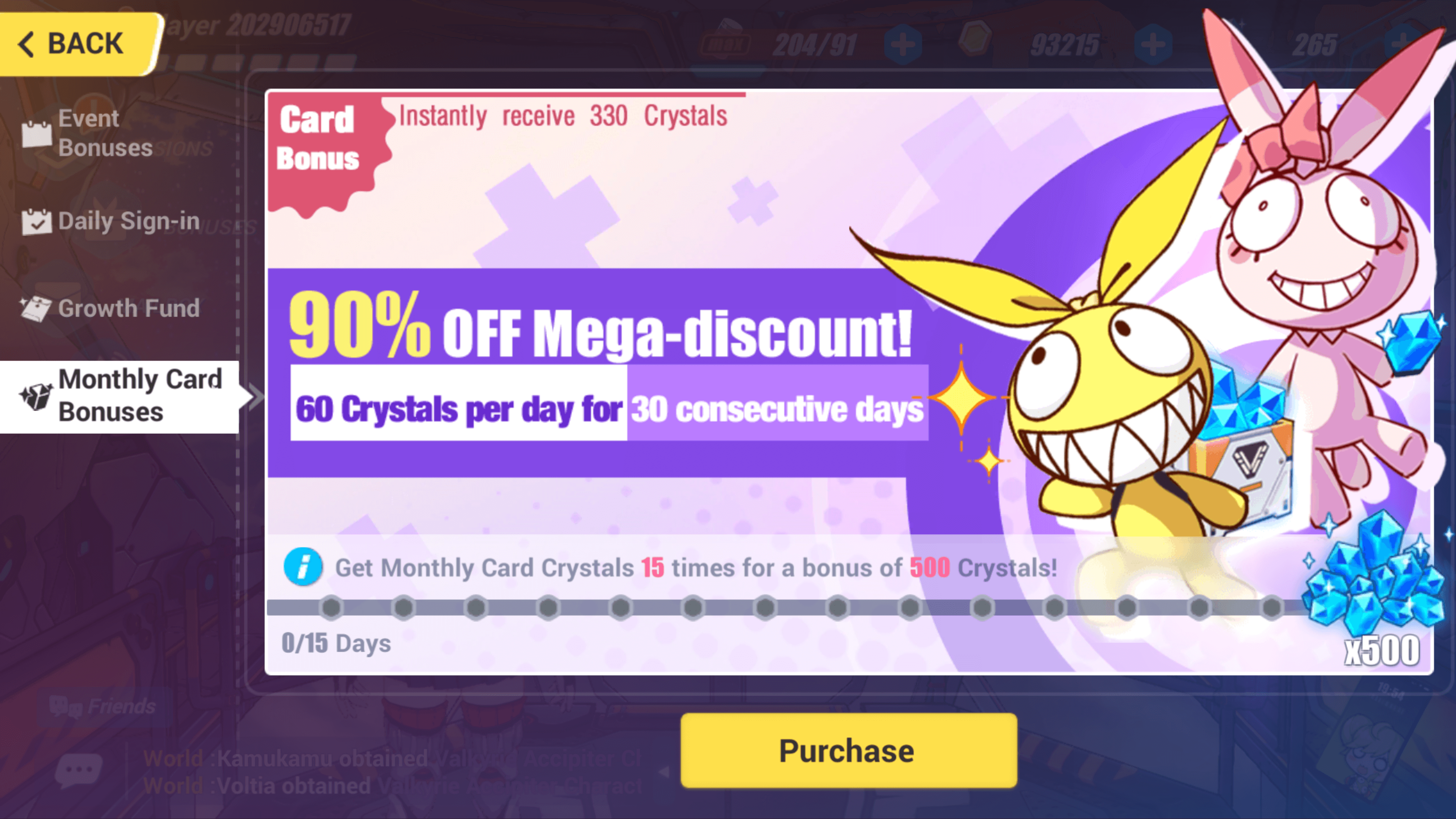
Players frequently report Monthly Card purchases as missing because they expect an immediate delivery of 3,130 Crystals. Honkai Impact 3rd does not distribute subscription passes all at once.
The Monthly Card model distributes currency over a 30-day active window. On domestic servers, this subscription costs around 30 yuan, scaling to regional currency equivalents worldwide. Here is the exact distribution schedule you agree to at purchase:
| Distribution Phase | Crystals Granted | Delivery Mechanism and Rules |
|---|---|---|
| Immediate Transaction Yield | 330 Crystals | Credited directly to your account immediately upon payment completion. |
| Daily Login Allocation | 60 Crystals / Day (1,800 Total) | Distributed on daily login over 30 days; uncollected days cannot be claimed. |
| 15-Day Cumulative Milestone | 500 Crystals | Awarded automatically once you reach 15 cumulative logins during the pass. |
| Total Subscription Yield | 3,130 Crystals | The absolute maximum yield achievable across the entire 30-day active window. |
Takeaway: You only receive 330 Crystals upfront when buying a Monthly Card; the remaining 2,800 Crystals require daily check-ins.
If only 330 Crystals appear in your balance after purchase, the transaction was processed correctly. Claim the rest through the daily login interface.
The Device Lock Problem and Browser Workarounds
Attempting to buy Crystals through the PC or tablet client often triggers an error requiring you to purchase on the device used to register your account. This restriction is an intentional security lock built into mobile-created profiles to safeguard accounts during credential leaks.
Do not spoof hardware identifiers or jailbreak devices to bypass this prompt, as modifying device tokens triggers automated bans.
Client-side device locks can be bypassed entirely by purchasing through a web portal. Using an external option like Honkai Impact 3 Crystals & B-Chips Top Up routes delivery through server-side crediting. Because web recharges validate through your public UID and server selection rather than local hardware tokens, you can top up from any web browser without accessing your original phone.
Knowing When to Wait vs. When to Panic
Most digital currency orders credit within two minutes. However, inventory bottlenecks, payment gateway queues, and banner-launch server spikes can slow delivery down.
Use this operational timeline to pace your escalation:
- 0 to 15 Minutes: Standard processing window. Close the game, verify that your bank recorded the charge, and check your internet connection.
- 15 Minutes to 2 Hours: Gateway queues or automated fraud filters are processing. If you bought through a web portal, check whether the invoice reads "processing" or "pending verification."
- 2 to 24 Hours: Possible reseller stock backlog or deep gateway verification. Confirm that your receipt displays the correct UID and server region.
- 72 Hours: The standard deadline for support escalation. If funds cleared and your balance remains unchanged after 72 hours, submit a support ticket.
Do not contact your bank to issue a chargeback before customer support investigates the order. Payment chargebacks against an active account trigger automatic currency clawbacks. If you have already spent those Crystals, your account drops into negative balance, resulting in an automated account ban unless the balance deficit is cleared out of pocket within a set deadline.
How to Submit an Escalation Ticket
If you reached the 72-hour mark without receiving your items, file a support request with the merchant or the game's help desk. Providing structured data speeds up manual server audits.
Include these details in your first message:
- Your Exact UID and Server: Copied directly from your in-game player card.
- Your In-Game Character Name: Used to cross-reference account ownership.
- Order Date and Exact Timestamp: Including your timezone.
- Official Transaction ID: The unique reference number listed on your merchant receipt.
- Uncropped Screenshot Proof: A clean image of the digital receipt showing the charge total, status, and reference code. Avoid cropped images that omit timestamps.
If your issue involves a gift voucher, claim codes in-game under Player ID -> Account -> Exchange Rewards. Note that promo codes and first-time purchase double bonuses are restricted to one claim per account.
For verified order logs and straightforward tracking, purchasing through Honkai Impact 3 Crystals & B-Chips Top Up gives you immediate access to full transaction receipts for customer support review.
Budget Allocation: Recommendations by Spender Tier
Choosing currency options suited to your play habits minimizes purchase delays during tight banner deadlines.
The Free-to-Play and Low Spender
Stick strictly to the Monthly Card. Receiving 3,130 Crystals across 30 days provides the highest Crystal-per-dollar ratio in the game. Avoid raw Crystal packs unless you are within single-digit pulls of a guaranteed pity drop on the final day of a banner.
The Mid-Tier Dolphin
Target B-Chip outfit bundles and battle pass tiers alongside your Monthly Card. B-Chips unlock exclusive cosmetics and upgrade caches unavailable through free gameplay, offering higher practical value than raw Crystal packs. Track first-time double bonuses across direct Crystal tiers, but note that double yields apply only once per reset cycle.
The Heavy Spender
Avoid placing multiple high-tier mobile transactions back-to-back. Payment processors frequently flag repeated large charges as suspected fraud. When acquiring packages to rank up a new battlesuit, space your transactions out or route them via Honkai Impact 3 Crystals & B-Chips Top Up to avoid card-issuer security holds during gacha sessions.
Spotting Legitimate Top-Ups vs. Outright Scams
Legitimate recharge platforms never ask for account passwords, email logins, or two-factor authentication codes. Genuine purchases require only your public UID and server selection to credit currency via backend APIs.
| Verification Metric | What Legitimate Services Require | What Scams and Phishing Sites Demand |
|---|---|---|
| Account Access Credentials | Your public numerical UID and Server region only | Your Hoyoverse password, email login, or 2FA codes |
| Checkout Visibility | Fixed totals displayed clearly before payment confirmation | Hidden processing surcharges added without notification |
| Delivery Method | Direct server crediting via official UID hooks | Demands to log into your account directly to "manually load" goods |
| Payment Processing | Regulated checkout gateways with encrypted sessions | Direct gift card trades, cryptocurrency transfers, or unverified chats |
Takeaway: A safe top-up service only ever asks for your public UID and server name—never hand over account passwords or two-factor authentication codes.
Additional Costs: Watching the Checkout Surcharge
Gateway processing fees explain why a final bank statement deduction can slightly exceed the base in-game price. Different payment rails apply distinct fees: local e-wallets add roughly S$0.01, Apple Pay tacks on around S$0.29, and credit card processors or Google Pay typically add about S$0.31.
Check the checkout summary screen before submitting payment verification so you know the exact total charged to your card.
The Final Verdict on Stalled Crystals
A delayed delivery in Honkai Impact 3rd rarely means lost funds. Wait 15 minutes, restart the game client to refresh account data, and confirm your receipt details. If gateway backlogs or input errors push the delay past 72 hours, submit a support ticket with your uncropped receipt and UID.
Avoid filing an immediate bank chargeback. Allowing customer support to investigate prevents negative currency bans and protects your account.
Frequently Asked Questions
Why haven't my Honkai Impact 3rd Crystals appeared after payment?
Delayed delivery usually stems from server latency, platform risk screening, or an incorrect UID or server entry. Check your payment statement to ensure the charge cleared, and restart the game client to refresh account balances.
Where can I find my Honkai Impact 3rd UID?
Your UID is located in the top-left corner of the main screen by tapping your character name. Copy this number directly from your profile card to prevent mistyping it on top-up forms.
What happens if I entered the wrong server during top-up?
Crystals or B-Chips will be credited to the account matching your UID on that specific server rather than your active profile. You will need to contact customer support with your transaction receipt to request manual reassignment.
Why did I only receive 330 Crystals after buying a Monthly Card?
The Monthly Card credits only 330 Crystals immediately upon purchase. The remaining 2,800 Crystals must be collected gradually via daily logins (60 per day) and the 15-day milestone bonus over the 30-day period.
Can I file a bank chargeback for missing Honkai Impact 3rd Crystals?
No, you should avoid initiating bank chargebacks because they can trigger negative currency balances or permanent account bans. Reach out to the store support team or game customer service with your transaction ID first.
What should I do if the in-game client refuses my top-up due to a device mismatch?
Use a browser-based web top-up center instead of the mobile or PC game client. Official web top-up routing bypasses the device-registration lock associated with your initial account creation.
How long should I wait before contacting support about an unreceived top-up?
Wait up to 72 hours before submitting an official support inquiry if your payment cleared without the items appearing. Have your transaction receipt, payment provider order ID, UID, and server name ready when submitting your ticket.






Comments