


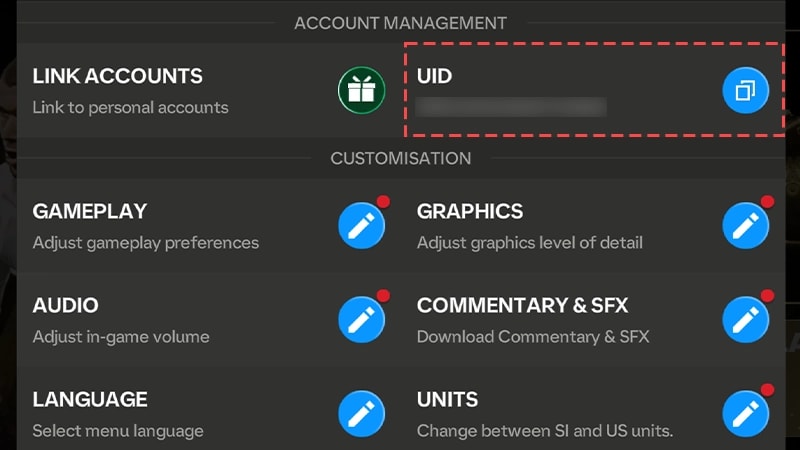
You can buy FC Points and Silver directly without Google Play or the Apple App Store by using web-based direct User ID (UID) top-up platforms, where prices range from $0.39 USD for 40 FC Points up to $99.99 USD for 12,000 FC Points. Web purchases do not require access to your mobile app store balance or linked credit cards, eliminate login sharing, and credit points straight to your game balance by entering your public account UID found in the in-game Settings menu.
Why Players Skip Google Play and App Store Billing
App stores impose strict regional frameworks and payment channel limitations. On July 31, 2024, Google Play suspended Idea and Vodafone carrier billing in India, and starting October 2025, Netbanking was discontinued entirely on the platform as documented by Google Play Support. For players without an international credit card or whose domestic payment options were eliminated, buying currency inside the mobile client simply fails.
Platform fees also shape ecosystem pricing. Standard in-app purchase systems charge publishers platform service fees of up to 30%. In contrast, external billing arrangements reduce service fees to roughly 9% or 20%, returning 10 to 20 margin points to developers before processing fees, according to data from Solidgate. These structural fee differences allow authorized web storefronts to distribute bonus incentives—such as loyalty programs—that are unavailable inside the traditional mobile app stores.

39 Silver
 39 SilverUSD 0.29Buy Now
40 FC POINTS
40 FC POINTSUSD 0.29Buy Now100 FC POINTS
100 FC POINTSUSD 0.69Buy Now99 Silver
99 SilverUSD 1.03Buy Now499 Silver
499 SilverUSD 4.81Buy Now520 FC POINTS
520 FC POINTSUSD 4.81Buy Now1070 FC POINTS
1070 FC POINTSUSD 10.33Buy Now999 Silver
999 SilverUSD 10.33Buy Now1999 Silver
1999 SilverUSD 19.98Buy Now2200 FC POINTS
2200 FC POINTSUSD 19.98Buy Now4999 Silver
4999 SilverUSD 47.55Buy Now5750 FC POINTS
5750 FC POINTSUSD 47.55Buy Now12000 FC POINTS
12000 FC POINTSUSD 102.70Buy Now9999 Silver
9999 SilverUSD 102.70Buy Now1070 FC POINTS
1070 FC POINTSUSD 9.25Buy Now40 FC POINTS
40 FC POINTSUSD 0.41Buy Now100 FC POINTS
100 FC POINTSUSD 0.94Buy Now520 FC POINTS
520 FC POINTSUSD 4.75Buy Now2200 FC POINTS
2200 FC POINTSUSD 19.33Buy Now5750 FC POINTS
5750 FC POINTSUSD 47.71Buy Now12000 FC POINTS
12000 FC POINTSUSD 97.96Buy Now39 Silver
39 SilverUSD 0.41Buy Now99 Silver
99 SilverUSD 0.94Buy Now499 Silver
499 SilverUSD 4.75Buy Now999 Silver
999 SilverUSD 9.24Buy Now1999 Silver
1999 SilverUSD 19.33Buy Now4999 Silver
4999 SilverUSD 47.71Buy Now9999 Silver
9999 SilverUSD 98.07Buy Now40 FC POINTS
40 FC POINTSUSD 0.46Buy Now100 FC POINTS
100 FC POINTSUSD 1.12Buy Now520 FC POINTS
520 FC POINTSUSD 5.41Buy Now1070 FC POINTS
1070 FC POINTSUSD 10.16Buy Now2200 FC POINTS
2200 FC POINTSUSD 21.47Buy Now5750 FC POINTS
5750 FC POINTSUSD 54.24Buy Now12000 FC POINTS
12000 FC POINTSUSD 108.51Buy Now39 Silver
39 SilverUSD 0.46Buy Now99 Silver
99 SilverUSD 1.12Buy Now499 Silver
499 SilverUSD 5.16Buy Now999 Silver
999 SilverUSD 10.16Buy Now1999 Silver
1999 SilverUSD 21.47Buy Now4999 Silver
4999 SilverUSD 54.24Buy Now9999 Silver
9999 SilverUSD 108.51Buy Now520 FC POINTS
520 FC POINTSUSD 3.50Buy Now1070 FC POINTS
1070 FC POINTSUSD 7.02Buy Now2200 FC POINTS
2200 FC POINTSUSD 14.07Buy Now5750 FC POINTS
5750 FC POINTSUSD 35.05Buy Now12000 FC POINTS
12000 FC POINTSUSD 70.22Buy Now99 Silver
99 SilverUSD 0.69Buy Now499 Silver
499 SilverUSD 3.50Buy Now999 Silver
999 SilverUSD 7.02Buy Now1999 Silver
1999 SilverUSD 14.07Buy Now4999 Silver
4999 SilverUSD 35.05Buy Now9999 Silver
9999 SilverUSD 70.22Buy Now40 FC POINTS
40 FC POINTSUSD 0.41Buy Now39 Silver
39 SilverUSD 0.41Buy Now
Official Webstore Pricing and the Loyalty Point System
The official webstore operated by Coda for the United States offers seven standard FC Points tiers. Each purchase automatically generates Loyalty Points at a fixed rate of 100 Loyalty Points per 1 USD spent, as detailed by the EA Webstore Announcement. These Loyalty Points expire after 1 year and redeem for special packs containing top OVR player items, ranging from 1 to 10,000 Loyalty Points.
| Tier & Currency | US Webstore Price | Bonus Loyalty Points | Visual Preview | Sourced Reference |
|---|---|---|---|---|
| 40 FC Points | $0.39 USD | 39 Loyalty Points |  | Codashop US Schedule |
| 100 FC Points | $0.99 USD | 99 Loyalty Points |  | Codashop US Schedule |
| 520 FC Points | $4.99 USD | 499 Loyalty Points |  | Codashop US Schedule |
| 1,070 FC Points | $9.99 USD | 999 Loyalty Points |  | Codashop US Schedule |
| 2,200 FC Points | $19.99 USD | 1,999 Loyalty Points |  | Codashop US Schedule |
| 5,750 FC Points | $49.99 USD | 4,999 Loyalty Points |  | Codashop US Schedule |
| 12,000 FC Points | $99.99 USD | 9,999 Loyalty Points |  | Codashop US Schedule |
Because base dollar amounts match typical app store list prices, the functional value difference on the webstore comes through these extra Loyalty Points and external payment acceptance rather than direct sticker discounts.
FC Points vs Silver: How Currency Purpose Dictates Your Top-Up
Before spending money off-platform, identify which currency your intended item actually requires. FC Mobile utilizes two distinct premium currencies that cannot be swapped interchangeably in the menus.
| Currency | Primary Function in FC Mobile | Minimum Purchase Requirement | Sourced Reference | | :--- | :--- | :--- | :--- | :--- | | FC Points | Opening tradeable player packs in Store, limited-time promo events, daily event node resets, tactical resources | 40 FC Points ($0.39 USD) | EA Sports FC Mobile Storefront | | Silver | Star Pass activation (Standard Premium Star Pass), expanded Star Pass Bundle, dedicated Silver Store tab | 999 Silver (Standard) / 1,999 Silver (Bundle) | EA Sports FC Mobile Storefront |
Upgrading to the seasonal Premium Star Pass costs exactly 999 Silver, while the Premium Star Pass Bundle requires 1,999 Silver, according to the official EA Sports FC Mobile Webstore. If you buy FC Points expecting to unlock the Star Pass directly, you will find yourself blocked. Players targeting player packs and daily event refreshes should buy FC Points; players aiming for seasonal pass ladders must buy Silver.
Direct UID Delivery vs Account-Sharing Dangers
Legitimate web-based top-ups never ask for your account password. Direct top-up channels credit your account balance using solely your numeric User ID (UID).
Services like XPTopup process recharges 100% password-free. They do not request Google logins, Apple IDs, or EA account credentials, delivering currencies directly to the account balance without triggering foreign IP flags or automated profile suspensions. In contrast, gray-market sellers asking for direct login access violate terms of service, expose your profile to theft, and frequently trigger backend bans.
| Method Type | Required Checkout Information | Account Access Risk | Sourced Platform Models | | :--- | :--- | :--- | :--- | :--- | | Direct UID Recharge | Numeric User ID (UID) only | Zero credential sharing; currency delivered directly to EA backend balance | Official Webstore, XPTopup, MRCODA | | Digital Voucher Code | Email for code delivery (redeemed manually) | Code expiration risk; varying availability across regional platforms | Listed by SEAGM; disputed by Recharge.com | | Account Sharing (Gray Market) | Username, EA password, two-factor auth backup codes | Extreme risk of permanent bans, IP flagging, and credential hijacking | Unofficial brokers and black-market forums |
Discrepancies exist across sellers regarding redemption codes. While SEAGM has marketed FC Points as digital redeem codes with 1-year lifespans, Recharge.com notes there is no standalone FC Points gift code to purchase. Concurrently, both MRCODA and XPTopup emphasize that modern FC Mobile transactions are handled via direct UID balance injection rather than voucher codes.
How to Find Your User ID and Complete Checkout
To ensure your points arrive without delay, you must provide your exact in-game User ID.
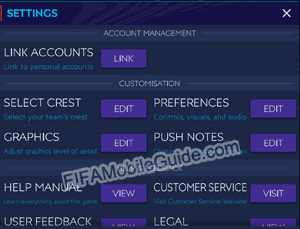
- Launch EA SPORTS FC Mobile on your device.
- Tap the Settings (cogwheel) icon on the main home screen.
- Locate your numeric User ID in the top-right corner of the menu, displayed immediately after "UID", as verified by EA Help.
- Write it down or copy it to your clipboard.
(Note on conflicting UI guidance: MRCODA states that players tap their profile avatar in the top-left corner to find the UID below their gamertag. Official EA Help documentation specifies the Settings cogwheel on the home screen as the primary location.)
Once copied, navigate to an authorized web provider like XPTopup's EA Sports FC Mobile portal or the official webstore. Select your desired denomination—such as 1,070 FC Points for $9.99 USD or the 999 Silver bundle—enter your UID, and proceed to checkout using your chosen alternative payment method. Supported alternatives often encompass local e-wallets, domestic debit systems, and web payment gateways that bypass Google Play and Apple App Store constraints.
Regional Pricing Rules and Server Anti-Arbitrage
EA SPORTS FC Mobile operates on a unified global game client without hard regional server locks. However, regional product pricing exists across different geographical markets.
According to MRCODA, EA enforces backend anti-arbitrage measures globally. If a player attempts to route top-up purchases through drastically discounted regional SKUs outside their actual billing region, the transaction will be rejected at the top-up backend. To avoid payment failures, always match the regional currency SKU to your actual account billing profile rather than attempting cross-region currency arbitrage.
What to Do If Purchased Points Do Not Appear
If you complete a web-based UID recharge and your points balance does not reflect the change immediately:
- Force close the EA SPORTS FC Mobile app completely and restart it. This forces a fresh synchronization hand-shake with EA servers.
- Check your in-game mailbox to see if items were routed as an internal claimable delivery.
- Allow a few minutes for payment gateway confirmation before re-attempting a purchase to avoid accidental duplicate charges.
- If the balance remains uncredited, reach out to the customer support desk of the specific web recharge platform used, providing your transaction receipt and numeric UID.






Comments