EA Sports FC Mobile Top Up: Instant FC Points and Silver Delivery
Building an elite squad in EA Sports FC Mobile requires the right resources at the right time. Whether you need FC Points to open promo player packs during major seasonal events or Silver to unlock the Premium Star Pass, having immediate access to in-game currency keeps your team competitive on the pitch.
XPTopup provides a direct recharge service for EA Sports FC Mobile that operates purely through your User ID (UID). You do not need to share account passwords, link personal social credentials, or wait through long processing queues. Select your required pack, enter your UID, and complete your order to have your FC Points or Silver credited directly to your account.
How to Top Up EA Sports FC Mobile FC Points and Silver with User ID
Recharging your account on XPTopup is designed to be quick and straightforward. Follow these steps to complete your purchase:
- Select Your Currency and Amount: Choose the desired amount of FC Points or Silver from the product list.
- Enter Your User ID (UID): Type or paste your exact FC Mobile UID into the player ID field. Ensure there are no extra spaces or typos.
- Review Order and Live Pricing: Verify your selected package and check the real-time price displayed on the live checkout screen.
- Complete the Payment: Choose your preferred payment option from the available methods and finalize the transaction.
- Receive Your In-Game Currency: Once the payment is verified, your FC Points or Silver are sent directly to your game account. Open or restart the game app to check your updated balance.
How to Find Your EA Sports FC Mobile UID
Your User ID (UID) is a unique numeric identifier assigned to your game profile. Because XPTopup only requires your UID to credit your account, locating the correct number is critical.
Follow this step-by-step process inside the game:
- Launch EA Sports FC Mobile on your iOS or Android device.
- From the main home screen, tap the Settings (gear icon) located in the top-right corner.
- Look at the top section of the Settings menu directly next to your profile avatar and in-game name.
- You will see a numeric string labeled as your User ID (UID).
- Tap the Copy button beside the number to copy it straight to your clipboard.
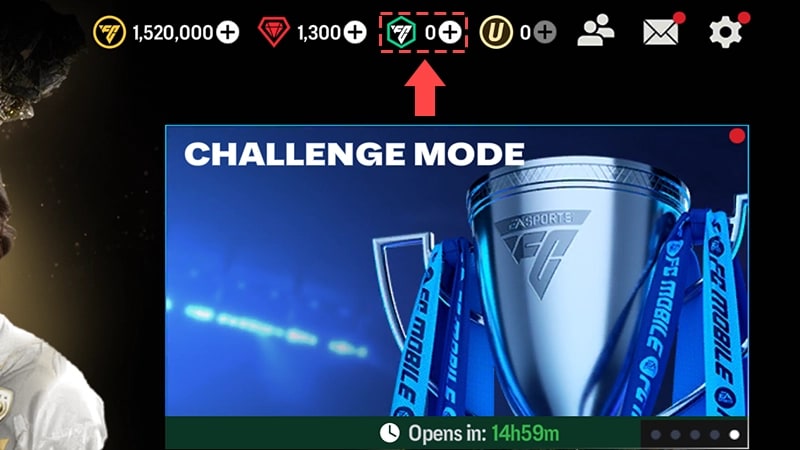
Always paste the copied UID directly into the order field on XPTopup to eliminate manual typing errors.
Differences Between FC Points and Silver in FC Mobile
EA Sports FC Mobile features two distinct premium currencies: FC Points and Silver. While both currencies enhance your progression and squad-building capabilities, they serve different functions within the in-game economy.
| Feature | FC Points | Silver |
|---|---|---|
| Primary Use | Event store packs, player packs, stamina refills, store bundles | Premium Star Pass unlock, exclusive Silver store offers |
| Star Pass Direct Buy | No (must use Silver or direct purchase) | Yes (direct purchase currency for Star Pass) |
| Event Packs | Universal currency for team promo packs | Limited to specific Silver-exclusive bundles |
| Delivery Method | Direct UID credit | Direct UID credit |
| Account Bound | Yes | Yes |
FC Points: The Universal Pack Currency
FC Points are the primary currency used to purchase player packs in the Store, participate in limited-time promo events, reset daily event nodes, and buy tactical resources. If your primary goal is opening tradeable player packs or acquiring promo event tokens, FC Points are the currency to select.
Silver: The Star Pass and Special Offer Currency
Silver is an exclusive premium resource designed specifically for unlocking the Premium Star Pass and accessing the dedicated Silver Store tab. If you want to claim milestone rewards, high-tier untradeable players, training transfer items, and gems from the seasonal pass tracks, you should top up Silver.
How to Use Silver to Unlock the Premium Star Pass
The Premium Star Pass provides some of the highest-value resource tracks in EA Sports FC Mobile, offering prime player items, rank-up materials, and massive gem reserves. Using Silver to activate your pass is simple:
- Open EA Sports FC Mobile and go to the Star Pass menu from the main dashboard.
- Tap the Unlock Premium Pass or Premium Pass Bundle button at the bottom of the track.
- The game will display the required Silver cost for the standard Premium Pass or the advanced bundle.
- Confirm the transaction using your available Silver balance.
- Claim all previously unlocked tier rewards instantly and continue progressing along the premium track.
Secure Payment Options and Instant UID Delivery Overview
XPTopup provides a transparent checkout experience with clear, real-time rates displayed for all FC Points and Silver denominations. All transactions are processed through encrypted payment gateways to protect your personal information.
Because the system connects directly to in-game delivery protocols using your UID, orders process immediately upon payment confirmation. There are no mandatory account registrations required to complete a top-up, enabling you to get back into the game with your newly acquired balance without unnecessary delays.
Account Safety: Ban-Proof Top-Up Without Password Sharing
Account safety is a top priority for every competitive football player. Unauthorized third-party services that demand your EA account credentials, login email, or one-time verification codes expose your profile to significant security risks, including permanent account bans or theft.
XPTopup guarantees 100% password-free recharges:- No Login Sharing: We never ask for your EA account password, Google Play login, Apple ID, or Facebook credentials.- UID-Only Processing: Delivery requires solely your public User ID, meaning your private login information remains completely in your hands.- Official Delivery Paths: Currencies are delivered directly into your game account balance without violating developer terms of service.- Zero Risk of IP Flagging: Because no external party logs into your profile from a different country or device, your account will never trigger security flags or automated bans.
Frequently Asked Questions
How do I find my EA Sports FC Mobile User ID (UID)?
Open the game, tap the Settings gear icon in the top-right corner of the main lobby, and locate the numeric UID displayed near your username. Tap the copy icon next to it to copy your ID directly.
What is the difference between FC Points and Silver in FC Mobile?
FC Points are used to open event packs, store player bundles, and purchase stamina across all live events. Silver is primarily used to activate the Premium Star Pass and purchase items from the dedicated in-game Silver Store.
How do I purchase the Premium Star Pass using Silver?
Once you have recharged Silver on XPTopup, open EA Sports FC Mobile, navigate to the Star Pass screen, tap the Unlock Premium option, and confirm the purchase using your in-game Silver balance.
Do I need to share my EA account login or password to top up on XPTopup?
No. XPTopup only requires your public User ID (UID). You should never share your login passwords, authentication codes, or linked platform credentials with any top-up service.
How long does it take to receive FC Points or Silver after payment?
Delivery processes automatically once your payment is confirmed. In most cases, your currency reflects in your game balance almost immediately.
What should I do if my FC Points or Silver do not appear immediately in-game?
If your balance does not update right away, close EA Sports FC Mobile completely from your device app switcher and restart the game. This forces the app to refresh its connection with the servers. If the balance has not updated after a few minutes, verify your order status on XPTopup and check that the submitted UID was correct.
Current package prices
Current package prices are shown below. Prices exclude Tax. Tax, payment fees and applicable coupons are shown at checkout.
| Package | Price |
|---|---|
| 39 Silver | USD 0.44 |
| 40 FC POINTS | USD 0.44 |
| 99 Silver | USD 1.07 |
| 100 FC POINTS | USD 1.07 |
| 499 Silver | USD 5.16 |
| 520 FC POINTS | USD 5.18 |
| 999 Silver | USD 9.75 |
| 1070 FC POINTS | USD 9.75 |
| 1999 Silver | USD 20.60 |
| 2200 FC POINTS | USD 20.60 |
| 4999 Silver | USD 52.06 |
| 5750 FC POINTS | USD 52.06 |
| 9999 Silver | USD 104.13 |
| 12000 FC POINTS | USD 104.13 |
| 40 FC POINTS | USD 0.29 |
| 39 Silver | USD 0.29 |
| 99 Silver | USD 0.69 |
| 100 FC POINTS | USD 0.69 |
| 499 Silver | USD 3.51 |
| 520 FC POINTS | USD 3.51 |
| 999 Silver | USD 7.04 |
| 1070 FC POINTS | USD 7.04 |
| 1999 Silver | USD 14.10 |
| 2200 FC POINTS | USD 14.10 |
| 4999 Silver | USD 35.14 |
| 5750 FC POINTS | USD 35.14 |
| 9999 Silver | USD 70.40 |
| 12000 FC POINTS | USD 70.40 |
| 39 Silver | USD 0.41 |
| 40 FC POINTS | USD 0.41 |
| 99 Silver | USD 1.01 |
| 520 FC POINTS | USD 4.73 |
| 499 Silver | USD 4.73 |
| 999 Silver | USD 10.13 |
| 1070 FC POINTS | USD 10.13 |
| 2200 FC POINTS | USD 19.59 |
| 1999 Silver | USD 19.59 |
| 5750 FC POINTS | USD 46.64 |
| 4999 Silver | USD 46.64 |
| 9999 Silver | USD 100.71 |
| 12000 FC POINTS | USD 100.71 |
| 39 Silver | USD 0.41 |
| 40 FC POINTS | USD 0.41 |
| 99 Silver | USD 0.93 |
| 100 FC POINTS | USD 0.93 |
| 499 Silver | USD 4.74 |
| 520 FC POINTS | USD 4.74 |
| 999 Silver | USD 9.24 |
| 1070 FC POINTS | USD 9.48 |
| 1999 Silver | USD 19.30 |
| 2200 FC POINTS | USD 19.30 |
| 4999 Silver | USD 47.63 |
| 5750 FC POINTS | USD 47.63 |
| 9999 Silver | USD 97.90 |
| 12000 FC POINTS | USD 97.96 |