

Learn how to join Destiny Rising closed beta test sessions in 2026. Follow step-by-step sign-up rules, verify invite emails, and secure test access safely.
Landing a spot in NetEase and Bungie's closed tests requires direct registration through official pipelines. Unofficial sites and leaked files carry security risks and instant account bans. To secure an invite, your survey submission must match the exact hardware profiles developers are testing during that wave.
Here is the step-by-step registration workflow, hardware cutoffs, progression wipe rules, and purchase rebate terms for upcoming test phases.

Official Sign-Up Channels and Registration Steps
Sign-ups run directly through the game's official web portal. NetEase and Bungie recruit testers via targeted surveys rather than distributing open keys.
Registration steps:
- Open playdestinyrising.com in your browser.
- Click the pre-registration button on the homepage.
- Enter the email address you check on your mobile device.
- Select your phone model, processor brand, and region.
- Complete the survey detailing your mobile shooter experience.
- Submit the form and confirm any verification prompts sent to your inbox.
Using an official destiny rising beta sign up link through the verified developer site protects your credentials. Use the email address tied to your primary Google Play or Apple ID account, as invitations link directly to storefront testing tracks.
Be accurate about your device. Submitting flagship specs while actually using a budget chipset triggers automated rejection filters. Developers balance their test pools across specific device tiers to measure thermal throttling and frame pacing.


Device Eligibility and Hardware Performance Benchmarks
With its real-time instances and particle-heavy combat, the game demands capable hardware. Checking destiny rising closed beta eligibility requirements beforehand ensures your device avoids crashes during strikes or PvP matches.
Hardware cutoffs are strict. Devices below the minimum floor will fail at the installation stage or crash during initial shader compilation.
The table below outlines verified device thresholds:
| Platform Category | Minimum Hardware Tier | Recommended Hardware Tier | Operational Notes |
|---|---|---|---|
| Android Processor | Snapdragon 835 / Dimensity 700 | Snapdragon 845 or newer | Android 8.0+ operating system required |
| Apple iPhone | iPhone 7 | iPhone 8 or newer | Requires baseline iOS compatibility |
| Apple iPad | Standard iPad 7th Gen | iPad 8th Gen / iPad Air 3rd Gen+ | Optimized for larger aspect ratios |
| Controller Support | Bluetooth Gamepads | Native Physical Gamepads | Supports First-Person and Third-Person view toggles |
Devices below a Snapdragon 835 or iPhone 7 fail to boot the game engine cleanly.
Control setups remain flexible. The client supports Bluetooth and wired mobile gamepads, allowing you to switch between first-person and third-person view modes depending on whether you are precision-aiming in PvE or dodging in arena battles.
Spotting Real Playtest Invitations and Avoiding Fake APKs
Invitations roll out in staggered recruitment waves. Identifying an authentic destiny rising playtest invitation email keeps you safe from malicious files.
Legitimate invites arrive from official developer domains and link directly to Google Play or Apple test builds. They will never ask for your passwords, bank details, or crypto wallets. Any email directing you to download an .apk file from an open file host is fake.
Hunting for a standalone destiny rising test server apk download puts your device at risk. Server-side authentication restricts access strictly to whitelisted accounts. An unauthorized APK will simply lock you out at the login screen.
Fresh installs are mandatory. Developers require deleting older test builds rather than patching over old assets to prevent cache corruption, missing textures, and handshake failures.
Bug reporting happens in the official Destiny: Rising Discord server. The developers incentivize quality reports: first-time confirmed bug reports yield 50 to 500 Lumia Leaves, while accepted game suggestions award 50 to 1,000 Lumia Leaves via in-game mail.
Test Data Policies, Progression Wipes, and Silver Rebates
Review the destiny rising beta data wipe rules before grinding characters. All progression, gear, and character ranks reset completely prior to global launch.
Real-money purchases during qualified tests are refunded at launch through a structured rebate program:
| Purchase Bracket | Rebate Multiplier | Launch Currency Delivery | Account & Redemption Terms |
|---|---|---|---|
| Up to 18,000 Silver | 150% Rebate | Credited to in-game balance | Requires identical bound social account |
| Above 18,000 Silver | 120% Rebate | Credited to in-game balance | 90-day post-launch redemption window |
| Bug Bounty Lumia Leaves | Standard Grant (50-1,000) | Distributed via in-game mail | Test-phase balance (wiped at test end) |
Rebates require logging in within 90 days of launch using the exact social account bound during the test. Guest accounts or mismatched Apple/Google logins forfeit the refund permanently.
For upcoming live events, purchasing Destiny: Rising Silver on xptopup lets players prepare for Lightbearer pulls and cosmetics.
Core Gameplay Mechanics and Progression Systems Under Test
Recent test builds incorporate major structural updates. Individual hero leveling has been replaced by a unified Team Level system.
Raising your Team Level through campaign missions and strikes scales every unlocked hero simultaneously. You can recruit a new Lightbearer and immediately run them in endgame activities without grinding baseline stats.
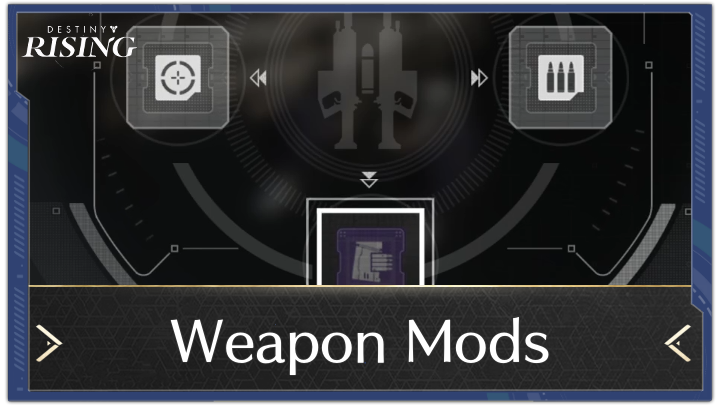
Weapon customization uses a modular blueprint system. Players discover blueprints, craft mods, and freely transfer them between weapons sharing the same base name.
Gacha mechanics include an early safety net: the permanent banner guarantees a Mythic hero within your first 30 pulls.
Reaching Chapter 1-1 and completing the "Assemble a Fireteam" mission unlocks pre-registration rewards—10 Bon Voyage Charms and 20,000 Glimmer—delivered via Ghost Mail.
There is no non-disclosure agreement. Content creators and players can stream, record, and share gameplay publicly.
To prepare for upcoming testing schedules, the Destiny: Rising top-up catalog outlines available currency packages.
Playtest Feature Roadmap and Reliability Assessment
Testing phases focus on specific technical pillars. The tracker below shows current implementation status across key game systems:
| Game System / Feature | Current Implementation Status | Source Confidence | Operational Scope |
|---|---|---|---|
| Unified Team Level | Fully Implemented | High | Global account progression replacing single-hero grind |
| Weapon Mod Blueprints | Fully Implemented | High | Craftable enhancements swappable on same-name weapons |
| 30-Pull Mythic Banner Pity | Confirmed in Client | High | Permanent banner mechanic for early roster acquisition |
| Bug Bounty Lumia Leaves | Active in Discord & Test Client | High | 50-500 leaves for bugs, 50-1,000 for accepted feedback |
| Milestone Mail Delivery | Confirmed at Chapter 1-1 | High | Unlocks 10 Bon Voyage Charms and 20,000 Glimmer |
| Public Streaming Rights | Confirmed (No NDA) | High | Zero embargo on gameplay broadcasting or capture |
One regional discrepancy remains: earlier testing limited active servers to Android users in the United States and Canada, while general pre-registration is open globally on iOS and Android. Later phases expand these boundaries as infrastructure grows.
When managing resource needs across test cycles and launch, recharging Destiny: Rising resources through xptopup provides a reliable method to top up your balance.
Troubleshooting Common Test Build Errors and Discord Support
If your invited build fails to launch, check these common fixes before submitting a ticket:
- Shader Compilation Crashes: If the client freezes at 0% or 100% on boot, clear app cache and confirm at least 15 GB of free storage.
- Authentication Mismatch Errors: Occurs when logging in with an email other than the invited address. Ensure your Google Play or Apple ID matches the whitelisted account.
- Patching Conflicts: Do not install new test builds over old ones. Uninstall the existing client, reboot your phone, and install fresh.
- Server Region Blocks: Connecting outside whitelisted geographic zones results in immediate connection timeouts.
For unresolved issues, use the technical support channels on the official Destiny: Rising Discord server, where developers monitor build logs.
Frequently Asked Questions
How do I sign up for the Destiny: Rising closed test?
Pre-register on playdestinyrising.com and complete the hardware screening survey. Selected applicants receive direct invitation emails with storefront access links.
Will my character progress during the closed beta carry over to launch?
No. All character levels, inventory, and campaign progress are wiped at the end of testing. Real-money purchases are refunded at launch via the rebate system.
How does the closed beta Silver purchase rebate work?
You receive a 150% rebate on up to 18,000 Silver and 120% on any amount above that. Rebates must be claimed within 90 days of launch on the same bound social account.
Can I play Destiny: Rising with a controller?
Yes. The build supports Bluetooth and physical mobile controllers, with real-time switching between first-person and third-person perspectives.
How can I avoid fake Destiny: Rising APKs and scams?
Only download via official invitations and storefront links on Google Play or Apple App Store. Leaked third-party APKs cannot bypass server whitelists.
Where should I report bugs or download errors during the test?
Submit issues via the official Discord server or in-game feedback surveys. Confirmed bug reports award bonus Lumia Leaves directly to your in-game mailbox.
Final Verdict for Beta Testers
Closed testing offers an early look at Bungie and NetEase's mobile shooter. Getting in requires prompt registration on the official portal, accurate hardware specs, and patience across rollout waves.
Skip unofficial APK downloads; without an invite whitelist, they will not connect to live servers. If you are invited, bind a permanent social account immediately to protect any Silver purchases for the 2026 launch.






Comments