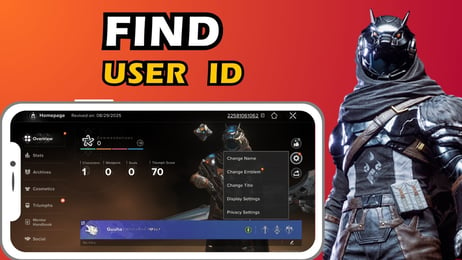
How to Top Up Destiny: Rising Silver with UID and Server
Topping up Silver in Destiny: Rising is quick and straightforward on XPTopup. You do not need to share account passwords or link social logins. The entire process uses your public User ID (UID) and Server selection.
Follow these steps to complete your order:
- Select Your Silver Package: Review the Silver denominations and bundle options available on the live checkout interface.
- Enter Your Player UID: Input your unique numerical in-game identifier into the UID input field.
- Select Your Server: Choose the exact server where your character profile resides (e.g., North America, Europe, Asia).
- Confirm Your Order Details: Double-check that your UID and Server selection match your in-game profile.
- Complete Payment: Select your preferred payment method and finalize the purchase.
- Receive Your Silver: Once the transaction finishes, open Destiny: Rising on your device. Silver credits directly to your in-game balance or arrives via the internal system mailbox.
Live pricing, promotional rates, and available payment methods are displayed directly on the checkout screen before you finalize your transaction.
How to Find Your Destiny: Rising UID and Server In-Game
To ensure your purchased Silver delivers to the correct character, you must copy your UID directly from the Destiny: Rising game client.
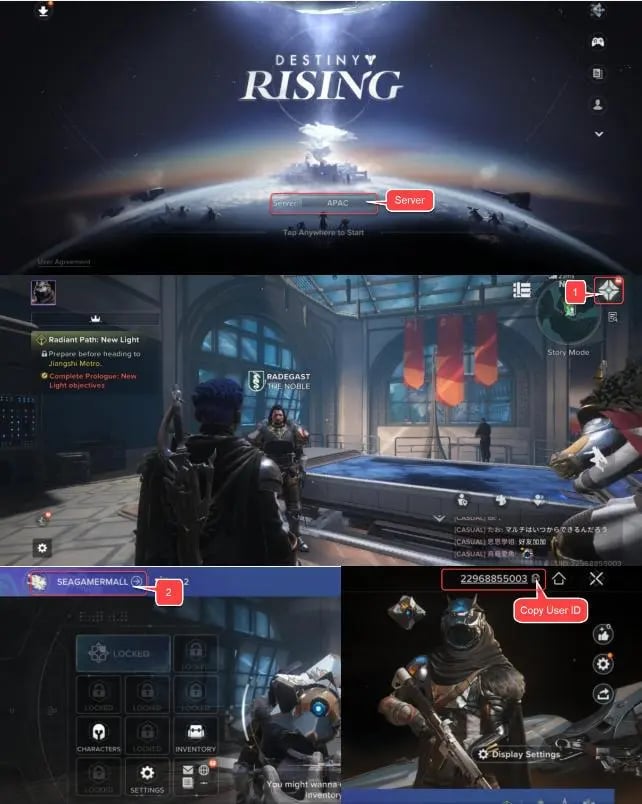
Follow these quick steps to locate your account information:
- Launch Destiny: Rising on your mobile device or client.
- Tap your Player Avatar / Profile Icon located in the top-left corner of the main hub screen.
- In the profile overview window, locate your UID—a sequence of numbers printed below your character display name.
- Tap the small Copy icon next to your UID string to prevent manual typing errors.
- Check the top or bottom corner of the login screen or settings tab to confirm your current active Server region.
- Paste your copied UID and select your verified Server on XPTopup before checkout.
Destiny: Rising Silver Bundles, Battle Passes, and In-Game Purchases
Silver serves as the premium currency in Destiny: Rising, allowing players to purchase exclusive items, cosmetics, character progression items, and seasonal passes without grinding basic activities.
Primary Uses for Destiny: Rising Silver
- Season & Battle Passes: Access premium reward tracks for high-tier weapons, exotic ornaments, upgrade materials, and bonus cosmetics.
- Character & Weapon Skins: Equip distinctive visual styles, armor sets, weapon finishes, and ghost shells.
- Summoning & Requisition Materials: Acquire premium tokens used to recruit new playable characters and unique gear variants.
- Direct Resource Bundles: Purchase energy refills, enhancement prisms, and character experience packages to streamline your progression.
| Item / Currency | In-Game Purpose | Required Details on XPTopup |
|---|---|---|
| Silver Currency Packs | Universal premium currency for store items, draws, and cosmetics | UID + Server |
| Seasonal Battle Pass | Premium reward track unlocking exclusive weapons and resources | Silver Equivalent via UID |
| Cosmetic Bundles | Exclusive character skins, gear ornaments, and emotes | Silver Equivalent via UID |
| Growth & Starter Packs | Bundled upgrade resources for rapid early-game progression | Silver Equivalent via UID |
Why UID-Only Top Up Is Safe and Password-Free
Account safety is the top priority for mobile RPG and shooter players. Third-party top-ups that ask for your Google, Apple, or game account credentials expose you to account lockouts, unauthorized transactions, and potential bans.
Benefits of ID-Based Direct Top-Ups on XPTopup
- No Password Required: You never share your account login, password, or security verification codes.
- Zero Risk of Account Takeover: Because no credentials change hands, your personal account remains completely in your control.
- Direct System Credit: Silver connects directly to the game's official delivery protocol using your unique player identifier.
- Quick and Clean Transactions: You only need to verify your numeric UID and Server once per purchase session.
Is Destiny: Rising Pay to Play or Pay to Win in 2026?
Destiny: Rising operates as a free-to-play sci-fi action RPG shooter. You can download, play the complete core campaign, participate in co-op strikes, and join competitive multiplayer modes without spending real money.
Monetization Structure
- Cosmetics First: A large portion of store offerings focus on visual customization, including armor shaders, emotes, and weapon skins.
- Convenience & Time-Saving: Silver allows players to obtain upgrade materials and battle pass tiers faster. However, top-tier performance in end-game strikes and PvP still relies heavily on combat skill, loadout synergy, and mechanical execution.
- Gacha and Character Acquisition: Players can earn free in-game summoning currency through events and daily tasks, while Silver provides extra pulls for specific banner targets.
Spending money provides speed and aesthetic variety, but the game is entirely playable for non-paying users throughout 2026.
Destiny: Rising Top-Up Troubleshooting and Delivery Support
If your Silver has not updated immediately after completing an order on XPTopup, check the following standard troubleshooting steps:
- Restart the Game App: Completely close Destiny: Rising from your device background apps and relaunch it. This forces the client to sync with the server database.
- Check the In-Game Mailbox: Certain purchases arrive as packaged items or claimable letters inside your in-game mailbox instead of direct wallet increments.
- Verify Server and UID Accuracy: Compare the UID on your XPTopup order confirmation with your actual in-game profile. If you play on multiple servers, verify you are logged into the server selected during checkout.
- Allow Processing Time: While most orders fulfill quickly, network congestion during patch launches or server resets may cause slight delays.
- Contact Customer Support: If your balance remains uncredited, reach out to XPTopup support with your Order ID, UID, and Server details for rapid manual verification.
Frequently Asked Questions
What information do I need to top up Destiny: Rising on XPTopup?
You only need your numeric player UID and your character's active Server region. No passwords, linked emails, or private login credentials are ever requested.
Where can I find my Destiny: Rising UID and Server?
Tap your player avatar in the top-left corner of the Destiny: Rising main screen to view your profile card. Your UID is listed under your player name. You can copy it directly using the copy button next to the digits. Your server is visible on the login screen or settings menu.
Do I need to share my login credentials or password?
No. XPTopup uses a direct ID-based recharge method. You never need to supply your password or account security codes.
Is Destiny: Rising pay to play or free-to-play in 2026?
Destiny: Rising is free-to-play. The core storyline, multiplayer strikes, and standard game modes require no purchase. Silver is completely optional for cosmetics, passes, and progression speed.
What can I buy with Silver in Destiny: Rising?
Silver can be spent in the in-game store on Battle Passes, character recruitment materials, exclusive weapon skins, armor ornaments, and resource booster packs.
What should I do if my Destiny: Rising Silver has not arrived after checkout?
First, restart your game and check your in-game mailbox. If the Silver balance does not update, check your XPTopup order history to verify your UID and Server, then contact XPTopup support with your order number for assistance.
Current package prices
Current package prices are shown below. Prices exclude Tax. Tax, payment fees and applicable coupons are shown at checkout.
| Package | Price |
|---|---|
| 60 Silver | USD 0.83 |
| 300 Silver | USD 4.20 |
| 600 Silver | USD 8.41 |
| 1500 Silver | USD 21.03 |
| 3000 Silver | USD 42.07 |
| 6000 Silver | USD 84.15 |