

Wrong UID, wrong region, gems gone forever. Here's the exact Player ID path, region match, and pack pick so a Nikke top up hits your mailbox once.
I have watched commanders eat a receipt because they typed a display name instead of the number. Goddess of Victory: Nikke is a sci-fi RPG gacha shooter, and Gems are the premium currency that actually moves an account: limited recruits, battle pass tracks, skins, a stamina refresh when you are stubborn. Land those gems on a stranger's UID and they do not come back.
Copy the right ID. Match the region. Buy a real pack. Open the mailbox before you touch Recruit.
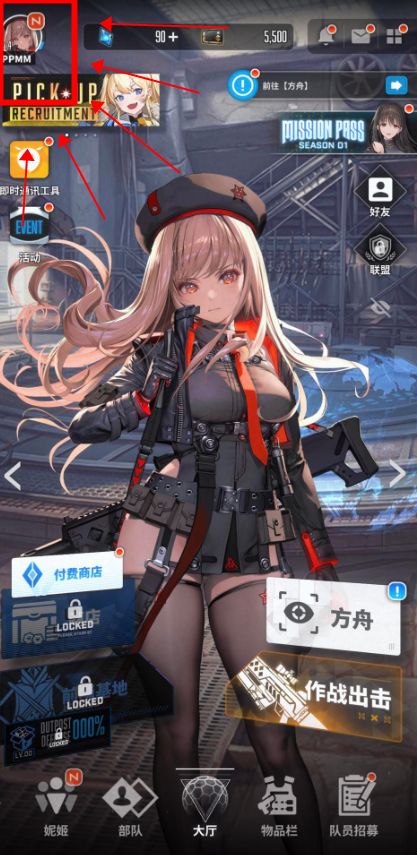
Copy the Player ID, not the name you can edit
Tap the avatar icon in the top-left corner of the main lobby. The profile summary prints the Character Name and the Player ID (UID) together. The UID is a fixed numeric string assigned when the account was created; change the name tomorrow and the number stays. A recharge that keys off the name is already the wrong kind of recharge.
I screenshot that screen every time I spend. Player IDs are unique and permanent, and one mistyped digit is enough when a banner timer is barking.
Write the number somewhere offline. Type it at checkout from the screenshot, not from memory.
Phone and PC share that UID if you are on the same linked account. Nikke supports cross-save between mobile and PC, so gems follow the account, not the device. They do not follow you onto a different server.
Before you pay, I would run a UID-checked nikke top up that asks for the public Player ID and the server name, and nothing that looks like a login form.

60 Gems
 60 GemsUSD 0.63Buy Now
120 Gems
120 GemsUSD 1.28Buy Now320 Gems
320 GemsUSD 3.22Buy NowMonthly Pass
Monthly PassUSD 3.22Buy Now720 Gems
720 GemsUSD 6.46Buy NowTechnical Master Pack
Technical Master PackUSD 7.16Buy Now1500 Gems
1500 GemsUSD 12.93Buy NowClass Research Set
Class Research SetUSD 14.33Buy NowGrow Selection Set
Grow Selection SetUSD 14.33Buy Now2300 Gems
2300 GemsUSD 19.29Buy Now2370 Gems
2370 GemsUSD 20.07Buy NowManufacturer Research Set
Manufacturer Research SetUSD 21.50Buy Now4200 Gems
4200 GemsUSD 36.12Buy NowEnhanced Module Set
Enhanced Module SetUSD 39.42Buy NowManufacturer Backup Pack
Manufacturer Backup PackUSD 39.42Buy NowTechnical Support S I
Technical Support S IUSD 39.42Buy Now6200 Gems
6200 GemsUSD 51.65Buy NowTechnical Support S II
Technical Support S IIUSD 71.68Buy Now
Match the region like it is part of the SKU
Nikke recharge catalogs split by region: Global, SEA, Japan, Korea. Pick the one your client sits on, not the country printed on your passport.
Treat the server field as part of the product. A Global pack shoved at a SEA UID is not a cute mix-up. A wrong server or a wrong UID can delay delivery, or it can complete against some other live account. Once gems process to an incorrect UID that exists, transfers are generally permanent and non-refundable. Support can sometimes stop an order that has not fulfilled yet. After that, the receipt is spent.
Same account, same region, phone and PC both see the gems. A different region is a different pile of progress, and the store will not guess because you play on two devices.
Confirm the region on the profile screen next to the UID. If the checkout dropdown does not list the region you see in-game, stop. Do not improvise.
Copy those two fields like they are the SKU. UID plus region is the pair that fails when a Goddess of Victory Nikke top up misses the mailbox.
| What you enter | Where you copy it | If you get it wrong |
|---|---|---|
| Player ID (UID) | Avatar menu, top-left of the lobby | Gems can credit another live account and stay there |
| Server region (Global, SEA, JP, KR) | Same profile screen as the client you play | Delay, or credit on the same number in another region |
| Character Name | Profile summary, for your eyes only | Names change; they are not a safe destination |
Takeaway: the UID and the region are the product. The name is a label you can rewrite after the gems land.
I will not type a password for gems
Public identifiers are the only how to top up Nikke path I trust. Player ID. Server. That is the whole login. Anyone who says they must sit in your account to press Buy is asking you to hand them the account.
Some storefronts still sell a login fulfillment path. They want the login method, the password, the character name, the UID, the server, sometimes a screenshot of the pack. That is a trap. You cannot un-send a password.
Two fulfillment styles sit on the market. Some flows advertise passwordless delivery against the public ID. Others still want a full sign-in so a person can buy the pack by hand. I only use the first kind.
A recharge should look like this, not like a password reset.
| Path | What they ask for | What I think of it |
|---|---|---|
| Direct UID top-up | UID and server name | The only path I use. No password. Gems credit to the public ID. |
| Login top-up | Login method, password, server, character name, often a pack screenshot | A credential harvest with extra steps. I walk away. |
| Marketplace seller fulfill | UID plus a private chat after you pay | Manual, easy to mistype a number in chat. I skip it. |
Takeaway: if the form wants a password, it is not a top-up form. It is an account handoff.
What a real checkout asks for versus a scam
A legitimate recharge asks for the Player ID and the region. It shows the pack, the quantity, and the total before you pay. It never needs a Level Infinite, Google, or Facebook password, remote-desktop access, or a 2FA code read into a chat window.
A scam asks for the password just this once. It asks you to confirm a login prompt you did not start, then rushes you because the banner ends in four minutes. Miss the rate-up. Do not donate the account.
Public ID is safer than a password, and it is still an address. I do not paste mine into random DMs.
Gem packs I would buy, and the ones I skip
Gems buy recruits on limited banners, premium battle pass tracks, costumes, and stamina. That is the job. I buy against a plan, not because a stack number looked friendly.
Pack prices move, so there is no fixed price-per-gem table here. Open the catalog, line the Nikke gem packs up, and divide gems by what you will actually pay. Bigger stacks usually win on rate. Smaller stacks win on not overspending a banner you will drop next week.
If you want current stacks, compare Nikke gem packs on the live catalog and trust the figures in checkout, not a screenshot from last month.
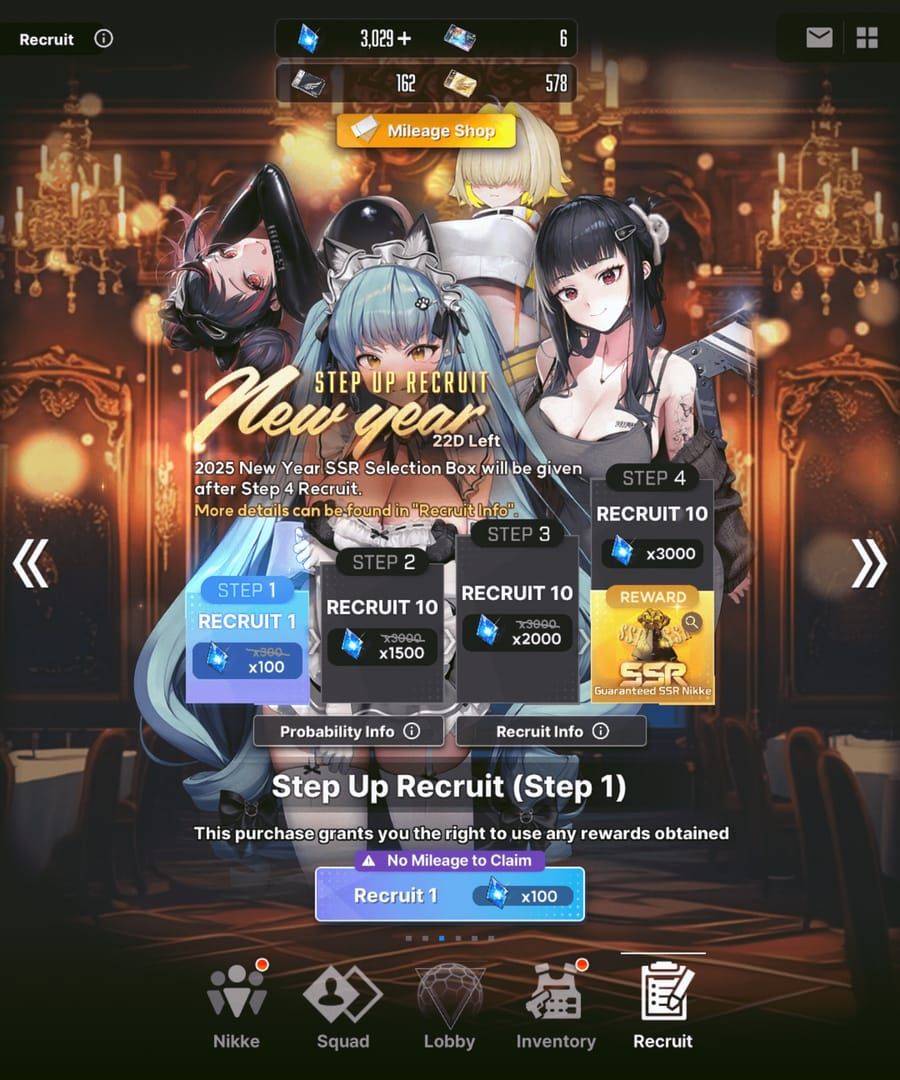
F2P, stay boring if you swipe at all: the smallest gem pack that covers one planned recruit burst, or the pass track if that is the real hole. A whale stack on a F2P account funds a banner you will not finish.
Lock the banner first if you mid-spend, then buy mid-size packs after the UID screenshot, sized to the pity you actually intend to hit. Two correct mid packs beat one oversized dump on a bad rate-up. I write the target name at the top of the screenshot so I do not wander into a skin shop.
Heavy spenders will buy the big pack. Fine. Pick the largest stack that still wins on price-per-gem on the live page, and only for the region you actually play. Type the UID twice anyway.
I do not chase login deals because they look cheaper. Cheaper access to my password is not a sale.
Confirm the mailbox before you pull
Do not launch a ten-pull the second the receipt hits email. Open Nikke on the same account and the same region, then open the mailbox.
Gems that arrived show there, then in the currency count. If the count did not move, do not buy a second pack to poke the system. That is how people double-charge a wrong ID.
If you have Nikke gems not received, read the UID and server on the order and compare them to the screenshot. One digit off, and you need support with the order number before fulfillment completes. If it already completed against a live wrong UID, assume the gems are gone.
Phone and PC should agree on a shared mailbox when the account is linked and the server matches. If PC shows gems and the phone does not, one client is on the wrong region.
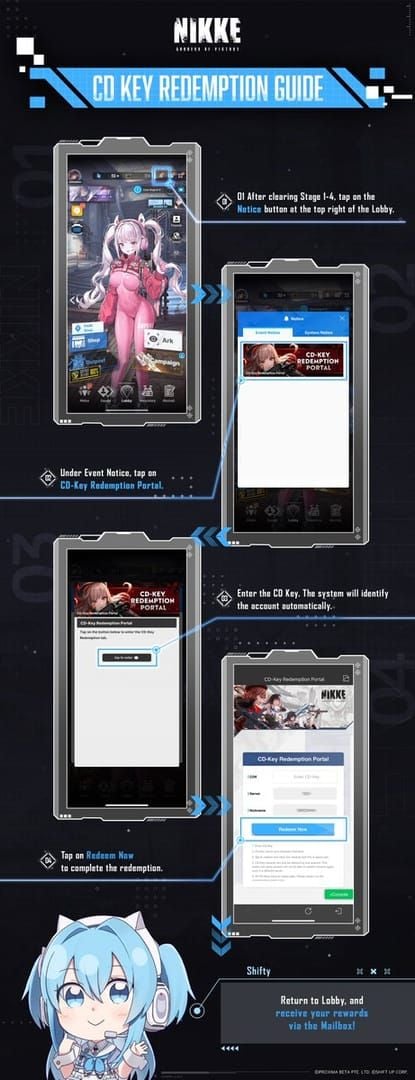
Automated third-party rails can credit almost instantly. Under load, some buyers wait. I still check the mailbox before I touch Recruit.
FAQ
Where can I find my Nikke Player ID (UID)?
Tap the avatar icon in the top-left corner of the main lobby. The profile summary lists the Player ID and the Character Name together. Copy the number, not the name you can edit later.
Do I need to give out my account password to top up Nikke?
No. A standard safe top-up wants the public Player ID and the server. I will not use a path that asks for Google, Facebook, or Level Infinite credentials. If a seller says they must log in to click Buy, that is their workflow, not a rule of the game.
What happens if I enter the wrong UID or server at checkout?
Message support immediately with the order number, before fulfillment. If the pack already processed to an incorrect account that exists, the transfer is generally permanent and non-refundable. Type from a screenshot. Check the region dropdown twice.
Will purchased Gems transfer between mobile and PC?
Yes, on the same linked account and the same server region. Nikke keeps that progress in sync. Log the phone into a different region and you will stare at a poorer mailbox. The gems did not vanish. You changed rooms.
Can I top up with my Character Name instead of the UID?
Do not. Display names change. The UID does not. A form may show the name as a confirmation after it looks up the ID, which is fine. A form that ships gems to a name alone is aiming at a moving target.
Where do I look if the gems never show?
Mailbox first, then the currency counter, then the UID and server printed on the order. If those match your screenshot and the mailbox is still empty, take the order number to support. A second pack as a test is how a bad ID gets paid twice.
The only check I still run after checkout
I will pay this game. I will not gamble the receipt.
Avatar, top-left. Copy the UID. Match Global, SEA, JP, or KR to the client you actually play. Refuse any form that wants a password. Pick a gem pack by price-per-gem against a banner or a pass you already planned. Then open the mailbox and wait until the number moves.
I would finish that sequence on a Goddess of Victory: Nikke recharge that keys off UID and server, because the live page is where the current packs and the current total sit. I will not print a payment-method list here. What a store accepts changes by country. The checkout in front of you is the only list that is true.
The name is not the account. The UID is. Type it once from a screenshot, and do not pull until the mailbox says you still own the gems you just bought.






Comments