120 Gems

Total

USD 1.28

Skip to main content
XPTopup
Search...
Quick answer

To top up Goddess of Victory: Nikke, pick a package, enter your Player ID and Server and pay at checkout. It is credited to that account after payment is confirmed — no password needed. Select the server your account plays on.

Product specs
GameGoddess of Victory: Nikke
PlatformsMobilePC
Product typeDirect top-up to your game account
Account details neededPlayer IDServer
ServerKR · JP · Global · SEA · NA
Packages17
DeliveryAutomatic after payment is confirmed, usually within minutes
PaymentCards, e-wallets, local methods and crypto — options depend on your country

Goddess of Victory: Nikke top up on XPTopup credits Gems, the Monthly pass and the listed set packs to your account using two fields: Player ID and Server. Nothing else is asked, and your password stays with you.

Goddess of Victory: Nikke top-up specs

  • Currency: Gems, plus the Monthly pass and named set packs
  • Gem packs: 60, 120, 320, 720, 1500, 2300, 2370, 4200 and 6200 Gems
  • Other items: Technical Master, Class Research Set, Grow Selection Set, Manufacturer Research Set, Enhanced Module Set, Manufacturer Backup, Technical Support S I and S II
  • Required: Player ID and Server
  • Region: account region as shown at checkout
  • Delivery: automatic, usually within minutes of confirmed payment
  • Login needed: no

Find your Player ID and server

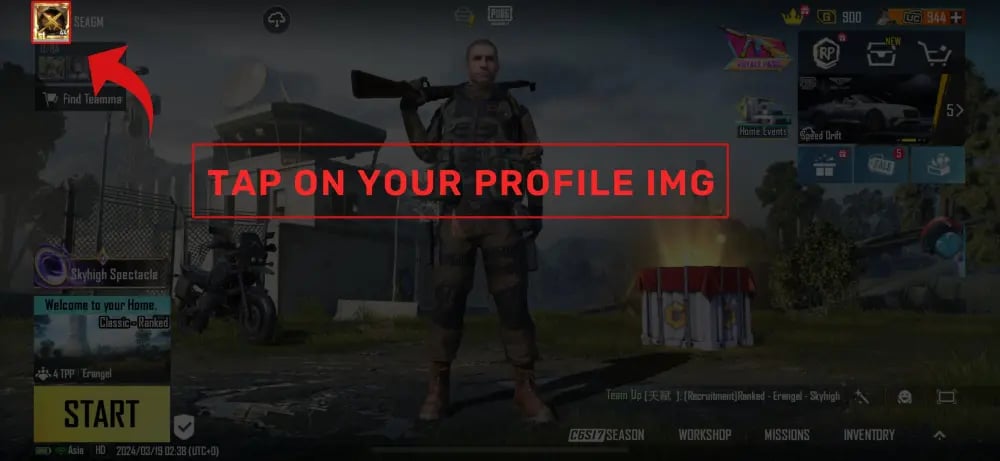
Open your profile from the main lobby of Nikke. The Player ID is the number shown with your commander details; copy it as it is and paste it into the Player ID field. Do not use your commander nickname.

The second field, Server, must be the one your account was created on. Gems are stored per server, so a pack bought for the wrong server does not show up in the account you actually play. If you are unsure, check the server name you pick on the login screen before you pay.

Which pack should you pick?

The ladder here is wide, and the packs line up with different habits in Nikke.

  • 60 to 320 Gems: a quick top-up when you are a few Gems short for one more recruit on a rate-up banner.
  • 720 to 1500 Gems: a block of recruits during a banner window, or Gems to bridge the gap between two events.
  • 2300 to 6200 Gems: a long banner chase or a stock of Gems built up ahead of a release you are saving for.
  • Monthly pass and set packs: pick these when the item itself, such as a research set or module set, is what you need and not raw Gems.

Match your goal to the list, check the live price table below the page, and remember that prices there can change.
Top Up Goddess of Victory: Nikke guide image

Recharge Process

Top-up Procedures

  1. 1

    Place Your Order & Check Out

    Complete your purchase securely through our checkout process.

  2. 2

    Instant Auto-Delivery to Your UID

    Once your payment is confirmed, your top-up is automatically delivered to the UID you entered — fast, 100% secure, and no account login required.

Goddess of Victory: Nikke FAQ

01

Why does the Nikke top-up ask for a server as well as the Player ID?

Nikke keeps account data per server, so the same Player ID format can exist on more than one of them. Choosing the server your account lives on makes sure the Gems land in the right place.

02

Is the Player ID the same as my commander name?

No. The Player ID is a number shown in your profile, while the commander name is a nickname you can change. Only the number goes into the checkout field.


03

Can I choose a Monthly pass or a set pack the same way as Gems?

Yes. The Monthly pass and the named set packs are listed next to the Gem packs and use the same two fields. Event eligibility and what a set contains are decided by the publisher, so check the in-game shop page for details.

04

What if the Gems do not show up after payment?

Look at the order page for the delivery status first, since delivery is automatic and normally finishes in a few minutes. If it still shows as undelivered, contact support. Failed orders are refunded to the original payment method.

05

Can a mistaken Player ID or server be corrected afterwards?

Once value has reached an account it cannot be pulled back, so read both fields again before you press pay. That one check prevents nearly every problem with these orders.

Goddess of Victory: Nikke
Top Up Goddess of Victory: Nikke

Goddess of Victory: Nikke

MobilePC2.3ksold

Prices exclude Tax. Tax is shown at checkout.

Payment Support

Toss PayNaver PayKakaoPaySBP (Faster Payments System)GCashCredit / debit cardBank transferTouch 'n Go eWalletOXXOBank card (Kazakhstan)Bank card (Belarus)BLIKFamilyMartPaotang PayLINE PayKNETNAPSConvenience store barcodeHi-LifeOK MartmadaPAYCOGASHOVODANAMayaGrabPay7-ElevenSamsung PayMercado PagoSPEIGrabPayBoletoJKOPAYPayUReal-time bank paymentBNIBoostMaybankTrueMoneyAlipayHKWeChat PayOctopusBinance PayGate PayTouch 'n Go eWalletE.SUN Bank transferBancontactFPSApple PayApple PayGoogle PayGoogle PayCredit / debit cardCredit / debit cardTrustlypaysafecardMyBankMultibancoXPTopup wallet balanceEps