

Need your Blockman Go player ID? Learn where to find Blockman Go User ID on Android, copy the numeric code in seconds, and avoid display name mix-ups.
Exact Taps to Find Blockman Go User ID on Android
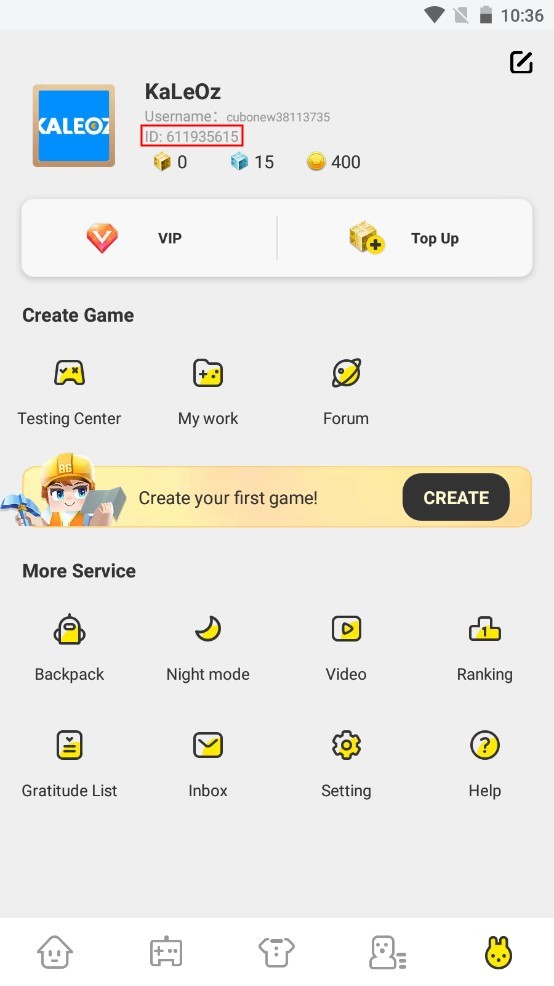
Finding your account credentials on mobile takes less than thirty seconds once you know where the developers placed the profile link. If you want to know where to find blockman go user id on android, launch the application on your phone or tablet and wait for the lobby to finish loading its network assets. Look at the upper-left quadrant of your device screen. You will see your circular character portrait next to your current handle.
Tapping that circular avatar opens your primary summary window immediately. If you prefer using the lower menu bar instead, tap the "Me" button positioned along the bottom navigation strip. Both pathways lead straight into your personal profile hub. Once the menu slides into view, direct your eyes right below your customized nickname.
You will spot a dedicated numeric sequence printed in bold, grey, or white text depending on your active theme settings. This sequence is your permanent user number. The client often renders an eight-digit sequence—such as 10293847—right beside a small clipboard symbol. Touch that clipboard icon or press firmly onto the digits to trigger your Android clipboard manager. A brief toast notification will confirm that the code has copied to your phone's memory. If the copy prompt fails to trigger, write the numbers down directly on paper so you have an offline backup.


60 GCubes
 60 GCubesUSD 0.87Buy Now
300 GCubes
300 GCubesUSD 4.19Buy NowPremium Monthly Card
Premium Monthly CardUSD 4.19Buy NowPremium Pass
Premium PassUSD 5.87Buy Now600 GCubes
600 GCubesUSD 8.38Buy NowLuxury Monthly Card
Luxury Monthly CardUSD 8.38Buy NowSubscription LV.2
Subscription LV.2USD 8.38Buy NowDeluxe Pass
Deluxe PassUSD 10.90Buy Now1650 GCubes
1650 GCubesUSD 20.96Buy NowSubscription LV.3
Subscription LV.3USD 20.96Buy Now3600 GCubes
3600 GCubesUSD 41.90Buy Now8400 GCubes
8400 GCubesUSD 83.82Buy Now
Profile ID vs In-Game Username: Key Differences
Many mobile gamers make the mistake of sharing their written screen handle when submitting bug reports or trading items. In Blockman Go, your visual name is completely separated from the database index that anchors your purchases. Understanding the blockman go profile id vs username distinction prevents failed transactions and missed friend requests.
Your username represents an alterable text string that sits on the top layer of your account. You can enter the Profile menu, tap Edit Name, and swap your moniker whenever you wish. The game client checks for input validity when you do this; if you try to submit a blank field, the interface immediately responds with a strict "Name cannot be empty" rejection error. Because players change their tags frequently or use invisible Unicode characters to style their identities, the backend cannot rely on names to locate specific accounts.
The User ID acts as the permanent database anchor. It is assigned sequentially by the game server the moment an account is initialized. It never changes, regardless of how many times you rewrite your public alias. When you want to buy Blockman Go GCubes securely, providing this exact numeric code guarantees that premium items route to your inventory rather than to another user who happens to share a similar display tag.
The table below outlines the structural boundaries between your public player name and the backend account identifier.
| Account Attribute | Permanent Numeric ID | Public Display Name |
|---|---|---|
| Data Format | Continuous numbers (e.g., 10293847) | Alphanumeric characters & symbols |
| Player Mutability | Read-only; cannot be altered | Editable via Profile Edit Name settings |
| System Function | Database indexing & top-up crediting | Visual identification in minigame lobbies |
| Uniqueness | Universally unique across all servers | Can be duplicated or mimicked by others |
| Input Restrictions | Assigned automatically by backend | Strict check: "Name cannot be empty" |
Keeping these two fields distinct ensures you never hand over temporary cosmetic text when a permanent numeric identifier is required.
App Interface Routes: Avatar Icon vs the Fifth Bottom Tab
Depending on whether you run Blockman Go on a smartphone or a widescreen tablet, the client presents two ways to pull up your account credentials.
The first method is the direct avatar shortcut. From the main game lounge, tapping your profile icon in the top-left corner bypasses secondary settings menus and drops you directly onto your overview card. This card presents your equipment loadout, your level progression, and your numeric ID sitting right under your nickname. It is the fastest route for any player who needs to copy blockman go id on phone hardware during a multiplayer match setup.
The alternative route uses the bottom navigation bar. Tap the fifth icon on this strip to open the master directory, select Settings, and review the Account & Security module. Official documentation points players here for third-party account bindings, security options, and deletion protocols.
While the fifth button is essential for deep account administration, using the top-left avatar icon remains significantly faster when you simply need to find blockman go character id numbers to send to a teammate. Both paths originate from the central home interface, so choosing between them is a matter of muscle memory.
What to Do When Your User ID Fails to Display on Android
Mobile clients occasionally run into rendering issues where network packets stall, leaving your profile fields completely blank or stuck on an infinite loading spinner. If you open your card and cannot see your numeric sequence, your local installation is suffering from a desynchronization glitch.
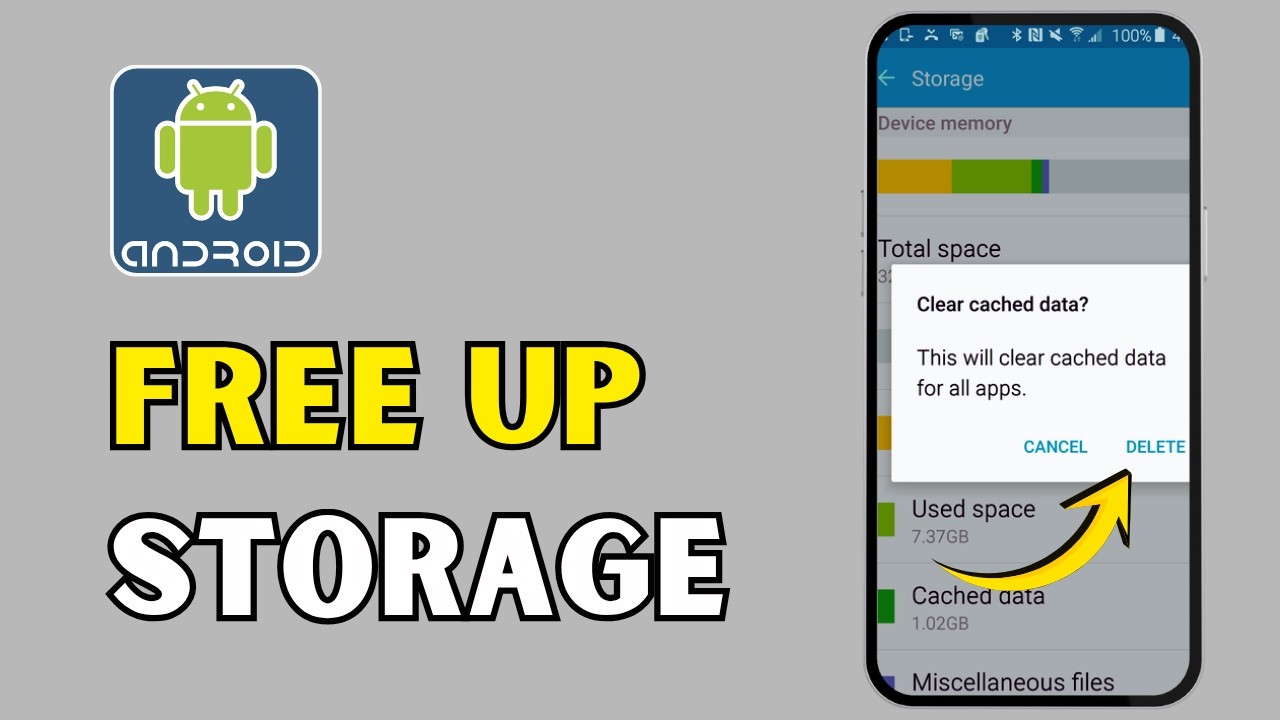
First, check your active internet connection. If switching between mobile data and local Wi-Fi does not force the interface to fetch your remote data, the issue almost certainly rests in your device's cached runtime files. Stale cache prevents the engine from parsing player credentials properly after minor background patches.
You can fix this without reinstalling the game. Minimize Blockman Go and open your Android device's Settings app. Go to the Apps or Application Manager list, select Blockman Go, and tap Storage. Choose Clear Cache. Do not tap Clear Data unless you have saved your password, as wiping data disconnects your active login session.
Once the cache wipe finishes, launch the client again. The software will rebuild its temporary resource directory, refresh your connection with the authentication servers, and repopulate the missing numeric string. If a persistent server outage prevents the profile from loading over multiple hours, you can reach out directly to the studio's official player support channel at bgofficialcontact@sandboxol.com to request manual verification of your account state.
Android Version Requirements and Technical Specifications
If you notice visual glitches or unresponsive menus while checking your blockman go user id location android, verify that your operating system meets the current baseline standards. Older hardware architectures struggle to process recent engine assets.
Earlier revisions of the game ran on Android 5.0 Lollipop, but modern updates require Android 6.0 Marshmallow or higher. Attempting to run current versions on an Android 5.0 handheld leads to hard crashes during startup or missing UI text strings. The technical release profile for recent 2026 updates introduces substantial local assets to support new minigame worlds, pushing storage requirements up.
For instance, the official client release designated as version 3.25.1, rolled out on August 13, 2026, carries an installation package size of 322.39 MB. The software distributes code compiled for both 32-bit and 64-bit ARM architectures under the official Android package identifier com.sandboxol.blockymods.channel.official. If your phone runs a heavily modified custom ROM or lacks official ARM runtime binaries, interface assets like the profile identification overlay may refuse to draw on the screen.
The table below details the technical environment required to run the current client stable build without interface failures.
| Specification Parameter | Current Standard Value | Impact on UI and Gameplay |
|---|---|---|
| Minimum Android OS | Android 6.0 or higher | Prevents crashing; ensures profile assets render |
| Legacy Android OS | Android 5.0 (Phased Out) | Causes broken text strings and startup dropouts |
| Client Build Version | Version 3.25.1 (August 13, 2026) | Introduces updated UI patches and bug fixes |
| Installation APK Size | 322.39 MB | Requires sufficient storage for cache expansion |
| Processor Architecture | ARM 32-bit & ARM 64-bit | Dictates client rendering and memory bandwidth |
| Official Package Name | com.sandboxol.blockymods.channel.official | Authenticates official update and top-up pipelines |
Confirming your handheld meets these operational parameters eliminates technical bottlenecks before you attempt to inspect or copy your profile data.
What Your Blockman Go User ID Is Used For
Your numeric ID does more than act as a serial number. Knowing how to see blockman go player id details helps with matchmaking, account recovery, and balance recharges.
Cross-Player Interactions and Matchmaking
Player names in Blockman Go can incorporate symbols, unusual spacing, and decorative font styles that are notoriously difficult to reproduce on a mobile touchscreen keyboard. If you meet someone in a round of Bed Wars and want to form a permanent party, typing their visual handle into the search tool often yields zero results due to invisible character spacing. Exchanging numeric User IDs eliminates typing errors. Entering an eight-digit sequence into the friend lookup tool brings up the exact profile immediately, bypassing every decorative font trick.
Account Recovery and Administrative Audits
Losing access to your mobile hardware can lock you out of your profile if your device credentials desynchronize. When filing an account retrieval ticket with bgofficialcontact@sandboxol.com, the technical support staff will ask for your numeric User ID rather than your public display name. System administrators use this number to query server databases, confirm transaction histories, and trace backup records.
Security protocols govern these archives. Under the platform's data retention policies, live game systems sever access immediately when an account deletion is requested, while encrypted disaster recovery backups retain account records for up to 60 days before permanent erasure. Having your exact ID documented allows support to cross-reference disaster recovery archives during that 60-day operational retention window if you accidentally initiate account removal.
Direct Inventory Crediting and Third-Party Transactions
Whenever you want to add balance to your account through an external platform, you must enter your numeric identifier into the order field. Digital delivery systems do not read your custom display name; they parse numeric strings to route currency directly into your mailbox. Using the correct code ensures that you can recharge Blockman Go GCubes with your User ID without experiencing order rejections or delays caused by ambiguous player nicknames.
VIP Discounts, GCubes Bundles, and Monthly Subscriptions
Once you have secured your User ID, you can use it to fund your avatar with premium resources. Blockman Go operates on a dual-currency framework comprising soft gold earned through standard minigame participation and GCubes acquired through real-money purchases. GCubes unlock high-tier items across the sandbox, including custom avatar costumes, cosmetic wings, and progression perks in competitive modes like Bed Wars.
Managing your currency effectively means choosing between direct bundle deposits or ongoing subscription passes. If you maintain an active VIP membership, the in-game economy shifts in your favor. VIP players receive daily login gift packages, accelerated gold accrual rates from completed matches, and a flat 20 percent discount across all items stocked in the decoration shop. Combining VIP status with bulk currency purchases maximizes the value of every credit you add to your profile balance.
For players who log in on a daily schedule, subscription passes provide structured returns. You can activate either the Dazzling Monthly Card or the Gold Monthly Card. These passes dispense currency batches every single day you sign into the client, making them popular alternatives to one-off bundles.
If you prefer immediate currency injections to buy a limited-time skin or seasonal wing accessory, standard packages provide fixed allotments. The official store formats digital bundles into five distinct tiers, ranging from small starter packs to substantial master deposits.
The breakdown below details the five standardized GCubes packages available for mobile accounts.
| Package Tier | Currency Amount | Practical Application |
|---|---|---|
| Starter Bundle | 300 GCubes | Basic accessories, entry cosmetics, small consumables |
| Basic Bundle | 600 GCubes | Mid-tier shop cosmetics, seasonal character items |
| Standard Bundle | 1650 GCubes | Rare costume sets, competitive mini-game upgrades |
| Premium Bundle | 3600 GCubes | Exclusive cosmetic wings, high-value shop bundles |
| Master Bundle | 8400 GCubes | Full seasonal collections, maximum long-term reserves |
Matching your planned cosmetic purchases with the right bundle tier prevents you from overspending on small, fragmented transactions.
Safe Practices for Managing Your Blockman Go Account
Protecting your player profile requires common sense and an understanding of what information is safe to share publicly. Your numeric User ID is semi-public by design; other players see it whenever they inspect your profile card in a lobby, and you must share it openly to receive friend requests or balance deliveries. You do not need to hide your numeric ID from your friends.
However, you must never share your account passwords, verification codes, or personal email credentials. No legitimate support agent or automated delivery service will ever ask for your password to send GCubes to your account. External systems only require your public numeric ID to complete a transaction. Whenever you decide to top up your Blockman Go account, ensure you only type your User ID into the destination field and keep your account passwords entirely to yourself.
Take advantage of the security settings under the fifth navigation tab on your main menu. Link your account to a verified email address or external login provider so you can recover progress after switching phones. If you suspect unauthorized access, updating your login credentials through the Account & Security menu immediately terminates active sessions on other devices.
Frequently Asked Questions
Where can I find my Blockman Go User ID on an Android device?
Tap your avatar icon in the top-left corner of the main lobby or select the "Me" tab on the bottom navigation bar. Your numeric User ID is printed directly underneath your display name alongside a quick-copy icon.
Is my Blockman Go User ID the same as my display nickname?
No, your User ID is a permanent numeric string assigned by the server, while your nickname is an editable text handle. You can alter your display name through profile settings, but your numeric ID never changes.
What does a Blockman Go User ID look like?
It appears as a continuous sequence of numbers without letters or spaces, such as 10293847. The length of the sequence generally reflects your account registration period within the global database.
Can I change or edit my Blockman Go User ID?
No, you cannot edit or customize your numeric User ID under any circumstances. It serves as the static identifier for your account in the game database, though you can still change your public username via the Edit Name menu.
Why do I need to know my Blockman Go User ID?
You need your User ID so teammates can locate your profile without spelling errors and external systems can credit GCubes packages accurately. It is also required by official customer support to verify account ownership during data recovery requests.
What should I do if my User ID or profile data fails to load on Android?
Check your internet connection and clear the Blockman Go application cache through your Android system storage settings. Restarting the client after clearing the cache will force the game to fetch your current profile credentials from the server.
What Android version is required to run the current Blockman Go client?
The current version requires Android 6.0 or higher to install and run properly. Legacy operating systems like Android 5.0 are phased out and will experience interface errors or startup failures.
Practical Verdict on Your Blockman Go Account ID
Locating your numeric identity in Blockman Go takes only two taps from the home lobby: hit your avatar at the top left, look under your nickname, and touch the copy icon. Keeping a personal record of that eight-digit sequence saves you countless headaches whenever you want to add new friends, resolve account glitches with support, or recharge your currency balance. Never confuse your permanent numeric ID with your customizable screen name, keep your passwords private, and use the quick cache clearing trick whenever the mobile interface refuses to load your details properly.






Comments