Blockman Go top up on XPTopup sends Gcubes, monthly cards, passes and subscription tiers straight to the User ID you type at checkout. No password and no login: pick an item, paste the ID, pay, and delivery runs on its own, usually within a few minutes after payment is confirmed.
Blockman Go top-up specs
- Currency: Gcubes, the premium currency of Blockman Go
- Gcubes packs: 60, 300, 600, 1650, 3600 and 8400 Gcubes
- Cards and passes: Premium Monthly Card, Luxury Monthly Card, Premium Pass, Deluxe Pass
- Subscriptions: Subscription LV.2, Subscription LV.3
- Required: User ID (numeric)
- Region: account region as shown at checkout
- Delivery: automatic, usually within minutes; status on the order page
- Login needed: no
Find your Blockman Go User ID
The User ID is the number attached to your account, not your nickname. Gcubes are credited to the account rather than to one mini-game, so it does not matter which mode you grind; only the number has to be right.
- Launch Blockman Go and stay on the main hub, not inside a match.
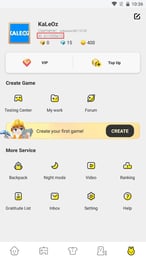
- Tap your own avatar to open your profile.
- Find the numeric ID shown next to or under your nickname.
- Use the copy button if the app offers one; otherwise note the digits carefully.
- Paste it into the User ID field and compare it digit by digit before paying.
Menu positions change between app versions. If the number is not on your profile card, check the settings screen before guessing.
Which Gcubes pack should you pick?
- 60 Gcubes: closes a small gap when your balance is just short of one item.
- 300 and 600 Gcubes: common sizes for one or two items or outfit pieces.
- 1650 Gcubes: the middle rung for players who spend regularly and want fewer, larger orders.
- 3600 and 8400 Gcubes: the two top rungs, for stocking up once instead of repeating small recharges.
Item prices inside Blockman Go are set by the game, so check how many Gcubes the thing you want costs, then pick the smallest pack that covers it with a little spare. The live price table below this guide shows the current price of every pack.
Gcubes vs. monthly cards, passes and subscriptions
Half of this picker is not loose currency. Read it as four groups before you buy Gcubes or anything else:
- The six Gcubes packs: balance added to your account, spent on whatever you choose in the app.
- Premium Monthly Card and Luxury Monthly Card: two monthly-card products.
- Premium Pass and Deluxe Pass: two pass tiers for players who follow a pass reward track.
- Subscription LV.2 and Subscription LV.3: subscription levels sold as separate items; only these two levels are listed.
What each card, pass or subscription contains, and how long it runs, is defined inside Blockman Go and can change with updates. Read the in-game description of the matching item before ordering. If you just want spendable balance, stay on the Gcubes ladder.