

Need your Hunter ID fast? Learn where to find your UID in Love and Deepspace on your phone to send friend requests, submit support tickets, and buy Crystals.
Finding Your Hunter UID on Mobile in Fifteen Seconds
You do not need to hunt through settings menus. The exact ID string sits directly on your main profile card.
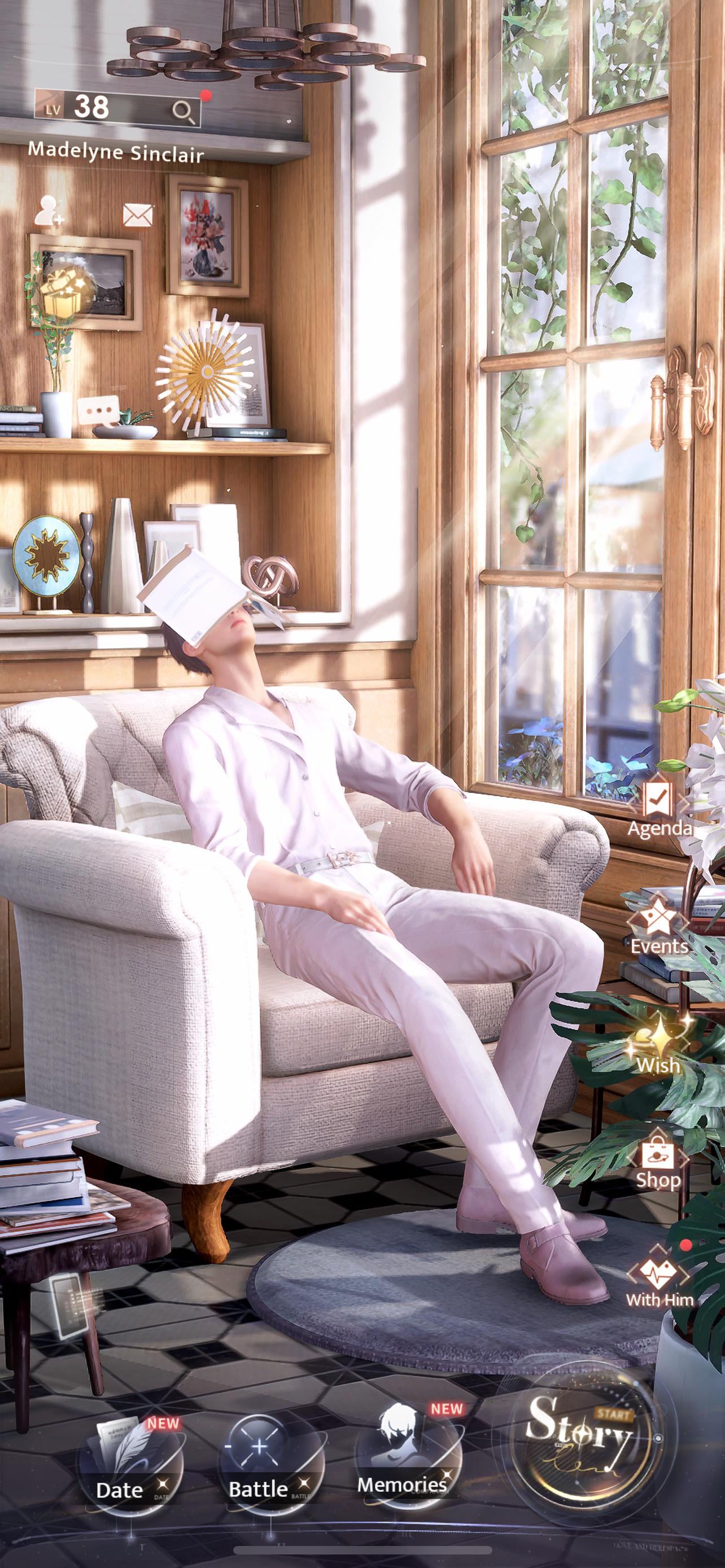
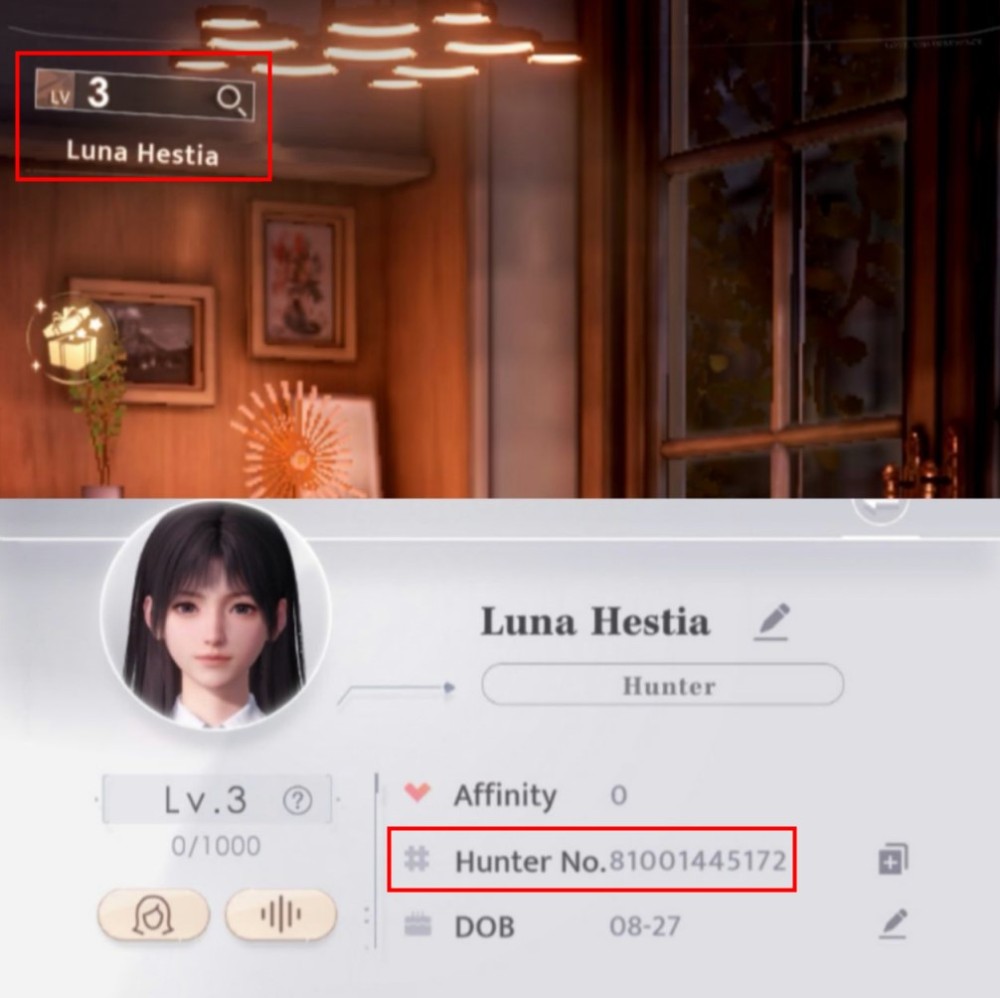
Launch Love and Deepspace on iOS or Android. Once login finishes and your Hunter appears in the Destiny Cafe, check the top-left corner. You will spot your avatar, current level badge, and profile frame. Tap that circular icon.
The character profile sheet slides open over the cafe backdrop. Your Hunter UID appears here under your custom nickname, labeled directly as "Hunter No." right next to a clipboard icon.
Destiny Cafe Screen (Top-Left)
  └── Tap Avatar / Profile Frame
        └── Profile Overview Card Opens
              ├── Nickname
              └── Hunter No. (UID) -> [Copy Icon]
Tap the copy icon. A brief prompt confirms the number saved to your clipboard, ready to paste into chat, a support ticket, or an external top-up field.
If you end up interacting with your companion in the middle of the room instead, your tap landed too far right. Aim squarely for the upper corner where your rank number sits.

60 Crystals
 60 CrystalsUSD 0.73Buy Now
300 + 30 Bonus Crystals
300 + 30 Bonus CrystalsUSD 3.66Buy NowAurum Pass
Aurum PassUSD 3.66Buy Now450 + 90 Bonus Crystals
450 + 90 Bonus CrystalsUSD 5.12Buy Now980 + 150 Bonus Crystals
980 + 150 Bonus CrystalsUSD 11.41Buy NowCompanionship Pack
Companionship PackUSD 13.70Buy Now1980 + 360 Bonus Crystals
1980 + 360 Bonus CrystalsUSD 22.86Buy Now3280 + 720 Bonus Crystals
3280 + 720 Bonus CrystalsUSD 36.61Buy Now6480 + 1600 Bonus Crystals
6480 + 1600 Bonus CrystalsUSD 73.27Buy NowAll-In-One Bundle
All-In-One BundleUSD 153.65Buy Now
Profile Screen Breakdown and Account Identifiers
The profile window contains several distinct fields. Confusing them can lead to failed friend requests or delayed support tickets.
Your display name is purely cosmetic. You can change it anytime to suit roleplay or aesthetic choices. Your Hunter No., however, is permanently tied to your server database entry. It never shifts, regardless of how often you rename your character.
+-------------------------------------------------------------+
| [Avatar Icon]  Nickname: StarlightHunter                    |
|                Hunter No.: 80001234567 [Copy]               |
|                Title: Deepspace Legend                      |
+-------------------------------------------------------------+
| Banner Image / Profile Showcase                             |
| [Quick Cleanup]                         [Appearance Reset]  |
+-------------------------------------------------------------+
Here is what each field handles:
- Nickname: Your chosen handle. Other players see it in chat, friend lists, and support threads. Multiple accounts can use the exact same name.
- Hunter No. (UID): The permanent numeric sequence assigned when you finish the prologue. It marks your specific save on Infold's server cluster.
- Profile Picture and Frame: Cosmetic borders unlocked through story progression, events, or bundles.
- Title: Badges earned through combat trials, companion affinity levels, or collection milestones.
- Banner Showcase: The graphical card behind your Hunter statistics displaying your chosen companion or unlocked event CG.
Never send only your nickname when a platform asks for an account identifier. Hundreds of players can share names like "Hunter" or "Player," so support agents and automated delivery queues cannot route data by display text alone.
Why Storefronts and Support Need Your Hunter ID
Your Hunter UID works like a bank account routing number. External systems use it to credit currencies or pull up logs, but it grants zero ability to withdraw funds, alter passwords, or hijack your character.
When you top up Love and Deepspace Crystals, third-party stores only need this numeric string and your server region. They never need your password, Apple ID, or Google login. Entering the number directs the order through official API channels, which deliver the items straight to your in-game mailbox.
Infold's technical support uses the exact same identifier. When a patch causes crashes or an "account not found" warning appears, agents cannot sift through millions of identical usernames. Infold advisories tell players to keep their Character ID written down. If local data corrupts, that number lets support locate your server profile immediately.
For payment bugs or missing purchases, email loveanddeepspace-en@infoldgames.com directly. Include your registered email, Hunter No., and server region to avoid turnaround delays.
Crystal Pricing and Tier Values
Crystals are the premium paid currency in Love and Deepspace. Unlike Diamonds—which accumulate through dailies, story milestones, and combat challenges—Crystals require cash top-ups. You can trade Crystals 1:1 for Diamonds to pull on limited Wish banners, or spend them directly on shop cosmetics, companion accessories, and resource packs.
Official base packages and bonus structures follow standard pricing across in-app and third-party delivery channels:
| Package Tier | Base Crystals | Bonus Crystals | Total Crystals | Base Cost (USD) |
|---|---|---|---|---|
| Starter | 60 | 0 | 60 | $0.99 |
| Tier 1 | 300 | 30 | 330 | $4.99 |
| Tier 2 | 450 | 90 | 540 | $6.99 |
| Tier 3 | 980 | 150 | 1,130 | $14.99 |
| Tier 4 | 1,980 | 360 | 2,340 | $29.99 |
| Tier 5 | 3,280 | 720 | 4,000 | $49.99 |
| Tier 6 | 6,480 | 1,600 | 8,080 | $99.99 |
Base pricing and Crystal allotments represent standard in-game catalog tiers; regional taxes or currency exchange fluctuations may alter local totals.
Buying the $0.99 pack repeatedly gives you the worst return: exactly 60 Crystals per dollar without bonuses. Tier 6 adds 1,600 bonus Crystals alongside the 6,480 base pool. If you plan to pull heavily on upcoming limited banners, saving for larger denominations yields more currency per dollar spent.
Profile Customization Costs and Storage Tools
Beyond displaying account data, the profile panel houses appearance controls and local storage utilities.
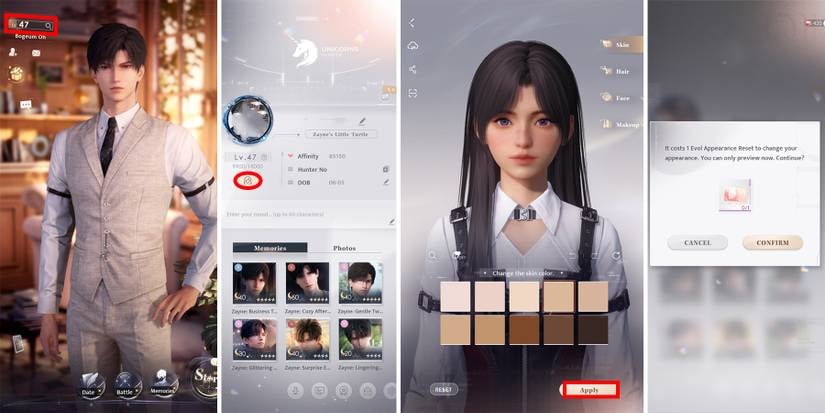
If you want to alter your Hunter's facial structure, hair, or makeup after character creation, enter the appearance suite from this screen. Reworking your face costs either an Evol Appearance Reset ticket or 300 Diamonds. Voice timbre and pitch adjustments also cost Diamonds to apply.
| Feature / Utility | Location in Profile | Cost to Modify | Primary Function | | :--- | :--- | :--- | :--- | | | Evol Appearance Reset | Edit Appearance button | 300 Diamonds | Redesign face, makeup, and hair structure | | Voice Tone Adjustment | Sound / Timbre settings | Diamond fee | Fine-tune voice pitch sliders | | Quick Cleanup Tool | Bottom of Profile panel | Free | Purges cached voice and visual assets | | Title Showcase | Below Nickname | Free | Equips earned combat and affinity badges | | Avatar Frame Change | Tap Avatar Icon | Free | Equips cosmetic unlocked profile borders |
Appearance changes consume premium resources, whereas storage tools and title badges are free maintenance features.
Watch the "Quick Cleanup" button at the bottom of the card. Love and Deepspace accumulates immense storage footprints due to high-poly 3D models and audio tracks. When stuttering occurs or storage space drops after a patch, run this tool. It wipes temporary caches while keeping login bindings, progress, and save files intact.
UID Top-Up vs In-Game Purchases
You can acquire resources in two ways: native in-app billing through your device app store, or external web-based UID direct top-up. Both fund your account, but credential handling and delivery paths differ.
When buying an Aurum Pass and extra Crystals, UID delivery routes items to your mailbox via automated server sync. The Aurum Pass provides 30 days of daily login currency alongside custom cafe track options and dynamic backgrounds. Knowing how your order routes prevents confusion if your counter balance does not update the second checkout clears.
| Attribute | In-App Native Store | Web UID Direct Delivery | | :--- | :--- | :--- | | | Credentials Needed | Device Store Login (FaceID / Password) | Hunter No. (UID) + Server Region | | Account Risk | Low | Low (Zero password exposure) | | Delivery Method | Direct Counter Balance Update | In-Game Mailbox Deposit | | Payment Processing | Google Play / Apple Pay | Storefront Web Checkout Gateway | | Typical Use Case | Impulse single pulls while in Wish menu | Pre-planning banner reserves & gifting |
Both systems deposit verified currency to your Hunter profile, but UID delivery operates entirely through remote mailbox routing.
UID delivery is especially useful for gifting passes or funding alt accounts. Native checkout requires logging into the operating system account on the target phone, creating security risks. With a Hunter UID, you enter the number, select the server, and let the balance hit the player's mailbox without sharing private passwords.
Remember to claim incoming deliveries manually. UID orders do not inject currency into your counter on the fly. Head to the Destiny Cafe, open the envelope icon, and tap "Claim" on the delivery notice.
Resolving Missing Accounts and Client Channel Mismatches
Opening the game to find a level 1 prologue cutscene instead of your geared Hunter usually means an authentication error or regional client mismatch, not a deleted save.
Infold uses your UID alongside third-party login bindings (Apple ID, Google, or an Infold email) to sync data across devices. Work through this checklist before opening a support ticket:
| Problem Symptom | Root Cause | Immediate Fix | | :--- | :--- | :--- | | | Fresh Level 1 Hunter Prologue | Wrong Server Region Selected | Log out at title screen; pick your original server | | "Account Not Found" Warning | Mistyped Login Credential / Channel Client | Verify original login provider or swap to official build | | Crystals Missing After Order | Items Sitting in Mailbox Unclaimed | Tap Mail icon on home menu and claim package | | Top-Up Rejects UID | Hunter No. Digit Omission | Copy ID via clipboard button instead of manual typing | | Infinite Loading on Profile | Corrupted Cache Post-Patch | Use title screen Repair button or in-profile Quick Cleanup |
Account disappearance is almost never a database wipe; mismatched servers and third-party client wrappers cause the vast majority of profile errors.
Beware of channel clients. Downloading installers through unofficial aggregators or modified app repositories can link your install to an isolated third-party client wrapper. These builds do not sync with Infold's global directory, meaning an official update can lock you out of your profile. Keep your client updated through official app stores to avoid broken bindings.
Before ordering on xptopup's Love and Deepspace recharge page, verify your copied UID against the screen. A mistyped digit can send packs to an inactive account or stall the order until support intervenes.
Do not confuse your Hunter UID with non-game identifiers. Search results referencing "GO ID" or state hunting licenses have nothing to do with Infold accounts, nor do profile numbers from unrelated titles like Hawked. Your only relevant ID is the numeric Hunter No. shown on your Destiny Cafe profile overview.
FAQ
Where can I find my Hunter UID in Love and Deepspace?
Tap your avatar profile icon in the top-left corner of the main Destiny Cafe screen. Your Hunter UID is listed directly on your profile card as your "Hunter No." right under your character nickname.
Do I need to share my password to top up Crystals with my UID?
No, third-party top-up platforms only require your Hunter UID and your server selection. Never disclose your account password, email login credentials, or verification codes to recharge services.
Where do items go after completing a UID top-up?
Purchased items such as Crystals or the Aurum Pass are sent directly to your in-game mailbox. Tap the envelope mailbox icon on your home screen to open the message and claim your items into your inventory.
Why is my Hunter UID missing or showing as a level 1 account?
You likely selected the wrong server region on the title screen or downloaded an unofficial channel client instead of the global release. Log out to the title menu, verify your original server, and confirm your linked email credentials.
Can other players do anything harmful with my UID?
No, your Hunter UID is a public identifier designed for adding friends and routing top-up purchases. It cannot be used on its own to bypass your security, alter your password, or compromise your personal account data.
How can I contact customer support if I lose my account?
You can contact Infold support directly by sending an email to loveanddeepspace-en@infoldgames.com. Be sure to provide your exact Hunter No., character nickname, registered login method, and proof of any past purchases.
Does changing my appearance or voice change my Hunter UID?
No, modifying your Hunter's visual appearance or vocal timbre has zero effect on your account number. Those aesthetic tweaks simply cost Diamonds or Evol Appearance Reset tickets, while your Hunter No. stays permanently fixed.
Can I find my UID if the game client will not load past the start screen?
If your client cannot reach the Destiny Cafe, check past payment receipts or earlier screenshot captures of your profile card. If you never recorded it, email Infold support with your bound email address so they can search their database for your character record.
The Final Check on Hunter ID Safety
Finding your Hunter UID takes five seconds, but keeping it recorded is what protects your account when an update goes wrong. Open the game, tap your avatar icon in the Destiny Cafe, hit the copy icon next to your Hunter No., and paste it into a secure notes app.
Treat your UID and your login credentials as separate tiers of data. Your Hunter UID is safe to share with friends and recharge vendors because it only handles incoming queries. Your password, security codes, and linked account logins belong to you alone. Maintain that boundary, keep the number documented, and your character data stays safe.






Comments