

Learn how to top up Mico coins in 2026, find your numeric user ID, dodge common gifting traps, and verify your credited wallet balance right away.
Live-streaming apps run on attention and digital currency. On MICO, coins are the engine behind everything from sending virtual fireworks during live broadcast PK battles to locking down VIP perks and getting into private audio calls. You cannot participate in higher-tier room activities without them.
Buying coins without checking your account details burns cash fast. Users routinely buy bundles marked up by in-app store fees or misplace a digit, sending fifty dollars to an inactive account. Below is the 2026 checkout sequence, the exact method to copy your numeric ID, and how to verify your balance once payment settles.
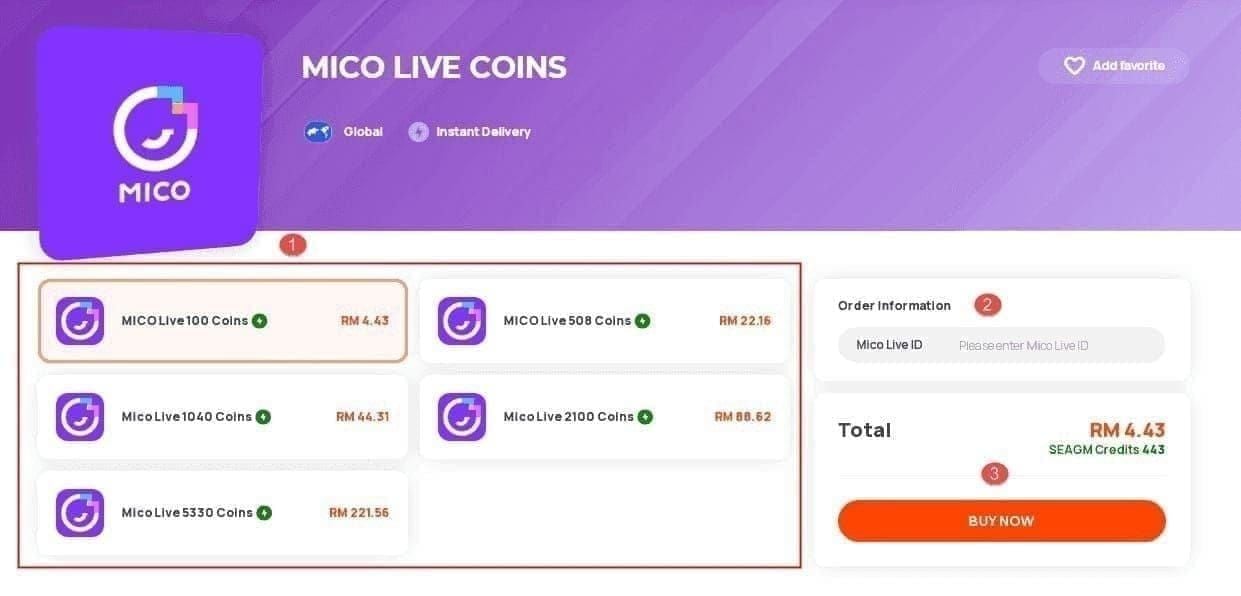
Understanding the 2026 MICO In-App Economy
MICO is a global live-streaming and video chat platform where coins represent the only direct currency users can buy to send gifts and unlock status badges. Broadcasters do not keep coins directly; the app converts coin-based gifts into internal creator earnings called Diamonds or Beans.
That conversion rate sits at roughly 50%. Firing off a 1,000-coin rocket yields approximately 500 Diamonds for the host. For creators under official agency contracts, standard cashout valuations baseline at roughly 476 diamonds per $1 USD. Knowing this baseline clarifies what your gifts actually pay the broadcaster after platform cuts.
MICO enforces a strict minimum age requirement of 18 years across its network. Accounts identified as underage face immediate bans, and digital balances on banned profiles are permanently lost. Ensure your profile adheres to platform terms before loading substantial funds onto it.
Room formats have expanded over recent updates, with client builds reaching version 9.1.2.2 on Android. Multi-guest video rooms allow group streaming where either 8 guests join a single creator or 9 participants chat together simultaneously depending on the selected layout. Gifting across these larger rooms burns through balances rapidly, making efficient coin purchases essential.
| Currency Type | Primary Function | Transferability | Standard Baseline Value |
|---|---|---|---|
| MICO Coins | Gifting broadcasters, VIP perks, PK battles | Purchased by users; non-refundable | 445 Coins for $4.99 (In-App) |
| Diamonds / Beans | Host creator earnings from received gifts | Converted from gifts (~50% coin value) | ~476 Diamonds per $1 USD |
| Free Reward Coins | Low-tier stream interactions & basic chats | Earned via daily tasks & community events | Nil cashout value; non-withdrawable |
Table 1: The dual-currency pipeline within MICO Live, showing the step-down conversion from user spend to creator cashout.
This gap explains why casual spenders get caught off guard: spending $5 in the app store leaves a broadcaster with barely two dollars of take-home value after platform cuts.

445 Mico Coins
 445 Mico CoinsUSD 3.57Buy Now
500 Mico Coins
500 Mico CoinsUSD 4.01Buy Now900 Mico Coins
900 Mico CoinsUSD 7.21Buy Now1,100 Mico Coins
1,100 Mico CoinsUSD 8.81Buy Now2,200 Mico Coins
2,200 Mico CoinsUSD 17.62Buy Now2,730 Mico Coins
2,730 Mico CoinsUSD 21.86Buy Now3,300 Mico Coins
3,300 Mico CoinsUSD 26.43Buy Now4,400 Mico Coins
4,400 Mico CoinsUSD 35.23Buy Now5,500 Mico Coins
5,500 Mico CoinsUSD 44.05Buy Now5,700 Mico Coins
5,700 Mico CoinsUSD 45.65Buy Now6,600 Mico Coins
6,600 Mico CoinsUSD 52.86Buy Now7,700 Mico Coins
7,700 Mico CoinsUSD 61.69Buy Now8,550 Mico Coins
8,550 Mico CoinsUSD 68.48Buy Now8,800 Mico Coins
8,800 Mico CoinsUSD 70.48Buy Now11,000 Mico Coins
11,000 Mico CoinsUSD 88.09Buy Now22,000 Mico Coins
22,000 Mico CoinsUSD 176.19Buy Now33,000 Mico Coins
33,000 Mico CoinsUSD 264.28Buy Now55,000 Mico Coins
55,000 Mico CoinsUSD 440.47Buy Now
Mico ID Finder: Locating Your Numeric UID
Recharging outside the standard app store requires exactly one piece of information: your numeric MICO User ID (UID). You do not need a password, and you should never hand one over.
Here is how to locate the exact string:
- Launch the MICO application on your phone.
- Tap the Profile icon located in the bottom right corner of the navigation bar.
- Look directly beneath your avatar and display name.
- You will see a dedicated sequence of digits labeled as your ID or UID.
- Tap the small copy icon beside the numbers, or write them down manually.
[ Profile Tab ]
  ├── Avatar & Display Name
  ├── ID: 123456789  <-- [Tap Copy Icon Here]
  └── Wallet / Balance
Do not confuse your custom display handle with your numeric ID. Handles change, allow special characters, and vary across regional display rules. The routing system recognizes only the numeric string. Submitting an alphabetical handle on an external storefront will cause the recharge to fail or stall indefinitely.
Double-check the digits against your profile before submitting any payment. External recharge workflows dispatch orders through automated programmatic channels. If you type 8472910 instead of 8472919, the system will happily deliver those coins to whoever owns the wrong ID. Digital coins on MICO are non-refundable once credited, meaning recovery of funds sent to a stranger is impossible.
Price Breakdown: In-App Store vs. Web Top-Up
Why bypass the in-app purchase button? Mobile store fees. When you buy directly through Apple or Google, platform commissions inflate the price, and MICO passes that overhead directly to you.
Official in-app baseline rates charge roughly $4.99 for 445 Coins, which averages out to between 89 and 110 coins per dollar spent. Independent web platforms bypass mobile marketplace cuts entirely, allowing discounts that reach up to 25% off official app store rates.
To lock in the best value without paying mobile platform markups, you can complete your Mico coins top up through specialized storefronts that credit your balance directly via UID.
| Coin Package | Baseline In-App Store Price | External Discounted Price | Effective Savings |
|---|---|---|---|
| 445 Coins | $4.99 | $4.12 | ~17.4% |
| 900 Coins | $9.99 | $8.33 | ~16.6% |
| 2,200 Coins | $24.42 | $20.23 | ~17.1% |
| 5,500 Coins | $61.05 | $50.57 | ~17.1% |
| 11,000 Coins | $122.10 | $101.79 | ~16.6% |
| 22,000 Coins | $244.20 | $204.30 | ~16.3% |
| 55,000 Coins | $610.50 | $519.10 | ~14.9% |
Table 2: Pricing comparison between standard mobile app store listings and discounted web storefront tiers.
Purchasing large packs in-app wastes substantial cash. Buying a 55,000-coin bundle through a web channel saves over $90 compared to tapping the standard in-app purchase prompt on iOS or Android.
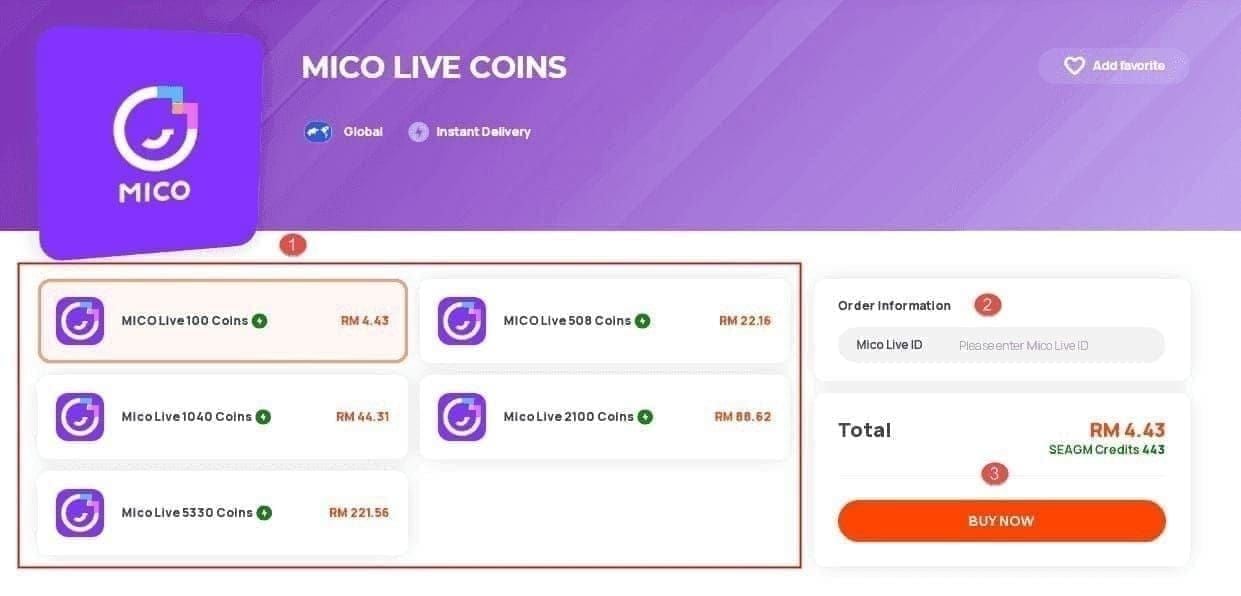
Step-by-Step Walkthrough: How to Top Up Mico Coins
Once you have your numeric UID copied, the actual checkout sequence takes under two minutes. Follow these steps to ensure clean delivery.
Step 1: Select Your Bundle Size
Choose the package that matches your planned stream activity. If you only plan to drop entry-level roses or join basic chat rooms, a 445 or 900-coin tier is sufficient. If you intend to back a broadcaster during competitive PK battles, calculate your target gift point threshold before purchasing so you do not have to perform multiple mid-stream recharges.
Step 2: Input Your Numeric MICO ID
Paste the numeric UID you copied from your profile page into the recipient field. If you are recharging for a friend or your favorite host, paste their numeric ID instead. The recharge protocol treats all valid IDs the same, making direct external top-ups the cleanest way to gift someone a balance without logging into their hardware.
Step 3: Complete Checkout
Pick your regional billing option on the live checkout screen. Independent portals dynamically load payment processors according to your country of residence, so verify the final total displayed before confirming the transaction.
Step 4: Wait for Order Confirmation
Reliable platforms process coin dispatches automatically. Over 98% of standard orders settle within a few minutes of successful payment confirmation. Keep your browser window open until you see the success notification with your transaction reference number.
If you want a straightforward checkout that handles external delivery cleanly, use xptopup Mico recharge to route your order using nothing more than your public account number.
How to Verify Your Balance and Fix Delays
After your payment clears, do not assume the coins are visible on your live stream overlay immediately. Streaming video clients cache asset balances to save bandwidth, which can cause a temporary visual desync.
Here is the exact verification sequence:
- Fully close the MICO app (swipe it out of your active device app switcher).
- Reopen MICO.
- Tap Profile in the bottom right corner.
- Select Wallet (or Recharge / Balance depending on your OS build).
- Check the current numeric balance at the top of the wallet screen.
[ Profile ] -> [ Wallet / Balance ]
                   │
                   ├── Coins: [ Updated Total ]
                   └── Diamonds / Beans: [ Host Balance ]
If the coins do not show up immediately, do not panic and do not make a duplicate purchase. Check your email or purchase receipt to verify that payment cleared your bank. While 98% of orders process within minutes, regional fraud prevention screenings or peak platform traffic can stretch fulfillment times out toward a few hours on rare occasions.
If two hours pass and your in-app wallet balance remains unchanged, gather your payment receipt, the transaction order number, and your numeric UID. Submit a support ticket directly to the storefront where you bought the coins. Because MICO digital goods cannot be refunded once delivered, storefront support will review the dispatch log against your UID to confirm whether the platform accepted the batch.
Legitimate Recharge vs. Scam storefronts
Microtransaction platforms attract phishing clones and account-theft rings targeting active spenders. Knowing what a secure recharge channel asks for protects your profile from takeovers.
Some shady storefronts claim that an operator will "log into your account to process the coins manually while you wait." Run away from these sites. MICO’s direct delivery API only requires a numeric user ID. Any website asking for your account login, Google credentials, Apple ID password, or SMS two-factor verification codes is attempting to hijack your account.
| Request Type | Legitimate Platform | Scam / Hijacking Operation |
|---|---|---|
| Account Identifier | Public Numeric UID only | Login Email, Phone Number, Password |
| Two-Factor Codes | Never requested | Demands SMS or App 2FA codes |
| Fulfillment Method | Direct server injection via UID | Claims "agent will log in for you" |
| Pricing Claims | 10% to 25% realistic market discounts | "Unlimited Free Coins" or 80% off |
Table 3: Security checklist comparing legitimate direct-top-up platforms against credential phishing portals.
If a recharge page asks for a password or two-factor code, close the tab immediately.
Budget Strategies for Every Spender Tier
Wallet needs vary by viewer habits. Match your bundle size to your typical stream activity rather than stockpiling bulk currency on impulse.
The Casual Lurker (F2P / Low Spender)
If your goal is simply talking in chat, dropping occasional entry-level reaction gifts, and supporting friends during regular streams, stay on the low-tier packs. Grab the 445 or 900-coin bundles. You can also supplement your stash without spending cash: MICO occasionally offers free coin trickle rewards through daily login events, platform milestone tasks, and community challenges. Free coins are low-volume, but they cover basic social features without requiring financial input.
The Regular Supporter (Mid Spender)
If you spend a few evenings a week watching consistent broadcasters, the 2,200 ($20.23) or 5,500 ($50.57) packs offer the best compromise between cost and longevity. These tiers let you drop animated mid-tier gifts that capture a host's attention without blowing through fifty dollars in three clicks. Avoid buying multiple small 445-coin packs in succession; transaction processing fees add up, making mid-tier bulk buys far more economical.
The PK Battle Whale (Heavy Spender)
If your primary enjoyment comes from competitive PK battles, group room dominance, or chasing VIP status leaderboard frames, buying small packs is a strategic mistake. PK rounds move fast; if you run out of coins with thirty seconds left on the clock, you will lose the round before an in-app checkout screen can reload. Purchase the 22,000 ($204.30) or 55,000 ($519.10) bundles ahead of major events.
If you are planning an extended gifting session for a competitive stream event, you can buy Mico coins online at scale to ensure your wallet stays loaded before the timer starts.
FAQ
Where do I find my MICO ID to recharge coins?
Open the MICO app and tap the Profile icon in the lower-right corner of the interface. Your numeric User ID is displayed directly below your avatar and username. Use the copy button next to the numbers to prevent typing mistakes.
Do third-party top-up websites need my MICO account password?
No, legitimate top-up services require only your public numeric UID. Never give your account password, email credentials, or phone verification codes to any recharge service.
How do I verify that my MICO Coins have been added?
Restart your MICO app completely, navigate to your Profile tab, and tap Wallet or Recharge. Your updated coin total should reflect immediately at the top of the balance screen.
Can I get a refund if I buy MICO Coins?
Delivered MICO coins are strictly non-refundable once credited to an account. External platforms will generally only issue refunds if a technical failure prevents the order from being fulfilled to the network.
What happens if I submit an incorrect UID during recharge?
Orders sent to an incorrect but existing numeric ID will credit that stranger's account permanently. Fulfillments are automated and irreversible, so double-check your ID before completing payment.
Can I top up MICO Coins directly for a friend or streamer?
Yes, you can recharge another user's balance by entering their specific numeric MICO UID instead of your own during checkout. The purchased coins will deposit straight into their wallet without requiring their account credentials.
How long does it take for topped-up coins to appear in MICO?
Most automated top-ups credit within a few minutes of successful payment. In rare cases involving high server loads or regional payment reviews, delivery can take up to a couple of hours.
Final Verdict on MICO Recharging
Topping up your MICO wallet does not have to be expensive or stressful if you steer clear of standard in-app purchase markups. Mobile app stores levy steep commission charges on live-streaming microtransactions, turning everyday gifting into an overpriced habit. Moving your purchases to an external web channel delivers the same coins to your exact UID while trimming your spend by up to 25%.
Keep your workflow disciplined: copy your numeric ID directly from the profile tab, verify the digits twice, choose bundle sizes that match your weekly viewing habits, and never hand out your account credentials to anyone. Once the transaction clears, restart the client, check your in-app wallet balance, and enjoy your time supporting your favorite broadcasters.






Comments