Knives Out Vouchers Top Up: Direct UID Recharge Guide
Knives Out Vouchers serve as the core premium currency within the battle royale action of Knives Out. Vouchers allow players to unlock high-tier cosmetics, obtain tactical supplies, and personalize their combat identity across the battlefield. When you order your top up through XPTopup, your Vouchers are credited directly to your player profile using your User ID (UID) and Server selection.
What In-Game Items Can You Purchase With Vouchers?
Accumulating Knives Out Vouchers gives you access to the store inventory, limited-time prize pools, and progression passes:
- Battle Pass and Season Passes: Unlock premium progression tiers to earn seasonal rewards, exclusive character attire, and vehicle camos.
- Vehicle Skins: Obtain legendary sports car, coupe, pickup truck, and motorcycle skins with custom engine sounds, visual effects, and kill broadcast banners.
- Weapon Crates & Evo Firearms: Pull for upgradeable firearm finishes featuring progressive inspection animations, reload effects, and elimination feeds.
- Supply Crates & Gacha Events: Participate in collaboration draws and limited-time thematic supply drops for rare items.
- Character Outfits & Accessories: Equip custom tactical gear, suits, wingsuits, parachutes, and lobby emotes.
Why Buy Knives Out Vouchers on XPTopup
XPTopup provides a direct, secure interface tailored for global Knives Out players looking for a reliable recharge experience.
- Direct UID Delivery: Complete your recharge using only your public player UID and Server. You never have to share passwords, secondary verification codes, or login credentials.
- Live, Transparent Pricing: Product package values and localized checkout totals are updated dynamically on the store page so you always know your exact cost before paying.
- Global Server Coverage: Whether your account is based on the Global, Japan, or North America servers, XPTopup processes your order directly to your chosen destination.
- 24/7 Customer Support: Our dedicated help desk is available around the clock to assist you with order status inquiries and delivery verification.
How to Find Your Knives Out UID and Server
Locating your account details in Knives Out is straightforward. Follow these steps inside the game client to retrieve the exact information needed for your recharge:
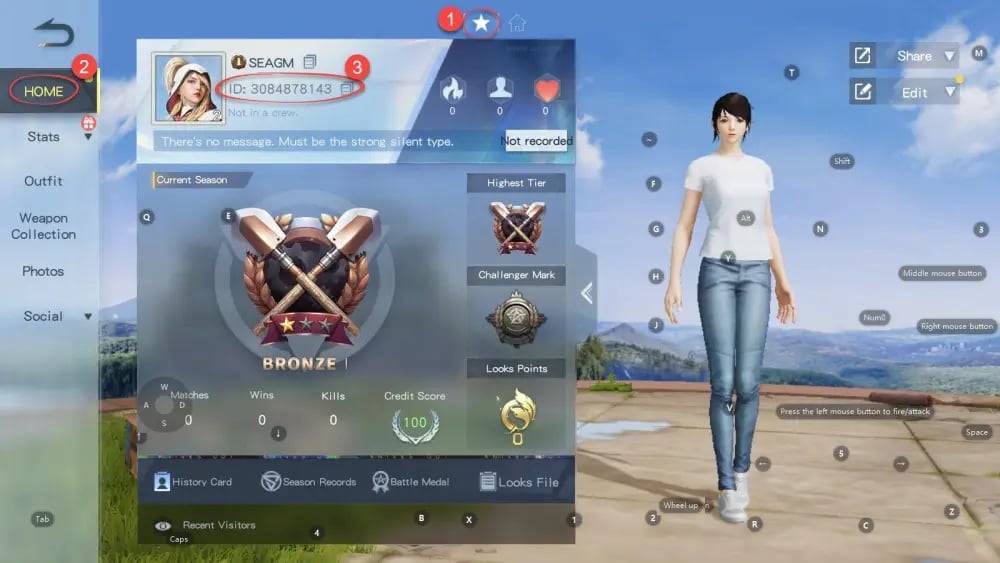
- Launch the Knives Out app on your mobile device or PC.
- On the main login screen, note the Server name displayed in the center or top corner (for example, Global Server or Japan Server).
- Log into your account and enter the main game lobby.
- Tap your Avatar / Profile Icon located in the upper-left corner of the lobby screen.
- In the Personal Profile overview tab, locate your character name and your numerical UID displayed beneath or beside your avatar.
- Tap the copy icon next to your UID to copy the numerical string directly to your clipboard.
Step-by-Step Guide: How to Recharge Knives Out Vouchers on XPTopup
Follow this walkthrough to complete your Knives Out direct top up on XPTopup:
- Select Voucher Denomination: Choose the number of Knives Out Vouchers you want to add to your balance.
- Enter Your UID: Paste your numeric Knives Out UID into the UID field.
- Select Your Server: Choose your active game server from the Server field dropdown or input field.
- Check Your Details: Double-check your entered UID and Server against your in-game profile to prevent delivery delays.
- Complete Payment: Select your preferred local payment method and complete the checkout process.
- Receive Vouchers In-Game: Once payment processing finishes, your Vouchers are credited directly to your Knives Out account balance.
Knives Out Server Selection and Region Compatibility
Knives Out operates separate regional databases. Providing the correct Server name alongside your UID ensures that the direct top-up system routes your Vouchers to the right character profile.
| Server Name | Target Region | Character Identification |
|---|---|---|
| Global Server | International / North America / Europe / SEA | Numerical UID linked to Global profile |
| Japan Server | Japan & East Asia | Numerical UID linked to Japan regional server |
| PC Server | Dedicated PC Client Players | Numerical UID linked to PC server cluster |
Tip: If you play on multiple servers, always verify which server holds the active character you want to credit before submitting an order on XPTopup.
Security Benefits of UID-Only Top Up (No Password Required)
Account safety is essential when purchasing in-game currencies. XPTopup utilizes a direct top-up mechanism that relies solely on your public User ID and Server.
- Zero Account Sharing: You will never be asked for your login email, phone number, password, or two-factor authentication codes.
- Safe Against Unauthorized Access: Because your credentials remain solely with you, your account cannot be compromised or modified during the transaction process.
- Compliance With Direct In-Game Balance Updates: Direct UID recharges send your currency straight to the game database, matching standard player balance updates.
Troubleshooting Delayed Orders and Verification Steps
If you have completed your payment on XPTopup and your Vouchers have not appeared immediately, follow these troubleshooting steps:
- Restart the Game Client: Close Knives Out completely, swipe it away from your device background apps, and relaunch it. This forces the client to synchronize your balance with the server.
- Check In-Game Mail: Certain special promotions, bonus items, or tier rewards are sent via the in-game mailbox rather than directly added to the numerical balance counter.
- Verify Your Order Confirmation: Check your XPTopup order confirmation to ensure your UID and Server were entered without typos.
- Contact Customer Support: If your balance does not update within a few minutes, reach out to the 24/7 XPTopup support team with your order ID and UID for real-time tracking assistance.
Frequently Asked Questions
How to get ID and Server in Knives Out?
Open Knives Out and observe the server displayed on the title screen before entering the game. Once in the lobby, tap your avatar in the top-left corner. Your numerical UID is shown under your character name on the profile tab.
How to recharge Knives Out Vouchers on XPTopup?
Select your desired Voucher package on XPTopup, enter your Knives Out UID, select your Server, and proceed to checkout using your preferred payment method. The Vouchers will be delivered straight to your in-game account.
Do I need to provide my Knives Out account password to top up?
No. Top-ups on XPTopup require only your public UID and Server. We will never ask for your game password, third-party linked account passwords, or verification codes.
What can I buy with Knives Out Vouchers in-game?
Knives Out Vouchers can be spent on Battle Passes, vehicle skins, weapon crates, Evo weapon upgrade components, character outfits, parachute cosmetics, and limited-time collaborative events.
What should I do if I entered the wrong UID or Server?
Contact XPTopup 24/7 customer support immediately with your order ID. If the order has not yet been processed by the automated top-up system, our support staff can help update the account details.
How long does it take for Knives Out Vouchers to arrive after payment?
Under normal operating conditions, Vouchers are credited directly to your Knives Out account shortly after your payment is confirmed. Relaunch your game client to refresh your current balance.
Current package prices
Current package prices are shown below. Prices exclude Tax. Tax, payment fees and applicable coupons are shown at checkout.
| Package | Price |
|---|---|
| 60 + 5 Vouchers | USD 0.87 |
| 180 + 10 Vouchers | USD 2.63 |
| 300 + 16 Vouchers | USD 4.38 |
| 680 + 36 Vouchers | USD 8.71 |
| 1280 + 110 Vouchers | USD 17.43 |
| 1980 + 180 Vouchers | USD 26.15 |
| 3280 + 320 Vouchers | USD 43.58 |
| 6480 + 550 Vouchers | USD 87.17 |