Roblox Gift Card Top Up and Credit Overview
A Roblox Gift Card is a digital voucher containing a unique code that allows players to add funds directly to their Roblox account balance. Instead of linking a credit card or bank account directly to the game platform, purchasing a digital gift card code gives you full control over your spending while keeping your financial information private.
When you redeem a Roblox Gift Card, the value is first added to your account as Roblox Credit. This credit functions as a flexible balance stored under your account profile. You can keep the credit on your account indefinitely or use it immediately to purchase Robux (the primary in-game virtual currency) or activate a monthly Roblox Premium subscription.
Digital gift cards provide a fast, secure method to access premium experiences, avatar clothing, animations, limited-edition items, and developer passes across millions of user-created worlds.
How to Buy a Roblox Gift Card on XPTopup Using Email
Ordering a Roblox digital code on XPTopup is straightforward and requires zero sensitive account information. You never need to share your Roblox account password or allow third-party account access.
Follow these steps to complete your purchase:
- Select your desired Roblox Gift Card denomination from the product catalog.
- In the recipient details field, enter your active Email address. Make sure the email address is spelled correctly, as your digital redemption code will be sent straight to this inbox.
- Proceed to the checkout screen and select your preferred payment method from the available live checkout options.
- Complete the transaction. Once payment is confirmed, your digital PIN code will be generated and delivered to your email.
Because the digital code is sent directly to your email, you can purchase cards for personal use or easily forward the code as a digital gift to friends and family.
Step-by-Step Guide: How to Redeem a Roblox Code at roblox.com/redeem
Roblox requires all digital gift card codes to be redeemed through an internet browser. You cannot redeem standard gift card PIN codes directly inside the Roblox mobile application on iOS or Android devices.
Follow this walkthrough to apply your code to your account:
- Open a web browser on your PC, Mac, tablet, or smartphone and visit roblox.com/redeem.
- Log into the specific Roblox account where you want the credit applied.
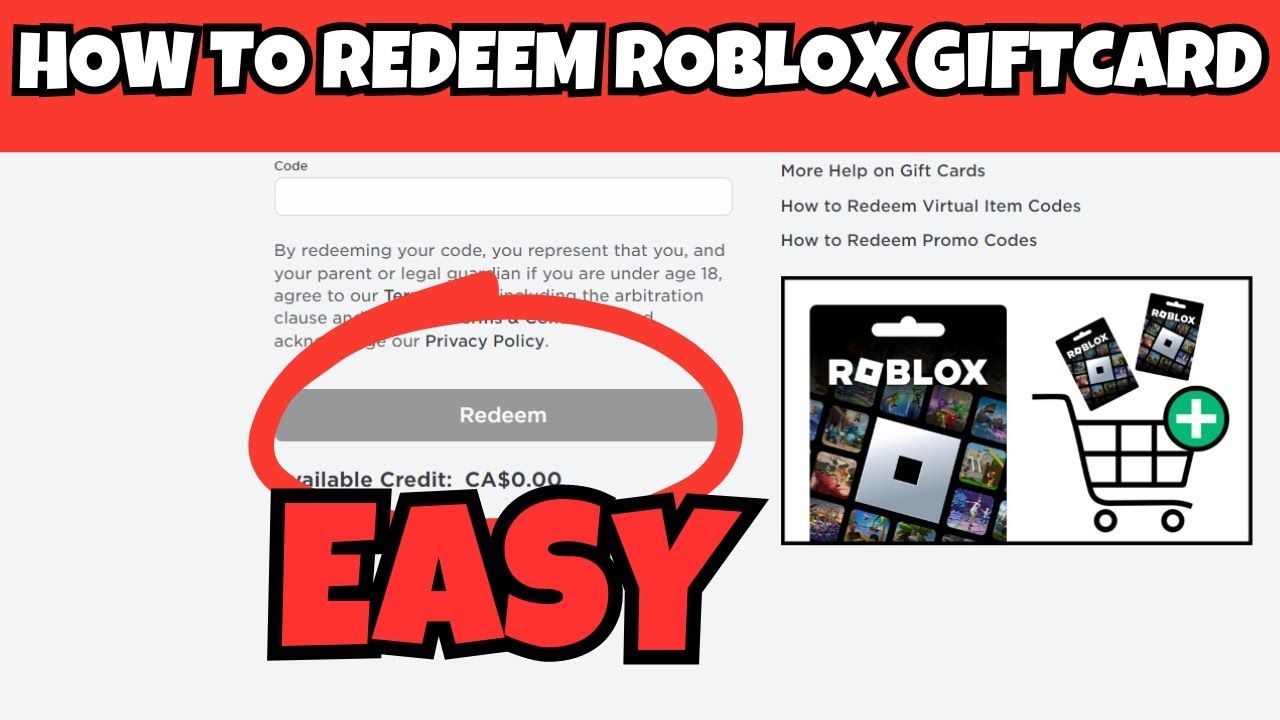
- Locate the text field labeled Code.
- Type or paste your digital gift card PIN exactly as received in your email delivery.
- Click the Redeem button.
- A success message will appear displaying your updated Roblox Credit balance.
If you are redeeming multiple codes, repeat this process for each code. The credit balance will accumulate in your account wallet.
Roblox Credit vs Robux: How to Convert Balance into Robux or Premium (2026)
Redeeming your gift card is a two-stage process: the code loads Roblox Credit onto your account, which you then convert into Robux or use for Roblox Premium.
Converting Credit to Robux
- Stay on the redemption success page at roblox.com/redeem or go to the Roblox billing settings.
- Look for the button labeled Convert to Robux below your available credit balance.
- Confirm the conversion. The dollar value of your credit will instantly be converted into the corresponding Robux amount and added to your main balance.
Using Credit to Buy Roblox Premium
- Navigate to the Roblox Premium membership page on your web browser.
- Choose your subscription tier (Premium 450, Premium 1000, or Premium 2200).
- On the payment selection screen, select Roblox Credit as your payment method.
- Click Submit Order to activate your monthly subscription and receive your monthly Robux stipend and trading privileges.
Roblox Gift Card Denominations and Robux Value Overview
Roblox Gift Cards are available in various standard denominations. When converted directly into Robux via a web browser, standard packages grant specific amounts of currency:
| Card Value (USD) | Standard Robux Received | Premium Member Robux Bonus (Approx.) | Primary Use Cases |
|---|---|---|---|
| $10.00 | 800 Robux | 880 Robux | Avatar accessories, game passes, small game perks |
| $25.00 | 2,000 Robux | 2,200 Robux | Premium bundles, rare cosmetics, VIP servers |
| $50.00 | 4,500 Robux | 4,950 Robux | Limited avatar gear, major experience game passes |
| $100.00 | 10,000 Robux | 11,000 Robux | High-tier limited items, developer asset purchases |
Note: Exact conversion rates and package bonuses depend on regional pricing and current Roblox store policies displayed at checkout.
Fixing Common Roblox Gift Card Code Errors and Region Issues
If you encounter an error message when attempting to redeem your code, use these troubleshooting steps to resolve the issue:
- Check for Character Confusion: Digital codes can contain characters that look similar. Ensure you have not confused the number
0(zero) with the letterO, the number1(one) with capitalIor lowercasel, or5withS. - Verify Region and Currency Alignment: Roblox Gift Cards are tied to specific currencies (such as USD, EUR, GBP, or CAD). Your Roblox account's country settings must match the currency denomination of the gift card. If there is a currency mismatch, the redemption page will return an invalid region error.
- Address "Code Already Redeemed" Messages: If the system states the code has already been claimed, refresh your browser and check your account balance. Sometimes a slight network delay redeems the code on the server side before updating your screen. You can review your transaction history under the Billing tab in your account settings.
- Clear Browser Cache or Try Incognito: Browser extensions or accumulated cache files can interfere with the redemption script on roblox.com. Switch to an incognito/private window to submit the code.
Account Safety: No-Password Policy and Safe Purchasing
Protecting your gaming account is critical. Legitimate digital gift card transactions never require you to share your Roblox login credentials, master password, or two-factor authentication codes.
When buying a Roblox Gift Card on XPTopup:- You only provide an email address where the digital code is sent.- You retain total ownership and privacy of your account by manually entering the code on the official Roblox website.- Never enter your gift card PIN into unofficial third-party websites or generator tools claiming to give free Robux, as these are unauthorized and put your account security at risk.
Frequently Asked Questions
How do I top up Roblox with a gift card?
To top up Roblox with a gift card, buy a digital code on XPTopup using your email address. Once received, open a web browser, navigate to roblox.com/redeem, log into your Roblox account, enter the PIN code, and click Redeem. Your account will be credited with Roblox Credit, which you can convert into Robux or use for Premium.
How much Robux does a $25 Roblox gift card give you?
Current package prices are shown below. Prices exclude Tax. Tax, payment fees and applicable coupons are shown at checkout.
Can you recharge or add money back onto an existing Roblox gift card?
No, digital Roblox gift cards are single-use vouchers. Once a PIN code is redeemed at roblox.com/redeem, its balance is permanently transferred to your Roblox account wallet and the code cannot be reloaded. To add more funds to your account, purchase a new gift card code.
Why does my Roblox gift card say invalid or already redeemed?
An "invalid code" error usually results from a typo (such as mixing up 0 and O or 1 and I) or a currency/region mismatch between the card and your account settings. An "already redeemed" error means the credit was already applied. Check your Roblox transaction history and account balance to verify if the credit is already in your wallet.
Do digital Roblox gift card codes expire?
Roblox digital gift card PIN codes do not have an expiration date. Once purchased, the code remains valid until it is redeemed on an eligible Roblox account.
Can I redeem a Roblox gift card inside the Roblox mobile app?
No. The Roblox mobile app on iOS and Android does not support direct gift card PIN redemption due to mobile app store billing constraints. You must open a mobile browser (such as Safari or Chrome) or a desktop browser and complete the redemption process at roblox.com/redeem.
Current package prices
Current package prices are shown below. Prices exclude Tax. Tax, payment fees and applicable coupons are shown at checkout.
| Package | Price |
|---|---|
| 10 USD (1000 Robux) | USD 8.19 |
| 25 USD (2500 Robux) | USD 20.48 |
| 50 USD (5250 Robux) | USD 40.95 |
| 100 USD (10500 Robux) | USD 81.90 |
| 200 USD (21000 Robux) | USD 163.80 |