BEST LIVE Top Up: Direct In-App Credits via UID
BEST LIVE connects global audiences with live broadcasters, interactive chat rooms, and talent showcases. To participate in community events, send gifts to favorite hosts, and unlock premium profile features, users need in-app credits.
XPTopup provides a direct recharge system that transfers credits straight to your BEST LIVE account using only your User ID (UID). You do not need to share passwords or link personal social media accounts. Select your preferred package, input your UID, finish checkout, and your balance updates automatically.
Live pricing, promotional rates, and available denomination tiers are calculated directly on the checkout module above so you can select the exact credit bundle you need.
What are BEST LIVE Credits and How to Use Them
BEST LIVE credits serve as the core virtual currency within the platform ecosystem. Broadcasters rely on viewer engagement, and credits give you the ability to interact dynamically across live streams.
Primary Uses of BEST LIVE Credits
- Virtual Gifting: Send animations, standard badges, and luxury gifts to streamers during live broadcasts to show appreciation and boost their leaderboard rankings.
- VIP Status and Special Entrances: Access exclusive room entrance animations, special nameplates, and highlighted chat text that stand out in crowded streams.
- PK Battle Support: Back your favorite host during live competitive PK battles by sending event gifts that increase their points tally before the timer runs out.
- Private Room and Fan Club Access: Join dedicated creator fan clubs, access subscriber-only live streams, and unlock personalized creator emotes.
| Credit Usage Type | Primary In-App Benefit | Account Impact |
|---|---|---|
| Virtual Gifts | Direct support to hosts during live shows | Increases viewer badge rank & creator points |
| VIP Badges | Profile decoration & distinct chat styling | Higher visibility in public stream chats |
| Entry Effects | Screen-wide entrance animations | Immediate recognition when entering rooms |
| PK Battle Boosts | Adds points during competitive matches | Helps streamers win daily platform rankings |
Step-by-Step Guide: How to Top Up BEST LIVE via UID
Recharging your account balance on XPTopup requires only a few simple steps. Follow this guide to ensure your credits arrive without delay:
- Select Your Credit Amount: Browse the available credit packages listed on the live product interface and choose the denomination you want to purchase.
- Enter Your BEST LIVE UID: Type your numeric UID into the required field. Always double-check the digits to prevent sending credits to the wrong user profile.
- Choose Your Payment Method: Select your preferred local or international payment gateway from the available options at checkout.
- Complete Payment: Follow the on-screen payment instructions to finalize your transaction securely.
- Check Your In-App Balance: Open your BEST LIVE app, go to your profile wallet, and verify your updated credit balance. Most orders process immediately upon transaction approval.
How to Find Your BEST LIVE UID
Your User ID (UID) is a unique numeric identifier tied to your BEST LIVE profile. You do not need to provide your username or phone number—only this numeric ID is required for top-ups.
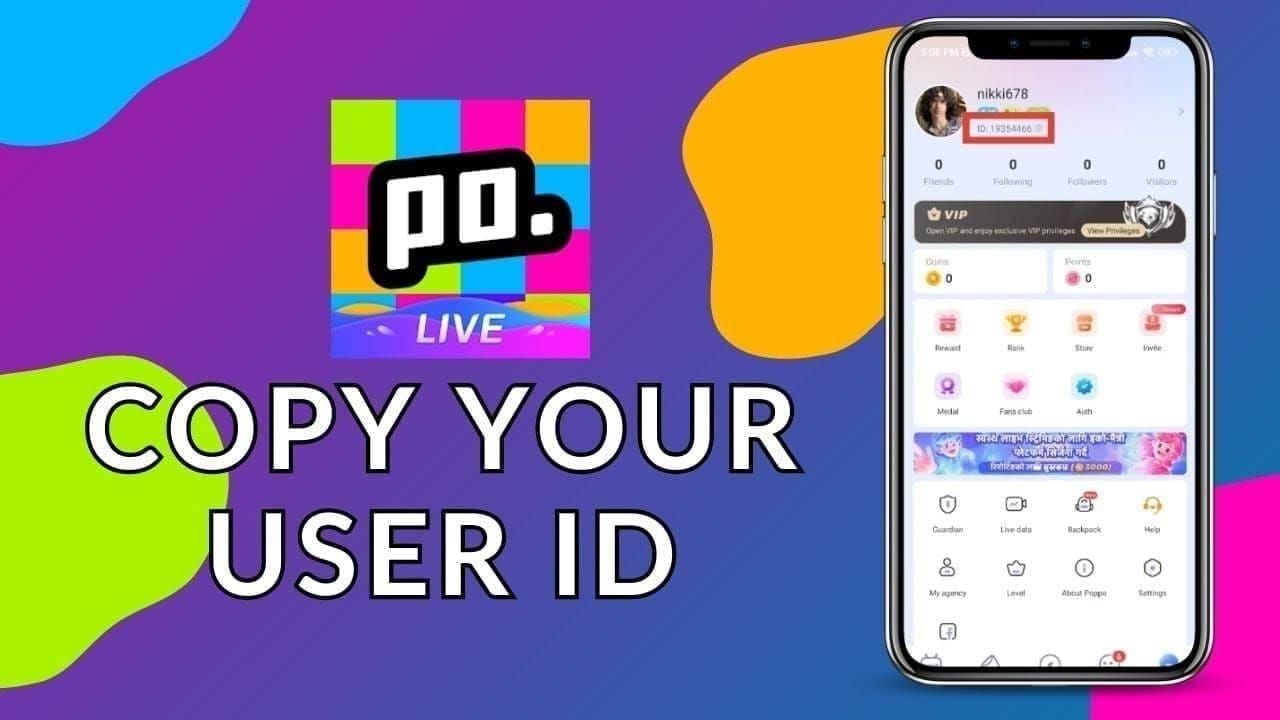
Step-by-Step UID Retrieval:
- Launch the BEST LIVE application on your smartphone.
- Tap the Profile / Me icon located in the bottom-right corner of the main screen.
- View your profile banner at the top of the screen.
- Look directly below your display name and avatar to find the string labeled ID or UID followed by a series of numbers.
- Tap the Copy icon next to the number sequence to copy your UID directly to your clipboard, then paste it into the order field on XPTopup.
Supported Payment Methods for BEST LIVE Recharge
XPTopup provides flexible payment coverage to make purchasing credits simple regardless of where you are located. All available options display during the checkout step with transparent local currency conversion.
- Credit and Debit Cards: International Visa, Mastercard, and other major card networks.
- Digital Wallets and E-Money: Localized digital payment systems and regional e-wallets depending on your country.
- Direct Online Banking: Bank transfers and instant debit options tailored to regional banking infrastructures.
Select your country on the checkout page to view the precise payment methods and transaction fees available in your territory.
Security and Account Safety: Why You Never Share Your Password
Account safety is essential when purchasing in-app currencies online. Legitimate direct top-up platforms never require your account password, email access, or verification codes (OTP).
Why UID-Only Top-Up is the Safest Method:
- Zero Credential Exposure: You only provide your public UID. Your login credentials, private messages, and connected social media accounts remain completely untouched.
- No Account Handover: Platforms that ask you to log out so someone else can log in to your profile pose severe risks of theft and unauthorized balance spending. XPTopup processes orders directly through secure system pipelines without logging into your account.
- Encrypted Transactions: All payment processing utilizes high-grade SSL encryption, ensuring your billing details remain protected against unauthorized access.
Never share your password, security questions, or SMS confirmation codes with anyone offering top-up services.
Troubleshooting Delivery Issues and Support
In rare instances where network lag or payment delays occur, use the following checklist to verify your order status:
- Refresh the App: Fully close the BEST LIVE app from your recent apps screen and reopen it. Check your wallet balance again.
- Verify the UID Entered: Check your order confirmation email from XPTopup to verify that the UID you entered matches your in-app ID.
- Check Payment Confirmation: Ensure your payment provider cleared the transaction and issued a completed payment receipt.
- Contact Customer Support: If your balance does not update after payment confirmation, contact the XPTopup 24/7 customer support team. Provide your Order ID and BEST LIVE UID so our support agents can track and resolve the transaction immediately.
Frequently Asked Questions
How do I find my BEST LIVE UID?
Open the BEST LIVE app, tap the Me or Profile tab in the bottom right corner, and look below your profile nickname. Your unique numeric ID is displayed next to an ID label. Tap the copy icon to copy it.
Do I need to share my password to top up BEST LIVE credits?
No. Recharging through XPTopup requires only your public numeric UID. We will never ask for your account password, login tokens, or two-factor authentication codes.
How long does it take for BEST LIVE credits to arrive after payment?
Credits are dispatched automatically as soon as your payment is verified by the payment processor. Under normal conditions, delivery occurs within moments of completed checkout.
What can I purchase with BEST LIVE credits?
You can use BEST LIVE credits to send virtual gifts to live streamers, purchase VIP profile privileges, unlock customized room entry animations, and support hosts in PK battles.
Is it safe to recharge BEST LIVE credits on XPTopup?
Yes. XPTopup uses direct ID-based processing and encrypted payment gateways, ensuring that your financial data and personal account details remain secure throughout the transaction.
What should I do if I enter the wrong UID during top up?
Because top-up orders are processed automatically upon payment confirmation, credits delivered to an existing, valid UID cannot be reversed. Always copy and paste your UID carefully before confirming your order. If you notice an error before the payment status completes, contact XPTopup support immediately.
Current package prices
Current package prices are shown below. Prices exclude Tax. Tax, payment fees and applicable coupons are shown at checkout.
| Package | Price |
|---|---|
| BEST LIVE - BEST LIVE*5000000 | USD 8.33 |
| BEST LIVE - BEST LIVE*10000000 | USD 16.65 |
| BEST LIVE - BEST LIVE*50000000 | USD 83.25 |
| BEST LIVE - BEST LIVE*100000000 | USD 166.50 |
| BEST LIVE - BEST LIVE*1000000 | USD 1.67 |