Marvel Rivals Top Up: Get In-Game Lattices Fast
Marvel Rivals features a dynamic superhero team-based shooter experience where custom character costumes, MVP animations, sprays, and seasonal battle passes let you stand out on the battlefield. To obtain premium cosmetics and battle passes, you need premium currency. XPTopup provides a direct Marvel Rivals top up service designed to deliver Lattices straight to your game account using only your in-game User ID (UID).
Whether you need Lattices for the latest seasonal release or want to convert your balance into store Units, XPTopup offers a fast, reliable checkout experience tailored for global players.
What Are Marvel Rivals Lattices and What Are They Used For?
Lattices serve as the primary premium currency inside Marvel Rivals. Acquired through direct recharge, Lattices allow players to unlock exclusive seasonal items, access the Luxury Pass, and convert directly into Units for standalone cosmetic items.
Key uses for Marvel Rivals Lattices include:- Purchasing the seasonal Battle Pass (Luxury Pass) to earn exclusive hero costumes, nameplates, and progression rewards.- Converting directly into Units for direct store cosmetic purchases.- Buying high-tier hero skins, weapon models, and seasonal event items.- Unlocking premium emotes, voice lines, MVP intros, and profile banners.
| In-Game Currency | How It Is Obtained | Primary Uses |
|---|---|---|
| Lattices | Direct top-up via UID | Battle Pass purchase, conversion to Units, exclusive bundles |
| Units | Lattice conversion / In-game progression | Individual character skins, sprays, emotes, profile items |
How to Top Up Marvel Rivals Lattices on XPTopup
Topping up your Marvel Rivals account is straightforward and requires no account credentials or sensitive passwords. Follow these simple steps:
- Select the Lattice denomination you wish to purchase from the live product options above. Current pricing is displayed directly on the checkout card.
- Enter your Marvel Rivals User ID (UID) in the required field. Make sure to double-check the numbers to prevent delivery to the wrong profile.
- Select your preferred payment method from the available checkout choices.
- Complete the transaction securely.
- Launch Marvel Rivals or restart your game client to verify your updated Lattice balance.
How to Find Your Marvel Rivals User ID (UID)
Finding your Marvel Rivals UID takes just a few seconds inside the game client on PC, PlayStation 5, or Xbox Series X/S.
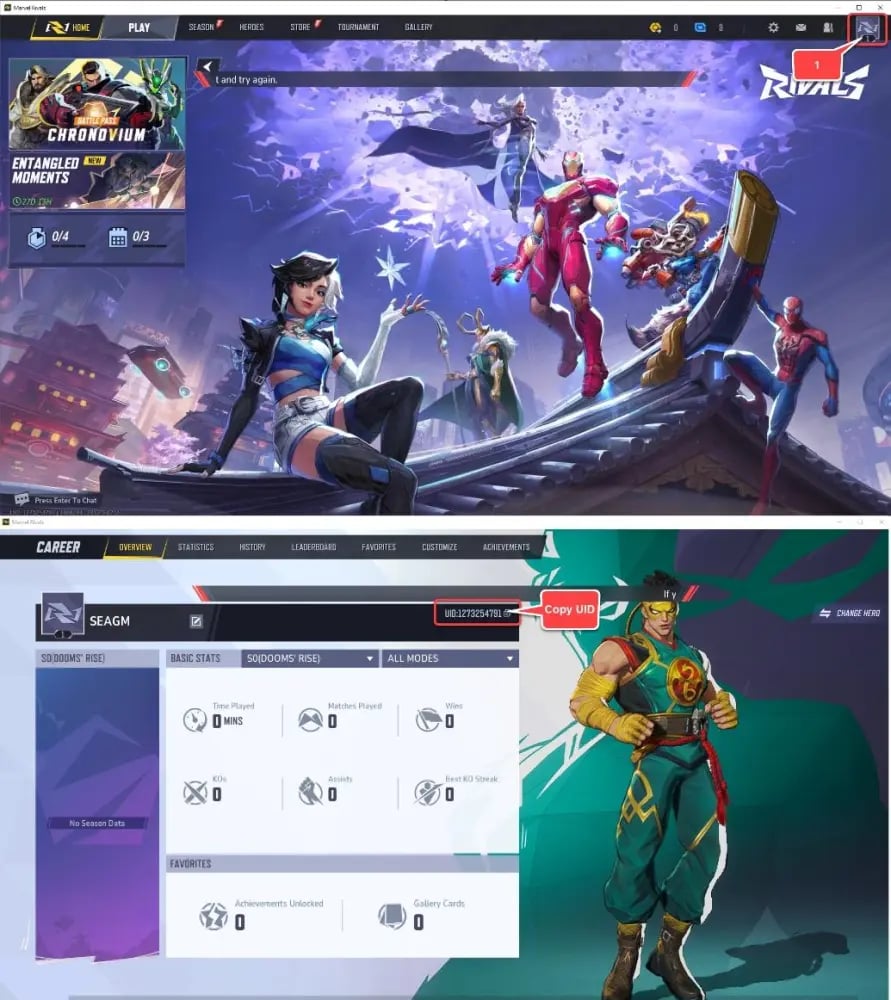
Follow these steps to locate and copy your UID:1. Launch Marvel Rivals and log into your account.2. Click on your profile avatar or username located in the top corner of the main lobby screen.3. Open your profile page or career overview tab.4. Look below your player name and account level to locate your numeric User ID (UID).5. Click the copy icon next to your UID or carefully note down the entire number string.6. Paste or enter this exact UID during your XPTopup checkout.
Converting Lattices to Units and Unlocking the Battle Pass
Understanding how currency functions in Marvel Rivals helps you get the most out of your purchase:- Lattices to Units Conversion: Inside the in-game shop, you can directly convert your Lattices into Units at a fixed exchange rate. This allows you to purchase individual cosmetic items, nameplates, and emotes priced exclusively in Units.- Unlocking the Battle Pass: The seasonal Marvel Rivals Battle Pass is unlocked directly with Lattices. Once you top up your balance, go to the Battle Pass tab in the main menu and select the premium pass unlock option. Any remaining Lattices can be saved for future seasons or converted to Units for immediate cosmetic unlocks.
Cross-Platform Marvel Rivals Top-Up (PC, PS5, Xbox Series X/S)
Marvel Rivals links player progression across platforms via the integrated game ID system. When you submit a Marvel Rivals top up using your numeric UID on XPTopup, the currency is credited directly to your core game profile.
Whether you play primarily on Steam, Epic Games Store, PlayStation 5, or Xbox Series X/S, your UID acts as the universal destination for your Lattices. For cross-save accounts, make sure your console and PC profiles are properly linked under the same core Marvel Rivals account before ordering to ensure your balance shows across all your devices.
Safe and Secure Marvel Rivals Top-Up via UID
Account safety is essential when purchasing in-game items online. XPTopup utilizes a direct-to-account top-up system that operates exclusively via your public User ID.- Zero Password Sharing: You will never be asked to share your game password, Steam login, PlayStation Network credentials, or Xbox account info.- Account Integrity: Direct UID recharges follow standard game delivery protocols, keeping your personal credentials completely private.- Order Support and Troubleshooting: If you notice any delay in balance updates, simply restart your game client to refresh the server connection. In the event of a typo in your UID or a delivery question, contact XPTopup customer service with your order reference number for quick assistance.
Marvel Rivals Top-Up FAQ
How do I add money or Lattices to Marvel Rivals?
Select your desired Lattice bundle on XPTopup, input your in-game Marvel Rivals User ID, and complete your purchase. The currency will be delivered directly to your in-game balance.
Where can I find my Marvel Rivals User ID?
Open Marvel Rivals, click your player avatar in the top corner of the main lobby, and view your profile page. Your numeric User ID is displayed directly below your player name.
Do I need to provide my Marvel Rivals password for a top-up?
No. You only need to provide your Marvel Rivals User ID (UID). XPTopup never asks for your password or platform login credentials.
What is the difference between Lattices and Units in Marvel Rivals?
Lattices are the premium currency obtained through direct top-up and used for major purchases like the Battle Pass. Units are secondary currencies converted from Lattices or earned via in-game milestones to buy individual shop cosmetics.
Can I buy the Marvel Rivals Battle Pass with Lattices?
Yes. You can purchase the premium seasonal Battle Pass directly using Lattices in the in-game Battle Pass menu.
How long does it take for Lattices to arrive after checkout?
Lattices are credited to your account shortly after payment confirmation. Restart your game client if your balance does not refresh automatically.
Current package prices
Current package prices are shown below. Prices exclude Tax. Tax, payment fees and applicable coupons are shown at checkout.
| Package | Price |
|---|---|
| 100 Lattice | USD 0.78 |
| 500 Lattice | USD 3.92 |
| 1,000 Lattice | USD 7.75 |
| 2,180 Lattice | USD 15.78 |
| 5,680 Lattice | USD 38.48 |
| 11,680 Lattice | USD 76.95 |