Biu Live Top Up for Video Chat and Interactive Streaming
Biu Live is a popular interactive social platform designed for 1-on-1 private video calls, real-time live streaming, and global friend discovery. Users around the world connect through high-definition video connections, casual text chat, and interactive voice rooms. In-app credits act as the primary virtual currency across the entire application, giving you the freedom to interact with your favorite broadcasters and creators without interruptions.
Note that Biu Live is an independent video chat platform and is distinct from other live broadcast apps such as Bigo Live. When purchasing currency for your account, ensure you are ordering for Biu Live to match your account profile.
Inside Biu Live, credits serve several key interactive functions:
- Direct 1-on-1 Video Calls: Connect privately with streamers and hosts across the globe using per-minute credit rates.
- Virtual Gifting: Send colorful animated gifts during live streams or video sessions to support creators and increase your profile level.
- Interactive Features: Access premium chat tools, VIP badge frames, and profile visibility boosts within the community.
- Match Connections: Speed up discovery filters to connect with users sharing similar language preferences and interests.
Refilling your balance on XPTopup ensures your account remains ready whenever you want to connect with creators or friends.
How to Find Your Biu Live UID
To process your order, XPTopup requires only your unique numeric User ID (UID). You do not need to share your login credentials or social account passwords. Follow these quick steps to locate your UID inside the app:
- Open the Biu Live app on your Android or iOS device.
- Tap the Profile icon (labeled "My" or showing your avatar) in the bottom-right corner of the main screen.
- Look directly beneath your avatar and display name on the profile overview.
- Find the numeric string marked ID or UID.
- Tap the copy icon next to the number to copy it to your clipboard, or carefully write down the full numeric code.
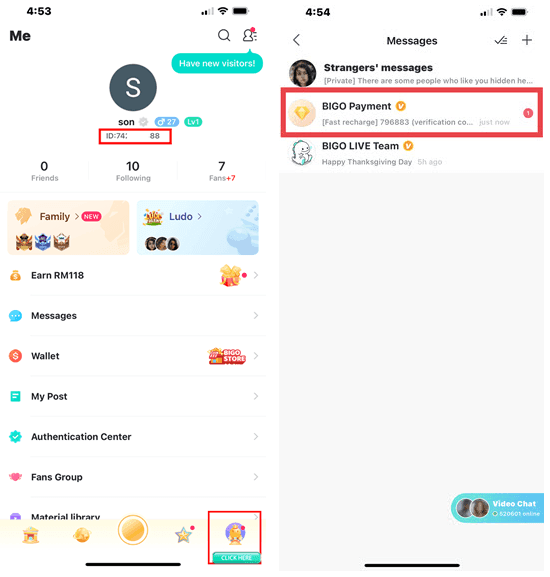
Double-check that you have copied every digit correctly before heading to the checkout page. Entering an accurate UID ensures your purchased credits reach your exact account without delays.
Step-by-Step Guide to Recharge Biu Live on XPTopup
Recharging your Biu Live account on XPTopup is direct, fast, and secure. Follow these steps to complete your transaction:
- Select Your Credit Bundle: Browse the product catalog on this page and choose the Biu Live credit package that meets your communication needs.
- Enter Your UID: Paste your numeric Biu Live User ID into the required input field.
- Review Your Information: Verify the UID you entered to make sure there are no typos or missing digits.
- Choose a Payment Method: Select your preferred local or international payment option from the list provided during checkout.
- Complete Checkout: Finalize your payment. The automated distribution system will route the ordered credits directly to your Biu Live account.
| Order Step | Action | Description |
|---|---|---|
| Step 1 | Package Selection | Pick the credit denomination you want to purchase |
| Step 2 | Input UID | Enter your numeric Biu Live ID from your profile tab |
| Step 3 | Verification | Confirm the digits match your personal account |
| Step 4 | Payment | Complete your order using your chosen payment channel |
| Step 5 | Account Refresh | Open the app to view your updated credit balance |
Account Safety: 100% UID-Only Top Up Security
Security is a fundamental priority for online transactions. When you purchase Biu Live credits on XPTopup, your account remains completely protected because we operate strictly on a direct UID fulfillment basis.
- No Account Passwords Required: You never have to reveal your account password, email credentials, or third-party login tokens (such as Google, Apple, or Facebook logins).
- Zero Risk of Account Hijacking: Because no login access is granted, your private messages, call history, and profile data remain entirely in your control.
- Gift Credits to Friends: Because only a public UID is needed, you can easily top up credits for friends or favorite hosts by entering their numeric ID at checkout.
- Encrypted Transactions: Every transaction processed on XPTopup uses standard encryption protocols to protect your billing information during payment processing.
Credit Delivery Timeline and Refresh Troubleshooting
Orders submitted on XPTopup are processed automatically once payment confirmation is received from your payment provider. Under normal operating conditions, credits are credited directly to your Biu Live balance shortly after completing your purchase.
If your balance does not reflect your new credits immediately after finishing checkout, follow these troubleshooting steps:
- Refresh the App: Swipe down on your Biu Live profile screen to trigger an account balance refresh.
- Restart the Application: Completely close the Biu Live app from your device's multitasking menu and launch it again.
- Verify Your Network Connection: Ensure your mobile device has a stable Wi-Fi or cellular data connection so the app can fetch the latest server data.
- Check Order Confirmation: Verify your XPTopup order status page to confirm that the payment went through successfully and that the UID entered was correct.
- Reach Out for Assistance: If your credits have not arrived after completing these steps, contact the 24/7 XPTopup customer service team with your Order ID and UID for direct order tracking.
Live Pricing and Supported Payment Channels on XPTopup
XPTopup provides flexible purchasing options for global Biu Live users. All pricing, available packages, and local currency rates are calculated and displayed in real time directly on the live checkout screen.
- Clear Pricing: The price you see on the package selection and checkout interface reflects current exchange rates with no hidden processing surcharges.
- Global Payment Options: Choose from a wide selection of payment methods, including major credit/debit cards, regional digital wallets, and local bank transfer systems depending on your region.
- 2026 Updated Rates: Product catalogs and bundle options are kept up to date throughout 2026 to ensure consistent availability.
Select your package above, input your Biu Live UID, and complete your recharge with total peace of mind.
Biu Live Top Up Frequently Asked Questions
What is Biu Live and how do credits work?
Biu Live is a live video chat and streaming application that allows users to meet people globally through 1-on-1 video calls, voice rooms, and interactive broadcasts. Credits are the in-app digital currency used to initiate video calls, purchase animated virtual gifts for creators, and access premium interactive features.
Where can I find my Biu Live UID for top up?
Open the Biu Live app and tap the Profile icon in the bottom right corner of the screen. Your numeric UID is located directly below your profile picture and username. Tap the copy icon next to your ID to copy it to your clipboard.
Do I need to share my Biu Live password to recharge on XPTopup?
No. XPTopup requires only your numeric Biu Live UID. You should never share your account password, email login, or verification codes with anyone. Direct UID top ups are completely safe and require no account access.
How quickly will my Biu Live credits appear in my account?
Credits are dispatched automatically as soon as your payment is confirmed. In most cases, the funds appear in your Biu Live wallet almost immediately. Simply refresh your profile page or restart the app to see your updated balance.
What happens if I enter the wrong UID during checkout?
Credit top ups are processed automatically based on the UID provided during checkout. If an incorrect but valid UID is entered, the credits will be delivered to that account and cannot be recalled or refunded. Always double-check your UID digits carefully before completing payment.
What payment options are available for Biu Live top up on XPTopup?
XPTopup supports a wide variety of domestic and international payment channels, including credit and debit cards, e-wallets, and regional payment methods. The full list of available options for your country will be displayed on the checkout screen.
Current package prices
Current package prices are shown below. Prices exclude Tax. Tax, payment fees and applicable coupons are shown at checkout.
| Package | Price |
|---|---|
| Biu Live - Biu Live*2000 | USD 3.14 |
| Biu Live - Biu Live*5000 | USD 7.86 |
| Biu Live - Biu Live*10000 | USD 15.72 |
| Biu Live - Biu Live*15000 | USD 23.58 |
| Biu Live - Biu Live*20000 | USD 31.45 |
| Biu Live - Biu Live*25000 | USD 39.31 |
| Biu Live - Biu Live*50000 | USD 78.61 |
| Biu Live - Biu Live*100000 | USD 157.23 |
| Biu Live - Biu Live*1000 | USD 1.57 |