ZEPETO Top Up: What Are ZEPETO Zems and Coins and How to Use Them
ZEPETO is a global avatar-centric social platform where digital identity, fashion design, and interactive virtual spaces meet. Customizing your avatar, building personalized rooms, and accessing premium creator items require in-app currency. ZEPETO operates on a dual-currency economy consisting of Zems and Coins. Understanding how each currency functions helps you choose the right top up package for your creative needs.
ZEPETO Zems: The Premium Currency
Zems represent the premium virtual currency in ZEPETO. They provide direct access to top-tier fashion collaborations, luxury designer collections, specialized animations, and creator-made studio items. Key uses for Zems include:- Creator Studio Items: Purchase custom-made clothing, exclusive hairstyles, and limited accessories designed by community creators.- Exclusive Brand Collaborations: Buy officially licensed fashion drops, runway collections, and limited-edition designer apparel.- Premium Avatar Animations: Unlock custom poses, viral dance moves, and unique camera gestures for photos and videos.- World Passes and VIP Rooms: Gain admission to exclusive areas and premium interactive rooms within ZEPETO Worlds.
ZEPETO Coins: The Standard Virtual Currency
Coins are the primary everyday currency within ZEPETO. While users earn small quantities of Coins through daily quests, mini-games, and reward wheels, top ups allow you to skip the grind and build your catalog immediately. Common uses for Coins include:- Base Wardrobe Essentials: Purchase standard shirts, pants, shoes, and everyday street fashion.- Basic Decor and Furniture: Decorate your personal space with standard interior items and room assets.- Mini-Game Items: Acquire basic tools, consumables, and entry tickets across community-created worlds.
| Currency | Type | Best Used For | Primary Source |
|---|---|---|---|
| Zems | Premium | Creator fashion, brand collabs, exclusive gestures, VIP rooms | Direct top up, rare platform events |
| Coins | Standard | Everyday apparel, basic room decor, mini-game items | Daily quests, mini-games, direct top up |
How to Top Up ZEPETO Zems & Coins on XPTopup
Recharging your ZEPETO balance on XPTopup takes only a few quick steps. Live pricing and active package options are displayed directly on the checkout module above. Follow this step-by-step process to complete your purchase:
- Select Your Desired Package: Choose the exact quantity of Zems, Coins, or combo bundles you wish to purchase from the selection grid.
- Enter Your Zepeto ID: Type your unique Zepeto ID into the designated input field. Make sure to double-check the characters to prevent sending currency to the wrong account.
- Proceed to Secure Checkout: Review the package details and the current price displayed on the live checkout interface.
- Complete the Payment: Pick your preferred payment method from the available local and international options and finalize the transaction.
- Check Your Account: Open the ZEPETO app on your mobile device. Your updated balance will be credited directly to your profile.
How to Find Your ZEPETO ID in the App
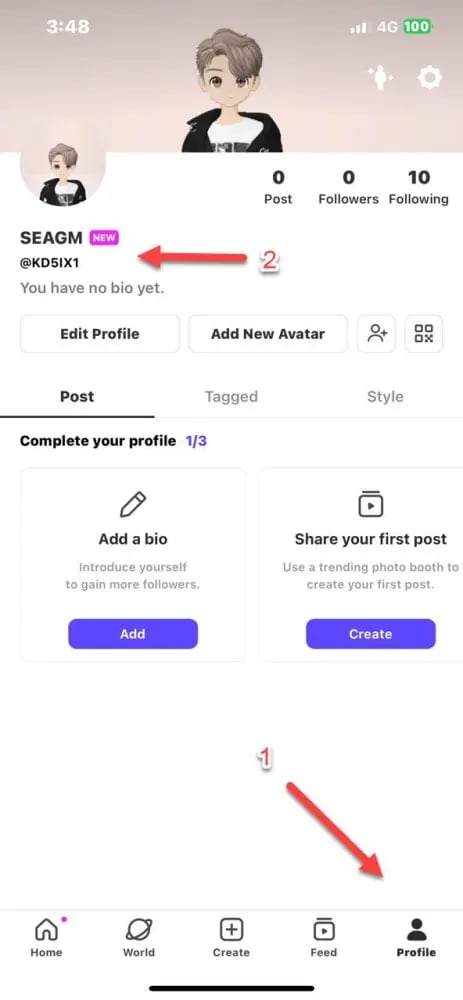
To complete an order on XPTopup, you only need to provide your Zepeto ID. You do not need to share your login credentials, email, or social account passwords. Follow these steps to find your Zepeto ID:
- Open the ZEPETO app on your iOS or Android device.
- Tap the Profile tab in the bottom navigation bar.
- Look at the section directly below your avatar and display name.
- Locate your unique Zepeto ID (often formatted as a username string or starting with an
@handle). - Tap the Copy icon next to your ID to copy the exact text to your clipboard.
- Paste the copied ID into the Zepeto ID box on the XPTopup product page.
How to Gift ZEPETO Zems and Coins to Friends
Surprising friends or community members with Zems and Coins is straightforward on XPTopup. Because our platform only requires a Zepeto ID to credit an account, you can send in-game currency directly to anyone without logging into their account or managing complex friend-gifting approvals inside the app.
To send a gift:1. Ask your friend for their exact Zepeto ID (found on their profile screen).2. Select the Zem or Coin pack you want to send them on XPTopup.3. Paste your friend's Zepeto ID into the player information field instead of your own.4. Complete the checkout process.5. The Zems or Coins will credit directly to your friend's balance, allowing them to purchase their favorite creator items immediately.
Account Safety: Why You Only Need a ZEPETO ID with No Password Required
Account safety is a core priority when purchasing digital currencies online. Traditional manual top-up methods that require account login credentials, passwords, or linked social media access introduce serious security risks.
XPTopup uses direct-to-ID crediting architecture. Here is why this ID-only system protects you:- Zero Password Sharing: You never expose your master account password, email credentials, or phone numbers.- Protected Social Logins: Whether your ZEPETO account is linked to Apple, Google, Twitter/X, or Facebook, those login authentications remain entirely private.- Immunity from Account Takeovers: Without access to your personal login info, third parties cannot modify your account settings, alter your email, or transfer items.- Safe for Content Creators & Streamers: Influencers and creators can receive top ups from fans or sponsors simply by sharing their public Zepeto ID.
Troubleshooting: What to Do If Your Zems or Coins Do Not Show Up
If you have completed your transaction on XPTopup but your new Zems or Coins are not visible in your ZEPETO account right away, follow these diagnostic steps:
- Force Restart the ZEPETO App: Completely close the ZEPETO application from your device's recent apps switcher and reopen it. This forces the client to sync with the central server and refresh your wallet balance.
- Check Your In-Game Mailbox: Certain promotional packages or bonus currencies may arrive as an in-game system message that requires you to tap "Claim".
- Verify the Submitted Zepeto ID: Review your order confirmation receipt on XPTopup. Check whether the Zepeto ID matches your profile character-for-character. If a typo occurred, contact support immediately.
- Check Network Connectivity: Ensure your mobile device has a stable internet connection so the app can fetch real-time profile data.
- Contact XPTopup Customer Support: If your balance does not update after restarting the app, submit your XPTopup order reference number to customer support for prompt verification and assistance.
Frequently Asked Questions
How do you buy Zems and Coins in ZEPETO?
To buy Zems and Coins, choose your desired bundle on XPTopup, provide your unique Zepeto ID, and complete payment via the secure checkout. The currency is credited straight to your ZEPETO profile balance without requiring any account passwords.
Where can I find my ZEPETO ID for a top up?
Open the ZEPETO application, tap the Profile icon in the lower-right corner, and look directly beneath your avatar name. Your Zepeto ID is displayed there with a quick-copy icon next to it.
Do I need to share my ZEPETO password to recharge Zems?
No. Recharges on XPTopup require only your public Zepeto ID. You should never share your password, verification codes, or linked social accounts with any top-up service.
Can I send ZEPETO Zems and Coins as a gift to a friend?
Yes. Simply enter your friend's Zepeto ID into the ID field on the XPTopup checkout page instead of your own. Once the payment finishes, the Zems or Coins will be added straight to their in-game balance.
What is the difference between ZEPETO Zems and Coins?
Zems are the premium currency used for exclusive creator studio clothes, licensed designer brand drops, and VIP world passes. Coins are the standard currency used for basic everyday apparel, common accessories, and standard room decor.
What should I do if my ZEPETO top up has not appeared in my account?
First, force close and relaunch the ZEPETO application to refresh your account data. If the balance remains unchanged, check your in-game mailbox to claim any pending items, verify that your submitted Zepeto ID was correct, and contact XPTopup support with your transaction details.
Current package prices
Current package prices are shown below. Prices exclude Tax. Tax, payment fees and applicable coupons are shown at checkout.
| Package | Price |
|---|---|
| 7 ZEMS | USD 0.35 |
| 4680 Coins | USD 0.69 |
| 14 ZEMS | USD 0.69 |
| 9700 Coins | USD 1.34 |
| 28 ZEMS | USD 1.34 |
| Premium 1M | USD 2.48 |
| 58 ZEMS | USD 2.67 |
| 25200 Coins | USD 3.35 |
| 40700 Coins | USD 5.39 |
| 128 ZEMS | USD 5.82 |
| 110000 Coins | USD 14.16 |
| 323 ZEMS | USD 14.75 |
| 300000 Coins | USD 38.48 |
| 1000 ZEMS | USD 43.87 |