What is Gimme Top Up and How In-App Credits Work
Gimme is a global live video chat and social platform designed to connect users across different regions in real time. Inside the Gimme application, credits (also referred to as coins or gems depending on regional app interfaces) function as the primary in-app currency. These credits enable you to initiate high-definition 1-on-1 video calls, access premium match filters, unlock private direct messaging features, and send animated virtual gifts to your favorite live streamers and chat partners.
A Gimme top up is the process of purchasing these digital credits outside the standard app store billing systems, allowing you to reload your account balance quickly using local and international payment methods. When you top up your balance through XPTopup, the credits are credited directly to your unique Gimme User ID (UID). You do not need to link credit cards to your mobile device's app store or share your login credentials with anyone. Having an active credit balance ensures uninterrupted conversations, instant connections, and the freedom to reward creators during live streaming sessions.
How to Find Your Gimme User ID (UID)
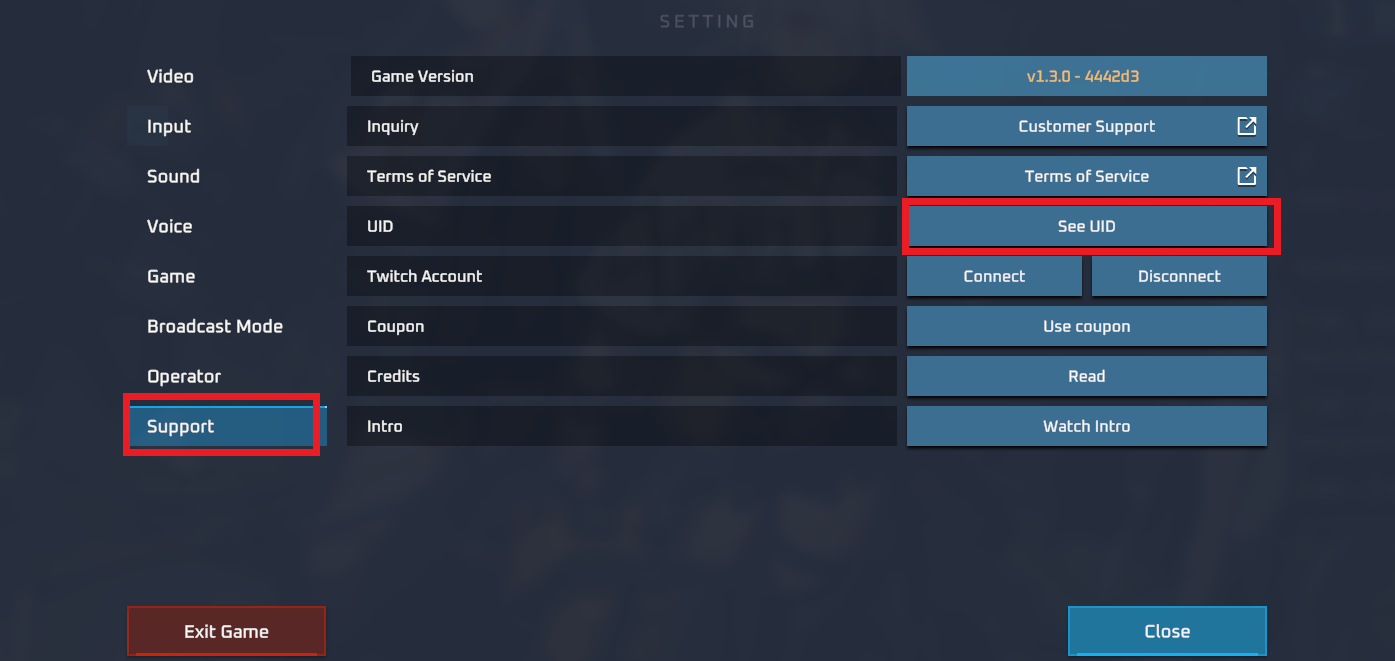
To ensure your purchased credits are delivered to the correct account, you must provide your exact Gimme User ID (UID). Your UID is a unique numerical identifier assigned to your profile upon registration. Finding it takes only a few seconds inside the app.
Follow these steps to locate your UID:
- Open the Gimme app on your mobile device.
- Tap the Profile or My Page icon located in the bottom-right corner of the main screen.
- Look directly beneath your profile avatar, display name, or account bio.
- Locate the numerical string labeled UID or ID (e.g.,
UID: 12345678). - Tap the copy icon next to the number, or write down the digits carefully.
Always double-check the copied digits before submitting your order on XPTopup to avoid crediting an unintended account.
Step-by-Step Guide to Top Up Gimme on XPTopup
Recharging your Gimme account on XPTopup is designed to be straightforward and fast. Follow this walkthrough to complete your purchase:
- Select Your Package: Browse the available Gimme credit tiers on this page and choose the package that fits your social and gifting needs.
- Enter Your Gimme UID: Paste your numerical User ID into the designated
UIDfield. Verify that no spaces or special characters were accidentally copied. - Proceed to Checkout: Click the purchase button to open the secure payment screen.
- Choose a Payment Method: Select your preferred payment channel from the real-time list of supported options on the checkout page.
- Complete Payment: Finalize the payment following the on-screen instructions. Your order will be processed immediately through automated direct delivery.
- Verify Balance: Open or restart your Gimme application to view your updated credit total.
Safe Checkout: Why You Only Need Your UID and No Password
Account safety is a critical priority when purchasing digital currencies online. XPTopup uses a direct UID-only recharge protocol for Gimme top ups, offering significant safety benefits:
- Zero Password Requirement: You never have to share your Gimme password, social login details (Google, Apple, Facebook), or SMS verification codes.
- No Account Sharing: Your personal chat history, contact lists, and profile settings remain completely private and under your control.
- Direct System Delivery: Credits are sent straight to your public account ID through direct backend integration, eliminating manual login handoffs.
- Protected Payment Gateway: All transactions on XPTopup are processed through encrypted payment systems, protecting your personal and financial data.
By keeping your login information strictly to yourself, you eliminate the risks associated with account takeover and unauthorized profile modifications.
Available Gimme Credit Packs and Real-Time Checkout
XPTopup provides multiple credit denominations to support casual video callers as well as active social gifters. The live checkout interface always reflects current package availability, updated pricing, and active regional payment options.
| Package Tier | Primary Use Case | Recharge Type |
|---|---|---|
| Starter Credit Pack | Quick 1-on-1 calls, testing match filters | Direct UID Delivery |
| Standard Credit Pack | Extended private video chats, casual gifting | Direct UID Delivery |
| Advanced Credit Pack | Regular live stream participation, animated gifts | Direct UID Delivery |
| Premium Credit Pack | High-tier gifting, long video sessions, priority matching | Direct UID Delivery |
Note: Exact credit amounts and currency prices are displayed on the real-time order selection module at the top of this page. Review the active rates prior to finalizing checkout.
Troubleshooting Delayed Credits or Incorrect UID Submissions
In most cases, Gimme credit recharges reflect on your account balance instantly after payment confirmation. If you experience an unexpected delay or suspect an error, follow these troubleshooting steps:
- Restart the Gimme App: Close the Gimme application completely on your mobile device (remove it from background apps) and reopen it. A fresh session forces the app to sync your latest balance with the server.
- Check Your Internet Connection: Ensure your mobile data or Wi-Fi connection is stable. Weak connections may cause the balance display in your profile tab to lag.
- Confirm the Order Status on XPTopup: Check your order confirmation page or transaction history on XPTopup to verify that the payment was processed successfully.
- Verify the Submitted UID: Check the order receipt to verify whether the UID submitted matches your current Gimme account number.
- Contact Support: If your credits have not arrived after a short period, or if you submitted the wrong UID, reach out to the XPTopup customer service team with your Order ID and transaction receipt for prompt assistance.
Frequently Asked Questions About Gimme Top Up
Where can I find my Gimme UID for top up?
Open the Gimme app, tap on the Profile icon in the bottom-right corner, and look below your profile picture and nickname. Your UID is the series of numbers displayed there. You can tap the icon next to it to copy the ID directly to your clipboard.
Do I need to provide my Gimme account password to recharge?
No. XPTopup only requires your numerical Gimme UID to deliver your credits. You should never disclose your password, verification codes, or linked social media login details to anyone during a top up.
How quickly do Gimme credits arrive after payment?
Credits are dispatched immediately once your payment is confirmed through the checkout gateway. In standard conditions, the credits appear in your Gimme in-app balance within moments. Refreshing the profile page in your app will show the updated balance.
Can I top up Gimme credits for a friend using their UID?
Yes. Because the top-up process only requires a valid Gimme UID, you can purchase credits for friends or family. Simply enter their Gimme UID in the player ID field instead of your own during checkout.
What should I do if I entered an incorrect UID during checkout?
If you realize you entered an incorrect UID, contact XPTopup customer support immediately with your order reference number. If the order has not yet been processed by the automated dispatch system, our team will assist in updating the information. Once an order has been successfully delivered to an existing third-party UID, it cannot be reversed.
Which payment options are supported for Gimme top up on XPTopup?
XPTopup supports a diverse range of localized and international payment options, including major credit/debit cards, e-wallets, online banking, and regional payment systems. The complete and up-to-date selection of available payment methods is shown directly on the checkout screen based on your region.
Current package prices
Current package prices are shown below. Prices exclude Tax. Tax, payment fees and applicable coupons are shown at checkout.
| Package | Price |
|---|---|
| Gimme - Gimme*15000 | USD 1.70 |
| Gimme - Gimme*20000 | USD 2.26 |
| Gimme - Gimme*25000 | USD 2.83 |
| Gimme - Gimme*50000 | USD 5.66 |
| Gimme - Gimme*100000 | USD 11.32 |
| Gimme - Gimme*500000 | USD 56.60 |
| Gimme - Gimme*1000000 | USD 113.20 |
| Gimme - Gimme*10000 | USD 1.13 |