TAKA Live Coins Top Up: Direct UID Balance Recharge
TAKA Live is an interactive social live-streaming and voice chat platform where users connect with broadcasters, join multi-guest audio parties, participate in PK battles, and play casual in-app mini-games. TAKA Live Coins serve as the primary virtual currency within the ecosystem, giving you the ability to send animated gifts, activate premium Noble statuses, access custom entrance effects, and interact directly with host communities.
Recharging on XPTopup provides a direct top-up method requiring only your numeric Player ID. You can select your required coin package, verify your account details, and receive your balance directly inside your TAKA Live app without sharing account credentials or social logins.
What Are TAKA Live Coins and In-App Utility
TAKA Live Coins are the premium balance used across all interactive features in the TAKA Live mobile app. Holding coins enables several core features across live video and voice environments:
- Animated and 3D Virtual Gifts: Send gifts ranging from standard roses and applause to full-screen luxury animations, luxury cars, and dynamic fantasy effects during live streams.
- PK Battle Support: Boost your favorite streamer's score during real-time PK challenges against rival broadcasters to help them win timed leaderboard rounds.
- Voice Room Interactions: Use coins to gift speakers across multi-seat audio chat rooms, trigger room-wide lucky gift bags, and interact with co-hosts.
- Profile Customization: Acquire custom avatar frames, animated chat bubbles, and unique profile rings that display in room participant lists.
- In-App Mini-Games: Use coins to participate in interactive social mini-games hosted directly within live rooms and audio channels.
Coins vs. Beans: How TAKA Live Currency Works
TAKA Live utilizes a dual-currency structure to separate viewer spending from host earnings. Understanding how these currencies interact ensures you manage your balance correctly.
| Currency | How It Is Acquired | Primary Use | Transferable? |
|---|---|---|---|
| Coins | Purchased via top-up (XPTopup / in-app) | Sending gifts, buying Noble perks, entrance effects, mini-games | Spent by viewers; converted to Beans when received by hosts |
| Beans | Earned by streamers when receiving gifts | Host revenue, leaderboard ranking, internal reward withdrawal | Converted by hosts or exchanged through official platform mechanisms |
When you send a gift using your Coins, the receiving broadcaster collects the gift's value in Beans. Viewers cannot receive direct transfers of Coins from other users; coins must be topped up directly to your Player ID.
How to Find Your TAKA Live Player ID
To ensure your recharge reaches the correct account, locate your numeric Player ID inside the TAKA Live application before placing an order.
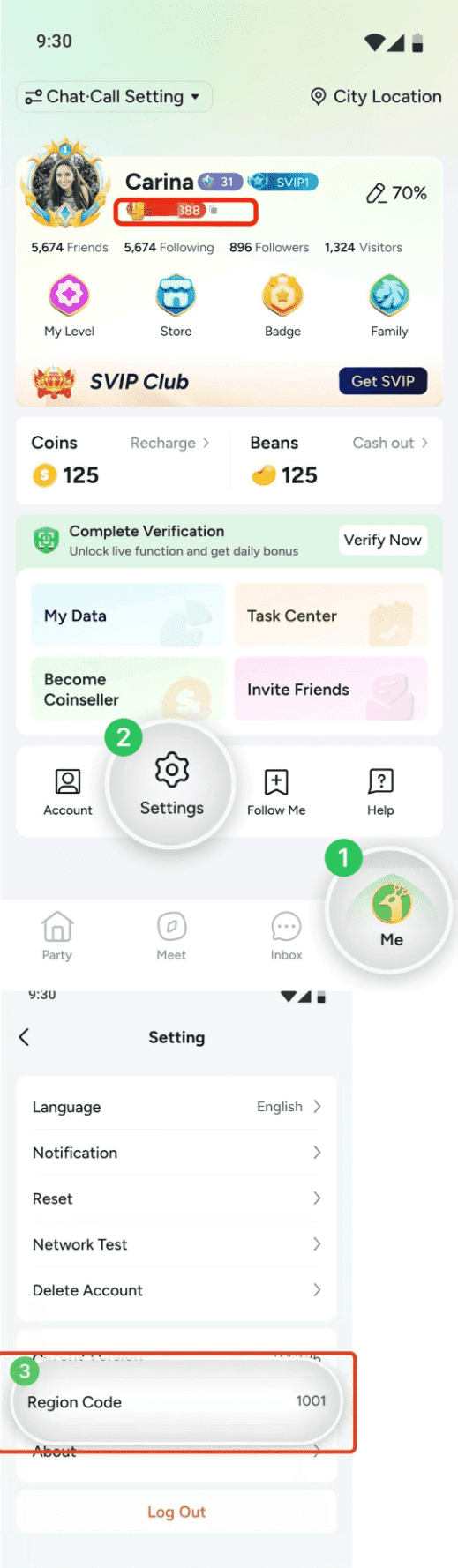
- Open the TAKA Live app on your mobile device.
- Tap the Profile (or Me) icon located at the bottom right corner of the main screen.
- Your Player ID (a series of numbers) is clearly displayed directly underneath your profile avatar and username.
- Tap the Copy icon next to your ID to copy the number directly to your clipboard.
Tip: Always copy and paste your Player ID rather than typing it manually to prevent typos and delivery delays.
How to Top Up TAKA Live Coins on XPTopup
To top up your TAKA Live Coins quickly and safely, follow these simple steps:
- Select Package: Choose the TAKA Live Coin denomination you wish to purchase from the product catalog.
- Enter Account Details: Paste your numeric Player ID into the designated field.
- Review Order: Check that the Player ID matches your in-app profile.
- Complete Payment: Proceed to checkout and select your preferred payment method from the available local and international options displayed on the payment screen.
- Receive Coins: Once payment is confirmed, the system delivers the coins directly into your TAKA Live account balance. Open the app to view your updated total.
VIP and Noble Status Perks with TAKA Live Coins
Spending TAKA Live Coins unlocks access to the platform's VIP and Noble ranking system. Attaining Noble status grants exclusive cosmetic and social privileges across the app:
- Exclusive Entrance Animations: Announce your presence with custom entrance vehicles, flying banners, and special screen announcements whenever you enter a live stream or voice room.
- Unique Badges and Nameplates: Stand out in chat feeds with distinguished Noble name badges, custom text colors, and high-visibility ranking markers.
- Voice Room Privileges: Access special seat-locking protections, immunity to standard room kicks, and priority audio queue placement.
- Exclusive Noble Gifts: Unlock access to high-tier virtual gifts reserved exclusively for Noble title holders.
Safe UID-Only Recharge: Why No Password Is Required
Account safety is a core priority when topping up live streaming credits. XPTopup uses a direct UID injection system that requires only your public Player ID.
- Zero Password Requests: You will never be asked for your account password, security questions, or linked social media credentials (Google, Apple, Facebook, or phone verification codes).
- No Account Handover: Your account remains entirely in your hands. You do not need to log out, share access, or grant third-party permissions.
- Direct Balance Updates: The recharge processes externally through your ID, crediting your official in-app balance without compromising private profile data.