Infun Top Up: What Is Infun and How Voice Room Credits Work
Infun is a social audio entertainment platform where users join multi-guest voice chat rooms, participate in live audio games, sing karaoke, and build online communities. Within the app, the core social interaction revolves around virtual gifting, room customization, and prestige progression.
Infun credits serve as the official digital currency required to access premium in-app features. When you hold credits in your balance, you can:
- Send Animated Gifts: Reward room hosts and active speakers with customized 3D gifts and particle effects.
- Activate Room Entry Effects: Display custom vehicles, banners, and sound effects whenever you enter a popular voice room.
- Boost Prestige Ranking: Gifting credits advances your account level, unlocking exclusive VIP badges and special chat bubble colors.
- Support Community Creators: Help hosts climb weekly and monthly leaderboards to earn community rewards.
Recharging credits directly to your account ensures uninterrupted participation during competitive room events and gifting battles.
How to Find Your Infun UID for Instant Top Up
Every Infun account has a unique numeric User ID (UID). This identifier is the only detail needed to credit your account on XPTopup, eliminating the need to share private account credentials.
Follow these steps to locate your UID:
- Open the Infun application on your mobile device.
- Tap the Profile or Me icon located in the bottom navigation bar.
- Look directly beneath your profile picture and nickname to find your UID (a sequence of numbers).
- Tap the copy icon next to your UID to copy it directly to your clipboard.
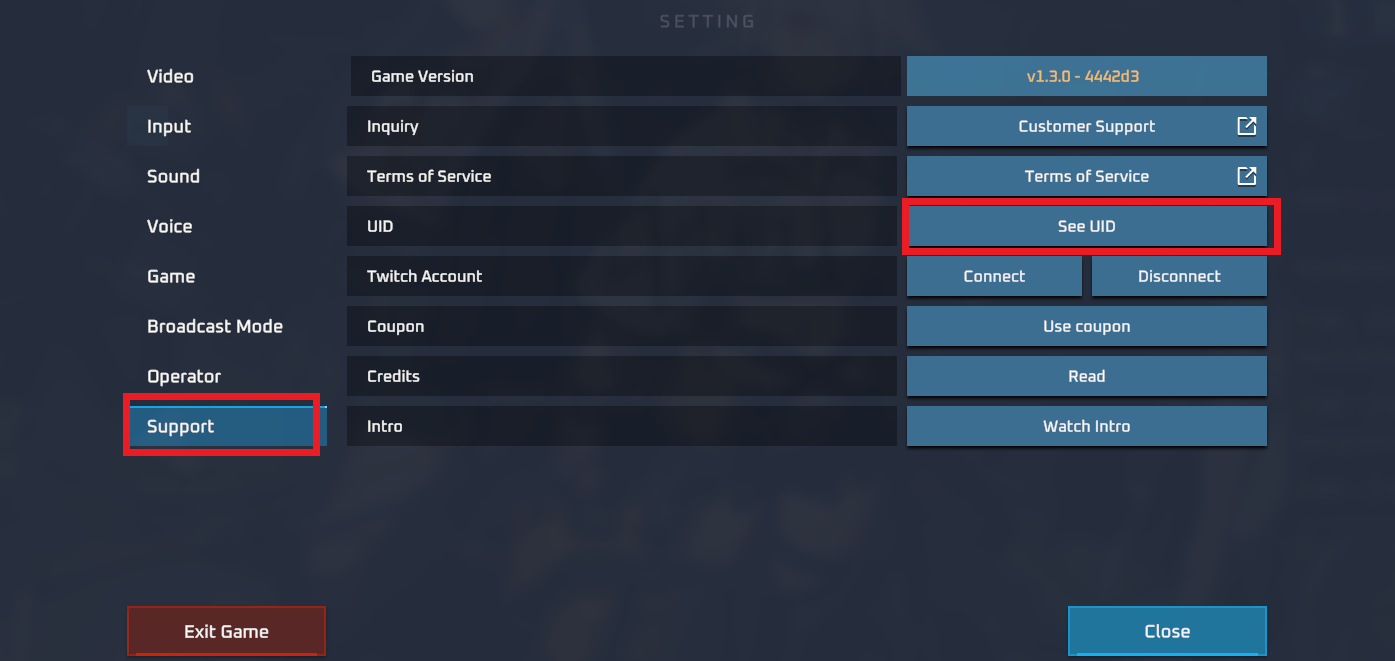
Always copy and paste your UID rather than typing it manually. Verifying the exact digits ensures that your credits arrive in the correct account without processing delays.
Step-by-Step Guide to Infun Recharge on XPTopup
To complete an Infun recharge on XPTopup, follow this direct checkout process:
- Select Your Credit Amount: Review the available credit packages listed on the live checkout interface.
- Enter Your UID: Paste your numeric Infun UID into the designated player ID field.
- Select Your Payment Method: Choose from the available regional and international payment options shown at checkout.
- Review and Confirm: Double-check your UID for accuracy and complete the transaction.
- Check In-App Balance: Open Infun and verify your updated credit balance in your wallet tab.
Infun UID Recharge Overview
| Detail | Information |
|---|---|
| Required Account Info | Infun UID (Numeric) |
| Password Required? | No (Never required) |
| Supported Platforms | Android and iOS |
| Primary Currency Use | Voice room gifts, entry effects, prestige upgrades |
| Pricing & Packages | Displayed directly on the live checkout page |
Infun Prestige System and Exclusive Room Level Perks in 2026
In 2026, the Infun prestige system grants active community members visible recognition inside voice rooms. As you spend credits on virtual gifts, your profile accumulates prestige points that unlock distinct social perks:
- Exclusive Avatar Frames: Show off dynamic borders around your profile picture in room guest seats.
- Luxury Entry Animations: Announce your presence with animated cars, aircraft, or mythical effects upon entering any public room.
- Custom Chat Bubbles: Distinguish your messages in fast-scrolling room text feeds with colored backgrounds.
- Microphone Stand Effects: Highlight your seat on stage with radiant spotlight animations during discussions or karaoke sessions.
Recharging credits on XPTopup allows you to maintain your prestige standing and support your favorite room hosts throughout competitive seasonal events.
Platform Compatibility: Infun on Android and iOS
Infun is accessible across major mobile operating systems. Whether you downloaded the app via the Google Play Store, installed an Android APK, or access it on iOS, all account profiles share the same centralized server infrastructure.
Because top-ups on XPTopup use direct UID routing, you do not need to worry about operating system restrictions. Once the recharge completes, your credit balance synchronizes across any device where you log into your Infun account.
Account Safety: Why UID-Only Top Up Protects Your Infun Account
Security is paramount when purchasing virtual currencies. XPTopup uses a UID-only direct recharge system, providing complete protection for your personal data:
- Zero Password Requests: You will never be asked for your account password, email login, or two-factor authentication codes.
- No Third-Party Logins: Your account remains active on your device without session interruptions or unauthorized login attempts.
- Protected Payment Gateways: All transactions are processed through encrypted payment channels.
- Gift for Friends Safely: Because only a UID is required, you can send credits directly to friends, family, or community moderators as gifts without needing access to their private accounts.
Troubleshooting Common Infun Top-Up Issues and UID Verification
If your credits do not appear immediately after completing a transaction, follow these standard troubleshooting steps:
- Restart the Infun App: Close the application completely from your background tasks and reopen it to force a server balance refresh.
- Verify Wallet History: Tap your profile, open your in-app wallet, and check the transaction log for recent top-up records.
- Check the Submitted UID: Confirm that the UID entered during checkout matches the UID displayed in your profile.
- Check Order Status on XPTopup: Log into your XPTopup account to verify that your order status shows as completed.
- Contact Customer Support: If your balance has not updated after a short period, reach out to XPTopup support with your order number and Infun UID for manual verification.
Frequently Asked Questions About Infun Top Up
Where can I find my Infun UID to top up?
Open the Infun app and tap the Profile icon in the bottom right corner. Your UID is the series of numbers displayed directly under your profile photo and username.
Is Infun available on Android and iOS in 2026?
Yes, Infun supports both Android and iOS devices. Credits recharged using your UID apply to your account regardless of the operating system you use.
Do I need to provide my Infun password to buy credits?
No. XPTopup only requires your numeric Infun UID. Never share your password or login verification codes with anyone.
What are Infun credits used for inside voice chat rooms?
Infun credits are used to purchase virtual gifts for room hosts, unlock custom entry animations, upgrade prestige level ranks, and acquire special chat accessories.
Can I recharge Infun credits for a friend using their UID?
Yes. Enter your friend's Infun UID in the player ID field at checkout on XPTopup. The credits will be sent directly to their account balance once payment is completed.
What should I do if my Infun recharge does not show up immediately?
First, restart the Infun app to refresh your wallet balance. If the credits do not appear, check your order status on XPTopup and contact customer support with your transaction order ID for assistance.
Current package prices
Current package prices are shown below. Prices exclude Tax. Tax, payment fees and applicable coupons are shown at checkout.
| Package | Price |
|---|---|
| Infun - Infun*20000 | USD 2.12 |
| Infun - Infun*25000 | USD 2.65 |
| Infun - Infun*50000 | USD 5.30 |
| Infun - Infun*100000 | USD 10.61 |
| Infun - Infun*500000 | USD 53.03 |
| Infun - Infun*1000000 | USD 106.06 |
| Infun - Infun*5000000 | USD 530.28 |
| Infun - Infun*15000 | USD 1.59 |