Fast and Secure Crystal of Atlan SEA Top Up
Power up your Magipunk adventure across Atlan with a direct Crystal of Atlan SEA top up on XPTopup. Whether you want to pull for the newest characters, restock vital energy for dungeon grinding, or grab limited-edition cosmetics, topping up through XPTopup provides a smooth and secure path to get the in-game resources you need.
All transactions are processed directly to your character using your Player ID, eliminating account-sharing risks. Follow these quick steps to complete your purchase:
- Select the bundle or amount of Opals or Vouchers you wish to buy from the live catalog above.
- Enter your numerical Crystal of Atlan SEA Player ID into the designated input field.
- Verify that your character is registered on the Southeast Asia (SEA) server.
- Choose your preferred regional payment option at checkout.
- Confirm your order and complete the transaction. Your items will arrive directly in your game account or in-game mailbox shortly after payment verification.
Live item prices and package selections are always updated directly on the checkout screen above.
How to Locate Your Crystal of Atlan Player ID
Finding your Player ID in Crystal of Atlan is simple and takes only a few seconds. Follow this step-by-step visual reference to ensure your top-up reaches the exact character profile:
- Launch the Crystal of Atlan application on your mobile device or PC client.
- Log in and enter the game world on your active SEA server.
- Tap your character avatar icon located in the top-left corner of the main HUD screen.
- Open your Personal Profile / Basic Info overview.
- Locate the numerical Player ID string displayed right beneath your character name.
- Tap the small copy icon next to your ID to copy the number directly to your clipboard, then paste it on XPTopup.
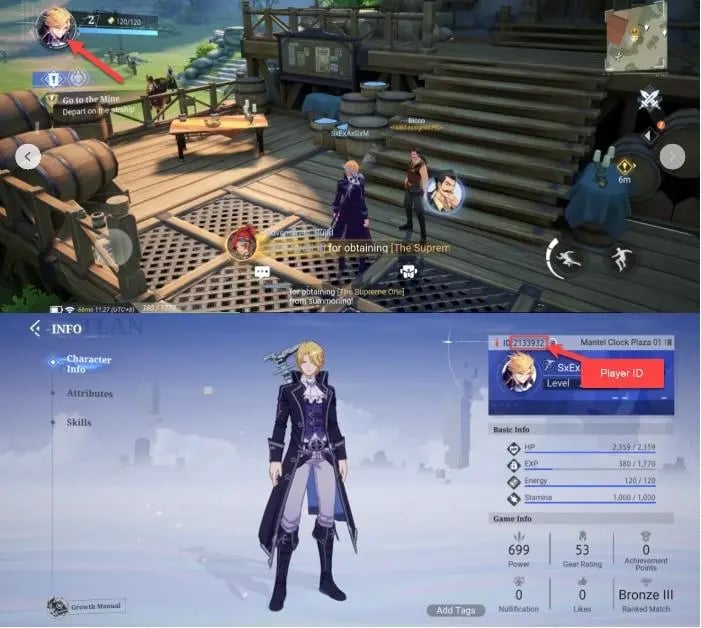
Double-check that the ID you enter on XPTopup matches your active character to prevent delivery delays.
Crystal of Atlan Currency Guide: Opals, Vouchers, and Battle Passes
Understanding the role of each currency in Crystal of Atlan helps you plan your progression and optimize your character builds across PvE raids and PvP arenas.
| Currency / Item | Main Function | Acquisition & Use |
|---|---|---|
| Opals | Premium gacha currency used for character summons, weapon banners, stamina refills, and item conversions. | Direct top-up or conversion from Vouchers in the in-game store. |
| Vouchers | Direct cash-shop equivalent currency used to buy exclusive bundles, discount packages, and special cosmetics. | Direct Player ID recharge on XPTopup. |
| Phantasium Pass | Seasonal battle pass unlocking premium reward tracks, exclusive costumes, enhancement materials, and extra Opals. | Purchased directly with Vouchers or in-game store access. |
Opals
Opals are the core currency for summoning top-tier equipment and companions. They are also essential for resetting daily activity limits and acquiring critical crafting reagents required to forge endgame gear.
Vouchers
Vouchers act as a direct cash equivalent within the in-game mall. Many limited-time promotion packs, cosmetic outfits, and progression boosters require Vouchers directly rather than converted Opals. Purchasing Vouchers allows you the flexibility to spend on whatever bundle offers the highest current value.
Phantasium Pass & Special Bundles
The seasonal pass offers substantial milestone rewards for completing daily and weekly dungeon runs. Upgrading to the advanced pass track yields exclusive cosmetic skins, weapon transmogs, and a steady stream of upgrade materials to boost your combat power.
Why Choose Player ID Direct Recharge Over Account Sharing
Security is paramount when purchasing in-game resources for MMORPGs. XPTopup strictly uses direct Player ID top-ups, which offers major advantages over account sharing:
- Zero Password Sharing: You never have to share your game password, bound email, social login, or security credentials. Your account credentials stay entirely in your control.
- Direct In-Game Crediting: Funds are delivered straight to your character on the SEA server through verified game infrastructure.
- No Risk of Account Compromise: Keeping your login details private protects your account from unauthorized logins, accidental gear dismantling, or security flags.
- Safe for Friends and Guildmates: Because only the Player ID is needed, you can easily top up Opals or gift Vouchers to guild members or friends by simply entering their Player ID at checkout.
Always ensure that you select the correct server region prior to submitting your order to guarantee accurate crediting.
Crystal of Atlan SEA 2026 Events, Outfits, and Updates
In 2026, Crystal of Atlan SEA continues to expand its floating islands with new high-level content, competitive PvP balance updates, and collaborative events:
- Magipunk Raid Expansions: Test your class mechanics against new multi-stage raid bosses that reward unique set gear and rare crafting blueprints.
- Seasonal Costume Drops: Dress your Berserker, Elementalist, Musketeer, Puppeteer, or other classes in limited-edition seasonal outfits and weapon visual effects available in the boutique.
- Guild Warfare & Ranked Arenas: Gear up your character to climb competitive PvP leaderboards and participate in cross-server guild territorial battles.
- Energy & Stamina Management: Ensure you have enough Opals on hand to refill your energy during double-drop weekend events and maximize your gear farming efficiency.
Troubleshooting Delivery and Order Status for Crystal of Atlan
If you have completed your payment on XPTopup and want to verify the status of your items, use these troubleshooting steps:
- Check Your In-Game Mail: Some promotional items, bundles, or converted Vouchers arrive in your system mailbox rather than directly modifying your top-bar balance. Open your in-game mailbox and click claim all.
- Restart the Game Client: If your balance does not update immediately while logged in, exit the game completely and log back in to force a server synchronization with your character data.
- Verify Your Order Status on XPTopup: Visit your XPTopup order history page to confirm that your payment has been processed successfully.
- Check the Submitted Player ID: Verify that the Player ID submitted during checkout matches your exact character profile and belongs to the SEA server.
- Contact 24/7 Support: If your order shows as completed on XPTopup but your items have not appeared after restarting, reach out to our dedicated 24/7 customer support team with your order number for prompt assistance.