KARAK CHAT Top Up: What Are Credits and How They Work
KARAK CHAT is an interactive voice-chat and social entertainment application where users connect across live voice rooms, participate in group discussions, and build digital communities. Within the platform, Karak Chat credits operate as the core virtual currency. Users spend these credits to interact with room hosts, send dynamic virtual gifts, activate special entrance banners, and unlock premium profile badges.
When you participate in active voice chatrooms, sending gifts using your credits allows you to support your favorite creators, increase your room visibility, and climb community leaderboards. Higher gift tiers feature animated visual effects that display across the room, creating an engaging experience for everyone present. Having an ample balance of Karak Chat credits ensures you never miss a moment to participate during live room events, group games, or community celebrations.
To keep your balance ready for room activities, online credit recharging provides direct delivery directly to your account profile without interrupting your active sessions.
How to Find Your Karak Chat UID in the App
Every Karak Chat account is assigned a unique User ID (UID). This numeric identifier links your purchases directly to your profile. Finding your UID is straightforward and can be done entirely within the mobile application.
Follow these steps to locate your Karak Chat UID:
- Launch the Karak Chat app on your mobile device and log in to your account.
- Tap the Profile or Me icon located in the bottom right corner of the main screen.
- On your personal profile page, locate your display name and avatar.
- Your numeric UID is displayed directly beneath your nickname.
- Tap the copy icon next to the number or write down the exact numeric string carefully.
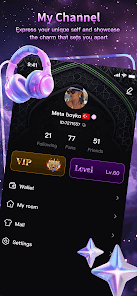
Always double-check that you have copied the complete number. Your UID is the only information required to complete an online credit recharge, making accuracy essential before you proceed to payment.
Step-by-Step Guide to Top Up Karak Chat Credits Online
Recharging your Karak Chat account on XPTopup is designed to be direct, quick, and secure. Follow this walk-through to complete your order:
- Select Your Credit Amount: Review the available Karak Chat credit packages on the product page and select the amount that meets your needs.
- Enter Your User ID: Paste or type your numeric Karak Chat UID into the designated field. Ensure there are no accidental spaces before or after the numbers.
- Review Order Details: Confirm that the selected credit denomination and your entered UID match your intended purchase.
- Choose Payment Method: Select your preferred payment option from the live checkout interface, where real-time pricing and local currency conversions are calculated automatically.
- Complete Checkout: Follow the prompts to finish the transaction securely.
- Check Your In-App Balance: Open or refresh your Karak Chat application. The purchased credits will be applied directly to your profile balance.
Why Choose XPTopup for Your KARAK CHAT Recharge
XPTopup offers a clear, dependable platform designed for social voice-app enthusiasts who want fast credit recharges without unnecessary account risks. Here is why users choose XPTopup for their Karak Chat top-ups:
- UID-Only Processing: You only provide your public numeric ID. You never have to share login credentials, passwords, or linked phone numbers.
- Transparent Live Checkout: All package rates and regional payment options are displayed clearly in real time on the checkout screen without hidden platform fees.
- Fast Account Delivery: Once your payment is verified, the credits are routed straight to your Karak Chat user account balance.
- Reliable Customer Assistance: If you ever run into a question regarding an order receipt or transaction status, dedicated customer support is accessible to assist you promptly.
Password-Free UID Security and Safe Recharge Guidelines
Account safety is essential when purchasing in-app items online. Authentic third-party top-ups for Karak Chat operate strictly through public player identifiers. Understanding these basic security rules helps protect your account from unauthorized access:
| Security Factor | Safe UID Top-Up Method | Unsafe Practices to Avoid |
|---|---|---|
| Account Credentials | Requires only your numeric Karak Chat UID | Sharing passwords, PINs, or SMS verification codes |
| Login Access | No third-party account login required | Handing over your phone login or third-party social credentials |
| Payment Processing | Encrypted checkout through verified payment gateways | Direct transfers to unverified personal accounts |
| Profile Privacy | Your personal chat logs and friends list remain completely private | Granting profile management access to external parties |
XPTopup will never ask you for your Karak Chat password, one-time verification SMS codes, or private login tokens. Recharging requires only your numeric UID, keeping your personal account data entirely secure.
Troubleshooting Delivery Issues and Verifying Credited Balance
If you have completed your top-up on XPTopup but do not see your updated credit balance immediately, follow these simple troubleshooting steps to verify your account status:
- Restart the Application: Fully close the Karak Chat app from your device's recent apps switcher and reopen it. This forces the app to pull fresh profile data from the game server.
- Check the In-App Wallet Screen: Tap your Profile tab and navigate to the in-app Wallet or Coins section to check if your total balance has updated, rather than relying solely on the room chat view.
- Verify Your UID on the Order Receipt: Check the confirmation email or order screen on XPTopup to verify that the UID submitted matches your actual Karak Chat profile ID exactly.
- Check Network Connectivity: Switch between Wi-Fi and mobile data to ensure a temporary network delay is not preventing your client from refreshing your profile stats.
- Contact Support with Your Order ID: If the balance has not updated after a short wait, reach out to XPTopup customer service with your transaction ID and UID for rapid verification.
What to Do If You Entered the Wrong Karak Chat UID
Because Karak Chat top-ups process automatically to the UID entered during checkout, entering an incorrect number can result in credits being delivered to another active user. Here is how to handle UID entry errors:
- If the UID Does Not Exist: If you typed a non-existent UID, the delivery system will generally fail to process the transfer. In this scenario, contact XPTopup support immediately with your order number and correct UID so the transaction can be updated and reprocessed.
- If the UID Belongs to Another User: If the entered ID is an active, valid account belonging to someone else, the credits are instantly delivered to that profile. Completed deliveries cannot be reversed or retrieved from third-party accounts once fulfilled.
- Prevention Tip: Always use the built-in copy function next to your UID in the Karak Chat profile screen, and paste it directly into the XPTopup checkout field to avoid typing mistakes.
Frequently Asked Questions About KARAK CHAT Top Up
How do I find my Karak Chat UID for top up?
Open the Karak Chat application, tap the Profile or Me icon in the bottom menu bar, and look right below your username. Your numeric UID is listed there with a convenient one-tap copy button.
Do I need to share my Karak Chat password to recharge credits?
No. Recharging Karak Chat on XPTopup requires only your numeric UID. You never need to share your password, SMS verification codes, or login credentials.
How long does it take for Karak Chat credits to be credited to my account?
Credits are dispatched directly to your Karak Chat profile as soon as your payment is confirmed at checkout. Restarting your app helps refresh your balance display right away.
What can I use Karak Chat credits for inside the app?
Karak Chat credits can be spent on virtual gifts for room hosts, interactive animated effects during voice chats, profile decorations, and participation in special in-app events.
Can I recharge Karak Chat credits for a friend using their UID?
Yes. You can top up credits for any friend or room host simply by entering their numeric Karak Chat UID during the checkout process on XPTopup.
What should I do if my Karak Chat credits have not arrived after purchase?
First, restart the Karak Chat app and check your profile wallet. If your balance does not update, check your order confirmation on XPTopup to verify the UID entered, then contact customer support with your order number for fast assistance.
Current package prices
Current package prices are shown below. Prices exclude Tax. Tax, payment fees and applicable coupons are shown at checkout.
| Package | Price |
|---|---|
| KARAK CHAT - KARAK CHAT*500000 | USD 7.06 |
| KARAK CHAT - KARAK CHAT*1000000 | USD 14.12 |
| KARAK CHAT - KARAK CHAT*5000000 | USD 70.61 |
| KARAK CHAT - KARAK CHAT*10000000 | USD 141.21 |
| KARAK CHAT - KARAK CHAT*100000 | USD 1.41 |