How to Complete Your MEYO Live Top Up on XPTopup
Recharging your MEYO Live account on XPTopup is direct, fast, and secure. You do not need to share your private login details or link your personal social media accounts. Follow these steps to complete your order:
- Select Your Gold Denomination: Review the available Gold packages on the product catalog and choose the quantity you need for your in-app activities.
- Enter Your MEYO Player ID: Type your numeric MEYO Player ID into the designated input field. Make sure to double-check every digit before proceeding.
- Select Your Preferred Payment Method: Choose from the available payment channels listed at checkout.
- Confirm and Pay: Click the purchase button and complete your transaction through the secure payment processor.
- Receive Your Gold: Once your transaction is approved, the Gold is credited directly to your MEYO Live account balance. Open or refresh the MEYO app to see your updated total.
Where to Find Your MEYO Live Player ID
Your MEYO Live Player ID (also referred to as your UID) is a unique numeric identifier assigned to your profile when you register. You only need this ID to receive your Gold directly on XPTopup.
Follow these simple steps inside the app to locate your ID:
- Open the MEYO application on your mobile device.
- Tap the Profile or Me icon located in the bottom navigation bar.
- Look directly beneath your profile picture and nickname at the top of the screen.
- Locate your ID number displayed on your profile card.
- Tap the copy icon next to the number to copy your Player ID straight to your clipboard.
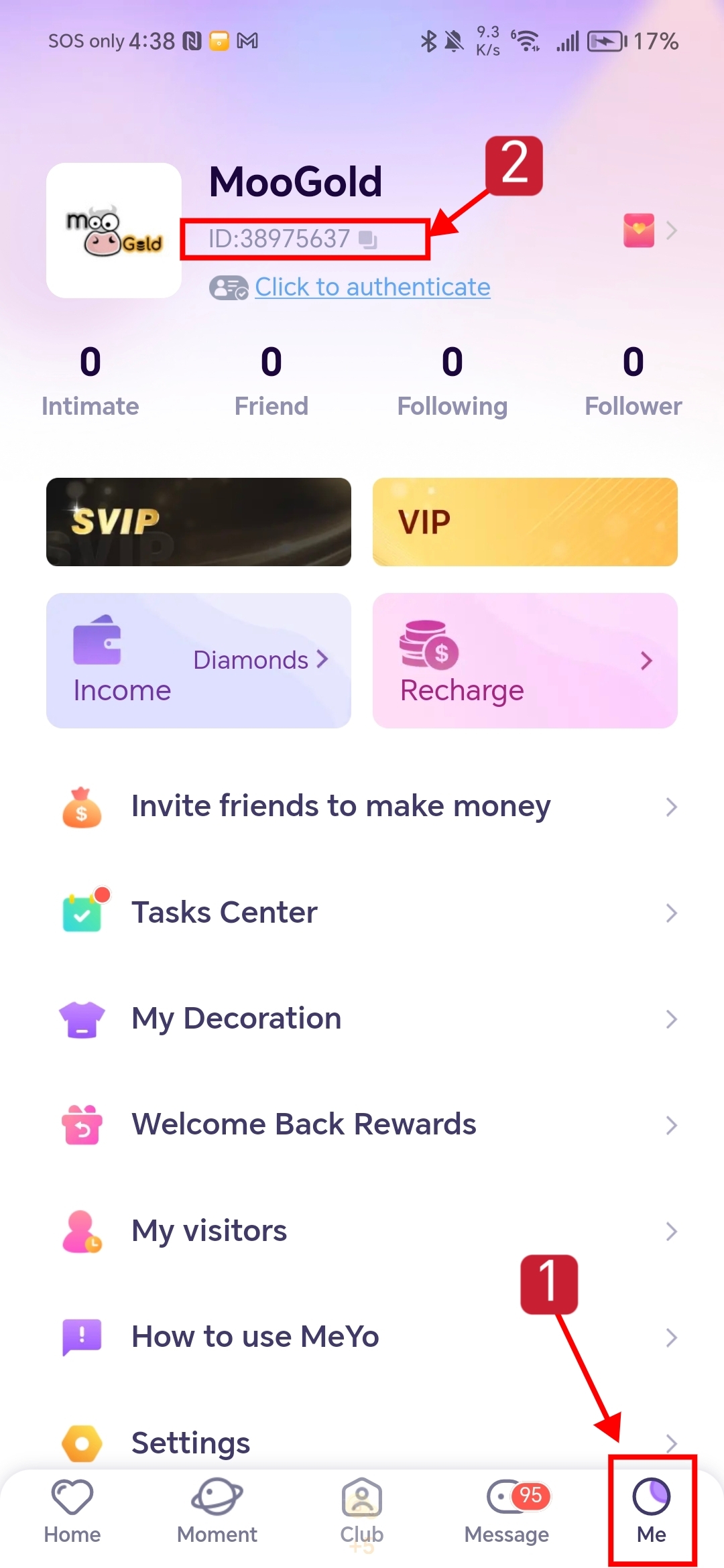
Paste this copied number into the Player ID box on the XPTopup checkout page to prevent manual typing mistakes.
What Is MEYO Live Gold and How to Use It
MEYO Live Gold is the primary in-app currency used across MEYO's social and live streaming ecosystem. Having a healthy balance of Gold gives you access to the platform's interactive and premium social features.
| Feature / Item | How Gold Is Used | In-App Benefit |
|---|---|---|
| Live Room Virtual Gifts | Send animated effects and luxury gifts to streamers | Supports hosts and boosts your ranking on the contributor leaderboard |
| Voice Chat Rooms | Participate in group voice games and special audio interactions | Increases visibility and unlocks private microphone slots |
| Direct Messaging & Calling | Initiate direct calls or send premium chat interactions | Connects you instantly with new friends and popular creators |
| VIP Badges & Frames | Purchase exclusive avatar borders and entrance effects | Distinguishes your profile whenever you enter public chat rooms |
Using Gold in MEYO Live lets you support your favorite hosts, unlock interactive mini-games within voice lounges, and stand out in active community discussions.
Safe and Password-Free Top-Up Process for MEYO Live
Account safety is critical when purchasing virtual currencies online. XPTopup uses a direct-to-ID delivery system for MEYO Live that ensures your account remains protected at all times:
- Zero Password Requirements: You are never asked for your account password, email credentials, phone verification codes, or third-party login tokens. Only your public Player ID is required.
- No Account Sharing: Because our system credits the currency directly to your UID, you never have to hand over your login credentials to a third party.
- Safe Data Processing: All payment information entered during checkout is processed through encrypted payment gateways, ensuring your billing details remain confidential.
This player-first security setup ensures you can recharge your account with complete peace of mind.
Supported Payment Options and Direct Delivery Steps
XPTopup provides a transparent checkout experience tailored to social app users across different regions. When you prepare to buy MEYO Gold, all available payment options, real-time prices, and supported local currencies appear clearly on the checkout screen before you finalize your order.
Delivery begins immediately upon payment confirmation. The system routes the Gold package directly to your specified Player ID without unnecessary manual verifications. If you are actively using the MEYO app while placing the order, simply restart the app or switch tabs to view your refreshed balance.
Troubleshooting Common MEYO Live Recharge Issues
If you experience any delay or issue during your recharge, check the following common scenarios:
- Gold Not Showing Immediately: Network delays can occasionally cause a brief lag between payment approval and in-app display. Close the MEYO app completely from your background applications and open it again. Check your in-app wallet balance under the profile menu.
- Incorrect Player ID Entered: If you accidentally enter the wrong Player ID and the transaction completes, the Gold is automatically delivered to the account associated with that ID. Because digital transactions process instantly, double-check your ID on your profile page before paying.
- Payment Pending: Some local payment providers take extra time to clear transactions. Check your payment confirmation receipt to ensure the charge was completed successfully.
- Contacting Support: If your payment went through but your Gold has not arrived after a few minutes, copy your XPTopup Order Number and your MEYO Player ID, then contact the XPTopup 24/7 customer support team for quick assistance.
Frequently Asked Questions About MEYO Live Recharge
How do I find my MEYO Live Player ID for recharge?
Open the MEYO app, tap the Me or Profile tab in the bottom right corner, and look below your profile avatar and username. Your unique numeric ID is displayed there with a convenient one-tap copy button.
Do I need to provide my MEYO account password to top up?
No. XPTopup only requires your public MEYO Player ID to process your Gold recharge. Never share your account password, SMS verification codes, or login credentials with anyone.
How long does it take for MEYO Gold to arrive after payment?
Delivery is processed directly after payment verification. In most cases, Gold arrives in your MEYO account balance within moments. Refresh your app wallet to view your new balance.
What should I do if I entered the wrong Player ID?
Recharge orders are fulfilled automatically based on the Player ID provided. If an incorrect but valid ID was entered, the Gold will be credited to that account. To prevent this, always copy and paste your ID directly from the MEYO profile screen before confirming your purchase.
Can I top up MEYO Live for a friend using their Player ID?
Yes. You can send MEYO Gold to friends or favorite streamers by entering their specific Player ID into the order field on XPTopup. The Gold will be credited straight to their profile.
What payment methods can I use to recharge MEYO Live on XPTopup?
XPTopup supports a variety of secure local and international payment methods. The full list of supported payment channels and exact localized prices for your region are displayed directly on the checkout screen.
Current package prices
Current package prices are shown below. Prices exclude Tax. Tax, payment fees and applicable coupons are shown at checkout.
| Package | Price |
|---|---|
| VIP7 DAYS MEYO LIVE | USD 2.86 |
| 490 MEYO LIVE | USD 4.36 |
| 980 MEYO LIVE | USD 8.80 |
| VIP30 DAYS MEYO LIVE | USD 8.82 |
| 1960 MEYO LIVE | USD 17.60 |
| VIP90 DAYS MEYO LIVE | USD 26.26 |
| 4900 MEYO LIVE | USD 44.01 |
| 9800 MEYO LIVE | USD 88.03 |