Pota Live Top Up: Direct and Secure Coin Recharge
Pota Live is an interactive social live-streaming and audio party platform where users connect with broadcasters, join multi-guest voice rooms, and participate in community entertainment. To interact with hosts and access premium social features, you need Pota Live coins. A Pota live top up on XPTopup gives you instant access to in-app credits so you can support creators, send animated gifts, and participate in real-time activities without interruption.
XPTopup provides a direct recharge system that requires only your numeric User ID (UID). You do not need to share passwords or link personal social accounts. Select your desired coin bundle, enter your UID, and complete the order through our secure checkout.
What Are Pota Live Coins and How to Use Them
Coins serve as the core virtual currency inside the Pota Live ecosystem. When you purchase coins, your account balance updates, allowing you to spend them across various live features:
- Virtual Gifting: Send standard and premium animated gifts to streamers during live broadcasts to show support and gain priority visibility in chat.
- Voice Room Interaction: Use coins to activate special microphone effects, send room-wide broadcast banners, and gift co-hosts in multi-user audio chat rooms.
- Interactive In-App Games: Use coins to join platform mini-games and community activities held inside voice channels.
- VIP Badges and Entry Effects: High gifting activity unlocks exclusive profile frames, status badges, and custom entrance animations that announce your arrival in broadcast rooms.
Pota Live Coin Features and Usage Breakdown
| Feature | Coin Usage | Account Benefit |
|---|---|---|
| Virtual Gifts | Small to high-tier animations | Increases host rank and room contribution level |
| Entry Effects | Unlocked through gift tiers | Distinct arrival animations in live and audio rooms |
| Audio Party Activities | Interactive room mini-games | Direct engagement with other room participants |
| Profile Customization | Exclusive frames and titles | Distinctive visual flair across community leaderboards |
How to Find Your Pota Live User ID (UID)
To ensure your coins reach the correct account, you must enter your exact Pota Live numeric UID. Note that Pota Live is a standalone application; do not confuse it with other streaming platforms such as Poppo Live, as user IDs are not interchangeable between different apps.
Follow these steps to find your UID:
- Open the Pota Live app on your mobile device.
- Tap the Profile or Me icon located in the bottom navigation bar.
- Look directly below your profile picture and display name.
- You will see your numeric UID (for example:
12345678). - Tap the copy icon next to the number or write it down carefully for checkout.
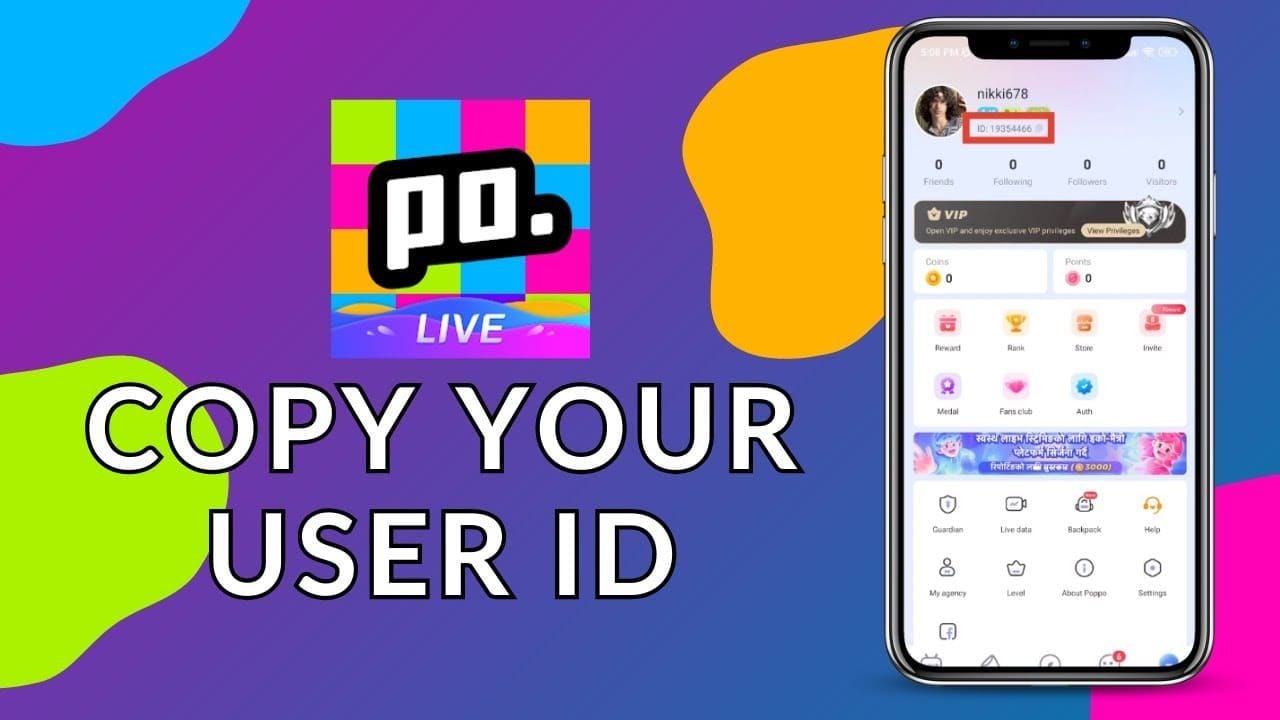
Double-check your UID before submitting your order to prevent crediting the wrong user profile.
Step-by-Step Guide: How to Recharge Pota Live on XPTopup
Recharging your Pota Live balance on XPTopup is straightforward and fast:
- Select Your Coin Package: Choose the coin bundle denomination you wish to buy from the product selection list on this page.
- Enter Your User ID: Type or paste your numeric Pota Live UID into the required
UIDinput field. - Proceed to Checkout: Click the recharge button to head to the payment screen.
- Select a Payment Method: Pick your preferred payment method available at checkout. Prices and available channels are displayed in real time based on your selected region.
- Complete Payment: Finalize the transaction. Once payment is confirmed, the coins are sent directly to your Pota Live account.
- Verify Balance: Open the Pota Live app, go to your profile or wallet section, and check your updated coin balance.
Safe UID-Only Top Up with No Password Required
Account safety is a top priority when topping up online gaming and social currencies. XPTopup uses a direct UID delivery system, which means:
- Zero Password Requests: You will never be asked for your Pota Live password, security questions, or private SMS verification codes.
- No Third-Party Logins: You do not need to link your Google, Apple, or social media login credentials to our store.
- Protection Against Unauthorized Access: Because no login credentials change hands, your personal data and account settings remain completely secure under your control.
Never share your login credentials with anyone offering unauthorized recharge services. A genuine top-up requires only your public numeric UID.
Payment Methods and Live Checkout on XPTopup
XPTopup supports a wide selection of payment solutions to accommodate users worldwide. Available options include international credit and debit cards, e-wallets, and regional payment gateways.
All real-time currency conversions, regional pricing, and available payment processors are calculated and displayed on the live checkout screen. Select the option that best fits your location for a fast and reliable transaction.
Troubleshooting Coin Delivery and Support Guide
If your coins do not reflect immediately after completing payment, review the following troubleshooting steps:
- Refresh the Application: Close the Pota Live app completely and reopen it. Check your profile wallet again.
- Verify Order Status: Check your order confirmation page on XPTopup to verify that your payment was successfully processed.
- Check Network Connection: Ensure your mobile device has a stable internet connection so the in-app wallet balance can synchronize with the platform servers.
- Contact 24/7 Support: If your balance does not update after a short period, reach out to the XPTopup customer support team. Provide your order number, payment confirmation receipt, and your numeric UID so our agents can trace and resolve your order promptly.
Frequently Asked Questions
What are Pota Live coins used for in the app?
Pota Live coins are the virtual currency used to send digital gifts to broadcasters, tip audio room hosts, unlock custom chat banners, access entrance effects, and participate in live mini-games within the app.
How do I find my Pota Live User ID (UID)?
Open the Pota Live app, tap your Profile or Me tab in the bottom right corner, and locate the numeric ID displayed underneath your avatar and username. Copy this number to use during checkout.
Do I need to provide my Pota Live password to top up?
No. XPTopup only requires your numeric Pota Live UID to deliver your coins. We will never ask for your account password, email login, or verification codes.
How fast will the Pota Live coins be credited to my account?
Coin orders are processed automatically once payment is verified at checkout. In most cases, your coins appear in your in-app wallet shortly after transaction completion.
Can I top up Pota Live coins for another user or friend?
Yes. Because the top-up process only requires a numeric UID, you can send coins to friends, family, or your favorite streamers by entering their Pota Live UID in the player field instead of your own.
What should I do if I entered the wrong UID or coins have not arrived?
If you entered an incorrect UID, contact XPTopup customer support immediately with your order number. If the order has not yet been processed by the automated system, our support team can assist in updating the details. If your UID was correct but coins have not appeared, provide your order receipt to support for immediate verification.
Current package prices
Current package prices are shown below. Prices exclude Tax. Tax, payment fees and applicable coupons are shown at checkout.
| Package | Price |
|---|---|
| Pota live - Pota live*100000 | USD 2.26 |
| Pota live - Pota live*500000 | USD 11.31 |
| Pota live - Pota live*1000000 | USD 22.62 |
| Pota live - Pota live*5000000 | USD 113.09 |
| Pota live - Pota live*10000000 | USD 226.17 |
| Pota live - Pota live*50000 | USD 1.13 |