MIGO Live Gold Top Up: What You Need to Know
MIGO Live is a popular global live streaming and social platform where users connect with broadcasters, participate in multi-guest voice rooms, and join interactive community events. To actively engage during live broadcasts, users rely on MIGO Live Gold.
There is often confusion across online forums regarding platform currencies. In MIGO Live:- Gold (Coins): The primary currency that viewers purchase and hold. You spend Gold to send virtual gifts, trigger dynamic room animations, activate entry effects, and support your favorite hosts.- Diamonds / Points: The creator earnings accumulated when hosts receive gifts from viewers. Broadcasters convert these rewards into earnings based on platform rules.
When you purchase a top-up, you are adding Gold directly to your user balance. With Gold in your account, you can unlock full social functionality and increase your user level during live broadcasts.
Step-by-Step Guide to Top Up MIGO Live Gold on XPTopup
Recharging your MIGO Live balance on XPTopup takes only a few moments. Follow these straightforward steps:
- Select Your Gold Package: Browse the available Gold denominations listed on the live product catalog and pick the amount you wish to purchase.
- Enter Your Migo ID: Type your unique numeric Migo ID into the required account field. Double-check your numbers to ensure direct delivery to your profile.
- Proceed to Secure Checkout: Choose your preferred payment method from the available local and international options.
- Complete the Transaction: Finalize your payment. The system processes the order directly to your account using your Migo ID.
- Check Your In-App Balance: Open or refresh the MIGO Live application to view your updated Gold balance in your profile wallet.
How to Find Your Migo ID in the MIGO Live Application
Your Migo ID is your unique account identifier. You only need this numeric ID to receive Gold. You do not need to provide passwords or link private credentials.
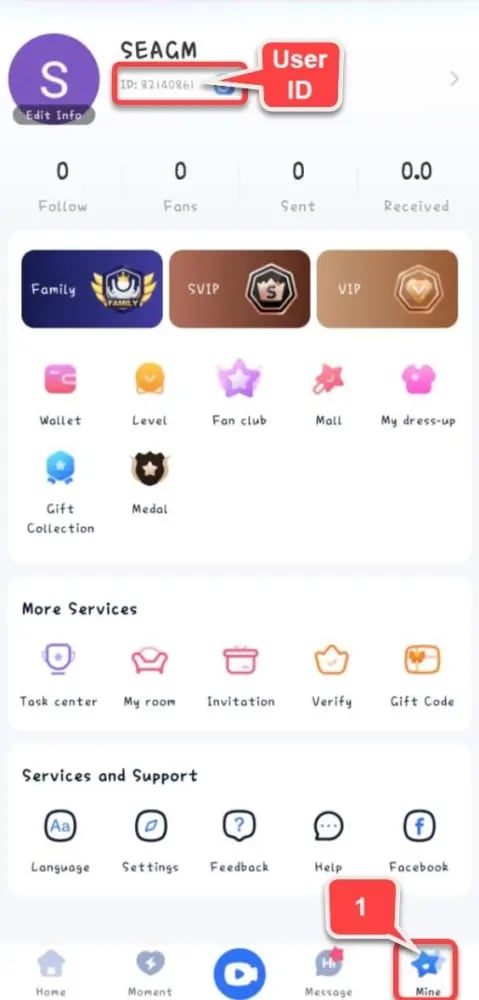
To find your Migo ID:1. Launch the MIGO Live app on your mobile device.2. Tap the Profile / Me icon located in the bottom-right corner of the main screen.3. Look directly beneath your avatar and display name on the profile dashboard.4. You will see ID: followed by a sequence of numbers (e.g., 12345678).5. Tap the copy icon next to your ID to copy it to your clipboard, then paste it directly into the XPTopup order page.
Benefits of Topping Up MIGO Live Gold with XPTopup
Choosing XPTopup gives you a reliable, direct top-up experience designed for global live streaming fans:
- 100% Password-Free Security: Transactions require only your public Migo ID. Your account login credentials, passwords, and linked social profiles stay completely private.
- Transparent Denominations: View exact package amounts and up-to-date pricing directly at checkout with no hidden service fees.
- Global Payment Accessibility: Pay using trusted regional payment methods, e-wallets, and cards tailored for international users.
- Direct Delivery Pipeline: Automated order routing sends Gold straight to your MIGO Live wallet as soon as payment is confirmed.
- Dedicated Customer Support: If you ever need order verification or payment assistance, support representatives are ready to assist.
MIGO Live Gold Packages and In-App Utility
MIGO Live Gold can be used for a wide range of platform interactions. The table below outlines how different package ranges are typically utilized inside the app:
| Gold Range | Typical In-App Use Case | Social Benefit |
|---|---|---|
| Small Packs (e.g., 100 – 1,000 Gold) | Chat stickers, standard roses, quick streamer greetings | Basic chat presence & profile badge points |
| Medium Packs (e.g., 2,500 – 10,000 Gold) | Animated gifts, sound effects, audio room tip jars | Highlighted chat status, streamer recognition |
| Large Packs (e.g., 20,000 – 50,000 Gold) | Full-screen visual gifts, PK battle support, VIP effects | Fast level progression, room announcement banner |
| Elite Tier (e.g., 100,000+ Gold) | Major broadcast leaderboards, luxury gift sequences | Top contributor rankings, custom broadcaster perks |
Note: Live pack sizes and current prices are updated in real time on the XPTopup order screen.
Account Safety and Security Guidelines
Maintaining account safety is critical when purchasing virtual currencies online. Keep these rules in mind:
- Never Share Your Password: Legitimate recharge services only need your Migo ID. Anyone asking for your SMS verification code, social login, or password is not operating an authorized direct recharge.
- Verify Your Migo ID Carefully: Gold orders are automatically fulfilled based on the ID submitted. Double-checking your numeric string prevents accidental transfers to third-party accounts.
- Avoid Third-Party Generators: Unofficial Gold generators and modified app APKs violate platform rules and can result in permanent account bans. Always use secure direct UID recharges.
Troubleshooting Common MIGO Live Top Up Issues
If you experience any delay or issue with your order, use these troubleshooting steps:
1. Gold Has Not Refreshed in the App
- Close MIGO Live completely and restart the app.
- Check your profile wallet screen to see if your total balance has updated.
- Switch between Wi-Fi and mobile data to ensure your device is pulling the latest server data.
2. Entered an Incorrect Migo ID
- If you notice a typo before completing payment, return to the product page and correct the ID.
- If payment was already completed for an incorrect but active ID, top-up delivery is instant and irreversible. If the entered ID was non-existent, contact XPTopup customer service immediately with your transaction receipt.
3. Payment Completed but Pending Confirmation
- Certain payment channels require a few minutes for bank settlement. Keep your order confirmation email and transaction number handy for quick tracking.
Frequently Asked Questions
What information is needed to top up MIGO Live Gold on XPTopup?
You only need to provide your numeric Migo ID and select the Gold package you wish to purchase. No login passwords or private personal details are required.
How do I find my Migo ID in the MIGO Live app?
Open MIGO Live, tap the "Profile" or "Me" tab in the bottom-right corner, and locate the numeric ID displayed under your profile avatar and username.
Do I need to share my MIGO Live password to recharge Gold?
No. XPTopup uses a direct UID delivery system. You never need to share your password, email login, or two-factor authentication codes.
What are MIGO Live Gold and Coins used for?
Gold (also called Coins) is spent on virtual gifts, live room entry effects, broadcaster PK battles, and leveling up your user badge within the community.
Can I recharge MIGO Live Gold for a friend?
Yes. Enter your friend's numeric Migo ID in the account field during checkout. The Gold will be delivered directly to their profile balance upon successful payment.
What should I do if my MIGO Live Gold has not arrived after payment?
First, restart the MIGO Live app to refresh your wallet. If your balance does not update within a few minutes, reach out to XPTopup customer support with your Order ID and payment receipt for immediate verification.
Current package prices
Current package prices are shown below. Prices exclude Tax. Tax, payment fees and applicable coupons are shown at checkout.
| Package | Price |
|---|---|
| 14,000 Gold Coins | USD 1.53 |
| 28,000 Gold Coins | USD 3.07 |
| 56,000 Gold Coins | USD 6.13 |
| 65,000 Gold Coins | USD 7.12 |
| 93,500 Gold Coins | USD 10.24 |
| 112,000 Gold Coins | USD 12.27 |
| 130,000 Gold Coins | USD 14.24 |
| 224,000 Gold Coins | USD 24.53 |
| 260,000 Gold Coins | USD 28.47 |
| 325,000 Gold Coins | USD 35.59 |
| 336,000 Gold Coins | USD 36.80 |
| 650,000 Gold Coins | USD 71.18 |
| 672,000 Gold Coins | USD 73.59 |
| 1,344,000 Gold Coins | USD 147.19 |