Salam Top Up Online with Your UID: Step-by-Step Guide
Recharging your balance online is direct and simple when using direct UID fulfillment. You do not need to share your account credentials, login passwords, or private verification codes. Using only your public account UID, XPTopup processes and routes your credit balance straight to your profile.
Follow these simple steps to complete your order:
- Enter Your Account UID: Locate your unique numeric identifier inside your application and type it into the UID input field on this page.
- Select Your Credit Denomination: Choose the refill pack that matches your data, voice, or plan renewal requirements.
- Review Current Rates on Checkout: Verify your selection on the live checkout interface to see active pricing and regional billing details.
- Pick Your Payment Method: Choose from secure, encrypted international and local payment channels.
- Confirm and Receive Credits: Once your payment clears, the system automatically applies the credits directly to your account.
Because the entire process is handled via direct UID crediting, your account remains fully protected at every step.
Where to Locate Your Salam UID for Fast Top Up
Finding your UID takes only a few seconds. Entering the correct identifier ensures that your recharge is credited without manual delays or routing errors.
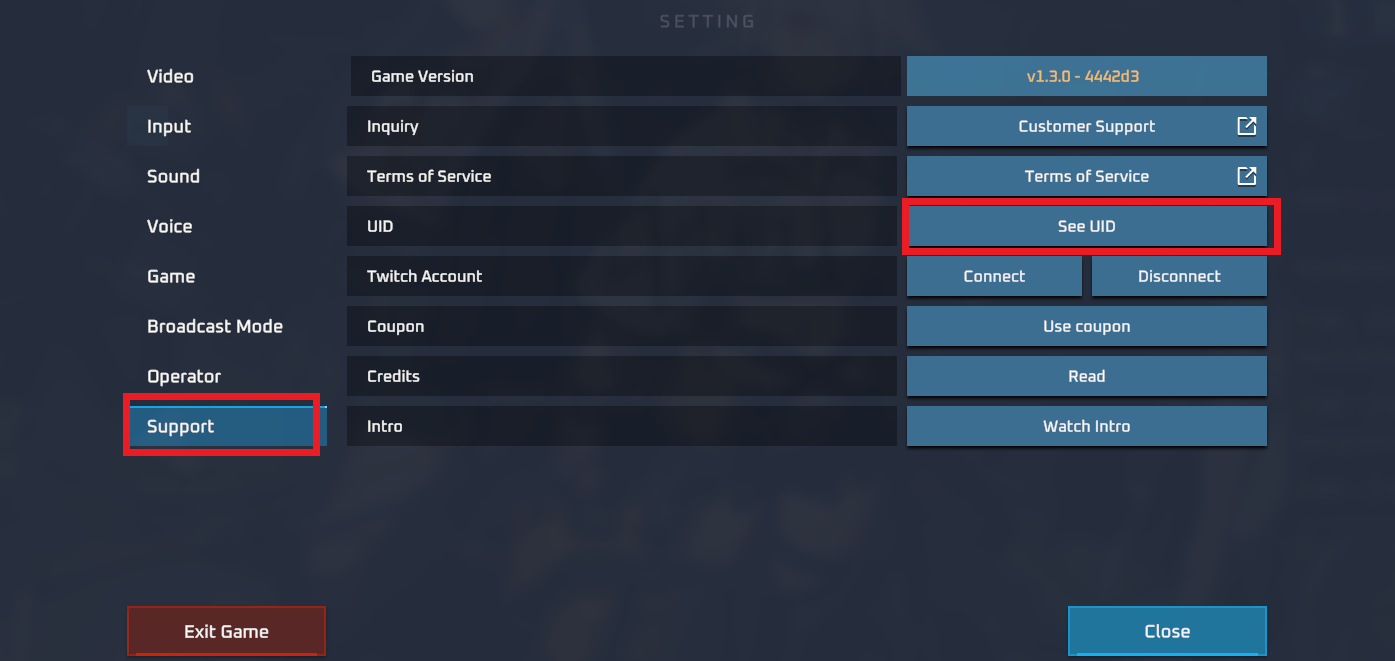
To find your UID:- Open your official application or user portal.- Go to your profile screen or account settings dashboard.- Look for the user identification number labeled as UID, Account ID, or User Number.- Copy or write down the exact numeric sequence.- Paste it directly into the input field at the top of this page before placing your order.
Always double-check the digits to prevent sending credits to an incorrect user profile.
Salam Credit Denominations and Pack Selection Guide
Selecting the right package ensures you maintain uninterrupted service, activate high-speed data bundles, or extend line validity. XPTopup lists various refill sizes to accommodate standard renewals or high-usage periods.
| Refill Category | Primary Use Case | Account Data Required | Fulfillment Type |
|---|---|---|---|
| Standard Refill | Quick balance top-ups, line validity extension, basic calls | User UID | Direct Account Credit |
| Data & Bundle Pack | Monthly data renewals, social media passes, video streaming | User UID | Direct Account Credit |
| High-Volume Pack | Heavy internet usage, international calling, multi-month plans | User UID | Direct Account Credit |
Review the live options on this page to select the exact pack suitable for your current subscription cycle. Prices and package availability update in real time on the checkout screen.
Supported Payment Methods and Secure Checkout on XPTopup
Security is paramount when purchasing balance online. XPTopup implements high-grade encryption protocols to safeguard your personal details and payment data.
Key checkout features include:- Password-Free Transactions: We never ask for your account password, email access, or two-factor authentication codes. Your UID is the only information required.- Flexible Payment Options: Choose from globally accepted credit cards, debit cards, digital wallets, and region-specific payment options displayed directly during checkout.- Clear Price Display: All processing fees, exchange rates, and final costs are shown before you click confirm, avoiding unexpected charges.- Encrypted Processing: All financial transactions run through secure payment gateways with end-to-end encryption to protect buyer privacy.
How to Check Your Remaining Salam Balance After Top Up
Once your transaction completes on XPTopup, you can verify your updated balance through official channels:
- Via the Official App: Open your app and pull down on the home screen to refresh. Your balance and active bundles will reflect the newly added credit.
- Via USSD Inquiry Code: If using mobile services, dial the standard balance inquiry code provided on your SIM card package to view remaining credit via an instant on-screen pop-up.
- Via SMS Notification: Automated confirmation messages are frequently sent directly to your registered number as soon as the credit batch is processed.
If the balance does not appear immediately, wait a couple of minutes and restart the application to trigger a cloud synchronization.
Troubleshooting Common Salam Recharge Issues and Typos
Recharges process smoothly when accurate details are provided. Here is how to handle occasional issues:
- Entered the Wrong UID: UID-based delivery systems transfer credit automatically. If you entered a valid UID belonging to someone else, the balance may be permanently credited to that profile. Always verify your numbers before completing payment.
- Payment Completed but Balance Not Updated: Network queues can cause brief delivery delays. Allow up to 10 minutes, then check your balance again. If credits are still missing, retrieve your order number from your XPTopup confirmation email and reach out to 24/7 customer support.
- Payment Failed or Cancelled: Verify that your payment card has international or online transactions enabled. Alternatively, try another payment method listed on the checkout screen.
Frequently Asked Questions About Salam Recharge
How do I top up Salam online using my UID?
Enter your Salam UID into the designated field on XPTopup, select your desired credit pack, proceed to checkout, and complete the transaction. The credit balance will be delivered directly to your profile.
Do I need to share my password to recharge Salam credits?
No. You never need to provide your account password, login credentials, or SMS verification codes. Recharging on XPTopup requires only your public UID.
How to check salam remaining balance after recharge?
You can check your updated balance by opening your official account application, refreshing your dashboard, dialing the standard service balance code, or checking confirmation SMS alerts.
What should I do if I enter the wrong Salam UID during checkout?
If the transaction has not yet been processed, contact XPTopup customer support immediately with your order number. If the order has already been finalized and delivered to an existing account, completed digital transfers cannot be reversed.
Which payment methods are supported for Salam top up on XPTopup?
XPTopup supports a wide selection of payment methods, including major credit/debit cards, digital payment gateways, and local payment channels. Available options for your area are displayed on the checkout page.
How quickly do Salam credits reflect on my account?
Credits are dispatched automatically upon successful payment confirmation. In most instances, your balance updates within minutes of completing the checkout process.
Current package prices
Current package prices are shown below. Prices exclude Tax. Tax, payment fees and applicable coupons are shown at checkout.
| Package | Price |
|---|---|
| Salam - Salam*1000000 | USD 8.66 |
| Salam - Salam*5000000 | USD 43.29 |
| Salam - Salam*10000000 | USD 86.58 |
| Salam - Salam*500000 | USD 4.33 |