One Punch Man: The Strongest Coupons Top Up on XPTopup
Coupons are the premier premium currency in One Punch Man: The Strongest. Having a ready supply of Coupons allows you to recruit top-tier SSR and UR characters, obtain exclusive Keepsakes, refresh stamina, and secure limited-time value packs during 2026 meta events.
Selecting a direct One Punch Man: The Strongest Coupons top up through XPTopup gives you a safe, direct path to fund your squad. All deliveries are credited straight to your game account using only your User ID (UID) and Server ID (SID). You never need to submit account login credentials or wait through complex verification processes. Choose your package, confirm your account details, and upgrade your battle lineup immediately.
How to Top Up One Punch Man: The Strongest Coupons on XPTopup
Completing an OPM The Strongest top up on XPTopup takes only a few quick steps:
- Select Your Coupon Package: Review the available denominations on the product page and choose the amount of Coupons you want.
- Enter Your Account Information: Input your in-game User ID (UID) and select or type your Server ID (SID) in the required fields.
- Proceed to Checkout: Check your UID and server name carefully to prevent misdelivery, then click the purchase button.
- Complete the Transaction: Choose your preferred payment method on the live checkout screen to finalize the order.
- Collect in Game: Launch One Punch Man: The Strongest, open your in-game mailbox, and claim your new Coupons directly into your inventory.
Where to Find Your User ID (UID) and Server ID (SID) In-Game
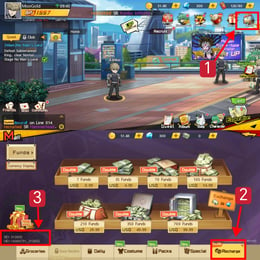
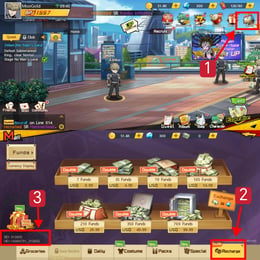
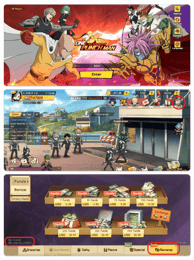
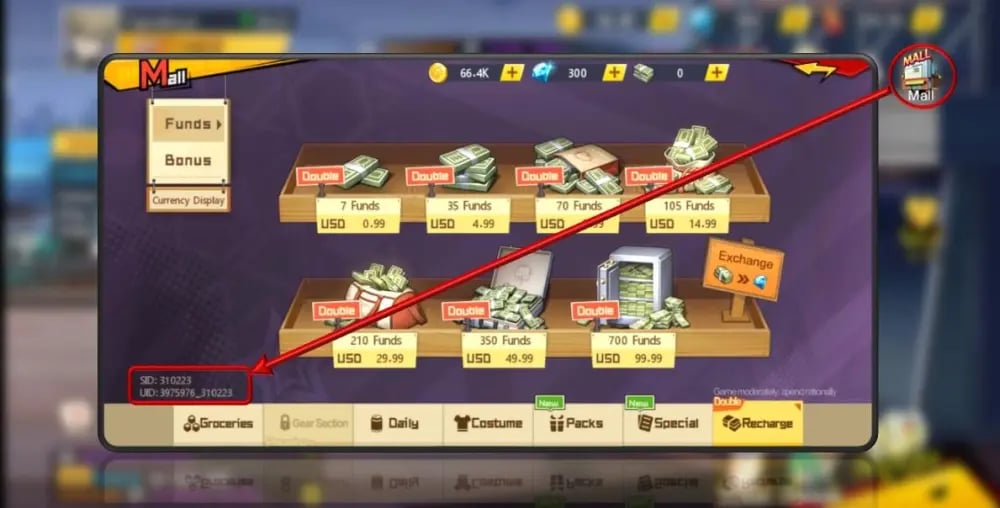
To ensure your One Punch Man The Strongest direct top up reaches the correct character, you must provide your exact User ID and Server ID. Follow these steps to find them:
- Open One Punch Man: The Strongest on your mobile device or emulator.
- Tap your Character Avatar in the top-left corner of the main lobby screen.
- Your User ID (UID) is displayed prominently inside the Player Profile window alongside your username.
- Note your Server ID (SID), which appears on the initial game launch screen or at the top of your profile information.
- Copy the numerical UID string accurately before entering it into the XPTopup order form.
Understanding Coupons vs Funds: Conversion Ratios and Pack Purchases
Many players confuse Coupons with Funds. While both serve as premium resources, their acquisition and purchasing utility differ significantly.
Coupons are purchased through direct top up services. Funds, on the other hand, serve as standard premium currency inside the general shop. When you convert Coupons to Funds, the conversion follows a direct 1:1 ratio (1 Coupon = 1 Fund). However, keeping your balance in Coupons gives you greater flexibility because special discount packs, monthly privilege cards, and limited event banners frequently require direct Coupon payments rather than standard Funds.
| Feature | Coupons | Funds |
|---|---|---|
| Primary Source | Direct Top Up on XPTopup | 1:1 Conversion from Coupons or In-Game Milestones |
| Direct Pack Purchases | Character Growth Packs, Black Vouchers, Privilege Cards | Standard Mall Items, Regular Recruitments, Daily Resets |
| Conversion Flexibility | Converts 1:1 into Funds at any time | Cannot be converted back into Coupons |
| Initial Storage | In-Game Mailbox -> Inventory Bag | Main Currency Status Bar |
Using Coupons directly in the mall often unlocks high-value bonus bundles that cannot be purchased with standard Funds. Check the in-game mall requirements before manually converting your Coupons.
Step-by-Step Guide: Claiming Coupons from In-Game Mail
When you buy One Punch Man: The Strongest Coupons, the items do not add directly to your status bar; they are delivered as consumable items via the system mail system. Follow these instructions for an OPM The Strongest coupon claim 2026 workflow:
- Open Mailbox: From the main game screen, tap the Mail icon located on the right-hand menu panel.
- Inspect System Messages: Look for the delivery mail titled with your top up order confirmation.
- Claim the Attachment: Tap the Claim or Claim All button to transfer the Coupon items into your Bag.
- Open Your Bag: Navigate to the Bag (Inventory) tab from the bottom interface.
- Use or Hold: You will see the Coupon items stored in your consumable inventory. You can leave them in your bag to spend on direct pack purchases, or tap Use to convert them into Funds at a 1:1 ratio.
Safe Direct ID Recharge: Why No Game Passwords Are Required
Security is paramount when managing your gaming accounts. XPTopup uses a direct UID recharge method that communicates directly with game servers.
- Zero Password Requests: You will never be asked for your login email, Google Play password, Apple ID, or third-party social credentials.
- No Account Sharing: Your account remains active on your device. You do not need to log out or hand over your session to anyone else.
- Purchased Packs vs. Promotional Codes: Direct Coupon top ups add permanent paid assets to your account. Unlike temporary 2026 promotional gift codes—which have limited redemption quotas and expiration dates—purchased Coupons never expire and remain safe in your inventory until used.
Troubleshooting Common Delivery and Server Selection Issues
If your order has completed on XPTopup but your items have not arrived immediately, check the following solutions:
- Check Game Server Matching: Verify that the Server ID entered during checkout matches the server where your active character resides. Cross-server transfers are not supported by the game engine.
- Restart the Client: Close the game application completely and relaunch it to refresh your server connection and force the mailbox to sync.
- Clear Mailbox Space: If your mailbox is full (at maximum capacity), delete older read system letters and reopen the mail tab.
- Confirm UID Accuracy: Double-check your numerical UID string from your profile page to confirm no numbers were transposed during entry.
Frequently Asked Questions
How do I find my User ID and Server ID in One Punch Man: The Strongest?
Tap your character avatar in the upper-left corner of the main lobby screen. Your User ID (UID) is the sequence of numbers displayed inside your profile card. Your Server ID (SID) is shown on the game start screen or listed near your character name in the profile menu.
Where do I claim my Coupons after completing the top up?
After your order is fulfilled, open One Punch Man: The Strongest and tap the Mail icon on the main screen. Open the top-up delivery mail, tap Claim, and the Coupons will appear inside your in-game Bag.
What is the difference between Coupons and Funds in One Punch Man: The Strongest?
Coupons are obtained via direct top up and can be spent directly on special growth packs, monthly passes, and vouchers, or converted 1:1 into Funds. Funds are standard in-game premium gems used for regular summons and daily stamina refreshes, but Funds cannot be converted back into Coupons.
Do I need to share my game account password for the top up?
No. A One Punch Man: The Strongest Coupons recharge on XPTopup requires only your User ID and Server ID. You should never share your account passwords or login credentials with anyone.
Can I use Coupons directly to buy character packs and recruitment vouchers?
Yes. Many exclusive bundles in the in-game Mall, including Black Ticket packs, Hero Vouchers, and daily discount boxes, accept direct Coupon payments without requiring prior conversion to Funds.
What should I do if my OPM Coupons do not appear in my in-game mailbox?
First, restart your game app to force a server mailbox refresh. Check that your mailbox is not full and confirm that your order was placed with the correct UID and Server ID. If you still do not see your delivery after a brief wait, contact XPTopup 24/7 customer support with your order number for fast assistance.
Current package prices
Current package prices are shown below. Prices exclude Tax. Tax, payment fees and applicable coupons are shown at checkout.
| Package | Price |
|---|---|
| 13 Coupons | USD 1.23 |
| 22 Coupons | USD 1.72 |
| 23 Coupons | USD 2.30 |
| 54 Coupons | USD 4.29 |
| 61 Coupons | USD 6.14 |
| 107 Coupons | USD 8.59 |
| 91 Coupons | USD 9.21 |
| 214 Coupons | USD 17.17 |
| 227 Coupons | USD 23.01 |
| 321 Coupons | USD 25.76 |
| 2669 Coupons | USD 214.63 |
| 8007 Coupons | USD 654.24 |
| 16013 Coupons | USD 1308.47 |