Sausage Man Candy Top Up: Fast In-Game Delivery
Candies serve as the premium currency in Sausage Man, allowing you to unlock exclusive character outfits, weapon finishes, seasonal battle passes, and special supply crates. Using XPTopup for your Sausage Man Candy top up gives you a direct, secure way to recharge your balance using only your numeric Character ID.
You do not need to share your game password, social media logins, or TapTap credentials. Enter your Character ID, select your desired Candy pack, and receive your balance directly in your game account. Live checkout pricing is shown on XPTopup before payment, giving you total clarity before completing your order.
What Are Sausage Man Candies and How to Use Them
Candies allow players to customize their sausage avatar and gain access to premium seasonal events throughout 2026. While skill and battle royale tactics determine who wins each match, Candies let you personalize your loadout, vehicles, and lobby displays.
Here is what you can acquire using Candies in Sausage Man:
- Golden Season Pass: Activate the premium battle pass tier to claim exclusive legendary outfits, gun skins, quirky emotes, and extra Supply Box Keys as you rank up across the season.
- Rainbow and Colorful Supply Boxes: Open seasonal crates containing rare weapon finishes, animated party cards, special tactical gear skins, and character costumes.
- Lucky Draw Events: Participate in limited-time prize wheels and gacha events featuring exclusive themed sets.
- In-Game Store Direct Purchases: Buy specific vehicle skins, mecha cosmetics, parachute trails, and custom kill announcement effects.
- Name Change Cards and Social Items: Update your profile appearance and send in-game gifts to your squad members.
How to Find Your Sausage Man Character ID
To ensure your Candies arrive without delay, you only need to provide your exact Sausage Man Character ID. Follow these steps to find it:
- Launch Sausage Man on your mobile device.
- Tap your Avatar Profile icon located in the top-left corner of the main lobby screen.
- Stay on the Overview page of your profile.
- Find the Character ID (a unique sequence of numbers) displayed underneath your avatar and player name.
- Tap the copy icon next to the numeric ID or write it down carefully.
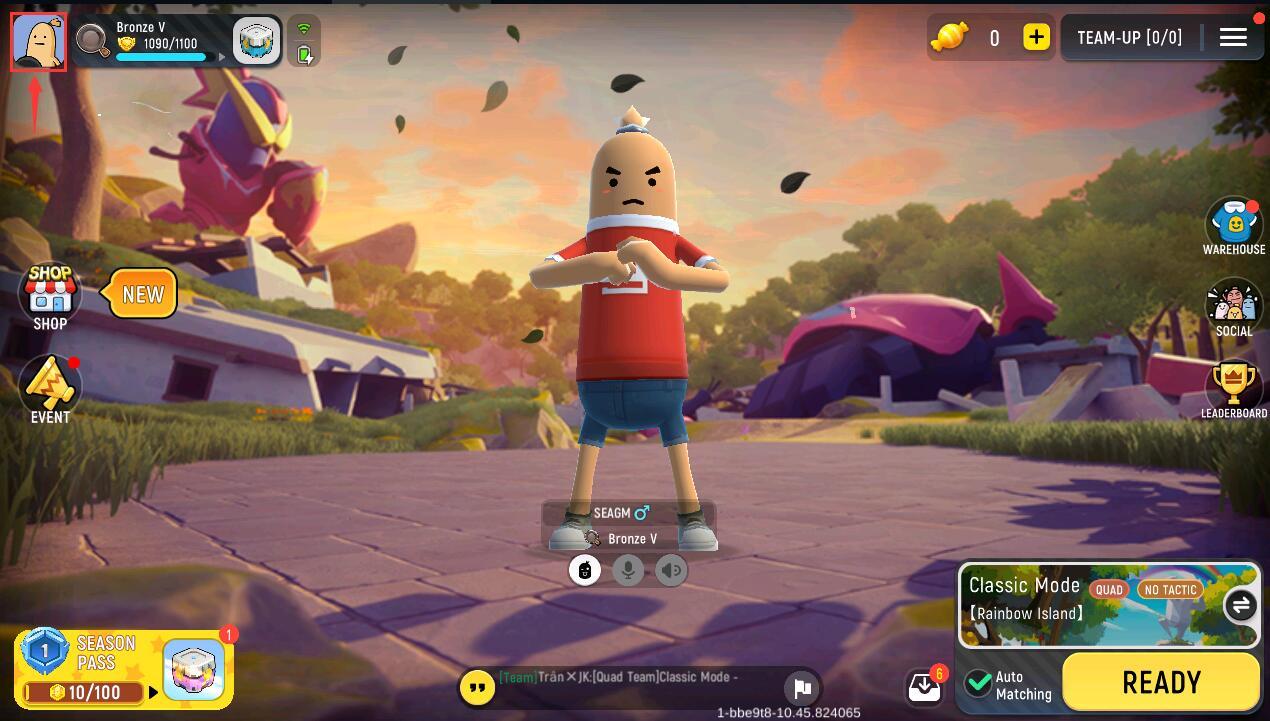
Double-check the copied numbers before placing your order to make sure the Candies go straight to your profile.
Step-by-Step Guide: How to Top Up Sausage Man Candy on XPTopup
Recharging your account on XPTopup is quick and straightforward. Follow this guide to complete your purchase:
- Select the Candy Amount: Choose the Candy denomination that fits your in-game goals, from small top-up packs to large bundles for Season Pass upgrades.
- Enter Your Character ID: Paste your numeric Sausage Man Character ID into the designated field on the product page.
- Review Checkout Pricing: View the live price and choose your preferred local or international payment option.
- Complete the Transaction: Follow the on-screen prompts to finalize your payment securely.
- Check Your In-Game Balance: Open Sausage Man and check the Candy counter at the top of the main lobby screen to confirm the delivery.
Available Sausage Man Candy Packs and Supply Box Perks in 2026
Different Candy amounts cater to different in-game purchases. Below is an overview of how various Candy amounts are typically used across global and regional Sausage Man servers:
| Candy Package Tier | Common In-Game Uses | Account Compatibility |
|---|---|---|
| 60 – 180 Candies | Daily shop specials, minor cosmetics, lucky box spins | Global / Regional Servers |
| 300 – 680 Candies | Standard Golden Season Pass unlock, Rainbow Supply Box openings | Global / Regional Servers |
| 1,280 – 1,980 Candies | Premium Season Pass bundle, elite weapon skins, vehicle customization | Global / Regional Servers |
| 3,280+ Candies | Full Lucky Draw completion, exclusive seasonal bundles, mythic sets | Global / Regional Servers |
Note: Exact in-game item costs may vary depending on active seasonal promotions and in-game store updates.
Why Choose Direct Character ID Top-Up Without Sharing Passwords
Direct top-up via Character ID is the safest method to buy Sausage Man Candies. Third-party logins or manual account access create unnecessary security risks. Here is why Character ID recharge on XPTopup is the preferred choice:
- Zero Password Sharing: You never disclose your TapTap, Google, Apple ID, or Facebook credentials. Your account access remains entirely in your hands.
- Protection Against Account Locking: Direct API and system recharges do not trigger abnormal login alerts or security locks caused by foreign IP addresses.
- Support for Friends and Teammates: Because only a Character ID is required, you can surprise your squadmates by sending Candies directly to their IDs without touching their accounts.
- Transparent Pricing: Check out with clear pricing directly on XPTopup without hidden processing deductions.
Troubleshooting Missing or Delayed Sausage Man Candy Deliveries
Orders processed through XPTopup are delivered swiftly. If you do not see your Candies in your Sausage Man balance immediately after checkout, follow these troubleshooting steps:
- Restart the Game Client: Completely exit Sausage Man and relaunch the application. A fresh server handshake often updates your currency balance instantly.
- Check Your Mailbox: Some event-related top-ups or bonus items are sent directly to your in-game mailbox instead of the top-bar counter.
- Verify Your Character ID: Check your receipt on XPTopup to verify that the Character ID submitted matches your in-game profile ID.
- Check Payment Status: Make sure your payment went through and that your bank or payment provider marked the transaction as successful.
- Contact Support: If the balance does not appear, contact XPTopup customer support with your Order Number and Character ID for quick assistance.
Frequently Asked Questions About Sausage Man Candies
How do I find my Sausage Man Character ID?
Open Sausage Man, tap your avatar profile in the top-left corner of the main lobby, and locate the numeric ID displayed under your character name on the profile overview page. Tap the copy button to capture the exact string.
What can I buy with Sausage Man Candies in 2026?
You can use Candies to purchase the Golden Season Pass, open Rainbow and Colorful Supply Boxes, participate in limited-time Lucky Draw wheels, and buy weapon skins, character costumes, mecha skins, and party cards directly from the store.
Do I need to provide my Sausage Man password to top up?
No. XPTopup only requires your public numeric Character ID. You should never share your account passwords, verification codes, or third-party login credentials.
How long does it take to receive Sausage Man Candies after purchase?
Deliveries are processed promptly once payment confirmation is received. In most cases, Candies appear in your account right away. If your balance does not update immediately, restart your game app.
Can I top up Sausage Man Candies for a friend using their Character ID?
Yes. Enter your friend's numeric Character ID instead of your own during checkout on XPTopup. The Candies will be sent directly to their Sausage Man account.
What should I do if I entered the wrong Character ID during recharge?
Direct top-ups are automated and apply to the ID submitted at checkout. If an invalid or non-existent ID was entered, contact XPTopup customer support immediately with your order details so the support team can assist you before processing finishes.
Current package prices
Current package prices are shown below. Prices exclude Tax. Tax, payment fees and applicable coupons are shown at checkout.
| Package | Price |
|---|---|
| 61 Candy | USD 0.62 |
| 186 Candy | USD 1.87 |
| 318 Candy | USD 3.14 |
| 686 Candy | USD 6.27 |
| 1378 Candy | USD 12.56 |
| 2118 Candy | USD 18.71 |
| 3548 Candy | USD 31.27 |
| 7108 Candy | USD 62.65 |