50 + 50 First Purchase Bonus

Total

USD 0.84

Skip to main content
XPTopup
Search...
Quick answer

To top up Mobile Legends: Bang Bang, pick a package, enter your Player ID and Server ID and pay at checkout. It is credited to that account after payment is confirmed — no password needed.

Product specs
GameMobile Legends: Bang Bang · Moonton
PlatformsMobile
Product typeDirect top-up to your game account
Account details neededPlayer IDServer ID
Packages299
DeliveryAutomatic after payment is confirmed, usually within minutes
PaymentCards, e-wallets, local methods and crypto — options depend on your country

Mobile Legends: Bang Bang top up on XPTopup delivers Diamonds and the Weekly Diamond Pass to your Player ID and Server ID. Pick a pack, pay, and the order is delivered automatically, usually within a few minutes after payment is confirmed. No password, no login.

Mobile Legends: Bang Bang top-up specs

  • Currency: Diamonds
  • Pack sizes: from 42 Diamonds up to 172 Diamonds, many shown as base + bonus, for example 64 + 6, 102 + 10 or 156 + 16
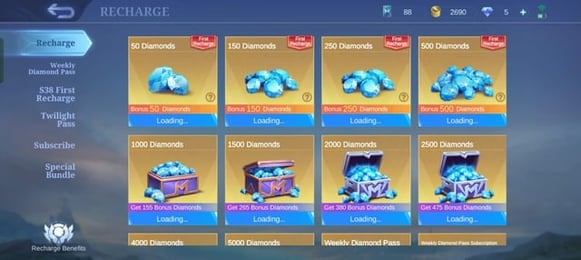
  • First-purchase packs: 150 + 150 Diamonds and 50 + 50, listed with a first top-up label
  • Passes: Weekly Diamond Pass, including a 2x variant
  • Region labels: some entries carry a prefix such as Global, Turkey or Brazil
  • Required: Player ID and Server ID
  • Delivery: automatic, usually within minutes after payment is confirmed
  • Login needed: no

Player ID and Server ID: two numbers, not one

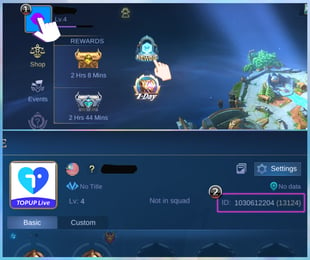
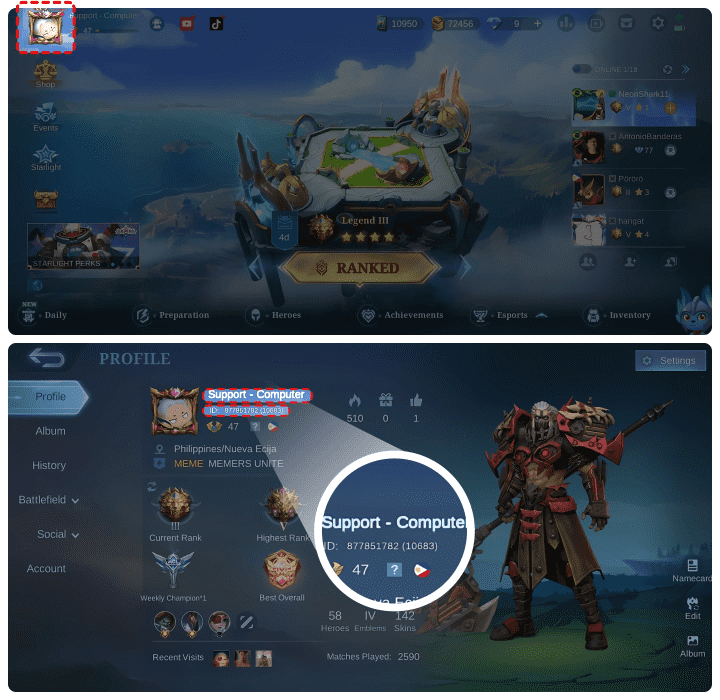
Mobile Legends identifies an account with a Player ID plus a Server ID, and the checkout asks for both in separate fields. In the game, tap your avatar in the top-left of the main lobby; on the profile screen the ID is normally displayed as a long number followed by a shorter number in brackets. The long number goes in Player ID and the bracketed number goes in Server ID. Do not mix them up and do not type the brackets. Menu layout can change between versions, so trust what your own profile screen shows.

Reading the pack names

Names like 102 + 10 or 78 + 8 mean a base amount of Diamonds plus a bonus amount, and the total is what arrives. The first-purchase entries, such as 150 + 150, are meant for an account that has not used that offer yet; whether your account still qualifies is decided by the game, not by the store. Entries with a Global, Turkey or Brazil prefix are listed for those regional catalogues, so choose the one that matches your account. The Weekly Diamond Pass is a pass rather than a Diamond pack, and the 2x versions are separate entries. Live prices are in the table below.

Which one fits your plan

  • A single hero skin or an upgrade: a mid-size Diamond pack covers it.
  • Steady daily play: the Weekly Diamond Pass is the entry to look at.
  • A brand-new account: check whether a first-purchase pack is still available to you.
Top Up Mobile Legends Diamonds guide image

Recharge Process

Top-up Procedures

  1. 1

    Place Your Order & Check Out

    Complete your purchase securely through our checkout process.

  2. 2

    Instant Auto-Delivery to Your UID

    Once your payment is confirmed, your top-up is automatically delivered to the UID you entered — fast, 100% secure, and no account login required.

Mobile Legends: Bang Bang FAQ

01

Which number is my Server ID in Mobile Legends?

It is the shorter number shown in brackets after your Player ID on the profile screen. Enter the long number in Player ID and the bracketed one in Server ID, without brackets.

02

What if I enter the Server ID of a different account?

The order may fail or the Diamonds may reach another account. Value delivered to a wrong account cannot be pulled back, so compare both numbers with your profile before paying. Failed orders are refunded to the original payment method.

03

Do bonus Diamonds count for recharge events?

That is decided by the publisher and can differ from event to event. Check the in-game event page for the exact rules before you buy.

04

Why do some packs say Global, Turkey or Brazil?

Those prefixes mark entries from regional catalogues. Pick the one that matches your account region as shown at checkout, and compare the live price table before you pay.

05

How quickly do Diamonds arrive?

Delivery is automatic and usually completes within a few minutes after payment is confirmed. The order page shows the delivery status, and support helps if something does not arrive.

Mobile Legends: Bang Bang
Top Up Mobile Legends Diamonds

Mobile Legends: Bang Bang

MoontonMobile3.2ksold

Prices exclude Tax. Tax is shown at checkout.

Related Articles

MLBB Anniversary Event Rewards: The Complete Milestone and Claim Guide

MLBB Anniversary Event Rewards: The Complete Milestone and Claim Guide

2026-10-09

Clear all MLBB anniversary event rewards with this milestone tracker, covering token math for Nana and Layla skins, shop priorities, and 08:00 UTC resets.

What to Do If Your Mobile Legends Top Up Is Not Received

What to Do If Your Mobile Legends Top Up Is Not Received

2026-10-03

Mobile Legends top up not received? Learn typical processing delays, how to fix mailbox and Zone ID issues, and steps to submit a Moonton customer support ticket.

Mobile Legends Anniversary Event Schedule and Free Rewards Checklist

Mobile Legends Anniversary Event Schedule and Free Rewards Checklist

2026-09-22

Track the Mobile Legends 10th Anniversary schedule, including Celebration Pass end dates, Nana, Chou, and Layla skin tasks, and the 08:00 UTC reset cutoff.

How to Reduce Lag and Heat in Mobile Legends on Android

How to Reduce Lag and Heat in Mobile Legends on Android

2026-09-15

Reduce lag, stutter, and overheating in Mobile Legends on Android with frame rate caps, RAM Plus tweaks, and verified network toggle configurations.

Magic Chess Win Guide 2026: Fast Strategy for Mythic Climbs

Magic Chess Win Guide 2026: Fast Strategy for Mythic Climbs

2026-09-15

Master the Magic Chess win guide 2026 meta with strict gold curves, commander picks, and synergy pivots to reach Mythic without bleeding rank stars.

Cheapest Way to Buy MLBB Diamonds Without Google Play in 2026

Cheapest Way to Buy MLBB Diamonds Without Google Play in 2026

2026-09-11

Learn the cheapest way to buy MLBB diamonds without Google Play in 2026. Bypass app store fees with direct player ID top-ups and claim the best rates.

How Does Magic Core Carry Over in Mobile Legends Magic Wheel Draws

How Does Magic Core Carry Over in Mobile Legends Magic Wheel Draws

2026-08-25

Learn how Magic Cores carry over in Mobile Legends Magic Wheel draws, why your core balance never expires, and how weekly chest milestones reset.

MLBB Redeem Codes 2026: Official Claim Steps and Errors

MLBB Redeem Codes 2026: Official Claim Steps and Errors

2026-08-21

Learn how to claim active mlbb redeem codes 2026, bypass verification errors on the Moonton exchange page, and avoid fake diamond generator traps.

Payment Support

Toss PayNaver PayKakaoPaySBP (Faster Payments System)GCashCredit / debit cardBank transferTouch 'n Go eWalletOXXOBank card (Kazakhstan)Bank card (Belarus)BLIKFamilyMartPaotang PayLINE PayKNETNAPSConvenience store barcodeHi-LifeOK MartmadaPAYCOGASHOVODANAMayaGrabPay7-ElevenSamsung PayMercado PagoSPEIGrabPayBoletoJKOPAYPayUReal-time bank paymentBNIBoostMaybankTrueMoneyAlipayHKWeChat PayOctopusBinance PayGate PayTouch 'n Go eWalletE.SUN Bank transferBancontactFPSApple PayApple PayGoogle PayGoogle PayCredit / debit cardCredit / debit cardTrustlypaysafecardMyBankMultibancoXPTopup wallet balanceEps