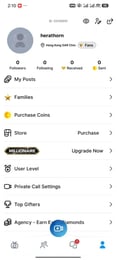
SuperLive Coins Top Up: Instant Live Stream Currency
SuperLive is a global live streaming community where broadcasters and viewers connect through interactive real-time video, talent shows, casual chats, and competitive PK battles. To participate actively in chat rooms, support your favorite creators, and stand out among thousands of viewers, you need SuperLive Coins.
Recharging your balance through XPTopup gives you direct access to live stream gifts, VIP perks, and room enhancements without needing to link private social credentials or share passwords. Enter your numeric user ID, select your desired coin denomination, and complete checkout to receive your balance directly in the SuperLive app.
What Are SuperLive Coins and How Do They Power Live Streams?
SuperLive Coins serve as the primary in-app currency for viewers on the platform. When you join a live broadcast, having an active coin balance allows you to interact directly with broadcasters in several distinct ways:
- Animated Virtual Gifting: Send standard and premium animated gifts during live streams to express appreciation, trigger visual screen animations, and catch the host's attention.
- PK Battle Contributions: During head-to-head streamer competitions (PK battles), gifts sent with coins contribute directly to the host's point score, helping them win rounds against opposing broadcasters.
- Chat Highlights and Bullet Comments: Use special message formats that remain pinned or highlighted in the live stream chat window so your messages never get lost in fast-moving streams.
- Broadcaster Ranking Support: Gifting increases a streamer's daily and weekly platform ranking, boosting their exposure on the trending discovery feed.
How to Find Your SuperLive UID in the App
To ensure your coins are credited to the correct account, you only need your unique SuperLive User ID (UID). Follow these simple steps inside the mobile application:
- Open the SuperLive app on your iOS or Android device.
- Tap the Profile icon located in the bottom right corner of the main screen.
- Look directly beneath your profile avatar and nickname on your personal profile page.
- You will see a dedicated numeric string labeled UID or ID.
- Tap the copy icon next to the number, or write it down carefully to enter during checkout.
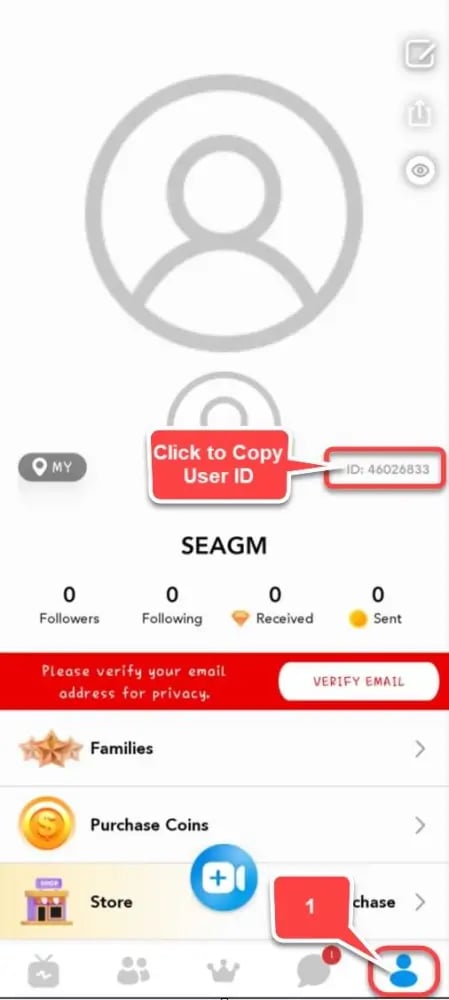
Note: Your UID contains only numbers. Do not use your custom display name or nickname, as usernames can change and cannot be used for direct automated delivery.
Step-by-Step Guide to Top Up SuperLive Coins on XPTopup
Adding coins to your SuperLive wallet takes only a few moments on XPTopup:
- Select the Coin Pack: Choose the coin amount that fits your gifting and streaming goals.
- Enter Your UID: Paste your numeric SuperLive User ID into the required account field. Double-check the numbers to avoid sending balance to the wrong account.
- Review Order Details: Confirm the selected denomination and your account UID before proceeding.
- Proceed to Checkout: Select your preferred local or international payment option supported at live checkout.
- Receive Your Coins: Once payment verification finishes, coins are credited directly to your SuperLive account. Restart the app or refresh your wallet screen to see your updated balance.
SuperLive Coins vs. Beans: Virtual Gifting and PK Battles in 2026
SuperLive operates a dual-currency ecosystem separating audience purchasing power from creator revenue. Understanding how Coins differ from Beans ensures clear expectations when managing your account:
| Feature | SuperLive Coins | SuperLive Beans |
|---|---|---|
| Primary Holder | Viewers & Fans | Streamers & Content Creators |
| How Obtained | Direct purchase via top-up | Received as gifts during broadcasts |
| Primary Use | Sending gifts, PK votes, VIP badges | Creator earnings and platform cash-out |
| Transferability | Non-withdrawable; used in app | Convert to real earnings or exchange |
| Account Impact | Increases Fan Level & VIP Rank | Increases Creator Platform Tier |
In 2026 live streaming events, sending Coins transforms into Beans on the receiving creator's dashboard, giving your favorite streamer both direct financial support and competitive rank momentum.
VIP Privileges and Interactive Perks Unlocked by SuperLive Coins
Consistently using SuperLive Coins opens access to exclusive audience privileges that enhance your social presence across the platform:
- Exclusive Entrance Effects: Enter live broadcast rooms with custom arrival banners, vehicle animations, and sound effects that notify the host and room of your presence.
- Level Badges: Higher coin spending increases your supporter level, giving you unique colored name tags and icons next to your messages in public chat.
- Specialty Gift Access: Certain rare, full-screen interactive gifts require specific VIP or supporter tiers before they can be unlocked and sent in stream rooms.
- Direct Fan Club Access: Join dedicated creator fan groups to gain custom chat badges, private stream access, and special community recognition.
Account Safety: Why Direct UID Top-Up Requires No Password
Account security is essential when recharging virtual currencies online. XPTopup utilizes a direct player ID delivery mechanism that guarantees full protection for your personal profile:
- Zero Password Requirement: You never need to provide your SuperLive account password, Apple ID, Google Play login, or social media credentials.
- No Account Sharing: Your profile remains strictly in your hands. There is no requirement for third-party operators to log in to your account to load currency.
- Safe for Gifting Friends: Because only the public UID is required, you can safely recharge balances for friends, family, or your favorite content creators directly without accessing their private devices.
- Global Server Compatibility: Direct UID top-up works across all registered regions and both major mobile operating systems (iOS and Android).
SuperLive Coins Delivery Timeline and Troubleshooting
Orders processed through XPTopup are delivered automatically through direct server processing. Keep these practical tips in mind for a smooth top-up experience:
- Instant Processing: In most cases, coins appear in your account balance within moments of completed payment.
- Refresh App Cache: If your balance does not update immediately after checkout, completely close the SuperLive app and restart it to refresh your in-app wallet balance.
- High-Traffic PK Events: During major platform-wide PK tournaments or seasonal streamer festivals, network traffic can occasionally cause minor display lag inside the app. Check your purchase history after a few minutes.
- Incorrect UID Troubleshooting: If you accidentally enter an incorrect UID, reach out to XPTopup 24/7 customer support immediately with your order confirmation number for assistance.
Frequently Asked Questions
What is my SuperLive UID and where can I find it?
Your SuperLive UID is a unique numeric identifier assigned to your account upon registration. You can find it by opening the SuperLive app, tapping the profile icon in the bottom right corner, and reading the numbers displayed directly under your profile avatar and username.
Do I need to share my SuperLive password to recharge Coins?
No. Recharging on XPTopup requires only your public numeric UID. You should never share your SuperLive account password, linked email login, or verification codes with anyone.
How long does it take for SuperLive Coins to be credited to my account?
Delivery begins as soon as your payment is verified. Coins are transferred directly to your balance automatically. A simple app restart is usually all that is required to view your refreshed coin count.
What is the difference between SuperLive Coins and Beans?
Coins are purchased by viewers to send gifts, trigger screen effects, and vote in PK battles. Beans are earned by broadcasters when they receive gifts from viewers, which streamers can accumulate and withdraw according to SuperLive platform policies in 2026.
What can I use SuperLive Coins for during live streams in 2026?
You can use coins to send static and dynamic animated gifts, post highlighted bullet messages in chat, support streamers during live PK competitions, unlock VIP entrance effects, and boost your overall audience ranking badge.
Can I top up SuperLive Coins for another streamer or friend?
Yes. Because the recharge system only requires a valid numeric UID, you can enter any streamer's or friend's UID at checkout to send coins directly to their account as a surprise gift or sponsorship.
What should I do if my SuperLive Coins have not arrived after payment?
First, force close and reopen your SuperLive application to refresh the wallet connection. If your coins still do not show after a short wait, check your payment receipt and contact the 24/7 XPTopup customer support team with your order number and UID for immediate verification.
Current package prices
Current package prices are shown below. Prices exclude Tax. Tax, payment fees and applicable coupons are shown at checkout.
| Package | Price |
|---|---|
| 605 Coins | USD 3.76 |
| 1230 Coins | USD 7.64 |
| 3125 Coins | USD 19.41 |
| 6250 Coins | USD 38.82 |
| 10000 Coins | USD 62.10 |
| 13800 Coins | USD 88.69 |
| 20850 Coins | USD 133.98 |
| 43000 Coins | USD 276.33 |
| 50050 Coins | USD 321.62 |
| 71500 Coins | USD 459.47 |
| 100000 Coins | USD 642.61 |