How to Top Up Tumile Coins on XPTopup
Recharging your Tumile account on XPTopup is direct, fast, and secure. You do not need to share your account login credentials or link private social profiles. Follow these simple steps to complete your purchase:
- Select Your Coin Package: Browse the available coin denominations listed on the live product page and choose the package that fits your communication needs.
- Enter Your Player ID: Type or paste your numerical Tumile Player ID into the designated input field. Double-check the digits to ensure accurate delivery.
- Proceed to Checkout: Select your preferred payment option from the live checkout page.
- Complete the Transaction: Finalize the payment following the on-screen instructions.
- Receive Your Coins: Once payment confirmation is received, your Tumile coins are credited directly to your in-app balance without requiring manual redemption codes.
Live pricing, promotional rates, and localized currency options are updated directly on the checkout screen at the time of purchase.
How to Find Your Tumile Player ID in the App
Your Player ID is a unique numerical identifier assigned to your Tumile profile. Entering the correct ID ensures that your coins arrive in your account without delays.
Follow this walkthrough to locate your ID:
- Open the Tumile app on your mobile device.
- Tap the Profile icon located in the bottom-right navigation bar to open your personal center.
- Look directly beneath your profile picture and display name at the top of the screen.
- You will see your numerical Player ID (or User ID).
- Tap the copy icon next to your ID number to copy it to your clipboard, then paste it directly into the input box on XPTopup.
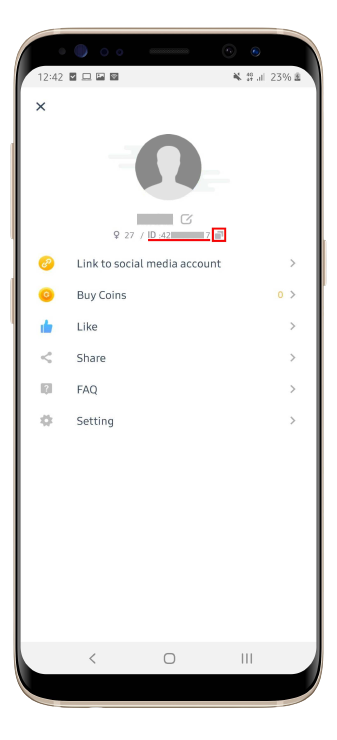
Always copy and paste your ID directly rather than typing it manually to prevent typos that could misdirect your coin delivery.
What Can You Buy and Unlock with Tumile Coins
Coins serve as the core in-app currency within Tumile, allowing you to connect with global creators, start real-time conversations, and access exclusive interaction features.
| Feature | Coin Utility Description |
|---|---|
| 1v1 Video Calls | Initiate direct private video chats with users and friends worldwide. |
| Match Preference Filters | Apply gender, region, and language filters during random video matching. |
| Virtual Gifts | Send animated presents and tokens of appreciation during live conversations. |
| VIP Profile Badges | Activate premium profile highlights and stand out in community discovery lists. |
| Message Extensions | Keep private text and voice messaging channels active after video sessions. |
Direct 1-on-1 Video Calling
Tumile uses coins to establish direct private video calls. Having a ready coin balance lets you initiate and extend video calls without unexpected interruptions.
Advanced Matching and Regional Filters
Standard random matching connects you globally, but spending coins allows you to specify target regions, languages, or gender preferences to match with individuals who share your interests.
Virtual Gifts and Profile Interaction
Express appreciation during live video calls by sending virtual gifts such as flowers, luxury animations, and specialty effects. Gifting helps build rapport and supports your favorite conversation partners.
Safe ID-Only Recharge: Keeping Your Account Secure
Account safety is essential when purchasing digital items online. XPTopup processes your Tumile recharge using ID-based direct top-up technology, providing maximum account protection.
- No Password Required: You never need to provide your account password, email login, or third-party authentication tokens.
- Zero Account Sharing Risk: Your personal chat history, friend lists, and private profile data remain completely secure on your own device.
- Server-Direct Delivery: The system pushes the coin purchase straight to the game servers linked to your specific numerical ID.
- Gift to Friends Safely: Because only the Player ID is needed, you can top up coins for friends, family members, or streamers by entering their Player ID at checkout.
Tumile Coin Delivery Process and Balance Verification
Once your transaction completes on XPTopup, the automated delivery system validates your Player ID and deposits the purchased coins directly into your Tumile wallet.
How to Verify Your Updated Balance
- Launch the Tumile app on your phone.
- Tap the Profile tab in the lower right corner.
- Check your Coin Wallet total shown on your dashboard.
- If the balance has not changed immediately, pull down on the profile screen to refresh the interface, or force-close and restart the app.
Recharges processed on XPTopup support global Tumile accounts, meaning users across North America, Europe, Asia, Latin America, and the Middle East receive coins into their regional accounts without restrictions.
Troubleshooting Tumile Coin Delivery and Payment Issues
If you experience any delay or issue with your order, use the following troubleshooting guide to resolve it promptly:
- Check Your Order Status: Log into your XPTopup account and view your order history to confirm that payment processing is marked as completed.
- Restart the Tumile App: Server balances sometimes take a moment to sync with your local client. Closing the app completely and reopening it forces a fresh balance query.
- Verify the Player ID Submitted: Check the confirmation email or order summary to verify that the Player ID entered matches your in-app profile ID.
- Review Network Connectivity: Ensure your mobile device has a stable internet connection so the app can fetch the latest wallet data from Tumile servers.
- Contact Customer Support: If your balance does not update after payment confirmation, reach out to XPTopup customer support with your Order ID and Tumile Player ID for prompt assistance.
Frequently Asked Questions
What can you buy with Tumile coins?
Tumile coins are used to start direct 1v1 video calls, apply regional and gender matching filters, send animated virtual gifts during live chats, and access premium profile features.
Where can I find my Tumile Player ID?
Open the Tumile app, tap your Profile icon in the bottom right corner, and find the numerical ID displayed directly beneath your username and profile picture. Tap the copy icon next to it.
Do I need to provide my Tumile password to top up?
No. Top-ups on XPTopup require only your numerical Player ID. You never need to share your password, login credentials, or verification codes.
How long does it take for Tumile coins to arrive in my account?
Coins are credited directly to your Tumile balance as soon as payment is confirmed. In rare cases of network congestion, restarting the Tumile app will display your updated balance.
Can I top up Tumile coins for a friend using their Player ID?
Yes. Enter your friend's Tumile Player ID in the Player ID field during checkout on XPTopup. The coins will be delivered directly to their account once payment is finished.
What should I do if my Tumile coins do not reflect after checkout?
First, restart the Tumile app and check your profile coin wallet. If the coins still do not show, verify that your payment was completed and contact XPTopup 24/7 customer support with your order number and Player ID.
Current package prices
Current package prices are shown below. Prices exclude Tax. Tax, payment fees and applicable coupons are shown at checkout.
| Package | Price |
|---|---|
| tumile 650 coins | USD 3.26 |
| tumile 1250 coins | USD 6.26 |
| tumile 1800 coins | USD 8.59 |
| tumile 3500 coins | USD 15.53 |
| tumile 7000 coins | USD 30.62 |
| tumile 15000 coins | USD 66.30 |
| tumile 300 coins | USD 67.62 |
| tumile 35000 coins | USD 155.80 |