Lords Mobile Diamonds Top Up: What Are Diamonds and How Do They Work?
Diamonds serve as the primary external exchange currency in Lords Mobile. Unlike standard in-game Gems that you harvest from resource tiles or earn through Colosseum battles, Diamonds function as direct credit vouchers for the in-game Mall.
When you credit Diamonds to your account, they sit in your wallet balance ready for instant conversion. Inside the Mall, every special pack, speed-up bundle, hero chest, and gear upgrade material that normally lists a real-money price can be purchased directly using your Diamond balance. This system gives you total flexibility: you can stock up on Diamonds during promotional periods on XPTopup and spend them whenever a time-sensitive Mall pack or Guild Fest event goes live.
Diamonds are tied straight to your unique account ID. Once credited, they remain on your account until you choose to redeem them for packs, meaning you never lose purchasing power between kingdom updates.
How to Find Your Lords Mobile IGG ID
To ensure your Diamond delivery arrives accurately, you only need to provide your numeric IGG ID. You do not need to share passwords or link social accounts. Follow these steps to find your ID inside the game client:
- Launch Lords Mobile on your mobile device or PC emulator.
- Tap the Gear icon (Settings) in the bottom right corner of the main screen.
- Tap on the Account button.
- Locate your numeric IGG ID displayed at the top of the window.
- Tap the small copy icon next to the digits to copy your IGG ID directly to your clipboard.
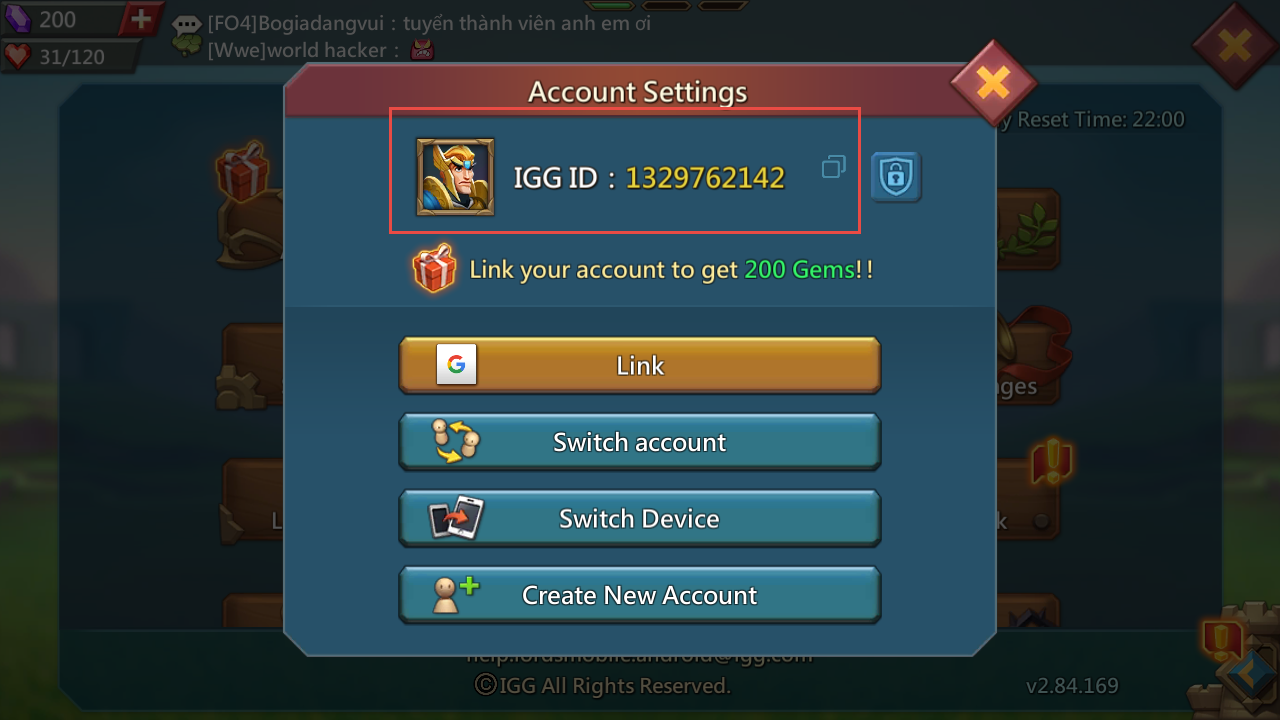
Double-check that you copy the full sequence of numbers without extra spaces to avoid delivery delays.
Step-by-Step Guide: How to Top Up Lords Mobile Diamonds on XPTopup
Recharging your Lords Mobile account takes less than a minute through XPTopup:
- Select Your Diamond Package: Review the available Diamond denominations on this page and pick the amount matching your game goals. Live unit prices are always displayed clearly at checkout.
- Enter Your IGG ID: Paste your numeric Lords Mobile IGG ID into the player ID field.
- Confirm Your Order: Verify that your entered ID is accurate so the balance routes to the correct castle.
- Complete Payment: Choose your preferred secure payment method from the available checkout options and finalize the transaction.
- Check Your In-Game Balance: Open Lords Mobile, access the in-game Mall, and confirm your updated Diamond balance.
How to Use Diamonds to Buy Mall Packs in Lords Mobile
After your Diamonds arrive, spending them inside the game is straightforward:
- Open Lords Mobile and tap the Mall icon located on the upper right side of your kingdom interface.
- Browse the available bundles, such as Material Madness, Monster Hunting gear, Hero Medals, or Resource packs.
- The Mall interface displays pack prices in Diamonds alongside standard options. Select the pack you want.
- Confirm the transaction. The game deducts the required Diamonds from your account balance instantly and delivers the pack contents straight to your in-game bag.
Using Diamonds bypasses app store payment prompts, allowing you to quickly secure limited-time packs right before Kingdom vs Kingdom (KvK) or Dragon Arena battles.
Comparing Diamonds vs Gems vs Linked Gems in Lords Mobile
Understanding the difference between the three major currencies in Lords Mobile helps you spend efficiently and optimize your kingdom progression.
| Currency | Primary Source | Main Use Cases | Account Restrictions |
|---|---|---|---|
| Diamonds | Direct Web Recharge (XPTopup) | Purchasing Mall Packs, Bundles, Hero Chests | Bound to IGG ID; direct cash substitute |
| Standard Gems | Gathering, Colosseum, Hell Events, Packs | Speeding up constructions, Shields, VIP Points | Freely usable; can gift items if unlocked |
| Linked Gems | Guild Fest, Kingdom Events, Milestones | Specific internal shop upgrades and utility items | Bound to account; non-giftable |
Standard Gems excel at emergency bubble shields and troop training rushes, while Diamonds give you access to high-tier Mall packs that contain rare monster materials, pact runes, and champion gear.
Account Safety: Why You Only Need Your IGG ID to Recharge
Account safety is a core priority when buying game credits online. Top-up systems on XPTopup require only your public numeric IGG ID to route Diamonds to your account.
- No Passwords Required: You never share your login credentials, email passwords, Game Center, or Google Play logins.
- No Modded Clients: You do not need to download third-party APKs or modified game files that could compromise your device security or violate game terms.
- Direct System Delivery: Transactions credit directly to the official game servers via your IGG ID, keeping your account fully secure.
Always protect your account by refusing to share login passwords with any third party.
Troubleshooting Lords Mobile Diamond Delivery and In-Game Display
Diamond recharges process promptly. If you do not see your updated Diamond balance immediately after completing your order, try the following troubleshooting steps:
- Restart the Game Client: Close Lords Mobile completely from your background applications and relaunch it. This forces the client to sync with the central server.
- Open the Mall Screen: Sometimes the HUD balance icon does not update until you open the in-game Mall menu where Diamond balances are actively refreshed.
- Verify Your IGG ID: Check your order confirmation on XPTopup to ensure the IGG ID entered matches the account you are currently logged into.
- Check Server Maintenance: If the game is undergoing scheduled maintenance, balance updates appear as soon as the maintenance window concludes.
- Contact Customer Support: If your balance does not reflect after a brief wait and client restart, submit your order ID and IGG ID to XPTopup customer support for rapid verification.
Frequently Asked Questions
Where can I find my Lords Mobile IGG ID?
Open Lords Mobile, tap the Gear icon in the lower right corner, and select the Account tab. Your numeric IGG ID is displayed at the top of the screen.
Where to buy diamonds for Lords Mobile safely?
You can purchase Diamonds safely directly on XPTopup by providing your numeric IGG ID. The process requires no account passwords and routes credits securely to your castle.
How do I use Diamonds to purchase in-game packs in Lords Mobile?
Enter the in-game Mall, locate the bundle you wish to purchase, and tap buy. The game will automatically use your Diamond balance instead of prompting for an app store payment.
Do I need to share my Lords Mobile password to top up Diamonds?
No. Recharging through XPTopup only requires your numeric IGG ID. You should never share your login passwords, linked email accounts, or authentication codes.
What is the difference between Lords Mobile Diamonds and regular Gems?
Regular Gems are spent on in-game actions like speeding up timers, buying VIP points, or activating shields. Diamonds are an exchange currency used specifically in the Mall to purchase real-money packs and material bundles.
What should I do if my Lords Mobile Diamonds do not show up immediately?
Restart your Lords Mobile app and open the Mall screen to refresh your currency counter. If the balance remains unchanged, verify the IGG ID on your order receipt and reach out to XPTopup support with your transaction details.
Current package prices
Current package prices are shown below. Prices exclude Tax. Tax, payment fees and applicable coupons are shown at checkout.
| Package | Price |
|---|---|
| 195 Diamonds | USD 1.75 |
| Weekly Diamond Pass | USD 1.80 |
| 395 Diamonds | USD 3.61 |
| 785 Diamonds | USD 7.22 |
| 1179 Diamonds | USD 10.83 |
| 1964 Diamonds | USD 18.00 |
| Monthly Diamond Pass | USD 18.00 |
| 3928 Diamonds | USD 36.07 |
| 7857 Diamonds | USD 72.14 |
| 11785 Diamonds | USD 108.20 |
| 19642 Diamonds | USD 179.28 |