


To compare Yalla Live Gold prices accurately, look past advertised base package tags and inspect net checkout costs. Verified external web listings on XPTopup start at USD 23.18 for 2,890 Gold, USD 45.92 for 5,930 Gold, and USD 93.21 for 12,550 Gold before dynamic checkout taxes and payment processing fees. Because mobile in-app purchase storefronts bundle platform fees directly into regional app store tiers, establishing a universal discount margin requires comparing identical quantities on your device screen against final web payment invoices.
Sourced Web Packages and Unit Economics
Bulk volume dictates virtual currency efficiency.
On XPTopup, base unit pricing scales downward as package volume increases, but that catalog rate tells only half the story.
Here is the catch: none of these web display numbers represent your out-of-pocket settlement. Base catalog numbers exclude regional sales tax, dynamic payment processing fees, and regional payment gateway adjustments. These add-ons populate only when you reach the checkout screen.



In-App Purchases vs External Web Checkouts
Mobile users often assume that purchasing directly inside an iOS or Android app is inherently more expensive due to native store fees. That assumption requires proof on your own screen.
Third-party web stores advertise lower base sticker prices specifically because they operate outside the closed mobile app store payment flows. However, because verified data sets currently lack parallel catalog rates from Apple App Store and Google Play for these exact Gold quantities (2,890, 5,930, and 12,550 Gold), any blanket claim that web top-ups offer a guaranteed percentage discount is mathematically unverified.
Mobile in-app purchases automatically display localized consumer prices that package platform processing costs into the list price. External portals unbundle those costs, displaying a lower base tag and tallying transaction fees right before you swipe your card. To find the cheapest option for your account, compare the final sum on your mobile checkout sheet against the final checkout page on the web store.
How User ID Recharge Works Across Global Infrastructure
Yalla Live operates on unified global server infrastructure. Your location or platform does not wall your account off from international recharges.
Whether your account was created on an iPhone in the Middle East, an Android tablet in Southeast Asia, or a browser in North America, Europe, or Latin America, the system recognizes a single identifier: your permanent numeric User ID. Web stores like XPTopup fulfill orders using this 7-to-9 digit number alone.
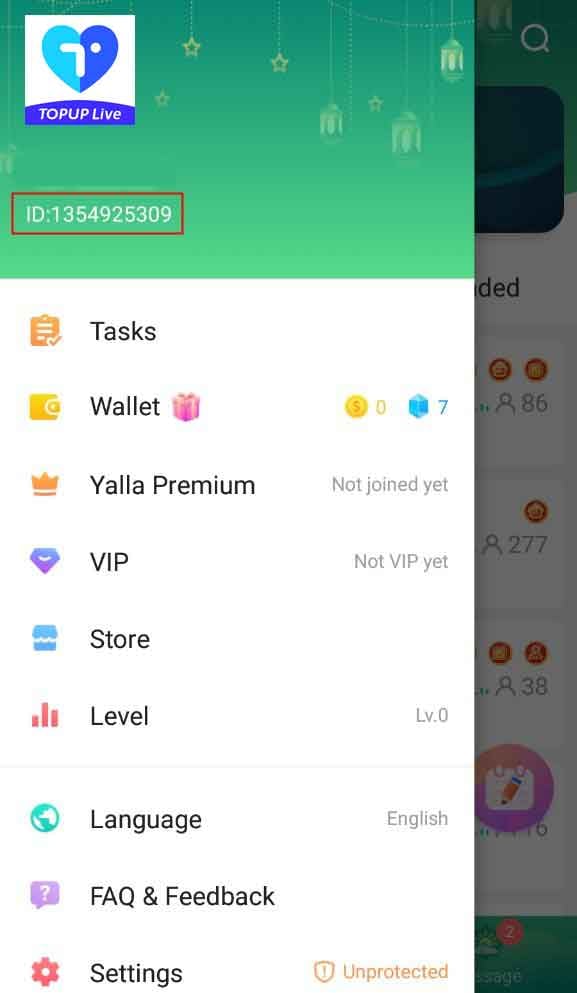
This delivery mechanism avoids security hazards: * No account passwords or profile logins are shared. * No SMS two-factor verification codes leave your phone. * No prepaid digital vouchers or secondary redemption portals are involved. * You can credit another account directly by inputting their numeric User ID at checkout.
To find your identifier, open Yalla Live, select the Me tab, and locate the 7-to-9 digit number positioned underneath your nickname. Inputting an inaccurate digit routes the Gold to whoever holds that ID, making manual verification essential before you pay.
Resolving Wallet Sync Delays in Live Voice Rooms
Virtual currency delivery via direct User ID injection is automated, but client-side caching often makes your wallet look empty right after checkout.
If you finalize a top-up while sitting in an active voice room sending gifts or playing casual board games, your displayed balance might not jump immediately. The voice room stream maintains an open data pipeline that prevents the local app client from polling server-side balance updates until you refresh.
| Symptom | Root Cause | Documented Fix | Post-Check Step |
|---|---|---|---|
| Balance unchanged during active room session | Client wallet interface failed to refresh against active voice stream | Force close the Yalla Live app completely and relaunch it | Check your profile wallet on initial app reload (Source). |
| Wallet balance stagnant on home tab | Temporary mobile network caching or latency | Toggle your device connection between Wi-Fi and mobile data | Confirm global server handshake updates balance (Source). |
| Balance missing after relaunch | Order routed to wrong target or gateway pending | Check your checkout transaction receipt for the submitted 7-to-9 digit ID | Submit order ID to merchant support if UID matches (Source). |
Frequently Asked Questions
Where can you locate your Yalla Live User ID for web checkouts?
Open the Yalla Live mobile app, tap the Me icon in the lower navigation bar, and view the 7-to-9 digit number printed under your display name (Source).
Can you buy Gold for a friend using their User ID?
Yes. Enter the recipient's 7-to-9 digit numeric User ID into the web store order field instead of your own. The server credits the Gold directly to their wallet (Source).
What steps should you take if your purchased Gold fails to show up?
Force close and reopen Yalla Live to break the local session cache. If the coins do not populate, switch your internet connection between Wi-Fi and mobile data, verify that the 7-to-9 digit ID on your receipt is accurate, and contact support with your transaction reference number (Source).
Does Gold purchased on the web work on both iOS and Android?
Yes. Because Yalla Live uses a unified global architecture, balances tied to your numeric User ID sync across iOS, Android, and web clients simultaneously (Source).
Editor's Verdict
Do not assume a web store is automatically cheaper just because its catalog base price sits low. Always calculate your final checkout total against your mobile app store's all-inclusive price before completing the transaction.
Follow XPTopup for more Yalla Live Gold news~






Comments