


To top up Arena Breakout: Infinite Bonds, retrieve your numeric UID from the Open ID field inside your PC launcher Account Center, enter it on an authorized web top-up portal, select your Bond pack, and complete checkout without sharing your account password. Deliveries credit directly to your PC client balance within 1 to 10 minutes.
Finding Your PC Player ID (Open ID) vs. Email Login
A common mistake during web top-up is entering a Level Infinite email address or an in-game character nickname. Web recharge systems require your exact numeric Player ID, which is identified as the Open ID in the PC launcher environment (XPTopup).
Follow these steps on your PC to locate the exact identifier:
- Launch the Arena Breakout: Infinite client launcher (standalone client or via Steam).
- Log in using your Level Infinite credentials if prompted.
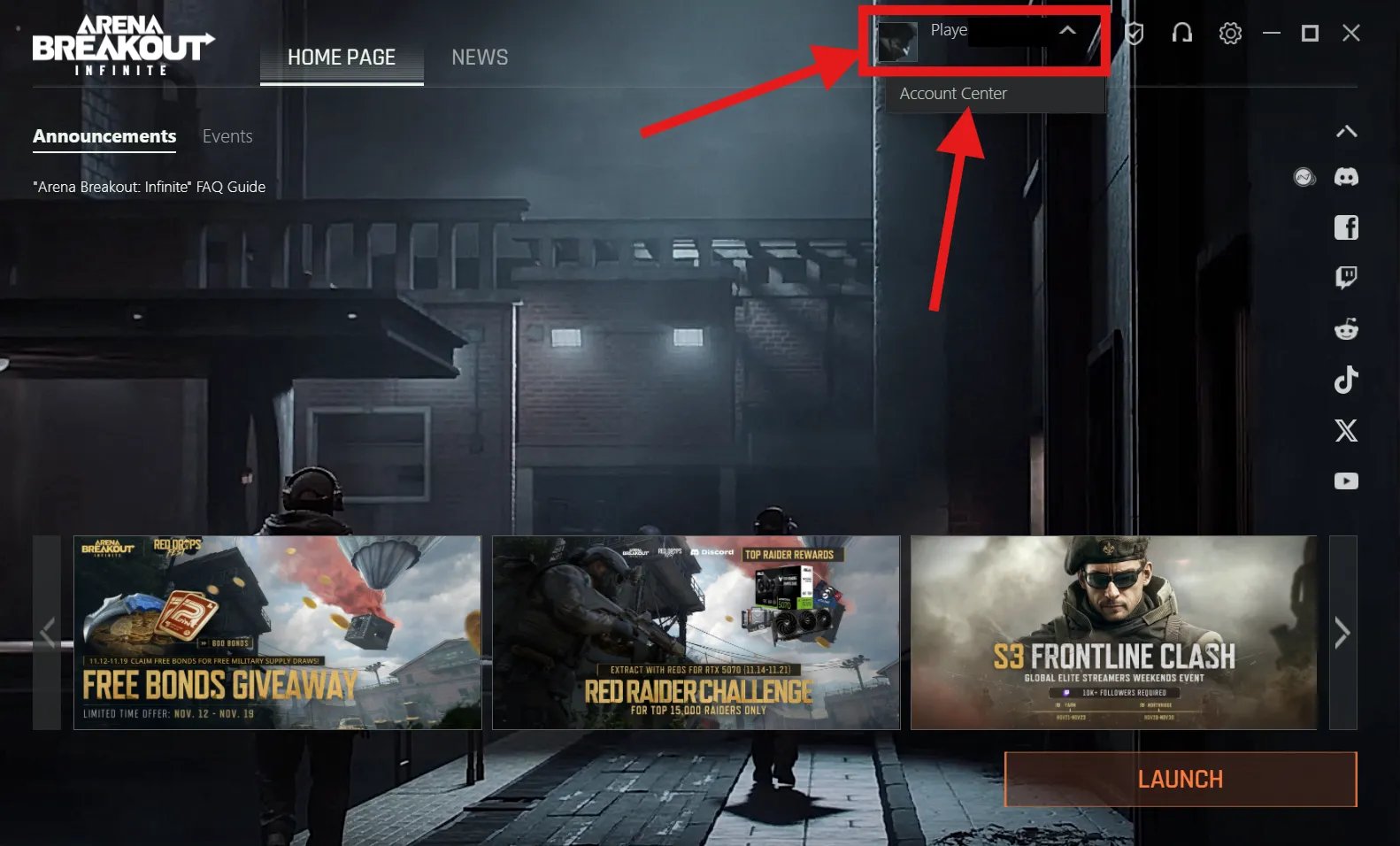
- On the launcher Home Page, click your profile avatar or profile name in the upper section.
- Select Account Center from the drop-down menu.
- Look for the Open ID line. The numeric string shown there is your Player ID.
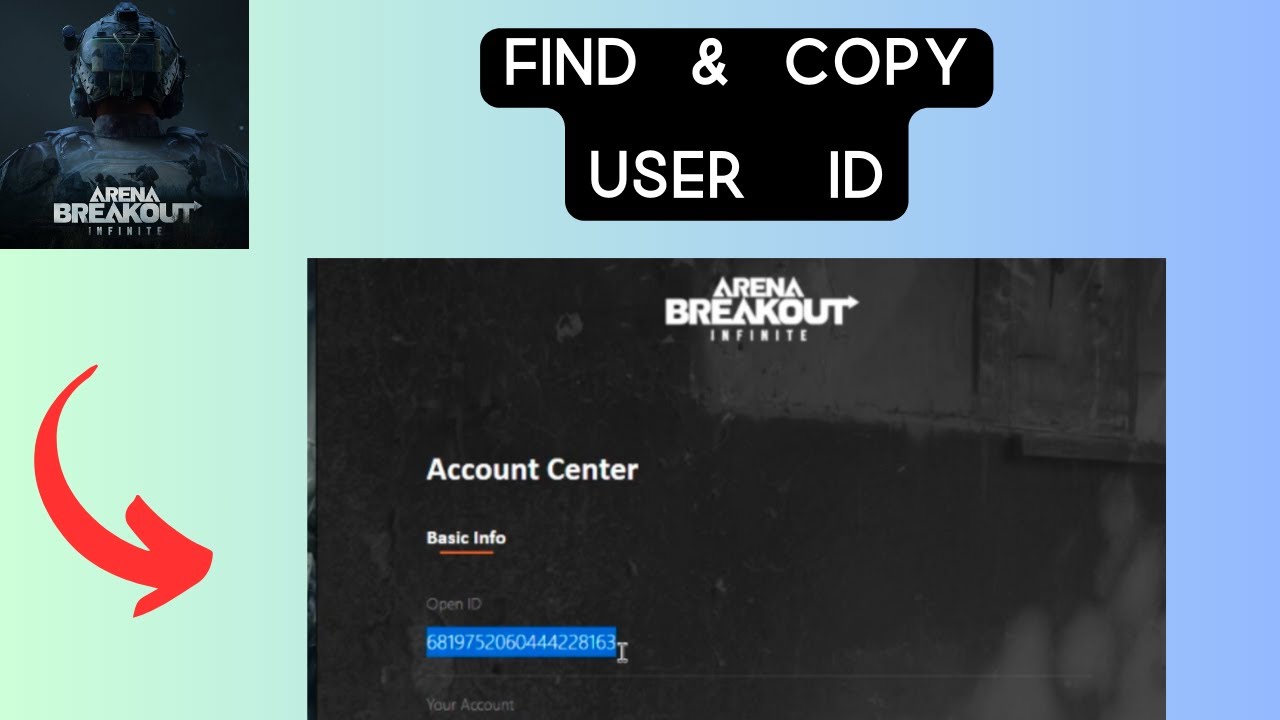
Unlike the mobile version of Arena Breakout—where players open their in-game profile card to view a UID—the PC edition requires viewing the launcher's Account Center. Entering an email address instead of the numeric Open ID will cause the recharge gateway to reject the order or fail to match an active PC character.


Web Top-Up Process Without Account Sharing
Legitimate third-party top-up sites operate strictly on a UID-only basis (TOPUPlive). Never provide your password, two-factor authentication codes, or Level Infinite login credentials to a merchant. Handing over account access violates terms of service and exposes your inventory to theft.
To complete an external top-up:
- Go to an external web store offering Arena Breakout: Infinite Bonds.
- Paste your numeric Open ID into the Player ID input field.
- Choose your desired Bond denomination.
- Complete the transaction through the merchant's secure checkout gateway.

Standard catalog denominations typically include:
- 100 Bonds
- 500 Bonds
- 1,000 Bonds
- 2,500 Bonds
- 5,000 Bonds
- 10,000 Bonds
Checkout totals, processing fees, and regional payment methods vary by payment vendor. Check the merchant's order summary for the final total before submitting payment.
What Bonds Unlock in Version 1.0 and Later
Bonds serve as the premium currency for Arena Breakout: Infinite on PC. You can spend them on cosmetic weapon skins, stash expansions, 30-day recurring Secure Case subscriptions, and seasonal Battle Pass rewards.
As of the September 15, 2025 version 1.0 update, developer Morefun Studios permanently removed the option to buy Koen directly with real money (Timesaver). Bonds cannot be converted into liquid raid cash through official cash-to-Koen storefront menus.
PC Client Isolation and Mobile Transfer Restrictions
Arena Breakout: Infinite on PC operates entirely separately from Arena Breakout on mobile devices (BuffBuff). The two games do not share cross-progression, cross-play mechanics, or a unified wallet.
- No Mobile Transfers: Bonds credited to a PC Open ID remain on the PC platform permanently. You cannot access these funds on the iOS or Android versions of Arena Breakout.
- Launcher Parity: Whether you launch the PC game through Steam or Morefun's standalone client, your profile connects to the same Level Infinite account infrastructure. Entering your launcher Open ID will credit the PC wallet across both launcher installations.
Delivery Windows and Resolving Missing Bonds
Standard web top-ups credit automatically between 1 and 10 minutes after payment verification (XPTopup). The currency syncs directly to the balance displayed in your upper menu bar.
If your balance has not refreshed after a completed purchase, follow this diagnostic sequence:
- Wait 15 Minutes: Network latency between the payment processor and game servers occasionally delays transaction processing beyond the standard 10-minute window.
- Restart the Client: If 15 minutes have passed and your balance remains unchanged, close Arena Breakout: Infinite entirely and exit the desktop launcher. Relaunching forces the game client to query the account database and refresh local cached balances.
- Inspect the In-Game Mailbox: Certain promotional bundles, system compensations, or third-party redemptions arrive as claimable mail attachments rather than direct wallet increments.
- Contact Platform Support: If the Bonds fail to appear after a full restart and 15 minutes of elapsed time, locate your merchant order number or transaction reference ID. Submit a support ticket to the recharge platform so representatives can trace the transaction against your submitted Open ID.
Frequently Asked Questions
Where do I find my numeric Player ID for Arena Breakout: Infinite on PC?
Open the PC launcher Home Page, click your profile avatar, and select Account Center; your numerical UID is displayed under the Open ID field (XPTopup).
Can Bonds bought for the PC version be transferred to the mobile game?
No. Arena Breakout: Infinite on PC and Arena Breakout on mobile operate on separate ecosystems without cross-progression or currency transfers (BuffBuff).
What should I do if my topped-up Bonds have not arrived in the PC client?
Most orders arrive in 1 to 10 minutes. Restart the game if Bonds have not appeared after 15 minutes, and contact platform customer support with your order reference (XPTopup).

Comments