Arena Breakout: Infinite Bonds top up on XPTopup credits Bonds to the Player ID you paste at checkout. Pick one of six packs, pay, and delivery runs automatically, usually within a few minutes after payment is confirmed. You do not log in and you never share a password.
Arena Breakout: Infinite specs at a glance
- Currency: Bonds
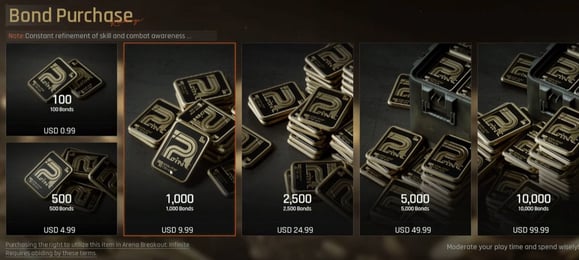
- Pack ladder: 100, 500, 1000, 2500, 5000 and 10000 Bonds
- Required: Player ID (checkout prompt: Please Enter Player ID)
- Region: account region as shown at checkout
- Delivery: automatic, usually within minutes after payment is confirmed
- Login needed: no
PC Infinite is not the mobile game
This page is for Arena Breakout: Infinite. The mobile Arena Breakout title is a separate product with its own pack list, so do not enter an ID from the mobile version here. Make sure the ID you paste belongs to the Infinite account you actually play on.
Getting your Player ID
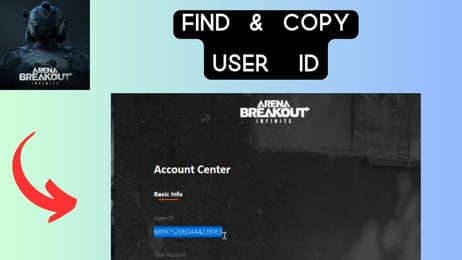
In the game or its launcher, open your profile or account page and look for the numeric ID, which may also be labelled UID or Open ID. A common route is to click your profile name or avatar on the launcher home page and open the account center, but the layout can change between updates, so if the label looks different, use the number that identifies your account. Copy the full number, paste it without spaces, and compare it once more with the screen before you pay.
Reading the six Bonds packs
The ladder is simple: every pack is a plain Bonds amount with no bonus split. 100 Bonds is a small top-up when a balance falls just short. 500 and 1000 Bonds are the middle steps for a handful of purchases at once. 2500 and 5000 Bonds suit players who plan several buys in one go, and 10000 Bonds is the largest single pack for stocking up. Because there are no bonus tiers, the pack name is exactly what lands on your account. Live prices sit in the table below this guide.
Checks that save a refund request
- Match the Player ID to your account character before paying. Bonds delivered to a wrong ID cannot be pulled back.
- No password is asked at any step.
- The checkout lists the payment methods open in your region.
- If the order does not arrive, support helps with it, and failed orders return to the original payment method.