

Learn how to top up Free Fire with your 9-10 digit UID and get Diamonds in under 2 minutes. No password needed, fast direct recharge for Android and iOS.
What Free Fire Diamonds Actually Get You
Garena Free Fire Diamonds are the premium currency for weapon skins, elite characters, emotes, outfits, and events like Luck Royale and Booyah Pass. Grinding alone won't cover an Evo gun skin or the meta character everyone runs in ranked — that costs Diamonds.
New players burn Diamonds on random crates. Skip that. Luck Royale drains your balance fast. A character or Booyah Pass changes how you play and gives a full reward track; buy skins last.
Free Fire and Free Fire MAX use the same Diamonds and the same recharge. The in-game store and any legitimate outside recharge credit the same account. You just need your Player ID, not a separate MAX login.

110 Diamonds
 110 DiamondsUSD 0.88Buy Now
100+10 Diamonds
100+10 DiamondsUSD 0.79Buy Now231 Diamonds
231 DiamondsUSD 1.77Buy Now210+53 Diamonds
210+53 DiamondsUSD 1.85Buy Now210 Diamonds
210 DiamondsUSD 1.97Buy Now310 Diamonds
310 DiamondsUSD 2.48Buy Now355 Diamonds
355 DiamondsUSD 2.20Buy Now310+31 Diamonds
310+31 DiamondsUSD 2.38Buy Now520 Diamonds
520 DiamondsUSD 4.15Buy Now470+47 Diamonds
470+47 DiamondsUSD 4.02Buy Now520+52 Diamonds
520+52 DiamondsUSD 3.68Buy Now583 Diamonds
583 DiamondsUSD 4.38Buy Now530+133 Diamonds
530+133 DiamondsUSD 4.57Buy Now720 Diamonds
720 DiamondsUSD 4.41Buy Now530 Diamonds
530 DiamondsUSD 4.96Buy Now1060 Diamonds
1060 DiamondsUSD 8.17Buy Now1188 Diamonds
1188 DiamondsUSD 8.78Buy Now1060+106 Diamonds
1060+106 DiamondsUSD 7.90Buy Now1080+270 Diamonds
1080+270 DiamondsUSD 9.14Buy Now956+96 Diamonds
956+96 DiamondsUSD 9.27Buy Now1450 Diamonds
1450 DiamondsUSD 8.81Buy Now1080 Diamonds
1080 DiamondsUSD 9.87Buy Now1637+164 Diamonds
1637+164 DiamondsUSD 13.30Buy Now2180 Diamonds
2180 DiamondsUSD 16.50Buy Now2420 Diamonds
2420 DiamondsUSD 17.54Buy Now2180+218 Diamonds
2180+218 DiamondsUSD 15.44Buy Now2200+550 Diamonds
2200+550 DiamondsUSD 18.29Buy Now2200 Diamonds
2200 DiamondsUSD 19.75Buy Now3640 Diamonds
3640 DiamondsUSD 22.04Buy Now3361+337 Diamonds
3361+337 DiamondsUSD 30.91Buy Now5600 Diamonds
5600 DiamondsUSD 40.85Buy Now5600+560 Diamonds
5600+560 DiamondsUSD 36.85Buy Now7290 Diamonds
7290 DiamondsUSD 44.28Buy Now11500 Diamonds
11500 DiamondsUSD 76.85Buy Now36500 Diamonds
36500 DiamondsUSD 254.11Buy Now73100 Diamonds
73100 DiamondsUSD 508.22Buy NowBrazil-310 + 31 Bonus Diamonds
Brazil-310 + 31 Bonus DiamondsUSD 2.36Buy NowBrazil-520 + 52 Bonus Diamonds
Brazil-520 + 52 Bonus DiamondsUSD 3.53Buy NowBrazil-1060 + 106 Bonus Diamonds
Brazil-1060 + 106 Bonus DiamondsUSD 7.57Buy NowBrazil-2180 + 218 Bonus Diamonds
Brazil-2180 + 218 Bonus DiamondsUSD 14.80Buy NowBrazil-5600 + 560 Bonus Diamonds
Brazil-5600 + 560 Bonus DiamondsUSD 35.30Buy NowCIS-100 Diamonds
CIS-100 DiamondsUSD 0.77Buy NowCIS-Weekly Membership
CIS-Weekly MembershipUSD 1.55Buy NowCIS-310 Diamonds
CIS-310 DiamondsUSD 2.28Buy NowCIS-520 Diamonds
CIS-520 DiamondsUSD 3.74Buy NowCIS-Monthly Membership
CIS-Monthly Membership USD 5.45Buy NowCIS-1060 Diamonds
CIS-1060 DiamondsUSD 7.46Buy NowCIS-2180 Diamonds
CIS-2180 DiamondsUSD 14.82Buy NowCIS-5600 Diamonds
CIS-5600 DiamondsUSD 38.18Buy NowEurope-100 Diamonds
Europe-100 DiamondsUSD 0.92Buy NowEurope-Weekly Membership
Europe-Weekly MembershipUSD 1.57Buy NowEurope-310 Diamonds
Europe-310 DiamondsUSD 2.75Buy NowEurope-520 Diamonds
Europe-520 DiamondsUSD 4.58Buy NowEurope-Monthly Membership
Europe-Monthly MembershipUSD 7.31Buy NowEurope-1060 Diamonds
Europe-1060 DiamondsUSD 9.16Buy NowEurope-2180 Diamonds
Europe-2180 DiamondsUSD 18.32Buy NowEurope-5600 Diamonds
Europe-5600 DiamondsUSD 44.23Buy NowGlobal-Weekly Membership
Global-Weekly Membership USD 1.56Buy NowGlobal-310 Diamonds
Global-310 DiamondsUSD 2.73Buy NowGlobal-530 Diamonds
Global-530 DiamondsUSD 4.49Buy NowGlobal-520 Diamonds
Global-520 DiamondsUSD 4.47Buy NowGlobal-Monthly Membership
Global-Monthly MembershipUSD 7.27Buy NowGlobal-1060 Diamonds
Global-1060 DiamondsUSD 8.90Buy NowGlobal-1080 Diamonds
Global-1080 DiamondsUSD 9.00Buy NowGlobal-2200 Diamonds
Global-2200 DiamondsUSD 17.76Buy NowGlobal-2180 Diamonds
Global-2180 DiamondsUSD 17.70Buy NowGlobal-5600 Diamonds
Global-5600 DiamondsUSD 44.23Buy NowGlobal-11500 Diamonds
Global-11500 DiamondsUSD 88.44Buy NowGlobal Vouchers-210 Diamonds
Global Vouchers-210 DiamondsUSD 1.66Buy NowGlobal Vouchers-530 Diamonds
Global Vouchers-530 DiamondsUSD 4.29Buy NowGlobal Vouchers-1080 Diamonds
Global Vouchers-1080 DiamondsUSD 8.57Buy NowGlobal Vouchers-2200 Diamonds
Global Vouchers-2200 DiamondsUSD 17.76Buy NowIndonesia-120 Diamonds
Indonesia-120 DiamondsUSD 0.88Buy NowIndonesia-125 Diamonds
Indonesia-125 DiamondsUSD 0.93Buy NowIndonesia-130 Diamonds
Indonesia-130 DiamondsUSD 0.99Buy NowIndonesia-140 Diamonds
Indonesia-140 DiamondsUSD 0.91Buy NowIndonesia-145 Diamonds
Indonesia-145 DiamondsUSD 1.04Buy NowIndonesia-150 Diamonds
Indonesia-150 DiamondsUSD 1.08Buy NowIndonesia-160 Diamonds
Indonesia-160 DiamondsUSD 1.18Buy NowIndonesia-170 Diamonds
Indonesia-170 DiamondsUSD 1.28Buy NowIndonesia-180 Diamonds
Indonesia-180 DiamondsUSD 1.38Buy NowIndonesia-190 Diamonds
Indonesia-190 DiamondsUSD 1.38Buy NowIndonesia-200 Diamonds
Indonesia-200 DiamondsUSD 1.47Buy NowIndonesia-210 Diamonds
Indonesia-210 DiamondsUSD 1.33Buy NowIndonesia-Weekly Membershio
Indonesia-Weekly MembershioUSD 1.52Buy NowIndonesia-230 Diamonds
Indonesia-230 DiamondsUSD 1.67Buy NowIndonesia-260 Diamonds
Indonesia-260 DiamondsUSD 1.86Buy NowIndonesia-250 Diamonds
Indonesia-250 DiamondsUSD 1.86Buy NowIndonesia-280 Diamonds
Indonesia-280 DiamondsUSD 1.76Buy NowIndonesia-300 Diamonds
Indonesia-300 DiamondsUSD 2.16Buy NowIndonesia-BP Card
Indonesia-BP CardUSD 2.27Buy NowIndonesia-350 Diamonds
Indonesia-350 DiamondsUSD 2.45Buy NowIndonesia-355 Diamonds
Indonesia-355 DiamondsUSD 2.21Buy NowIndonesia-360 Diamonds
Indonesia-360 DiamondsUSD 2.50Buy NowIndonesia-375 Diamonds
Indonesia-375 DiamondsUSD 2.65Buy NowIndonesia-405 Diamonds
Indonesia-405 DiamondsUSD 2.85Buy NowIndonesia-400 Diamonds
Indonesia-400 DiamondsUSD 2.90Buy NowIndonesia-425 Diamonds
Indonesia-425 DiamondsUSD 2.94Buy NowIndonesia-420 Diamonds
Indonesia-420 DiamondsUSD 2.99Buy NowIndonesia-455 Diamonds
Indonesia-455 DiamondsUSD 3.24Buy NowIndonesia-475 Diamonds
Indonesia-475 DiamondsUSD 3.33Buy NowIndonesia-495 Diamonds
Indonesia-495 DiamondsUSD 3.44Buy NowIndonesia-510 Diamonds
Indonesia-510 DiamondsUSD 3.57Buy NowIndonesia-512 Diamonds
Indonesia-512 DiamondsUSD 3.58Buy NowIndonesia-515 Diamonds
Indonesia-515 DiamondsUSD 3.63Buy NowIndonesia-520 Diamonds
Indonesia-520 DiamondsUSD 3.68Buy NowIndonesia-545 Diamonds
Indonesia-545 DiamondsUSD 3.83Buy NowIndonesia-565 Diamonds
Indonesia-565 DiamondsUSD 3.92Buy NowIndonesia-600 Diamonds
Indonesia-600 DiamondsUSD 4.27Buy NowIndonesia-635 Diamonds
Indonesia-635 DiamondsUSD 4.41Buy NowIndonesia-645 Diamonds
Indonesia-645 DiamondsUSD 4.51Buy NowIndonesia-Monthly Membership
Indonesia-Monthly MembershipUSD 4.53Buy NowIndonesia-655 Diamonds
Indonesia-655 DiamondsUSD 4.61Buy NowIndonesia-710 Diamonds
Indonesia-710 DiamondsUSD 4.90Buy NowIndonesia-720 Diamonds
Indonesia-720 DiamondsUSD 4.41Buy NowIndonesia-700 Diamonds
Indonesia-700 DiamondsUSD 4.95Buy NowIndonesia-725 Diamonds
Indonesia-725 DiamondsUSD 4.95Buy NowIndonesia-740 Diamonds
Indonesia-740 DiamondsUSD 5.09Buy NowIndonesia-770 Diamonds
Indonesia-770 DiamondsUSD 5.29Buy NowIndonesia-790 Diamonds
Indonesia-790 DiamondsUSD 5.39Buy NowIndonesia-800 Diamonds
Indonesia-800 DiamondsUSD 5.48Buy NowIndonesia-820 Diamonds
Indonesia-820 DiamondsUSD 5.69Buy NowIndonesia-840 Diamonds
Indonesia-840 DiamondsUSD 5.78Buy NowIndonesia-860 Diamonds
Indonesia-860 DiamondsUSD 5.89Buy NowIndonesia-910 Diamonds
Indonesia-910 DiamondsUSD 6.27Buy NowIndonesia-930 Diamonds
Indonesia-930 DiamondsUSD 6.37Buy NowIndonesia-925 Diamonds
Indonesia-925 DiamondsUSD 6.42Buy NowIndonesia-1000 Diamonds
Indonesia-1000 DiamondsUSD 6.17Buy NowIndonesia-1050 Diamonds
Indonesia-1050 DiamondsUSD 7.25Buy NowIndonesia-1060 Diamonds
Indonesia-1060 DiamondsUSD 7.34Buy NowIndonesia-1075 Diamonds
Indonesia-1075 DiamondsUSD 7.34Buy NowIndonesia-1080 Diamonds
Indonesia-1080 DiamondsUSD 7.40Buy NowIndonesia-1125 Diamonds
Indonesia-1125 DiamondsUSD 7.74Buy NowIndonesia-1145 Diamonds
Indonesia-1145 DiamondsUSD 7.84Buy NowIndonesia-1200 Diamonds
Indonesia-1200 DiamondsUSD 8.28Buy NowIndonesia-1215 Diamonds
Indonesia-1215 DiamondsUSD 8.33Buy NowIndonesia-1300 Diamonds
Indonesia-1300 DiamondsUSD 8.96Buy NowIndonesia-1440 Diamonds
Indonesia-1440 DiamondsUSD 9.79Buy NowIndonesia-1450 Diamonds
Indonesia-1450 DiamondsUSD 8.82Buy NowIndonesia-1490 Diamonds
Indonesia-1490 DiamondsUSD 10.19Buy NowIndonesia-1510 Diamonds
Indonesia-1510 DiamondsUSD 10.29Buy NowIndonesia-1580 Diamonds
Indonesia-1580 DiamondsUSD 10.77Buy NowIndonesia-1795 Diamonds
Indonesia-1795 DiamondsUSD 12.30Buy NowIndonesia-1800 Diamonds
Indonesia-1800 DiamondsUSD 12.35Buy NowIndonesia-1875 Diamonds
Indonesia-1875 DiamondsUSD 12.74Buy NowIndonesia-2020 Diamonds
Indonesia-2020 DiamondsUSD 13.34Buy NowIndonesia-1975 Diamonds
Indonesia-1975 DiamondsUSD 13.52Buy NowIndonesia-2000 Diamonds
Indonesia-2000 DiamondsUSD 13.67Buy NowIndonesia-2005 Diamonds
Indonesia-2005 DiamondsUSD 13.72Buy NowIndonesia-2100 Diamonds
Indonesia-2100 DiamondsUSD 13.81Buy NowIndonesia-2140 Diamonds
Indonesia-2140 DiamondsUSD 14.09Buy NowIndonesia-2160 Diamonds
Indonesia-2160 DiamondsUSD 14.14Buy NowIndonesia-2180 Diamonds
Indonesia-2180 DiamondsUSD 13.23Buy NowIndonesia-2190 Diamonds
Indonesia-2190 DiamondsUSD 14.23Buy NowIndonesia-2200 Diamonds
Indonesia-2200 DiamondsUSD 14.32Buy NowIndonesia-2210 Diamonds
Indonesia-2210 DiamondsUSD 14.42Buy NowIndonesia-2225 Diamonds
Indonesia-2225 DiamondsUSD 14.56Buy NowIndonesia-2280 Diamonds
Indonesia-2280 DiamondsUSD 14.89Buy NowIndonesia-2350 Diamonds
Indonesia-2350 DiamondsUSD 15.35Buy NowIndonesia-2355 Diamonds
Indonesia-2355 DiamondsUSD 15.41Buy NowIndonesia-2400 Diamonds
Indonesia-2400 DiamondsUSD 15.64Buy NowIndonesia-2575 Diamonds
Indonesia-2575 DiamondsUSD 16.87Buy NowIndonesia-2720 Diamonds
Indonesia-2720 DiamondsUSD 17.86Buy NowIndonesia-2750 Diamonds
Indonesia-2750 DiamondsUSD 17.95Buy NowIndonesia-3000 Diamonds
Indonesia-3000 DiamondsUSD 19.60Buy NowIndonesia-3310 Diamonds
Indonesia-3310 DiamondsUSD 21.62Buy NowIndonesia-3620 Diamonds
Indonesia-3620 DiamondsUSD 23.55Buy NowIndonesia-3640 Diamonds
Indonesia-3640 DiamondsUSD 22.05Buy NowIndonesia-3675 Diamonds
Indonesia-3675 DiamondsUSD 23.89Buy NowIndonesia-3800 Diamonds
Indonesia-3800 DiamondsUSD 24.69Buy NowIndonesia-4000 Diamonds
Indonesia-4000 DiamondsUSD 25.96Buy NowIndonesia-4050 Diamonds
Indonesia-4050 DiamondsUSD 26.33Buy NowIndonesia-4340 Diamonds
Indonesia-4340 DiamondsUSD 28.31Buy NowIndonesia-4450 Diamonds
Indonesia-4450 DiamondsUSD 28.93Buy NowIndonesia-4720 Diamonds
Indonesia-4720 DiamondsUSD 30.66Buy NowIndonesia-4800 Diamonds
Indonesia-4800 DiamondsUSD 31.33Buy NowIndonesia-4850 Diamonds
Indonesia-4850 DiamondsUSD 31.70Buy NowIndonesia-5500 Diamonds
Indonesia-5500 DiamondsUSD 35.76Buy NowIndonesia-5600 Diamonds
Indonesia-5600 DiamondsUSD 36.42Buy NowIndonesia-6000 Diamonds
Indonesia-6000 DiamondsUSD 39.01Buy NowIndonesia-6480 Diamonds
Indonesia-6480 DiamondsUSD 42.17Buy NowIndonesia-6550 Diamonds
Indonesia-6550 DiamondsUSD 42.49Buy NowIndonesia-6900 Diamonds
Indonesia-6900 DiamondsUSD 44.80Buy NowIndonesia-7290 Diamonds
Indonesia-7290 DiamondsUSD 44.18Buy NowIndonesia-7295 Diamonds
Indonesia-7295 DiamondsUSD 47.17Buy NowIndonesia-7310 Diamonds
Indonesia-7310 DiamondsUSD 47.32Buy NowIndonesia-7340 Diamonds
Indonesia-7340 DiamondsUSD 47.50Buy NowIndonesia-7360 Diamonds
Indonesia-7360 DiamondsUSD 47.60Buy NowIndonesia-7430 Diamonds
Indonesia-7430 DiamondsUSD 48.07Buy NowIndonesia-7645 Diamonds
Indonesia-7645 DiamondsUSD 49.48Buy NowIndonesia-7650 Diamonds
Indonesia-7650 DiamondsUSD 49.53Buy NowIndonesia-8010 Diamonds
Indonesia-8010 DiamondsUSD 51.84Buy NowIndonesia-8730 Diamonds
Indonesia-8730 DiamondsUSD 56.55Buy NowIndonesia-9290 Diamonds
Indonesia-9290 DiamondsUSD 60.36Buy NowIndonesia-9800 Diamonds
Indonesia-9800 DiamondsUSD 63.51Buy NowIndonesia-14580 Diamonds
Indonesia-14580 DiamondsUSD 94.25Buy NowLATAM-Booyah Pass Card
LATAM-Booyah Pass CardUSD 3.66Buy NowLATAM-Grenade - Burger Bang
LATAM-Grenade - Burger BangUSD 1.32Buy NowLATAM-Loot Box - Boxed Burger
LATAM-Loot Box - Boxed BurgerUSD 1.32Buy NowLATAM-Weekly Membership
LATAM-Weekly MembershipUSD 2.30Buy NowLATAM-Backpack - Strapped Sub
LATAM-Backpack - Strapped SubUSD 1.94Buy NowLATAM-Gloo Wall - Burger Bang
LATAM-Gloo Wall - Burger BangUSD 1.94Buy NowLATAM-341 Diamonds
LATAM-341 DiamondsUSD 1.88Buy NowLATAM-572 Diamonds
LATAM-572 DiamondsUSD 3.18Buy NowLATAM-1166 Diamonds
LATAM-1166 DiamondsUSD 5.90Buy NowLATAM-Monthly Membership
LATAM-Monthly MembershipUSD 11.12Buy NowLATAM-2398 Diamonds
LATAM-2398 DiamondsUSD 11.72Buy NowLATAM-6160 Diamonds
LATAM-6160 DiamondsUSD 29.80Buy NowMalaysia/Singapore-Weekly Membership
Malaysia/Singapore-Weekly Membership USD 1.44Buy NowMalaysia/Singapore-Evo Access 30D
Malaysia/Singapore-Evo Access 30D USD 2.10Buy NowMalaysia/Singapore-310 Diamonds
Malaysia/Singapore-310 Diamonds USD 2.48Buy NowMalaysia/Singapore-520 Diamonds
Malaysia/Singapore-520 Diamonds USD 4.15Buy NowMalaysia/Singapore-Monthly Membership
Malaysia/Singapore-Monthly MembershipUSD 7.09Buy NowMalaysia/Singapore-1060 Diamonds
Malaysia/Singapore-1060 Diamonds USD 8.17Buy NowMalaysia/Singapore-2180 Diamonds
Malaysia/Singapore-2180 Diamonds USD 16.52Buy NowMalaysia/Singapore-5600 Diamonds
Malaysia/Singapore-5600 Diamonds USD 40.84Buy NowMalaysia/Singapore-11500 Diamonds
Malaysia/Singapore-11500 Diamonds USD 84.12Buy NowMiddle East-110 Diamonds
Middle East-110 DiamondsUSD 0.86Buy NowMiddle East-231 Diamonds
Middle East-231 DiamondsUSD 1.73Buy NowMiddle East-583 Diamonds
Middle East-583 DiamondsUSD 4.28Buy NowMiddle East-1188 Diamonds
Middle East-1188 DiamondsUSD 8.54Buy NowMiddle East-2420 Diamonds
Middle East-2420 DiamondsUSD 17.08Buy NowTaiwan-100 Diamonds
Taiwan-100 DiamondsUSD 0.90Buy NowTaiwan-Evo Access 3D
Taiwan-Evo Access 3DUSD 0.90Buy NowTaiwan-170 Diamonds
Taiwan-170 DiamondsUSD 1.39Buy NowTaiwan-Evo Access 7D
Taiwan-Evo Access 7DUSD 1.77Buy NowTaiwan- Level Up Pass
Taiwan- Level Up PassUSD 1.76Buy NowTaiwan-Weekly Card
Taiwan-Weekly CardUSD 1.76Buy NowTaiwan-350 Diamonds
Taiwan-350 DiamondsUSD 2.75Buy NowTaiwan-520 Diamonds
Taiwan-520 DiamondsUSD 4.28Buy NowTaiwan-Booyah Pass
Taiwan-Booyah PassUSD 5.33Buy NowTaiwan-925 Diamonds
Taiwan-925 DiamondsUSD 6.89Buy NowTaiwan-Evo Access 30D
Taiwan-Evo Access 30DUSD 7.13Buy NowTaiwan-Monthly Card
Taiwan-Monthly CardUSD 7.68Buy NowTaiwan-1060 Diamonds
Taiwan-1060 DiamondsUSD 8.43Buy NowTaiwan-1875 Diamonds
Taiwan-1875 DiamondsUSD 13.75Buy NowTaiwan-2180 Diamonds
Taiwan-2180 DiamondsUSD 17.14Buy NowTaiwan-3800 Diamonds
Taiwan-3800 DiamondsUSD 27.50Buy NowTaiwan-5600 Diamonds
Taiwan-5600 DiamondsUSD 43.57Buy NowTaiwan-7650 Diamonds
Taiwan-7650 DiamondsUSD 59.05Buy NowTaiwan-9800 Diamonds
Taiwan-9800 DiamondsUSD 73.82Buy NowThailand-172 Diamond
Thailand-172 DiamondUSD 1.34Buy NowThailand-Weekly
Thailand-WeeklyUSD 1.81Buy NowThailand-310 Diamonds
Thailand-310 DiamondsUSD 2.40Buy NowThailand-517 Diamond
Thailand-517 DiamondUSD 4.01Buy NowThailand-690 Diamond
Thailand-690 DiamondUSD 5.18Buy NowThailand-1052 Diamond
Thailand-1052 DiamondUSD 7.77Buy NowThailand-Montlhy Pass
Thailand-Montlhy PassUSD 8.10Buy NowThailand-1801 Diamond
Thailand-1801 DiamondUSD 12.94Buy NowThailand-3698 Diamond
Thailand-3698 DiamondUSD 25.88Buy NowVietnam-283 Diamonds
Vietnam-283 Diamonds USD 1.66Buy NowVietnam-566 Diamonds
Vietnam-566 Diamonds USD 3.32Buy NowVietnam-1132 Diamonds
Vietnam-1132 Diamonds USD 6.64Buy NowVietnam-2830 Diamonds
Vietnam-2830 Diamonds USD 16.60Buy Now
Find Your 9-10 Digit UID in Under 10 Seconds
Your UID is public. It is not your password and it is not your nickname.
Open Free Fire or Free Fire MAX. On the main lobby, tap your avatar in the top-left corner. Your profile card opens. Directly under your name is your Player ID — that 9-10 digit number. Tap the copy icon. Done.
Players often copy the nickname or clan ID by mistake. If it has letters, it's not your UID. If you can't paste it as numbers only, you copied the wrong field. Double-check before you pay — Diamonds sent to a wrong UID can't be pulled back.
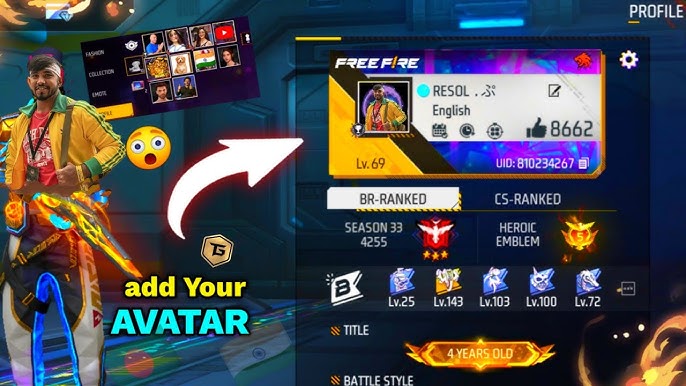
How to Top Up Free Fire With Your UID in Under 2 Minutes
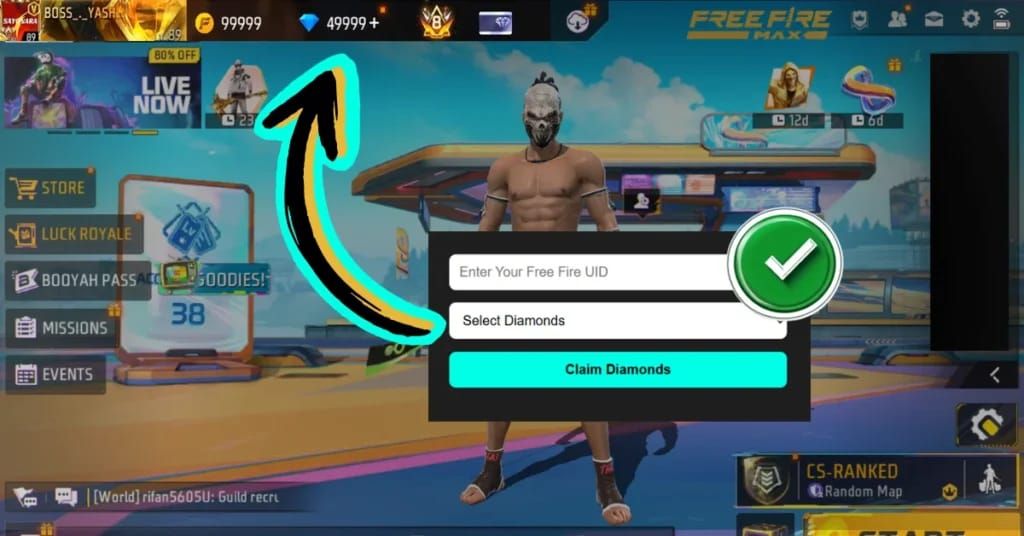
Never give any site your Garena password. Any recharge that asks for it is a red flag. Legit top-ups are login-free.
Here is the exact sequence I use:
- Copy your UID from your profile card as described above.
- Go to the recharge page and select your Diamond pack or Membership. If you want the fastest route, you can top up Free Fire Diamonds instantly without logging into your game account.
- Paste your UID carefully. Check the first three and last three digits. One wrong digit sends it to someone else.
- Choose your payment method and confirm the total on the checkout screen. Reputable stores show the final price before you pay.
- Complete payment and return to the game. Open your mail or wallet to confirm the balance updated.
Tips from experience: paste, don't type. Typing a 10-digit number on a phone keyboard is how errors happen. Also, stay logged into the game on the same server you are topping up. Account region locking prevents cross-region redemption, and trying to use another server's method can get your account flagged.
If your Diamonds don't appear right away, don't pay twice. Check your transaction confirmation first and allow a short window for server traffic to clear. If it still doesn't credit, contact support with your UID and transaction ID.
How Much Do Diamonds Cost and Which Packs Are Less Wasteful
Diamond pricing shifts with local taxes and purchasing power, so the same 100 Diamonds costs different amounts by server.
Here is what a baseline 100 Diamond pack looks like across a few regions to give you context:
| Pack | Price | Note |
|---|---|---|
| 100 Diamonds (India) | ₹84 | Approx. $0.96 USD equivalent base reference |
| 100 Diamonds (Bangladesh) | ৳99 | Approx. $0.81 USD equivalent base reference |
| 100 Diamonds (Brazil) | R$9.90 | Approx. $1.80 USD equivalent base reference |
| 100 Diamonds (USA) | $0.99 | Standard app store baseline pricing |
Don't compare your price to a YouTuber in another country. Compare packs inside your own server. The cheapest per-Diamond rate on your server will always beat chasing a foreign price you can't use.
Bigger packs usually give more Diamonds per dollar. Small packs can cost 12 to 38 percent more per Diamond than large bundles when that bulk-pricing mechanic applies over a season. If you know you'll spend that much this month, one larger pack beats three small ones.
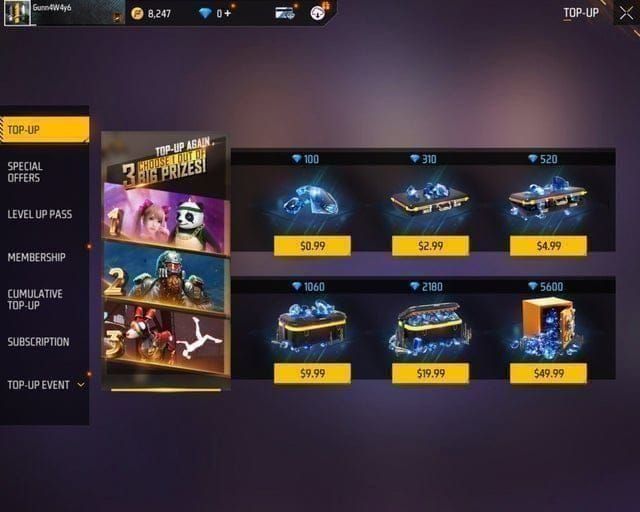
What I recommend by budget
If you spend $0-$5 a month (F2P leaning): Stick to a single small Diamond recharge or a Weekly Membership. Don't buy crates. Save for one character or one Booyah Pass. You get more playtime for the same money.
If you spend $10-$20 a month (mid-tier): Skip the 100 packs. Grab a mid-size bundle or a Monthly Membership. This is the sweet spot where that 12-38% efficiency actually adds up. Pick the Membership here if you log in daily.
If you spend $25-$30 a month (heavy): Go bulk. Large bundles win on cost per Diamond, and you'll burn through Diamonds on Booyah Pass levels and Luck Royale anyway. Buying small repeatedly is the trap heavy players fall into.
Another cost to know: VIP progression only counts paid Diamonds in this system. Free mission Diamonds and code rewards don't move your VIP level the same way. The thresholds run from 100 Diamonds for VIP1 up to 5000 Diamonds for VIP5. If you care about VIP, plan your paid top-ups, not your free claims.
And for Booyah Pass planners, the numbers are fixed:
| Booyah Pass Tier | Cost |
|---|---|
| Premium Booyah Pass | 499 Diamonds |
| Premium Plus Booyah Pass | 999 Diamonds and instantly grants 50 levels |
If you're short on time, Premium Plus is the only one that jumps you 50 levels immediately. Most players should buy the 499 tier and grind. Paying double to skip levels only makes sense if you start late in the season.
Should You Buy Weekly and Monthly Memberships Instead?
New buyers often mix up instant Diamonds and drip-fed Memberships.
Weekly and Monthly Memberships give you Diamonds over time instead of all at once. You pay once and claim a little each day you log in. Miss a day, miss that day's claim. They reward consistency.
I like Memberships for two types of players. First, daily players who want the lowest cost per Diamond and don't mind logging in. Second, low-budget players who want to stretch $5 across a full month instead of blowing it in one session.
If you're an impulse buyer or you only play on weekends, buy Diamonds directly. Memberships punish irregular play. Check the Free Fire Weekly Monthly Membership top up options to see current bonus rates and claim rules before you decide, since the daily amounts and durations are listed on the live product page.
One more note on vouchers: if you ever buy a Garena Shell voucher code from a wallet or card network, the provider's rule is that codes remain valid for at least 7 days from purchase. That is the wallet's policy, not a store promise. Redeem promptly so you don't let it expire.
Legit Recharge vs Scam: What to Check Before You Pay
Scams cost accounts. Here's the quick filter I use.
A legitimate top-up asks for: - Your public Player ID (the 9-10 digit UID) - Your selected pack - Payment confirmation
A scam asks for: - Your Garena password or login OTP - Your email password - To install a strange app or share your screen
Legitimate methods and resellers never ask for your account password. Recharging requires only your public Player ID. Any site demanding login details is a phishing risk. Close it.
You can't gift Diamonds directly inside Free Fire. There is no transfer button. To help a friend, top up their account by entering their exact Player ID on a trusted recharge platform. Triple-check that UID.
FAQ
Where can I find my Free Fire UID?
Open the game and tap your avatar in the top-left corner of the main screen. Your UID is displayed directly underneath your profile name and you can copy it with the copy icon next to it.
Why didn't my diamond top-up arrive immediately?
Delays can happen due to payment processing or heavy server traffic, so check your transaction confirmation and allow up to 30 minutes. If Diamonds still do not show, contact customer support with your UID and transaction details instead of paying again.
Can I gift Free Fire diamonds directly to a friend?
Free Fire does not support direct diamond transfers between accounts. You can still top up a friend by entering their exact Player ID on a trusted recharge platform and paying for the pack you want to send.
Are third-party top-up websites safe to use?
Using authorized third-party platforms is generally safe if they only require your public Player ID rather than your login credentials. Always stick to reputable stores and avoid any site that asks for your password or OTP.
Should I buy Diamonds or a Weekly/Monthly Membership?
Buy Diamonds if you want everything at once or you play irregularly. Buy a Membership if you log in daily and want to stretch a small budget over weeks. Compare the live totals on the product page before you choose.
Does my account region affect my top-up?
Yes. You must top up through a method matching your account's registered server. Trying to use another region's pricing tier can fail or risk a ban, so always recharge on your home server.
My Verdict: Recharge Smart and Get Back in the Game
If you're about to spend $1-$30, keep it simple. Copy your UID correctly, pick the pack that matches how often you actually play, and pay where you only need to paste your ID.
I'd buy a mid-size Diamond bundle if I play a few times a week, and a Membership if I know I'll log in every day. Avoid buying the smallest pack three times in a row — that 12-38% markup adds up when the bulk mechanic applies. And never enter your password anywhere for a recharge.
Ready to go? Head to the Free Fire recharge with UID page, paste your UID, confirm the total, and get back to the lobby. Your Diamonds should be waiting when you check your wallet in game.


Comments