Free Fire top up on XPTopup delivers Diamonds, plus weekly memberships, passes and a few item packs, straight to the account behind your UID. Pick the pack labelled for your account's region, paste the UID, pay, and the order is processed automatically, usually within a few minutes after payment is confirmed.
Free Fire top-up specs
- Currency: Diamonds
- Diamond packs (examples): 100+10, 110, 210, 231 and 210+53 Diamonds, plus regional packs such as Indonesia-120, Thailand-172, Vietnam-283 and LATAM-341 Diamonds
- Other items: Weekly Membership (Global, Europe, CIS, Indonesia, Malaysia/Singapore), Thailand Weekly, Taiwan Weekly Card, Taiwan Level Up Pass, Taiwan Evo Access 3D and 7D, LATAM item packs
- Required: UID (one field)
- Region: shown by the label at the start of each pack name, for example Global, Europe, CIS, Middle East, Indonesia, Malaysia/Singapore, Thailand, Taiwan, Vietnam or LATAM
- Delivery: automatic, usually within minutes of confirmed payment
- Login needed: no, the UID is all the order uses
Find your Free Fire UID
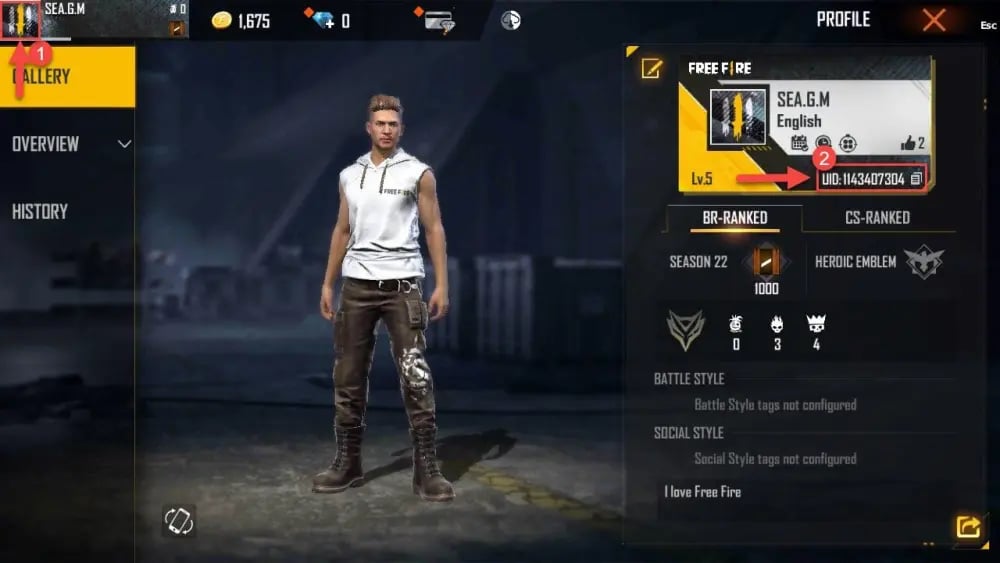
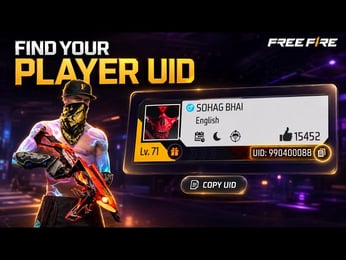
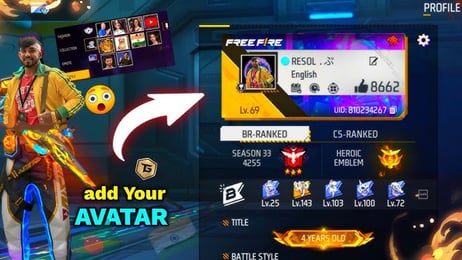
Your UID is the numeric player ID Free Fire gives every account. In the lobby, tap your avatar in the top-left corner to open your profile; the UID sits under your nickname with a copy icon next to it. Free Fire MAX uses the same account, so the UID is identical in both apps.
- Open Free Fire or Free Fire MAX on the account that should receive the Diamonds.
- Tap your avatar in the lobby to open the profile.
- Tap the copy icon next to the UID instead of retyping the digits.
- Paste it into the UID field and read the number once more before paying.
Your nickname is not an ID: it can be changed, while the UID stays the same. Also keep in mind which region your account belongs to, because that decides which pack you should buy.
Region labels: matching the pack to your account
Most pack names begin with a region label (Indonesia, Europe, CIS, Middle East, Taiwan, Thailand, Vietnam, LATAM, Malaysia/Singapore, Global or Global Vouchers) followed by the content, as in Middle East-231 Diamonds or CIS-Weekly Membership. Choose the label that matches your account's region. A few packs carry no label, such as 110 Diamonds or 210+53 Diamonds; if you are not sure which accounts an unlabelled pack fits, ask support before you pay. If your region does not appear anywhere in the picker, do not buy another region's pack and hope it works, because a mismatched order can fail.
Names with two numbers, like 100+10 Diamonds or 210+53 Diamonds, list a base amount and an extra amount for that pack. Regional packs also come in their own sizes, so the same Diamond count is not offered in every region.
Which Free Fire pack should you pick?
Diamonds pay for the premium side of Free Fire: the Booyah Pass, Diamond Royale and other draws, bundles, characters and pets. Size the pack against what you are chasing:
- Around 100 to 130 Diamonds: one emote or bundle piece, or topping off before a draw.
- Around 200 to 283 Diamonds (210, 231, 210+53, Vietnam-283): a planned bundle or a few rounds in an event draw.
- LATAM-341 Diamonds and the bigger sizes in the full picker: longer event runs, or a pass plus extra draws.
- Weekly Membership or Weekly Card: for players who log in daily, since membership rewards are claimed in-game over its period rather than arriving in one go.
- Level Up Pass and Evo Access 3D or 7D: the versions listed here carry the Taiwan label, so they fit Taiwan-region accounts.
- LATAM item packs (Grenade - Burger Bang, Gloo Wall - Burger Bang, Backpack - Strapped Sub, Loot Box - Boxed Burger): one specific skin item for LATAM accounts, not Diamonds.
Check the Diamond cost in the game first and pick the smallest pack that covers it. The live price table below this guide shows the current price of each listed pack; prices can change.