

Learn how to find your UID and Zone ID in seconds and top up Mobile Legends diamonds instantly without invalid-ID errors or delays on your first try.
What Mobile Legends Diamonds Actually Buy
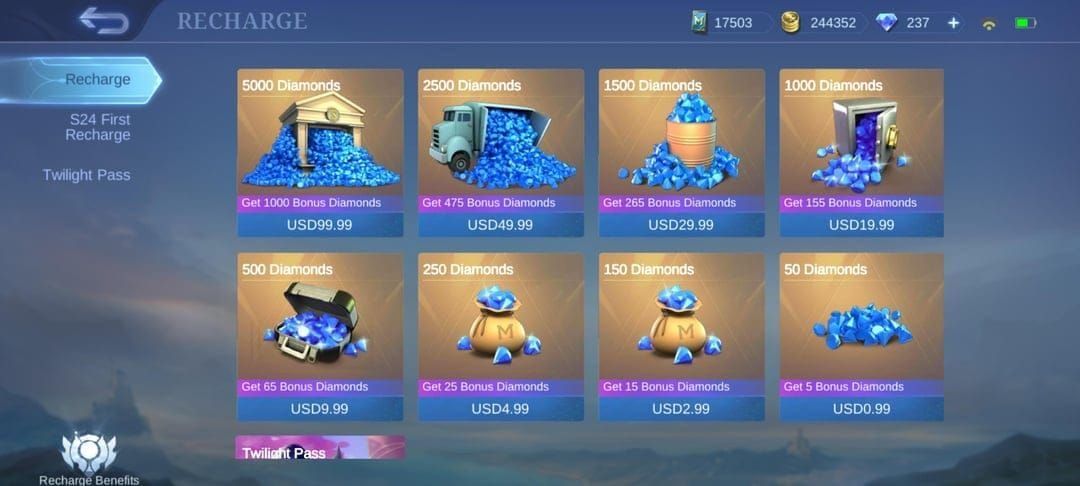
Mobile Legends: Bang Bang Diamonds are the premium currency for heroes, skins, emotes, Starlight memberships, and draw events. Gold won't cover skins, StarLight, lucky draws, or new heroes on release — diamonds do.
I treat diamonds as a tool to skip grind or grab a limited skin before it cycles out, so decide what you want before you pay.
For PH, ID, MY and Brazil players spending $5 to $50, the packs that line up with the tables below are small diamond packs, the Weekly Diamond Pass, and Twilight Pass. Each works differently and the game counts them differently for recharge events.

42 Diamonds
 42 DiamondsUSD 0.67Buy Now
70 Diamonds
70 DiamondsUSD 1.11Buy NowWeekly DiamondPass (Event Topup+100)
Weekly DiamondPass (Event Topup+100)USD 1.89Buy Now284 Diamonds
284 DiamondsUSD 4.44Buy Now569 Diamonds
569 DiamondsUSD 8.86Buy Now716 Diamonds
716 DiamondsUSD 11.11Buy Now1446 Diamonds
1446 DiamondsUSD 22.16Buy Now1730 Diamonds
1730 DiamondsUSD 26.60Buy Now2976 Diamonds
2976 DiamondsUSD 44.33Buy Now4422Diamonds
4422DiamondsUSD 66.61Buy Now6668 Diamonds
6668 DiamondsUSD 100.00Buy Now7502 Diamonds
7502 DiamondsUSD 110.90Buy Now86 Diamonds
86 Diamonds USD 0.96Buy NowWeekly Diamond Pass (Brazil)
Weekly Diamond Pass (Brazil)USD 1.23Buy NowFirst Top Up 150+150 Diamonds
First Top Up 150+150 Diamonds USD 1.84Buy Now172 Diamonds
172 DiamondsUSD 1.93Buy NowWeekly Diamond Pass 2x
Weekly Diamond Pass 2xUSD 2.47Buy NowFirst Top Up 250+250 Diamonds
First Top Up 250+250 DiamondsUSD 3.03Buy Now257 Diamonds
257 Diamonds USD 2.87Buy NowWeekly Diamond Pass 3x
Weekly Diamond Pass 3xUSD 3.70Buy Now344 Diamonds
344 DiamondsUSD 3.84Buy Now429 Diamonds
429 DiamondsUSD 4.79Buy NowWeekly Diamond Pass 4x
Weekly Diamond Pass 4xUSD 4.92Buy Now516 Diamonds
516 DiamondsUSD 5.76Buy NowFirst Top Up 500+500 Diamonds
First Top Up 500+500 DiamondsUSD 6.22Buy Now600 Diamonds
600 Diamonds USD 6.71Buy Now706 Diamonds
706 DiamondsUSD 7.68Buy Now792 Diamonds
792 Diamonds USD 8.63Buy Now878 Diamonds
878 Diamonds USD 9.59Buy Now963 Diamonds
963 Diamonds USD 10.54Buy Now1050 Diamonds
1050 DiamondsUSD 11.52Buy Now1135 Diamonds
1135 DiamondsUSD 12.47Buy Now1220 Diamonds
1220 Diamonds USD 13.60Buy Now1346 Diamonds
1346 Diamonds USD 14.39Buy Now1412 Diamonds
1412 DiamondsUSD 15.35Buy Now1669 Diamonds
1669 Diamonds USD 18.22Buy Now1.825 Diamonds
1.825 Diamonds USD 19.18Buy Now1.926 Diamonds
1.926 DiamondsUSD 21.10Buy Now2014 Diamonds
2014 Diamonds USD 22.06Buy Now2195 Diamonds
2195 Diamonds USD 23.01Buy Now2901 Diamonds
2901 DiamondsUSD 30.68Buy Now3.688 Diamonds
3.688 DiamondsUSD 38.35Buy Now5.532 Diamonds
5.532 DiamondsUSD 57.53Buy Now9.288 Diamonds
9.288 DiamondsUSD 95.87Buy NowGlobal-86 Diamonds (78 + 8 Bonus)
Global-86 Diamonds (78 + 8 Bonus)USD 1.04Buy NowGlobal-70 Diamonds ( 64 + 6 Bonus )
Global-70 Diamonds ( 64 + 6 Bonus )USD 1.10Buy NowGlobal-Weekly Pass
Global-Weekly Pass USD 1.31Buy NowGlobal-112 Diamonds ( 102 + 10 Bonus )
Global-112 Diamonds ( 102 + 10 Bonus )USD 1.87Buy NowGlobal-150+150 Diamonds
Global-150+150 DiamondsUSD 1.98Buy NowGlobal-140 Diamonds
Global-140 DiamondsUSD 2.13Buy NowGlobal-172 Diamonds (156 + 16 Bonus)
Global-172 Diamonds (156 + 16 Bonus)USD 2.07Buy NowGlobal-Weekly Pass x2
Global-Weekly Pass x2USD 2.64Buy NowGlobal-223 Diamonds ( 203 + 20 Bonus )
Global-223 Diamonds ( 203 + 20 Bonus )USD 3.76Buy NowGlobal-257 Diamonds (234 + 23 Bonus)
Global-257 Diamonds (234 + 23 Bonus)USD 3.02Buy NowGlobal-250+250 Diamonds
Global-250+250 DiamondsUSD 3.19Buy NowGlobal-Monthly Epic Bundle (Available Once a Month)
Global-Monthly Epic Bundle (Available Once a Month)USD 3.34Buy NowGlobal-Weekly Pass x3
Global-Weekly Pass x3USD 3.95Buy NowGlobal-284 Diamonds
Global-284 DiamondsUSD 4.24Buy NowGlobal-336 Diamonds ( 303 + 33 Bonus )
Global-336 Diamonds ( 303 + 33 Bonus )USD 5.64Buy NowGlobal-344 Diamonds (312 + 32 Bonus)
Global-344 Diamonds (312 + 32 Bonus)USD 4.14Buy NowGlobal-355 Diamonds
Global-355 DiamondsUSD 5.24Buy NowGlobal-429 Diamonds ( 390 + 40 Bonus )
Global-429 Diamonds ( 390 + 40 Bonus )USD 5.18Buy NowGlobal-Weekly Pass x4
Global-Weekly Pass x4USD 5.27Buy NowGlobal-514 Diamonds(468 + 46 Bonus)
Global-514 Diamonds(468 + 46 Bonus)USD 6.03Buy NowGlobal-Weekly Pass x5
Global-Weekly Pass x5USD 6.58Buy NowGlobal-500+500 Diamonds
Global-500+500 DiamondsUSD 6.53Buy NowGlobal-570 Diamonds ( 504 + 66 Bonus )
Global-570 Diamonds ( 504 + 66 Bonus )USD 8.08Buy NowGlobal-Twilight Pass
Global-Twilight PassUSD 6.83Buy NowGlobal-Weekly Pass x6
Global-Weekly Pass x6USD 7.89Buy NowGlobal-706 Diamonds (625 + 81 Bonus)
Global-706 Diamonds (625 + 81 Bonus)USD 8.15Buy NowGlobal-716 Diamonds
Global-716 Diamonds USD 10.40Buy NowGlobal-963 Diamonds(859 + 104 Bonus)
Global-963 Diamonds(859 + 104 Bonus)USD 11.16Buy NowGlobal-1050 Diamonds(937 + 113 Bonus)
Global-1050 Diamonds(937 + 113 Bonus)USD 12.29Buy NowGlobal-1084 Diamonds
Global-1084 DiamondsUSD 15.62Buy NowGlobal-1446 Diamonds ( 1296 + 150 Bonus )
Global-1446 Diamonds ( 1296 + 150 Bonus )USD 17.19Buy NowGlobal-1770 Diamonds (1589 + 181 Bonus)
Global-1770 Diamonds (1589 + 181 Bonus)USD 21.25Buy NowGlobal-2195 Diamonds (1860 + 335 Bonus)
Global-2195 Diamonds (1860 + 335 Bonus)USD 24.66Buy NowGlobal-2398 Diamonds ( 2015 + 383 Bonus )
Global-2398 Diamonds ( 2015 + 383 Bonus )USD 36.49Buy NowGlobal-2539 Diamonds(2172 + 367 Bonus)
Global-2539 Diamonds(2172 + 367 Bonus)USD 28.80Buy NowGlobal-2901 Diamonds(2485 + 416 Bonus)
Global-2901 Diamonds(2485 + 416 Bonus)USD 32.81Buy NowGlobal-2976 Diamonds (2655 + 321 Bonus)
Global-2976 Diamonds (2655 + 321 Bonus)USD 34.61Buy NowGlobal-3688 Diamonds (3099 + 589 Bonus)
Global-3688 Diamonds (3099 + 589 Bonus)USD 41.14Buy NowGlobal-4165 Diamonds(3527 + 635 Bonus)
Global-4165 Diamonds(3527 + 635 Bonus)USD 47.17Buy NowGlobal-4394 Diamonds(3724 + 670 Bonus)
Global-4394 Diamonds(3724 + 670 Bonus)USD 49.28Buy NowGlobal-5532 Diamonds (4649 + 883 Bonus)
Global-5532 Diamonds (4649 + 883 Bonus)USD 62.12Buy NowGlobal-6046 Diamonds(5117 + 929 Bonus)
Global-6046 Diamonds(5117 + 929 Bonus)USD 68.15Buy NowGlobal-6238 Diamonds(5274 + 964 Bonus)
Global-6238 Diamonds(5274 + 964 Bonus)USD 70.26Buy NowGlobal-7182 Diamonds(6132 + 1050 Bonus)
Global-7182 Diamonds(6132 + 1050 Bonus)USD 81.48Buy NowGlobal-7502 Diamonds (6429 + 1073 Bonus)
Global-7502 Diamonds (6429 + 1073 Bonus)USD 85.19Buy NowGlobal-7727 Diamonds(6509 + 1218 Bonus)
Global-7727 Diamonds(6509 + 1218 Bonus)USD 86.78Buy NowGlobal-9288 Diamonds (7740 + 1548 Bonus)
Global-9288 Diamonds (7740 + 1548 Bonus)USD 103.18Buy NowGlobal-12189 Diamonds(10225 + 1964 Bonus)
Global-12189 Diamonds(10225 + 1964 Bonus)USD 135.98Buy NowGlobal-12976 Diamonds(10839 + 2137 Bonus)
Global-12976 Diamonds(10839 + 2137 Bonus)USD 144.32Buy NowGlobal-14820 Diamonds(12389 + 2431 Bonus)
Global-14820 Diamonds(12389 + 2431 Bonus)USD 165.29Buy NowGlobal-18576 Diamonds(15483 + 3096 Bonus)
Global-18576 Diamonds(15483 + 3096 Bonus)USD 206.35Buy Now71 Diamonds (64 + 7 Bonus)
71 Diamonds (64 + 7 Bonus)USD 1.06Buy Now74 Diamonds (67 + 7 Bonus)
74 Diamonds (67 + 7 Bonus)USD 1.19Buy Now85 Diamonds (77 + 8 Bonus)
85 Diamonds (77 + 8 Bonus)USD 1.26Buy NowWeekly Diamond Pass
Weekly Diamond PassUSD 1.55Buy Now110 Diamonds (100 + 10 Bonus)
110 Diamonds (100 + 10 Bonus)USD 1.49Buy Now113 Diamonds (102 + 11 Bonus)
113 Diamonds (102 + 11 Bonus)USD 1.70Buy Now132 Diamonds (120 + 12 Bonus)
132 Diamonds (120 + 12 Bonus)USD 2.03Buy Now144 Diamonds (130 + 14 Bonus)
144 Diamonds (130 + 14 Bonus)USD 2.12Buy Now148 Diamonds (134 + 14 Bonus)
148 Diamonds (134 + 14 Bonus)USD 2.25Buy Now170 Diamonds (154 + 16 Bonus)
170 Diamonds (154 + 16 Bonus)USD 2.51Buy Now300 Diamonds (150 + 150 Bonus) Frist Topup
300 Diamonds (150 + 150 Bonus) Frist TopupUSD 2.49Buy NowWeekly Diamond Pass 2x
Weekly Diamond Pass 2xUSD 3.09Buy Now2x Weekly Diamond Pass
2x Weekly Diamond PassUSD 3.09Buy Now229 Diamonds (207 + 22 Bonus)
229 Diamonds (207 + 22 Bonus)USD 3.38Buy Now240 Diamonds (217 + 23 Bonus)
240 Diamonds (217 + 23 Bonus)USD 3.51Buy Now255 Diamonds (231 + 24 Bonus)
255 Diamonds (231 + 24 Bonus)USD 3.77Buy Now277 Diamonds (250 + 27 Bonus)
277 Diamonds (250 + 27 Bonus)USD 4.16Buy Now284 Diamonds (254 + 30 Bonus)
284 Diamonds (254 + 30 Bonus)USD 4.19Buy NowMonthly Elite Bundle
Monthly Elite BundleUSD 3.96Buy Now296 Diamonds (256 + 40 Bonus)
296 Diamonds (256 + 40 Bonus)USD 4.31Buy Now500 Diamonds (250 + 250 Bonus) First Topup
500 Diamonds (250 + 250 Bonus) First TopupUSD 4.15Buy Now301 Diamonds
301 DiamondsUSD 4.39Buy NowWeekly Diamond Pass 3x
Weekly Diamond Pass 3xUSD 4.64Buy Now3x Weekly Diamond Pass
3x Weekly Diamond PassUSD 4.64Buy Now340 Diamonds (308 + 32 Bonus)
340 Diamonds (308 + 32 Bonus)USD 5.01Buy Now370 Diamonds (333 + 37 Bonus)
370 Diamonds (333 + 37 Bonus)USD 5.53Buy Now408 Diamonds (367 + 41 Bonus)
408 Diamonds (367 + 41 Bonus)USD 6.03Buy Now436 Diamonds (392 + 44 Bonus)
436 Diamonds (392 + 44 Bonus)USD 6.47Buy Now4x Weekly Diamond Pass
4x Weekly Diamond PassUSD 6.18Buy Now466 Diamonds (410 + 56 Bonus)
466 Diamonds (410 + 56 Bonus)USD 6.81Buy Now493 Diamonds (444 + 49 Bonus)
493 Diamonds (444 + 49 Bonus)USD 7.27Buy Now510 Diamonds (462 + 48 Bonus)
510 Diamonds (462 + 48 Bonus)USD 7.52Buy Now536 Diamonds (473 + 63 Bonus)
536 Diamonds (473 + 63 Bonus)USD 7.82Buy Now5x Weekly Diamond Pass
5x Weekly Diamond PassUSD 7.72Buy Now568 Diamonds (503 + 65 Bonus)
568 Diamonds (503 + 65 Bonus)USD 7.94Buy NowTwilight Pass
Twilight PassUSD 7.52Buy Now1000 Diamonds (500 + 500 Bonus) Frist Topup
1000 Diamonds (500 + 500 Bonus) Frist TopupUSD 8.33Buy Now648 Diamonds (584 + 64 Bonus)
648 Diamonds (584 + 64 Bonus)USD 9.52Buy Now704 Diamonds (623 + 81 Bonus)
704 Diamonds (623 + 81 Bonus)USD 10.33Buy Now720 Diamonds (651 + 69 Bonus)
720 Diamonds (651 + 69 Bonus)USD 10.52Buy Now789 Diamonds (700 + 89 Bonus)
789 Diamonds (700 + 89 Bonus)USD 11.58Buy Now816 Diamonds (734 + 82 Bonus)
816 Diamonds (734 + 82 Bonus)USD 12.04Buy Now875 Diamonds (774 + 101 Bonus)
875 Diamonds (774 + 101 Bonus)USD 12.14Buy Now903 Diamonds (799 + 104 Bonus)
903 Diamonds (799 + 104 Bonus)USD 12.58Buy Now934 Diamonds (827 + 107 Bonus)
934 Diamonds (827 + 107 Bonus)USD 13.01Buy Now960 Diamonds (851 + 109 Bonus)
960 Diamonds (851 + 109 Bonus)USD 13.39Buy Now1000 Diamonds (879 + 121 Bonus)
1000 Diamonds (879 + 121 Bonus)USD 14.63Buy Now1045 Diamonds (928 + 117 Bonus)
1045 Diamonds (928 + 117 Bonus)USD 14.64Buy Now1115 Diamonds (991 + 124 Bonus)
1115 Diamonds (991 + 124 Bonus)USD 15.64Buy Now1136 Diamonds (1006 + 130 Bonus)
1136 Diamonds (1006 + 130 Bonus)USD 15.87Buy Now1171 Diamonds (1030 + 141 Bonus)
1171 Diamonds (1030 + 141 Bonus)USD 16.44Buy Now1283 Diamonds (1141 + 142 Bonus)
1283 Diamonds (1141 + 142 Bonus)USD 18.15Buy Now1368 Diamonds (1218 + 150 Bonus)
1368 Diamonds (1218 + 150 Bonus)USD 19.41Buy Now1453 Diamonds (1295 + 158 Bonus)
1453 Diamonds (1295 + 158 Bonus)USD 20.66Buy Now1523 Diamonds (1358 + 165 Bonus)
1523 Diamonds (1358 + 165 Bonus) USD 21.66Buy Now1691 Diamonds (1508 + 183 Bonus)
1691 Diamonds (1508 + 183 Bonus) USD 24.17Buy Now1704 Diamonds (1509 + 195 Bonus)
1704 Diamonds (1509 + 195 Bonus)USD 23.79Buy Now1750 Diamonds (1548 + 202 Bonus)
1750 Diamonds (1548 + 202 Bonus)USD 24.26Buy Now1835 Diamonds (1625 + 210 Bonus)
1835 Diamonds (1625 + 210 Bonus)USD 25.52Buy Now2010 Diamonds (1708 + 302 Bonus)
2010 Diamonds (1708 + 302 Bonus)USD 26.58Buy Now2625 Diamonds (2322 + 303 Bonus)
2625 Diamonds (2322 + 303 Bonus)USD 32.18Buy Now4020 Diamonds (3416 + 604 Bonus)
4020 Diamonds (3416 + 604 Bonus)USD 53.15Buy Now4830 Diamonds (4003 + 827 Bonus)
4830 Diamonds (4003 + 827 Bonus)USD 63.49Buy Now6030 Diamonds (5124 + 906 Bonus)
6030 Diamonds (5124 + 906 Bonus)USD 79.72Buy Now8040 Diamonds (6832 + 1208 Bonus)
8040 Diamonds (6832 + 1208 Bonus)USD 106.30Buy Now9660 Diamonds (8006 + 1654 Bonus)
9660 Diamonds (8006 + 1654 Bonus)USD 126.97Buy Now14490 Diamonds (12009 + 2481 Bonus)
14490 Diamonds (12009 + 2481 Bonus)USD 190.45Buy Now20100 Diamond
20100 DiamondUSD 246.06Buy Now20130 Diamond
20130 DiamondUSD 247.13Buy Now21330 Diamond
21330 DiamondUSD 260.40Buy Now27864 Diamond
27864 DiamondUSD 341.95Buy Now30990 Diamonds
30990 DiamondsUSD 369.77Buy Now50 + 50 First Purchase Bonus
50 + 50 First Purchase BonusUSD 0.82Buy Now70 Diamonds
70 DiamondsUSD 1.07Buy Now112 Diamond ( 102 + 10 Bonus )
112 Diamond ( 102 + 10 Bonus )USD 1.64Buy NowWeekly Diamond Pass
Weekly Diamond PassUSD 1.76Buy Now140 Diamonds
140 Diamonds USD 2.13Buy Now168 Diamonds
168 DiamondsUSD 2.54Buy Now150 + 150 First Purchase Bonus
150 + 150 First Purchase BonusUSD 2.41Buy NowWeekly Diamond Pass x2
Weekly Diamond Pass x2USD 3.52Buy NowMonthly Epic Bundle
Monthly Epic BundleUSD 4.01Buy Now250 + 250 First Purchase Bonus
250 + 250 First Purchase BonusUSD 4.01Buy Now284 Diamonds
284 DiamondsUSD 4.25Buy NowMalaysia-278 Diamonds ( 254 + 26 Bonus )
Malaysia-278 Diamonds ( 254 + 26 Bonus )USD 4.04Buy Now355 Diamonds
355 DiamondsUSD 5.21Buy NowWeekly Diamond Pass x3
Weekly Diamond Pass x3USD 5.28Buy Now429 Diamonds
429 DiamondsUSD 6.25Buy NowWeekly Diamond Pass x4
Weekly Diamond Pass x4USD 7.05Buy Now569 Diamonds
569 DiamondsUSD 7.98Buy Now500 + 500 First Purchase Bonus
500 + 500 First Purchase BonusUSD 8.15Buy Now571 Diamonds ( 521 + 53 Bonus )
571 Diamonds ( 521 + 53 Bonus )USD 8.08Buy NowWeekly Diamond Pass x5
Weekly Diamond Pass x5USD 8.80Buy NowTwilight Pass
Twilight PassUSD 9.53Buy Now716 Diamonds
716 DiamondsUSD 10.52Buy Now1192 Diamonds
1192 Diamonds USD 16.16Buy Now1048 Diamonds (940 + 108 Bonus)
1048 Diamonds (940 + 108 Bonus)USD 16.14Buy Now1085 Diamonds
1085 DiamondsUSD 15.75Buy Now1136 Diamonds (1016 + 120 Bonus)
1136 Diamonds (1016 + 120 Bonus)USD 16.98Buy Now1220 Diamonds (1092 + 128 Bonus)
1220 Diamonds (1092 + 128 Bonus)USD 18.24Buy Now1358 Diamonds (1221 + 137 Bonus)
1358 Diamonds (1221 + 137 Bonus)USD 20.36Buy Now1412 Diamonds (1270 + 142 Bonus)
1412 Diamonds (1270 + 142 Bonus)USD 21.20Buy Now1446 Diamonds
1446 DiamondsUSD 19.82Buy Now1506 Diamonds (1348 + 158 Bonus)
1506 Diamonds (1348 + 158 Bonus)USD 22.49Buy Now1788 Diamonds
1788 Diamonds USD 24.31Buy Now1584 Diamonds (1409 + 175 Bonus)
1584 Diamonds (1409 + 175 Bonus)USD 23.56Buy Now1669 Diamonds (1493 + 176 Bonus)
1669 Diamonds (1493 + 176 Bonus)USD 24.82Buy Now1704 Diamonds (1522 + 182 Bonus)
1704 Diamonds (1522 + 182 Bonus)USD 25.47Buy Now1730 Diamonds
1730 DiamondsUSD 24.38Buy Now1841 Diamonds (1649 + 192 Bonus)
1841 Diamonds (1649 + 192 Bonus)USD 27.57Buy Now1875 Diamonds (1635 + 240 Bonus)
1875 Diamonds (1635 + 240 Bonus)USD 27.47Buy Now1926 Diamonds (1720 + 206 Bonus)
1926 Diamonds (1720 + 206 Bonus)USD 28.66Buy Now2010 Diamonds (1760 + 250 Bonus)
2010 Diamonds (1760 + 250 Bonus)USD 29.64Buy Now2380 Diamonds (2089 + 291 Bonus)
2380 Diamonds (2089 + 291 Bonus)USD 35.17Buy Now3005 Diamonds
3005 DiamondsUSD 40.40Buy Now2976 Diamonds
2976 Diamonds USD 40.98Buy Now3606 Diamonds
3606 Diamonds USD 47.87Buy Now3692 Diamonds ( 3134 + 558 Bonus )
3692 Diamonds ( 3134 + 558 Bonus )USD 53.06Buy Now4810 Diamonds
4810 Diamonds USD 64.63Buy Now4422 Diamonds ( 3753 + 669 Bonus )
4422 Diamonds ( 3753 + 669 Bonus )USD 63.61Buy Now4416 Diamonds ( 3781 + 635 Bonus )
4416 Diamonds ( 3781 + 635 Bonus )USD 63.88Buy Now4851 Diamonds ( 4136 + 715 Bonus )
4851 Diamonds ( 4136 + 715 Bonus )USD 69.98Buy Now5952 Diamonds ( 5002 + 950 Bonus )
5952 Diamonds ( 5002 + 950 Bonus )USD 81.54Buy Now6012 Diamonds ( 5066 + 956 Bonus )
6012 Diamonds ( 5066 + 956 Bonus )USD 80.78Buy Now6668 Diamonds (5635 + 1033 Bonus)
6668 Diamonds (5635 + 1033 Bonus)USD 95.50Buy Now7502 Diamonds
7502 DiamondsUSD 101.31Buy NowWeekly Diamond Pass
Weekly Diamond PassUSD 1.56Buy Now112 Diamonds ( 102 + 10 Bonus )
112 Diamonds ( 102 + 10 Bonus )USD 1.54Buy Now168 Diamonds ( 153 + 15 Bonus )
168 Diamonds ( 153 + 15 Bonus )USD 2.30Buy Now150 + 150 Bonus
150 + 150 BonusUSD 2.28Buy NowWeekly Diamond Pass x2
Weekly Diamond Pass x2USD 3.12Buy Now223 Diamonds ( 203 + 20 Bonus )
223 Diamonds ( 203 + 20 Bonus )USD 3.08Buy NowMonthly Elite Bundle
Monthly Elite BundleUSD 3.79Buy Now279 Diamonds ( 254 + 25 Bonus )
279 Diamonds ( 254 + 25 Bonus )USD 3.93Buy Now250 + 250 Bonus
250 + 250 BonusUSD 3.79Buy Now301 Diamonds ( 274 + 27 Bonus )
301 Diamonds ( 274 + 27 Bonus )USD 4.25Buy NowWeekly Diamond Pass x3
Weekly Diamond Pass x3USD 4.68Buy Now336 Diamonds ( 303 + 33 Bonus )
336 Diamonds ( 303 + 33 Bonus )USD 4.46Buy NowWeekly Diamond Pass x4
Weekly Diamond Pass x4USD 6.24Buy NowWeekly Diamond Pass x5
Weekly Diamond Pass x5USD 7.79Buy Now570 Diamonds ( 504 + 66 Bonus )
570 Diamonds ( 504 + 66 Bonus )USD 7.45Buy NowTwilight Pass
Twilight Pass USD 7.60Buy Now500 + 500 Bonus
500 + 500 BonusUSD 7.67Buy Now626 Diamonds ( 555 + 71 Bonus )
626 Diamonds ( 555 + 71 Bonus )USD 8.41Buy Now669 Diamonds ( 609 + 60 Bonus )
669 Diamonds ( 609 + 60 Bonus )USD 9.15Buy Now682 Diamonds ( 606 + 76 Bonus )
682 Diamonds ( 606 + 76 Bonus )USD 9.16Buy Now738 Diamonds ( 657 + 81 Bonus )
738 Diamonds ( 657 + 81 Bonus )USD 9.93Buy Now849 Diamonds ( 758 + 91 Bonus )
849 Diamonds ( 758 + 91 Bonus )USD 11.45Buy Now906 Diamonds ( 807 + 99 Bonus )
906 Diamonds ( 807 + 99 Bonus )USD 12.20Buy Now1018 Diamonds ( 909 + 109 Bonus )
1018 Diamonds ( 909 + 109 Bonus )USD 13.74Buy Now1163 Diamonds ( 1007 + 156 Bonus )
1163 Diamonds ( 1007 + 156 Bonus )USD 14.87Buy Now1733 Diamonds ( 1511 + 222 Bonus )
1733 Diamonds ( 1511 + 222 Bonus )USD 22.88Buy Now2398 Diamonds ( 2015 + 383 Bonus )
2398 Diamonds ( 2015 + 383 Bonus )USD 29.72Buy Now3561 Diamonds ( 3022 + 539 Bonus )
3561 Diamonds ( 3022 + 539 Bonus )USD 45.73Buy Now4131 Diamonds ( 3526 + 605 Bonus )
4131 Diamonds ( 3526 + 605 Bonus )USD 53.35Buy Now5132 Diamonds ( 4333 + 799 Bonus )
5132 Diamonds ( 4333 + 799 Bonus )USD 65.56Buy Now6042 Diamonds ( 5035 + 1007 Bonus )
6042 Diamonds ( 5035 + 1007 Bonus )USD 74.30Buy Now7205 Diamonds ( 6042 + 1163 Bonus )
7205 Diamonds ( 6042 + 1163 Bonus )USD 91.46Buy Now8440 Diamonds ( 7050 + 1390 Bonus )
8440 Diamonds ( 7050 + 1390 Bonus )USD 106.70Buy Now9010 Diamonds ( 7554 + 1456 Bonus )
9010 Diamonds ( 7554 + 1456 Bonus )USD 114.33Buy Now10173 Diamonds ( 8561 + 1612 Bonus )
10173 Diamonds ( 8561 + 1612 Bonus )USD 129.57Buy Now12084 Diamonds ( 10070 + 2014 Bonus )
12084 Diamonds ( 10070 + 2014 Bonus )USD 152.42Buy Now15052 Diamonds ( 12589 + 2463 Bonus )
15052 Diamonds ( 12589 + 2463 Bonus )USD 190.54Buy Now20524 Diamonds ( 17120 + 3404 Bonus )
20524 Diamonds ( 17120 + 3404 Bonus )USD 259.13Buy Now50 + 5 Diamonds
50 + 5 Diamonds USD 0.86Buy NowWeekly Pass
Weekly PassUSD 1.72Buy Now150 + 15 Diamonds
150 + 15 Diamonds USD 2.54Buy Now250 + 25 Diamonds
250 + 25 Diamonds USD 4.23Buy Now500 + 65 Diamonds
500 + 65 Diamonds USD 8.50Buy Now1000 + 155 Diamonds
1000 + 155 Diamonds USD 17.06Buy Now1500 + 265 Diamonds
1500 + 265 Diamonds USD 25.50Buy Now2500 + 475 Diamonds
2500 + 475 Diamonds USD 42.55Buy Now5000 + 1000 Diamonds
5000 + 1000 Diamonds USD 84.99Buy Now50 + 50 First Purchase Bonus
50 + 50 First Purchase BonusUSD 0.82Buy Now70 Diamonds
70 DiamondsUSD 1.07Buy NowWeekly Diamond Pass
Weekly Diamond PassUSD 1.70Buy Now140 Diamonds
140 Diamonds USD 2.06Buy Now168 Diamonds
168 DiamondsUSD 2.55Buy Now150 + 150 First Purchase Bonus
150 + 150 First Purchase BonusUSD 2.41Buy Now182 Diamond (165 + 17 Bonus)
182 Diamond (165 + 17 Bonus)USD 2.66Buy Now210 Diamond (191 + 19 Bonus)
210 Diamond (191 + 19 Bonus)USD 3.18Buy NowWeekly Diamond Pass x2
Weekly Diamond Pass x2USD 3.39Buy NowMonthly Epic Bundle
Monthly Epic BundleUSD 4.01Buy Now250 + 250 First Purchase Bonus
250 + 250 First Purchase BonusUSD 4.01Buy Now284 Diamonds
284 DiamondsUSD 4.25Buy Now278 Diamonds ( 254 + 26 Bonus )
278 Diamonds ( 254 + 26 Bonus )USD 4.04Buy Now355 Diamonds
355 DiamondsUSD 5.21Buy NowWeekly Diamond Pass x3
Weekly Diamond Pass x3USD 5.09Buy Now429 Diamonds
429 DiamondsUSD 6.25Buy NowWeekly Diamond Pass x4
Weekly Diamond Pass x4USD 6.79Buy Now500 + 500 First Purchase Bonus
500 + 500 First Purchase BonusUSD 8.15Buy Now569 Diamonds
569 DiamondsUSD 8.08Buy Now571 Diamonds ( 521 + 53 Bonus )
571 Diamonds ( 521 + 53 Bonus )USD 8.08Buy NowWeekly Diamond Pass x5
Weekly Diamond Pass x5USD 9.07Buy Now716 Diamonds
716 DiamondsUSD 10.52Buy Now1085 Diamonds
1085 DiamondsUSD 15.62Buy Now1446 Diamonds
1446 DiamondsUSD 21.21Buy Now1730 Diamonds
1730 DiamondsUSD 24.38Buy Now1788 Diamonds (1599 + 189 Bonus)
1788 Diamonds (1599 + 189 Bonus)USD 24.31Buy Now2976 (2501+475) Diamonds
2976 (2501+475) DiamondsUSD 40.98Buy Now3005 Diamonds (2648 + 357 Bonus)
3005 Diamonds (2648 + 357 Bonus)USD 40.40Buy Now3606 Diamonds (3073+ 533 Bonus)
3606 Diamonds (3073+ 533 Bonus)USD 47.87Buy Now6012 Diamonds ( 5066 + 956 Bonus )
6012 Diamonds ( 5066 + 956 Bonus )USD 80.78Buy Now7502 Diamonds
7502 DiamondsUSD 101.31Buy NowTurkey-55 Diamonds ( 50 + 5 Bonus )
Turkey-55 Diamonds ( 50 + 5 Bonus )USD 0.86Buy NowTurkey-88 Diamonds ( 80 + 8 Bonus )
Turkey-88 Diamonds ( 80 + 8 Bonus )USD 1.14Buy NowTurkey-Weekly Diamond Pass
Turkey-Weekly Diamond PassUSD 1.68Buy NowTurkey-133 Diamonds ( 121 + 12 Bonus )
Turkey-133 Diamonds ( 121 + 12 Bonus )USD 1.72Buy NowTurkey-165 Diamonds ( 150 + 15 Bonus )
Turkey-165 Diamonds ( 150 + 15 Bonus )USD 2.54Buy NowTurkey-221 Diamonds ( 201 + 20 Bonus )
Turkey-221 Diamonds ( 201 + 20 Bonus )USD 2.86Buy NowTurkey-275 Diamonds ( 250 + 25 Bonus )
Turkey-275 Diamonds ( 250 + 25 Bonus )USD 4.23Buy NowTurkey-494 Diamonds ( 449 + 45 Bonus )
Turkey-494 Diamonds ( 449 + 45 Bonus )USD 6.35Buy NowTurkey-565 Diamonds ( 500 + 65 Bonus )
Turkey-565 Diamonds ( 500 + 65 Bonus )USD 8.61Buy NowTurkey-1041 Diamonds ( 897 + 144 Bonus )
Turkey-1041 Diamonds ( 897 + 144 Bonus )USD 12.71Buy NowTurkey-2645 Diamonds ( 2242 + 403 Bonus )
Turkey-2645 Diamonds ( 2242 + 403 Bonus )USD 31.73Buy NowTurkey-6146 Diamonds ( 5122 + 1024 Bonus )
Turkey-6146 Diamonds ( 5122 + 1024 Bonus )USD 72.43Buy NowWeekly Diamond Pass
Weekly Diamond PassUSD 1.55Buy Now
Where to Find Your UID and Zone ID in Seconds
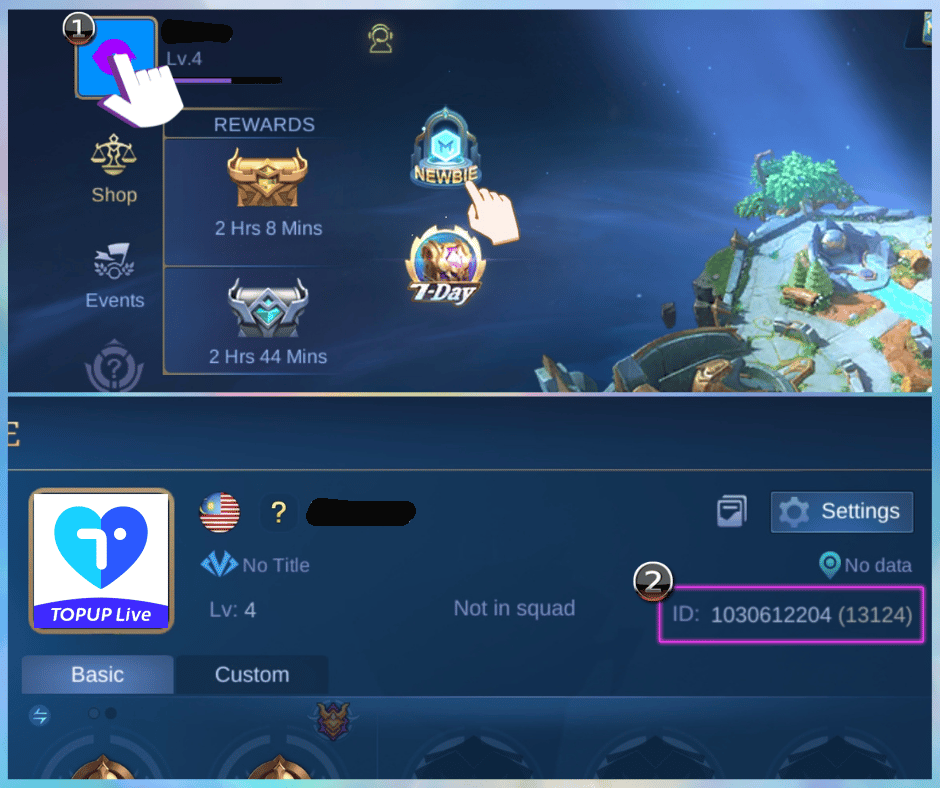
Every ID top-up needs two numbers: your numeric User ID and your Zone ID (the server ID in brackets). It looks like 12345678 (1234) — miss a digit and diamonds go to someone else with no recovery.
Here is where to grab them:
- Open Mobile Legends: Bang Bang and wait for the main lobby to load.
- Tap your avatar in the top-left corner of the screen.
- Your profile opens. Right under your name you will see the User ID and Zone ID together.
- Long-press to copy, or write them down exactly. Check twice.
That's it. Ten seconds once you know where to look.
Two warnings. First, UID top-ups are instant and non-refundable — one typo funds a stranger. Retype slowly or use an ID checker. Second, MLBB accounts are strictly region-locked: PH/MY/SG, ID, and Global run on different servers. Diamonds can't jump regions, so match the store region to your account before you pay.
I keep a screenshot of my profile in my gallery and paste from it. No guessing from memory.
How to Top Up on xptopup.com Without Errors
Slow down for 30 seconds here and you'll get it right the first time. This is where rushed clicks cause most errors.
The exact steps
- Go to the product page to top up Mobile Legends diamonds on xptopup and keep your game open on your profile screen for reference.
- Select the pack you want — standard diamonds, Weekly Diamond Pass, or Twilight Pass. Compare the totals on the page before you click buy.
- Enter your User ID and Zone ID exactly as shown in-game, including the numbers in brackets. Do not add spaces or extra zeros.
- Choose your payment method and confirm the total shown at checkout. You see fees upfront when the total is shown before you pay.
- Pay and check your in-game mailbox and diamond balance. If the IDs were correct, the credit is instant.
If you see an "invalid ID" error, stop. Don't guess. Re-open your profile, re-copy both numbers, and try once more. Often the error is a missing bracket digit or a swapped number.
A quick note on payments: options like GCash, Maya, GrabPay, 7-Eleven, Coins.ph and cards are rules set by those wallets and networks themselves, not by the top-up site. Availability and fees depend on the provider you pick. If your wallet shows a limit or needs verification, that's the wallet talking.
Choosing the Right Pack: Diamonds, Weekly Pass and Twilight Pass
Not every pack is built for the same goal. Pick based on what you actually want to unlock this month.
The table below sums up the three options most $5-$50 spenders look at.
Core offers at a glance:
| Pack | What You Get | Note |
|---|---|---|
| Weekly Diamond Pass | 220 Total Diamonds | 80 instantly + 20 daily for 7 days, plus a Late Sign-in card |
| Twilight Pass | Level-based rewards | Unlocks exclusive skins, trial cards, and tickets as you level |
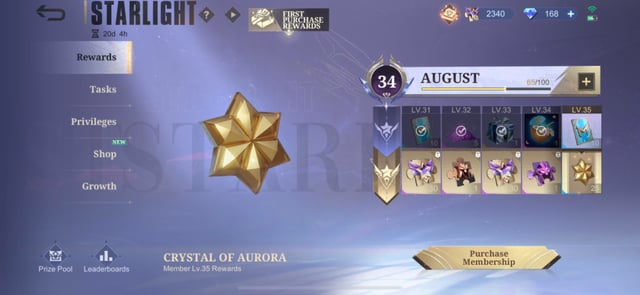
| Starlight Membership | 300 Diamonds to unlock | Grants monthly exclusive skin and privileges |
Weekly Pass is for steady daily diamonds, Twilight Pass is for level rewards over time, and Starlight is the gateway to that month's exclusive skin. If you only want one StarLight skin, 300 diamonds is the baseline.
A couple of quirks worth knowing before you buy:
| Mechanic | How It Works | Why It Matters |
|---|---|---|
| First-time double bonus | First purchase of a tier gives matching bonus diamonds, e.g., 50+50 or 500+500, including 150 and 250 tiers | Only triggers once per tier, so plan your first buy |
| Weekly Pass and events | Weekly Diamond Pass does not count toward recharge milestones or cumulative recharge bonuses | If you need to clear a recharge task, buy a standard diamond bundle |
| StarLight Plus | Requires 700 to 750 diamonds to unlock Plus tier | Do not buy the regular 300 if you wanted Plus rewards |
Those details change your buying math. Don't buy a Weekly Pass expecting it to clear a recharge event — it won't, and you'll end up buying again.
Weekly Diamond Pass is most consistently listed as 220 total — 80 instantly plus 20 daily for 7 days, plus a Late Sign-in card — though some pages quote 210 or 120. If the live product page shows a different total, follow the live page.
If you are torn between a straight diamond pack and the Weekly Pass, get your Weekly Diamond Pass on xptopup when you log in daily and want the best slow-burn value, and stick to standard diamonds when you need instant currency for a draw or StarLight right now.
Which Option Fits Your Budget?
I split this by how you actually play, not by theory.
Light spender / F2P-leaning ($5-$10): You log in most days but don't chase every skin. Grab the Weekly Diamond Pass first — 80 now, then 20 a day. It stretches your budget for a draw or two. Save your first-time double bonus for a 50 or 150 pack you really want.
Regular spender ($15-$30): You want this month's StarLight or you're finishing a hero collection. Buy the 300 diamonds for standard StarLight directly. If you play daily, add a Weekly Pass for the extra 220 over the week. Need recharge event points that week? Buy standard diamonds instead — Weekly Pass won't count.
Heavy for the month ($30-$50): You're going for StarLight Plus or a big event draw. You need 700 to 750 diamonds for Plus, so plan that as one block. Use your first-time double bonus on the 500 tier if you haven't yet — that 500+500 is the biggest one-time bump. Then fill the gap with a smaller pack or a Weekly Pass if you'll log in daily to collect.
For most returning players in PH and ID, the Weekly Pass plus a single 300 diamond buy covers a month nicely. You get the StarLight skin and a steady trickle for events without overspending.
Stay Safe: Real Top-Up Requests vs Scam Red Flags
Legit ID top-ups ask for two things only: User ID and Zone ID.
Here is how to spot the difference:
| Legitimate Store Asks For | Scam Asks For |
|---|---|
| User ID + Zone ID (numbers only) | Your Moonton password, email OTP, or login code |
| Pack selection and payment method | To log into your account "to deliver" or to install a remote app |
| Shows total before you pay | Hides fees until after you pay or asks for extra transfers |
No real store needs your password. If a seller asks to log in for you, close the chat. If a deal claims 40% off diamonds with no explanation, walk away. Stores that show the total before you pay and deliver directly to your UID need no account access.
Accounts are region-locked, so buying from the wrong regional store can leave diamonds stranded. Double-check the store version matches your server.
FAQ
How do I find my Mobile Legends User ID and Zone ID?
Tap your avatar in the top-left corner of the main lobby. Both numbers appear right underneath your name in the format 12345678 (1234). Copy them exactly, brackets and all, when you fill the top-up form.
Can I get a refund if I enter the wrong User ID?
No. ID-based diamond top-ups are instant and non-refundable, and a wrong digit sends diamonds to another player with no way to pull them back. Re-check both numbers or paste from a screenshot before paying.
Does the Weekly Diamond Pass count toward recharge events?
No, it does not count toward recharge milestones or cumulative top-up event rewards. If an event says "recharge X diamonds," you need to buy standard diamond bundles to trigger it, not the Weekly Pass.
How many diamonds does the Weekly Diamond Pass give?
The most consistent figure is 220 total diamonds — 80 instantly when you buy it, then 20 each day for 7 days, plus a Late Sign-in card. Some sources list 210 or 120, so if you see a different total at checkout, follow what the live product page shows.
What do I need for StarLight Membership?
You need at least 300 diamonds to unlock standard StarLight Membership for the month. StarLight Member Plus needs more, usually 700 to 750 diamonds, so pick the tier that matches the rewards you actually want.
Are third-party top-up sites safe to use?
Major platforms that deliver via UID are generally safe when you enter the correct region and IDs, since diamonds go directly to your account without sharing a password. Still, verify the store region for your account and confirm the total before you pay.
My Final Take: Get It Right the First Time
I've seen too many players lose $10 to a typo. There's no undo button. Copy your UID and Zone ID from your profile, paste carefully, and match your pack to your goal — Weekly Pass for daily value, standard diamonds for instant needs and event credit, StarLight when you want that month's skin.
If you are ready, check current Mobile Legends prices on xptopup and confirm your IDs one last time before payment. One careful minute now beats chasing support later.




Comments