

Cheaper Ludo Club Cash looks tempting until the checkout asks for your password. Here is the pre-pay checklist I use before any third-party top-up.
The Official Shop Is Safe. It Is Also Pricier.
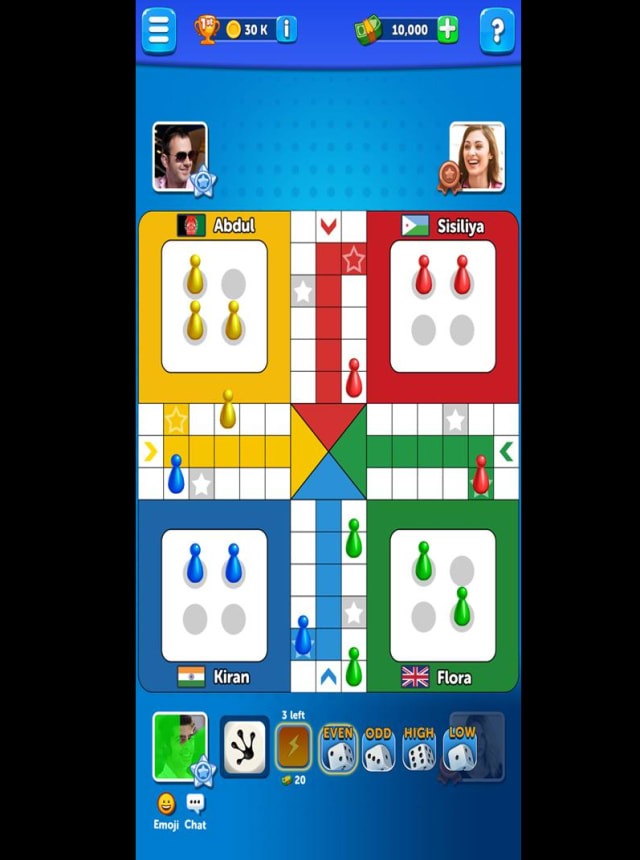
Ludo Club is a multiplayer mobile board game developed by Moonfrog. You spend Cash and Coins to enter competitive matches, sit at VIP tables, and unlock dice and pawn skins. That is the wallet. Everything else is decoration.
The in-app shop is the path I use when I do not want to think: the platform store already has a card on file, and the pack hits the lobby because you bought it from the publisher's own register. I still use that path when I only need a small bump. I do not feel clever paying full sticker for 3,200 Cash just to sit in online rooms all weekend.
Third-party menus routinely sit about 20 percent under those official packs, and that gap is the only reason this question exists. A fake Ludo Club top up site will advertise the same haircut. Price is not a trust signal. The form is.
I am not loyal to Apple or Google's cut. I am loyal to still having the account tomorrow.

120 Cash
 120 CashUSD 0.56Buy Now
37,500 Coins
37,500 CoinsUSD 0.56Buy Now190,000 Coins
190,000 CoinsUSD 1.13Buy Now250 Cash
250 CashUSD 1.13Buy Now700 Cash
700 CashUSD 2.82Buy Now1,300,000 Coins
1,300,000 CoinsUSD 5.63Buy Now3,300,000 Coins
3,300,000 CoinsUSD 7.89Buy Now3,200 Cash
3,200 CashUSD 11.27Buy Now13,500,000 Coins
13,500,000 CoinsUSD 16.90Buy Now10,800 Cash
10,800 CashUSD 33.80Buy Now70,000,000 Coins
70,000,000 CoinsUSD 50.70Buy Now20,000 Cash
20,000 CashUSD 56.39Buy Now
What a Legitimate Checkout Asks For
A real Ludo Club gems recharge legit flow is dull. You paste a public User ID, pick a Cash or Coins pack, leave a contact email, and pay. That is the entire list.
It never asks for your Moonfrog password, an OTP from SMS or mail, a helper APK, or a screen share. If any of those fields appear, you are not buying Cash. You are handing someone the account.
UID credit works because the store pushes the pack to the wallet the same way a gift would, and your login stays on your phone. I treat that as non-negotiable. Password sharing is how recharge agents get people banned. Publishers already close accounts tied to refund tricks, account trading, or unauthorized login-sharing. Cheap Cash is a stupid reason to lose a dressed-up profile.
Finding the ID takes ten seconds: open the lobby, tap the profile icon in the upper-left corner, copy the User ID, and paste it. Do not type it from memory. One wrong digit and the Cash lands on a stranger, and you get to enjoy a support chat about a balance that was never yours.
You can gift the same way. Put a friend's User ID in that field and their wallet gets the pack. Same rule. Public ID only. No "just log into their account for a second."
If I am buying for myself, I open a UID-only Ludo Club Cash checkout so I can confirm the form stops at Player ID, pack, and email before I even look at the total.
What the two currencies actually buy
Sources do not agree, which is irritating. One write-up treats Coins as the ticket into high-stakes elite rooms and Cash as a dice-reroll toy. The version that matches how the lobby is built is simpler. Coins cover offline and practice. Cash is the entry and betting currency for online multiplayer rooms, VIP tables, and daily tournament entries.
I budget as if that second version is true. If a listing only talks about "gems" and never names Cash or Coins, I treat the page as recycled copy from another game.
Free Cash exists, and it is capped: daily bonuses can add up to 500 Cash, and lucky dice rolls go up to 10 times per day. Fine for casual rooms. Useless if you burn entries at VIP tables every night.
Third Party Ludo Club Scam Patterns I Watch For
The scams are not clever. They are loud, cheap, and they work because someone is rushing to join a room.
Password and OTP harvest. The page wears the game's colors and asks you to "verify the account" by signing in. Sometimes it sends a code and wants it typed back. That is theft. A legitimate store cannot log in as you and does not need to.
Fake pay pages. You pick 3,200 Cash, tap pay, and the next host is a cloned wallet form on a lookalike domain. A padlock icon is not a character reference. Read the actual address. If the URL mutated after the pay button, I close the tab.
Undelivered Cash or Coins. You paid. The lobby still shows yesterday's balance. Sometimes the store was vapor. Sometimes they credited the ID you mistyped. This is the usual Ludo Club coins not credited complaint, and it almost always starts on a site with no order ID.
Refund-exploit middlemen offer Cash "for cheap" because a stolen card or a planned chargeback is doing the real work. Publishers permanently ban the account sitting at the end of that pipe. Saving a few dollars is a grim way to lose the profile.
Login-sharing agents in group chats want remote access or your password "so they can gift faster." That is how accounts vanish. I would rather overpay in the official shop than do this.
A checkout can still stop at a User ID. I do not run a partnership test at 11 p.m. The form is the test.
A legitimate checkout asks for a public User ID, a pack, and a contact email. A scam asks for a password, an OTP, a cloud-save login, a screen share, a random APK, or a "verification deposit" to a personal wallet with no order record.
I keep that split in a table.
If a page crosses from the left column to the right, I leave. No exception for a friend-of-a-friend seller.
| Checkpoint | Legitimate store | Scam or agent |
|---|---|---|
| What they want | Public User ID, pack, contact email | Password, OTP, SMS code, APK, screen share |
| Login required | Never | "Verify so we can deliver" |
| Where the Cash goes | The UID you pasted | Nowhere, or a mule account |
| After you pay | An order reference you can quote | Silence, or a demand for a second payment |
| Ban risk | Low on a clean UID credit | High if refunds or shared logins are involved |
Ludo Club checkout red flags are almost always extra fields. The dangerous store wants secrets. The boring store wants an ID you can already see in the lobby.
How Official Packs Stack Up Against Cheap Listings
A discount screenshot is not a coupon. It is a reason to slow down and compare the denomination to the in-app price I already know.
Most unofficial menus I have seen land around a 20 percent cut on the mid packs and a slightly thinner cut on the biggest one. The figures below are typical street prices versus the standard in-app sticker. They are not a promise from any one store, and they move.
| Pack | Typical third-party price | Official in-app price | Usual gap |
|---|---|---|---|
| 120 Cash | $0.64 | $0.79 | about 20% |
| 250 Cash | $1.29 | $1.59 | about 20% |
| 700 Cash | $3.21 | $3.99 | about 20% |
| 3,200 Cash | $12.85 | $15.99 | about 20% |
| 10,800 Cash | $38.57 | $47.99 | about 20% |
| 20,000 Cash | $64.27 | $74.99 | about 15% |
The 3,200 and 10,800 Cash packs are where the dollar gap starts to matter. The 120 Cash pack saves pocket change. I will not risk a sketchy domain to save fifteen cents.
Delivery chatter is messy. Some automated pipes credit in seconds. Other queues take up to 30 minutes. I have seen both claims in the same week, so I stay in the lobby until the balance ticks. I do not join a tournament on the assumption that the Cash is "probably there."
I also refuse to print payment logos. What a store accepts changes by country and by Tuesday. Open the live checkout and read the buttons that actually appear for you.
When I already know the pack, I use a safe Ludo Club recharge store that never asks for a password and I stop at the order summary if anything looks off.
The Pre-Pay Checklist I Actually Run
I run this list so I do not fund a third party Ludo Club scam.
- Confirm the game. Moonfrog's Ludo Club. Not a clone with a close name.
- Find the User ID under the top-left profile icon. Copy and paste. Never retype.
- Confirm the storefront only wants that ID, the pack, and an email.
- Read the domain out loud. Lookalikes love extra letters.
- Match the pack name to in-game Cash or Coins. Vague "gems" with no denomination is a warning.
- Check that the total is shown before you authenticate the payment.
Most reputable stores show the total before you pay. If the number only appears after a login popup, you are not in a top-up. You are in a trap.
Red flags that fail the list: a login wall, a request for OTP, a price that is 70 percent off instead of the usual teen-percent haircut, no order reference after pay, a countdown that says you will lose the deal in 60 seconds.
If Cash is not credited, I stay on the order page, screenshot the ID I submitted, and I do not fire a second payment "just in case." Double-pay is how a small mistake becomes a large one.
What I Would Buy at Each Spend Level
F2P and almost F2P
Stay on the daily bonus and the 10 lucky rolls. 500 Cash a day covers casual online rooms if you are not burning entries.
If you do top up, buy the smallest Cash pack you can stand, once, from a store that only takes the User ID. I would not hunt discounts on $0.79 of Cash. The official shop is fine here.
Mid spend, a few nights a week
This is me most months. I want enough Cash for online rooms and the occasional tournament without thinking about the free cap. I look at 700 Cash or 3,200 Cash. I will leave the official shop if a reputable third-party total is clearly lower and the form is clean. I will not leave it for a social-media seller who needs my OTP.
Heavy, VIP tables and skins
10,800 or 20,000 Cash is real money. I only use a store I can reopen tomorrow. I paste my own User ID, not a booster's. I do not want a ban on a profile I have already dressed with dice and pawn skins.
At this tier I would rather miss a 15 percent haircut than fund a chargeback pipeline.
Gifting is fine if you have the friend's User ID in writing. It is not fine if they offer to send the password.
FAQ
Is topping up Ludo Club outside the app safe?
Yes, if the store only asks for your Player ID. UID credit does not need your password, and that is the whole safety model. Services that want login details, OTPs, or remote access are not top-up stores. They are account-theft kits with a Cash icon on the landing page.
Where do I find my Ludo Club User ID for recharging?
Open the game lobby and tap your profile avatar in the upper-left corner. The User ID sits on that profile panel. Copy it and paste it into checkout. If you type it, you will mistype it, and then you get the Ludo Club coins not credited loop you were trying to avoid.
Can my Ludo Club account get banned for third-party recharges?
A straight UID-based credit does not modify game files and does not share the login. Ban risk stays low on that mechanic. What gets accounts closed is stolen-card Cash, refund exploits, account trading, and recharge agents who log in as you. If a seller's pitch includes any of that, walk.
Can I send a Ludo Club top-up to a friend?
Yes. Enter their User ID at checkout instead of yours. The Cash or Coins land on their account after payment. Get the ID from them in text, not from a cropped screenshot. Do not log into their profile to "make sure it arrived."
Why did my Ludo Club coins not get credited?
Wrong User ID is the first suspect. The second is a fake Ludo Club top up site that took the payment and stopped. The third is a queue that can run as long as half an hour on manual systems. Wait in the lobby, then use the order ID. Do not fire a second payment at a different site while you wait.
What does a safe Ludo Club recharge store look like at checkout?
Public ID. Pack. Email. A visible total. No password field. I open third-party Ludo Club Gems and Coins top-up when I want that exact shape and I am not in the mood to audit a random domain I saw under a YouTube video.
I Skip the Official Shop. I Do Not Skip the Checklist.
The in-app register does not have my loyalty. The official shop is safe because it is closed. It is also the most expensive way to buy 3,200 Cash.
Third-party is safe only in a narrow sense. The store credits by User ID, never touches your password, shows the total up front, and does not smell like a chargeback farm. Everything outside that lane is how people lose both the money and the account.
I will buy Cash outside the app. I will not buy it from a stranger who needs my OTP "to verify the gift." Paste the ID. Read the form. If the form gets greedy, close it.






Comments