Ludo Club Top Up: Get Cash and Coins Fast
Ludo Club brings classic board game strategy directly to your mobile screen, allowing you to compete with friends and global players in real time. Winning high-stakes matches, rolling dice with custom animations, and entering elite competitive rooms all depend on maintaining a steady supply of in-game resources. With a Ludo Club top up on XPTopup, you can refill your balance quickly and jump back into your matches without delay.
Every purchase on XPTopup processes through an account-safe UID system. You never have to share private credentials, passwords, or social login details. Simply enter your player UID, select the bundle that matches your gameplay needs, and check the live checkout screen for current pricing and available payment methods.
What Are Ludo Club Cash and Coins and How to Use Them
Ludo Club uses two main virtual currencies alongside custom cosmetic items: Coins, Cash (also known as Gems or Notes), and cosmetic Dice skins. Understanding how each asset functions helps you manage your balance effectively.
- Ludo Club Coins: Coins act as the standard entry fee for classic matches, quick games, and rush modes. Whenever you challenge an opponent or enter a multiplayer room, you place a coin bet. The winner claims the pot. Running out of coins locks you out of higher-tier rooms and requires waiting for free hourly bonuses.
- Ludo Club Cash: Cash serves as the premium currency. It lets you purchase second chances during tense moments, roll special bonus dice, unlock exclusive store items, and bypass waiting periods.
- Dice and Board Themes: Custom dice and themed boards personalize your play area. While some cosmetics unlock through special events, many feature unlock paths tied directly to Cash or specialized store bundles.
| Currency / Item | Primary In-Game Purpose | How to Obtain |
|---|---|---|
| Coins | Match entry fees, table betting, standard tournaments | Winning matches, hourly rewards, XPTopup top up |
| Cash (Gems) | Rerolls, premium store items, second chance mechanics | Special events, level rewards, XPTopup top up |
| Dice Cosmetics | Custom rolling visuals, unique board animations | Cash store unlocks, seasonal events, themed chests |
How to Find Your Ludo Club UID in the Game Settings
To complete an order on XPTopup, you only need your unique User Identification (UID) number. This numeric ID connects directly to your game profile and ensures your Cash and Coins land in the correct account.
Follow these steps to find your Ludo Club UID:
- Open the Ludo Club app on your mobile device.
- Tap your profile avatar icon located in the upper-left corner of the main lobby screen.
- Look at your player profile card. Your numeric UID appears directly below your display name or within the profile details menu.
- You can also tap the gear icon in the top-right corner to open Game Settings. Your UID is listed at the bottom of the settings menu.
- Tap the copy icon next to the number, or write down the exact digits.
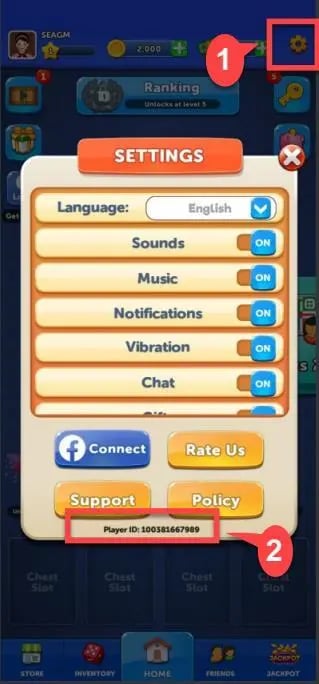
Make sure you copy the entire string of numbers without extra spaces or symbols before pasting it into the checkout field on XPTopup.
Step-by-Step Guide to Top Up Ludo Club on XPTopup
Recharging your Ludo Club balance takes only a few moments. Follow this simple process to place your order:
- Select Your Desired Pack: Browse the available Ludo Club Cash and Coin bundles on the product page. Choose the pack that fits your budget and match requirements.
- Enter Your Player UID: Paste your numeric UID into the designated field. Double-check the number to ensure delivery to the correct account.
- Check Live Checkout Pricing: Review your order summary. The live checkout screen displays your final price and all active payment options available in your region.
- Complete the Payment: Select your preferred payment method and authorize the transaction through the secure checkout interface.
- Receive Your In-Game Balance: Once the payment completes, open Ludo Club. Your new Coins or Cash balance updates automatically.
Sending Gifts to Friends
You can also send Cash and Coins directly to friends or family. Obtain their numeric UID, paste it into the UID field on XPTopup, and complete the payment. The resources credit directly to their profile with no password required.
UID Top Up Safety vs Risky Coin Generators
Player safety is essential when purchasing digital game currencies. Many risky websites and video guides advertise unlimited coin generators, mod APKs, or cheat tools for Ludo Club. These third-party utilities pose serious security risks to your personal data and your gaming account.
- No Password Requirement: A legitimate recharge through XPTopup requires only your public UID. We never ask for your login passwords, linked Facebook accounts, or verification codes.
- Zero Risk of Account Bans: Using unofficial APKs or balance modification tools violates game service terms and triggers permanent account bans. Direct UID recharges credit legitimate currencies recognized by the official game servers.
- Device Protection: Avoid downloading suspicious software or third-party patchers that expose your mobile device to malware, keyloggers, and data theft.
- Safe Transactions: XPTopup processes payments through secure, encrypted checkout protocols so your financial information remains private.
Troubleshooting Common Ludo Club Top-Up Issues
Delivery on XPTopup is typically prompt, but occasional network delays can occur between payment processors and game servers. If your Coins or Cash do not show up right away, use the following troubleshooting steps:
- Restart the Ludo Club App: Close Ludo Club completely from your background applications and relaunch it. This forces the game client to refresh its connection with the server and sync your latest wallet balance.
- Check Your Network Connection: Ensure your Wi-Fi or mobile data connection is stable. A weak connection can prevent the game from fetching balance updates.
- Clear Game Cache (Android): Open your phone Settings, tap Applications, select Ludo Club, and clear the app cache. Reopen the game to reload your profile assets.
- Verify Your UID: Check your order confirmation receipt to confirm that the entered UID matches your profile ID. A typo can route resources to an alternate profile.
- Contact Support: If your balance does not update after 15 minutes, reach out to XPTopup customer support with your transaction order ID and your game UID for verification.
Frequently Asked Questions About Ludo Club Top Up
How do I find my Ludo Club UID for top-up?
Launch Ludo Club and tap your avatar icon in the top-left corner of the home screen. Your UID appears below your nickname. You can also find it at the bottom of the Settings menu accessible via the gear icon.
What is the difference between Cash and Coins in Ludo Club?
Coins are the everyday currency used to enter classic, quick, and rush matches against other players. Cash is the premium currency used to purchase rerolls, second chances, special items, and exclusive dice cosmetics.
Do I need to provide my Ludo Club password to top up on XPTopup?
No. XPTopup only requires your numeric player UID. You should never share your account passwords, Facebook logins, or one-time verification codes with anyone.
Can I buy Ludo Club Cash and Coins for a friend?
Yes. Ask your friend for their numeric Ludo Club UID, enter that UID on XPTopup during checkout, and complete the order. The pack delivers directly to their in-game account.
What should I do if my Ludo Club Coins do not appear after purchase?
Close the Ludo Club app completely and reopen it to force a server sync. If your balance does not update within a few minutes, verify the UID on your order receipt and contact XPTopup support with your order number.
Are third-party unlimited coin generators for Ludo Club safe?
No. Unlimited coin generators, cheats, and modded APKs are fake tools designed to steal account data or install malware. Using them can result in permanent account bans. Always use secure UID-based top-ups on XPTopup to protect your account.
Current package prices
Current package prices are shown below. Prices exclude Tax. Tax, payment fees and applicable coupons are shown at checkout.
| Package | Price |
|---|---|
| 120 Cash | USD 0.57 |
| 37,500 Coins | USD 0.57 |
| 190,000 Coins | USD 1.13 |
| 250 Cash | USD 1.13 |
| 700 Cash | USD 2.83 |
| 1,300,000 Coins | USD 5.67 |
| 3,300,000 Coins | USD 7.94 |
| 3,200 Cash | USD 11.34 |
| 13,500,000 Coins | USD 17.00 |
| 10,800 Cash | USD 34.01 |
| 70,000,000 Coins | USD 51.01 |
| 20,000 Cash | USD 56.83 |