


Configuring an effective PUBG PC keybinds setup requires eliminating overlapping key conflicts, lowering mouse sensitivity below standard defaults to stabilize crosshair pull-down, and tuning the Vertical Sensitivity Multiplier above 1.0 to reduce required physical mousepad space. Setting the default fire mode to full auto, activating additional action queuing, and separating specific input collisions like sprint-inventory combinations give players immediate control over sustained weapon kick.
Core In-Game Gameplay Settings for Gunplay Responsiveness
Before modifying specific key assignments, two gameplay toggles directly impact how smoothly weapons handle in surprise engagements.
Switch the default weapon firing mode to Full Auto in the gameplay settings. As PCGamesN notes, this eliminates the risk of dropping into an early-game engagement on single-fire after picking up a ground weapon. Enabling auto-equip attachments alongside it cuts down manual looting time.
Turn on Additional Action Queuing. In default configurations, commands pressed before an existing animation finishes are often dropped. PCGamesN notes that queuing lets weapon switches and utility inputs register before the active animation completes.


Essential Keybind Tweaks: Fixing Movement and Overlay Bottlenecks
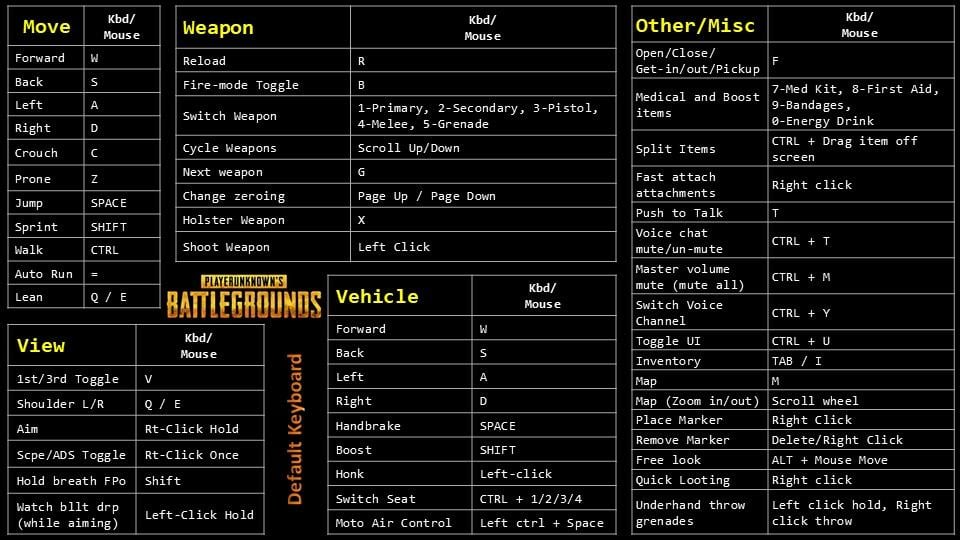
Default key configurations in PUBG PC contain several notorious physical layout traps that disrupt combat and character movement.
Resolving the Sprint and Inventory Overlay Freeze
In standard PC setups, sprinting is bound to Left Shift while opening the inventory is bound to Tab. Pressing both keys together while moving immediately triggers the default Steam overlay shortcut (Shift+Tab), freezing character control mid-sprint.
Rebind the Steam overlay shortcut in Steam's client settings to an isolated key such as Home, as documented on Zhihu. This prevents the overlay from hijacking character movement while opening your backpack on the move.
Relocating the Perspective Toggle
By default, the V key toggles the camera between third-person and first-person views. Because V rests right beside the C (crouch), B (fire mode), and Space (jump) cluster, players frequently tap it by mistake during frantic close-quarters movement.
Remapping the view switch to a distant key prevents accidental perspective shifts during close-quarters fights (Zhihu).
Windows Precision and Sensitivity Mechanics
Consistent recoil control depends on predictable physical-to-virtual hand movement. If your mouse pointer travels varying distances based on swipe velocity, building repeatable recoil compensation muscle memory becomes nearly impossible.
Disabling Pointer Precision in Windows
Disable "Enhance pointer precision" in the Windows Mouse Properties dialog before adjusting in-game values. Hardware guide Lorgar explains that this feature applies mouse acceleration, causing the cursor to travel inconsistent distances depending on hand velocity rather than physical pad travel.
Scope and ADS Sensitivity Tuning
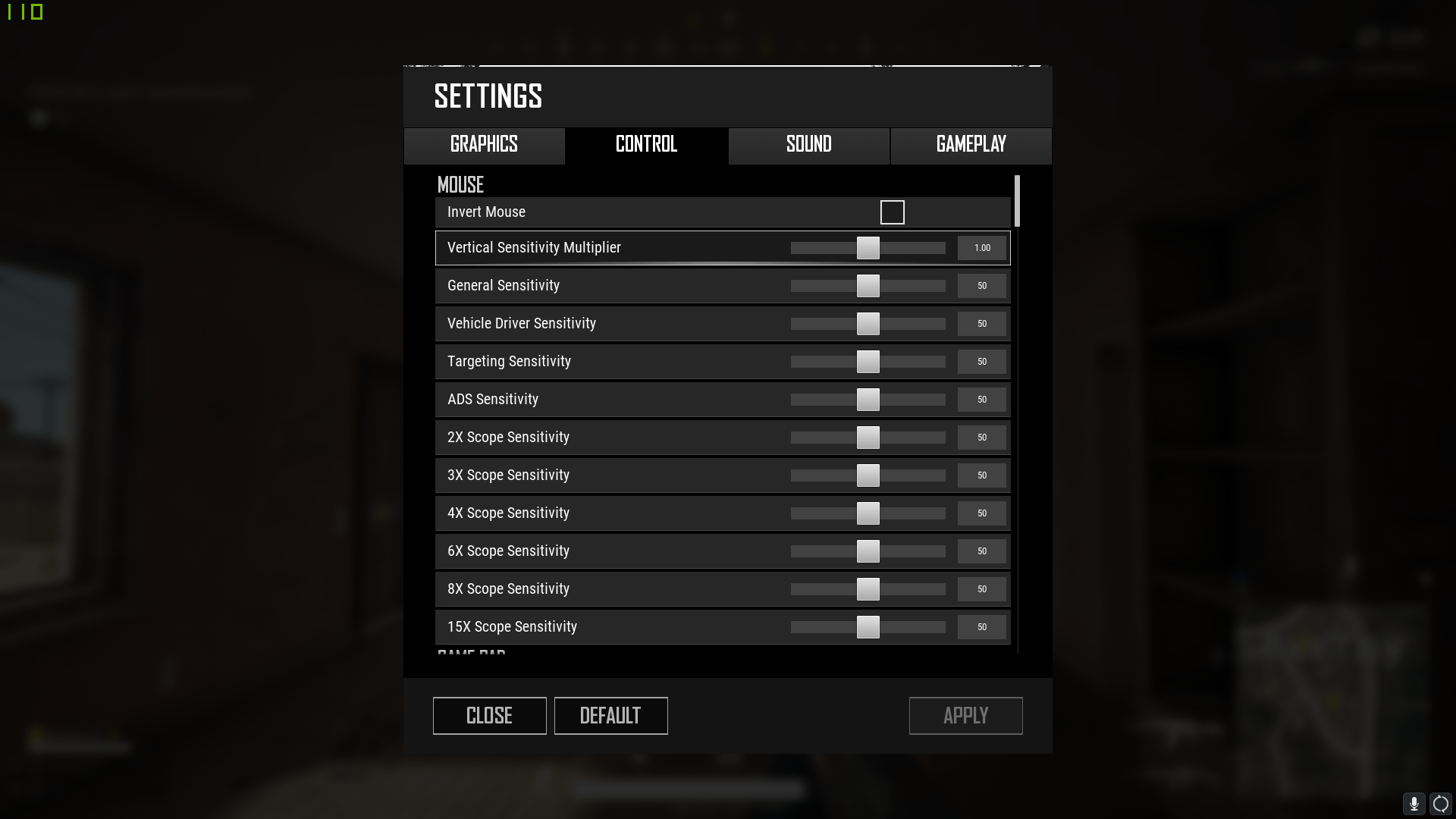
PUBG handles aim sensitivity across distinct weapon states rather than a single blanket value. Per Accessible Player Experiences, the game provides independent sliders for:
- General Sensitivity: Governs free camera movement and standard hip exploration.
- Targeting Sensitivity: Controls over-the-shoulder hip-aiming speed.
- ADS Sensitivity: Dictates camera speed when aiming down sights through iron sights, red dots, and holographic sights.
- Scope Zoom Sliders: Individual, dedicated sensitivity sliders for 2x, 3x, 4x, 6x, 8x, and 15x scopes.
Competitive guidance reported by PCGamesN indicates that high-level players routinely drop overall mouse sensitivity below default values. Lower base sensitivity trades broad rotational speed for tighter, finer crosshair micro-adjustments during sustained automatic sprays.
Vertical Sensitivity Multiplier Setup for Recoil Management
PUBG's aggressive muzzle rise requires steady downward mouse drag during sustained sprays.
The Vertical Sensitivity Multiplier scales vertical camera speed against horizontal speed (Accessible Player Experiences). Setting this multiplier above 1.0 increases vertical response, meaning you cover less downward desk space to counter heavy vertical kick.
Competitive Sensitivity Benchmarks and Setting Profiles
Tracking professional player profiles highlights common DPI and vertical multiplier ranges, though public tracking records frequently diverge over time.
| Profile / Benchmark Source | DPI & Polling Rate | Sensitivity Values | Vertical Multiplier | Source Reference |
|---|---|---|---|---|
| TGLTN Pro Profile | 1600 DPI, 1000 Hz | 20 General, 10 ADS, 15 on scopes | 1.11 | ProSettings |
| TGLTN Updated Entry (08.04.2024) | 800 DPI, 1000 Hz | 47 General, 35 ADS | 1.10 | GameSettings |
| General Shooter Baseline | 1600 DPI | 20 In-Game Sens (320 eDPI) | Standard (1.00) | Lorgar |
Public trackers carry conflicting records for top players. For example, ProSettings lists TGLTN at 1600 DPI with 20 General, 10 ADS, and a 1.11 vertical multiplier, while GameSettings logs an 800 DPI profile with 47 General, 35 ADS, and a 1.10 vertical multiplier dated August 4, 2024.
Graphics recommendations also diverge between sources: PCGamesN recommends Ultra textures and anti-aliasing for visual clarity, whereas esports profiles (including TGLTN's documented setup) set textures, anti-aliasing, shadows, and view distance to Very Low to maximize frame stability.
Customizing weapons or Survivor Passes using PUBG G-COIN changes visuals only; reliable spray control depends entirely on these mechanical input settings.
How to Reset Default Keybinds in PUBG PC
If key rebindings cause input conflicts, restore the game's default layout directly from the settings menu.
- Press Esc or click the gear icon in the top-right corner to open Settings.
- Navigate to the Key Binding or Control tab.
- Scroll to the bottom of the page.
- Click APPLY BACK DEFUALT (Default) to instantly restore standard factory mappings, as outlined by OnlineGameCommands.
- Reapply your essential individual changes (such as relocating the V view switch) one by one.
Frequently Asked Questions
How do you restore default keybinds if a layout causes problems?
Open Settings via the top-right gear icon, go to the controls tab, and click APPLY BACK DEFUALT at the bottom of the menu to restore standard bindings (OnlineGameCommands).
Why does opening inventory while running open an overlay?
Holding Left Shift to sprint while hitting Tab triggers the default Steam overlay shortcut. Remap the Steam overlay key inside your Steam client settings to an isolated key like Home to prevent movement lockups (Zhihu).
What does the Vertical Sensitivity Multiplier do in PUBG PC?
It modifies vertical camera speed relative to horizontal movement, letting players counter heavy weapon kick with less downward mousepad drag (Accessible Player Experiences).


Comments