PUBG G-COIN Top Up: Unlock Survivor Passes, Skins, and Crates
PUBG: BATTLEGROUNDS uses G-COIN as its primary premium currency across PC and console editions. Having a ready balance of G-COIN gives you direct access to the in-game store, where you can acquire seasonal Survivor Passes, progressive weapon skins, Contraband Crates, hideout crafting materials, character outfits, and exclusive cosmetic bundles.
Instead of entering credit card details directly into multiple clients or handling complex regional payment systems, you can complete your PUBG G-COIN top up on XPTopup. This service delivers coins directly using your account email, keeping your transactions secure and organized.
How to Top Up PUBG G-COIN on XPTopup
Recharging your G-COIN balance takes only a few simple steps. Follow this guide to ensure your order processes without delay:
- Select Your Denomination: Choose the G-COIN package amount you want from the available options on this page.
- Enter Your Account Email: Input the exact email address linked to your PUBG / KRAFTON ID account into the required field.
- Review Your Selection: Double-check your email entry to prevent delivery to the wrong profile.
- Complete Checkout: Choose your preferred payment method on the live checkout screen and confirm the purchase.
- Check Your In-Game Balance: Log into PUBG: BATTLEGROUNDS on your platform to verify that your G-COIN balance has updated.
Make sure the email you provide matches the primary email associated with your active game account. You do not need to share passwords, authentication codes, or temporary login tokens at any point during checkout.
PUBG G-COIN Package Sizes and Availability
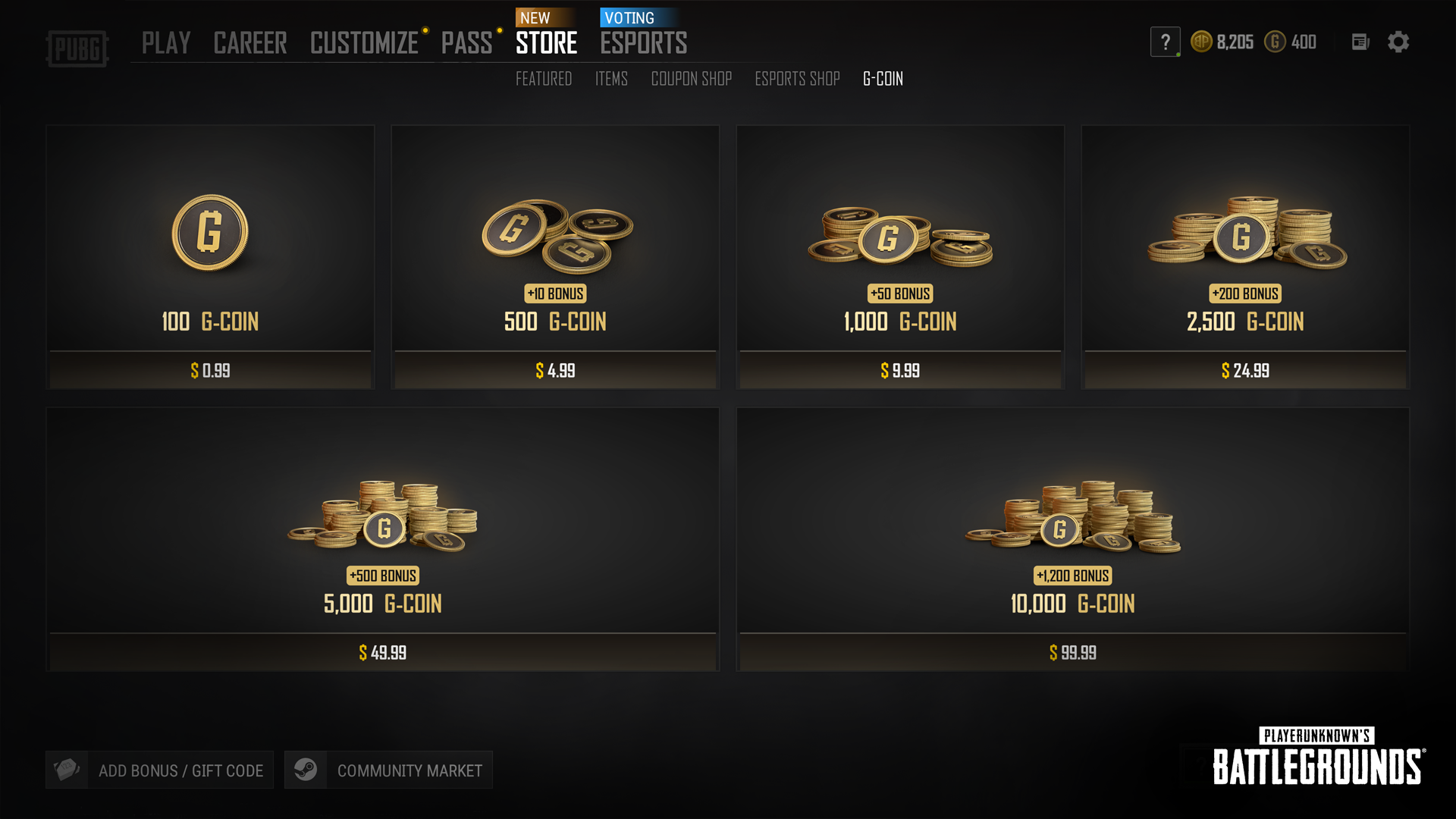
PUBG offers standardized G-COIN bundles. Depending on the pack size you choose, larger bundles include bonus coin amounts credited alongside the base value.
| Package Tier | Base G-COIN | Bonus G-COIN | Total G-COIN Received | Typical Use Case |
|---|---|---|---|---|
| Starter Pack | 100 | 0 | 100 | Small cosmetic items, basic spray tags |
| Standard Tier | 500 | 10 | 510 | Emotes, basic crate openings |
| Pass Tier | 1,000 | 50 | 1,050 | Premium Survivor Pass unlock |
| Collector Tier | 2,500 | 200 | 2,700 | Weapon skin bundles, premium outfits |
| Hideout Tier | 5,000 | 500 | 5,500 | Contraband crate multi-opens, hideout items |
| Master Tier | 10,000 | 1,200 | 11,200 | Progressive weapon upgrades, full store sets |
Note: Exact bundle pricing, regional availability, and active payment methods are updated on the live XPTopup checkout interface.
Account Security: Why Only Email Is Needed
Account safety is a major priority when buying digital game currencies. Many risky third-party sellers request direct account access, login credentials, or multi-factor authentication codes. This exposes your Steam, Xbox, PlayStation, or KRAFTON profile to unauthorized changes and potential security bans.
XPTopup operates on a password-free model. To complete your order, you only need to submit your account email. Here is why this protects you:
- Zero Credential Sharing: You never disclose passwords, security answers, or two-factor authentication prompts.
- No Account Takeover Risk: Because no third party logs into your profile, your inventory, friends list, and personal account settings remain untouched.
- Safe Delivery Protocol: Transactions are credited directly to the player ID associated with your verified email.
Never share your password or one-time verification codes with anyone claiming to provide faster top-up speeds.
PUBG G-COIN Expiration and Bonus Balance Rules
Understanding how KRAFTON handles your G-COIN balance prevents accidental loss of currency. In PUBG: BATTLEGROUNDS, your balance is split into two distinct categories:
1. Purchased G-COIN
This is the base currency you buy with real money. Purchased G-COIN has a long validity period (typically up to five years depending on regional consumer laws). It stays in your account until you spend it on store items.
2. Bonus or Promotional G-COIN
Bonus coins included with larger packs or received through event rewards often come with a shorter lifespan, usually between 30 and 90 days. When you purchase an item in the in-game shop, the game client automatically spends the coins closest to expiration first. Keep an eye on the expiration tab in the in-game store inventory to make sure you use promotional balances before they lapse.
PUBG G-Coin vs. PUBG Mobile UC: Key Differences
A frequent error among buyers is confusing PUBG G-COIN with PUBG Mobile Unknown Cash (UC). These are completely separate currencies designed for different titles:
- PUBG: BATTLEGROUNDS (PC / Xbox / PlayStation): Uses G-COIN. This is the full desktop and console battle royale game available on Steam, Epic Games Store, Xbox Network, and PlayStation Network.
- PUBG Mobile (iOS / Android): Uses UC (Unknown Cash). This mobile-exclusive title is developed independently for handheld devices.
Recharging G-COIN on this page will credit your PC or console PUBG account. It cannot be converted, transferred, or applied to PUBG Mobile. Verify your game platform before completing your payment.
Troubleshooting Delivery and Account Verification
If your G-COIN balance does not show up immediately after your purchase on XPTopup, follow these troubleshooting steps:
- Restart the Game Client: Completely close PUBG: BATTLEGROUNDS and your platform launcher (Steam, Epic, Xbox dashboard, or PSN menu), then relaunch the game.
- Check Your In-Game Mailbox / Store Inbox: Certain item bundles and coin deliveries require you to click "Claim" inside the in-game Store or Customize tab.
- Verify Email Accuracy: Review your XPTopup order confirmation receipt to confirm there were no typographical errors in the email you submitted.
- Contact Support with Your Order ID: If your coins have not appeared after completing the steps above, reach out directly to XPTopup customer support with your transaction reference number for immediate assistance.
Frequently Asked Questions About PUBG G-COIN Top Up
How to get more G coins in PUBG?
You can acquire G-COIN by purchasing top-up packs directly on XPTopup, buying bundles inside the official game client, or earning limited promotional bonus coins through special in-game events and Survivor Pass progression tiers.
How much is G-COIN in PUBG?
G-COIN pricing depends on the package size you select, ranging from small 100 G-COIN starter packs up to 10,000+ bonus coin bundles. You can check real-time rates and available bundle options on the XPTopup order selection menu above.
Does G-COIN expire in PUBG?
Purchased regular G-COIN remains valid for up to five years under standard platform policies. Bonus G-COIN granted from promotions or pack extras generally expires within 30 to 90 days. The game client automatically prioritizes using expiring bonus coins first during store purchases.
Is PUBG G-Coin the same as PUBG Mobile UC?
No. G-COIN is used exclusively for the PC and console versions of PUBG: BATTLEGROUNDS. PUBG Mobile uses an entirely different currency called UC. Purchases made for G-COIN cannot be used in or transferred to PUBG Mobile.
Do I need to share my PUBG password to top up G-Coin?
No. XPTopup only requires your linked account email to process your recharge. You should never share your password, Steam Guard codes, or console credentials with any top-up service.
How long does it take for PUBG G-Coin to arrive after purchase?
Orders placed on XPTopup are processed as soon as your payment is verified. In most cases, the currency reflects in your in-game balance shortly after order confirmation. Restarting your game client helps refresh your wallet balance immediately.
Current package prices
Current package prices are shown below. Prices exclude Tax. Tax, payment fees and applicable coupons are shown at checkout.
| Package | Price |
|---|---|
| 100 G-Coin | USD 0.75 |
| 500+10 G-Coin | USD 3.76 |
| 1000+50 G-Coin | USD 7.52 |
| 2500+200 G-Coin | USD 18.79 |
| 5000+500 G-Coin | USD 37.58 |
| 10000+1200 G-Coin | USD 75.15 |